

QUOTE(NagaK @ Jun 17 2024, 02:48 PM)
Someone share shoppee link? I'm not fan of rack fans just another mess

Just search for "router fan" and you'll find plentyUnifi Official TM UniFi High Speed Broadband Thread V42, READ 1ST PAGE FOR RELEVANT WIFI INFO!
|
|
 Jun 17 2024, 04:19 PM Jun 17 2024, 04:19 PM
Show posts by this member only | IPv6 | Post
#3221
|
 
Senior Member
2,608 posts Joined: Nov 2020  
|
QUOTE(NagaK @ Jun 17 2024, 02:48 PM) Someone share shoppee link? I'm not fan of rack fans just another mess Just search for "router fan" and you'll find plenty |
|
|
|
|
|
Jun 17 2024, 06:22 PM
|
|
Senior Member
1,280 posts Joined: Jan 2003
|
QUOTE(Raymond T. @ Jun 17 2024, 12:54 PM) Currently on Unifi 800mbps @ RM 230 Thar price for broadband only or with unifi tv ? |
|
|
Jun 17 2024, 06:49 PM
Show posts by this member only | IPv6 | Post
#3223
|

Junior Member
119 posts Joined: Apr 2017
|
QUOTE(jiaen0509 @ Jun 16 2024, 06:23 PM) I just bought this from Shopee with RM6.12 including shipping. So far use more than 2 weeks and the speed still constantly more than 1gbps. Hi, have one unit open box never used 2.5gb Unifi ONU unit for sale. Only one unit available. First come first serve. Do PM let me know if interested.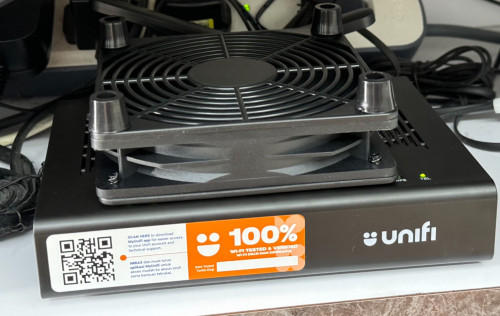 cHiLdHo0drEaMz and jonathanwhm liked this post
|
|
|
Jun 17 2024, 07:25 PM
Show posts by this member only | IPv6 | Post
#3224
|

Senior Member
1,368 posts Joined: Aug 2010
|
QUOTE(enduser @ Jun 17 2024, 06:22 PM) Thar price for broadband only or with unifi tv ? With stupid Aneka which they say cannot unsubscribe |
|
|
Jun 17 2024, 07:47 PM
Show posts by this member only | IPv6 | Post
#3225
|
|
Senior Member
1,208 posts Joined: Aug 2018
|
The slow link from South East Asia to US I have tested this problem affect Malaysia and Singapore as a whole. If you have CDN in Malaysia / Singapore, but Origin server in the US, transfer will be very slow and almost certainly timeout. This investigation started because I have a lot of problem working on Fedora, a flavor of Linux distro. A little background: There has been a lot of fights between Tier 1 and Tier 2 providers in EU and Asia lately, all of them involving Cogent. In the beginning of the year, Cogent de-peer NTT in EU, causing all EU traffic to peer in the US, increasing latency even if you are in EU. Example, two different AS in Amsterdam must peer in US, even when they are physically in the same city. Last month, Cogent de-peer TATA in Asia, cutting off many single-homed customers from each other. Submarine cable breakage towards EU and Japan also adds to the problem. Example: The website is fronted by Cloudflare or AWS CloudFront, and pings are fine. But when you actually starts transferring bulk data, speed quickly drop to less than 10KB/s and depending on how much data is being transferred, you will get a timeout. This happens regardless of the location of CDN either in KL, Johor or Singapore. In Fedora's case, they are fronted by AWS CloudFront but their Origin is physically in the US. Observation: Anecdotes suggest the link will mostly be fine between 4am to 11am Malaysia Time. As you can see, I don't have time to wait for the stars to align. My solution: Since I have built my own anti-censorship "VPN", I use it to solve my problem. In AWS, all inter-AZ or inter-region traffic will be routed via what is known as "cold potato routing". So I spin up one EC2 instance in Oregon and CloudFront it. I then connect to CloudFront KL, which will cold potato route me to my EC2 in Oregon. The end result: Hot potato routing Oregon -> TM CODE [ec2-user@i-063f1764f181fb8c3 ~]$ tracepath 115.134.191.254 1?: [LOCALHOST] pmtu 9001 1: ip-172-23-48-1.us-west-2.compute.internal 0.083ms pmtu 1500 1: no reply 2: 240.0.8.65 0.290ms 3: 242.0.65.69 4.915ms asymm 6 4: 240.1.228.15 9.178ms asymm 5 5: 242.4.195.71 6.556ms asymm 18 6: 150.222.214.74 6.814ms asymm 19 7: as6939.10gigabitethernet9-9.core1.sea1.he.net 9.802ms asymm 24 8: no reply 9: as6939.100gigabitethernet2-3.core1.sjc2.he.net 23.471ms 10: no reply 11: telekom-malaysia-inc.e0-2.core3.sjc2.he.net 248.402ms asymm 17 12: 115.134.191.254 235.339ms reached Resume: pmtu 1500 hops 12 back 17 Hot potato routing TM -> Oregon CODE tracepath ec2-18-246-47-189.us-west-2.compute.amazonaws.com 1?: [LOCALHOST] pmtu 1500 1: _gateway 4.103ms 1: _gateway 6.127ms 2: _gateway 2.176ms pmtu 1480 2: 115.134.191.254 11.807ms 3: 10.55.49.97 41.665ms asymm 6 4: 10.55.100.228 9.979ms 5: 10.55.209.61 11.560ms 6: ix-hge-0-0-0-22.ecore1.esin4-singapore.as6453.net 63.331ms asymm 16 7: if-bundle-33-2.qcore1.esin4-singapore.as6453.net 276.803ms asymm 16 8: if-bundle-19-2.qcore2.svw-singapore.as6453.net 195.879ms asymm 13 9: no reply 10: no reply 11: if-et-24-2.hcore2.kv8-chiba.as6453.net 121.413ms asymm 12 12: no reply <----- snip -----> 30: no reply Too many hops: pmtu 1480 Resume: pmtu 1480 Cold potato routing EC2 Oregon -> CloudFront KL CODE [ec2-user@i-063f1764f181fb8c3 ~]$ tracepath 18.68.55.119 1?: [LOCALHOST] pmtu 9001 1: ip-172-23-48-1.us-west-2.compute.internal 0.070ms pmtu 1500 1: no reply 2: 240.0.8.65 0.321ms 3: 242.0.64.71 1.648ms asymm 6 4: 100.100.22.74 0.516ms asymm 6 5: 150.222.246.46 166.174ms asymm 22 6: 240.5.48.12 165.231ms asymm 22 7: 240.5.48.23 164.835ms asymm 22 8: 240.65.60.195 164.776ms asymm 22 9: no reply <----- snip -----> 30: no reply Too many hops: pmtu 1500 Resume: pmtu 1500 The ping! (Cold potato routing) CODE [ec2-user@i-063f1764f181fb8c3 ~]$ ping -c 10 18.68.55.119 PING 18.68.55.119 (18.68.55.119) 56(84) bytes of data. 64 bytes from 18.68.55.119: icmp_seq=1 ttl=234 time=165 ms 64 bytes from 18.68.55.119: icmp_seq=2 ttl=234 time=165 ms 64 bytes from 18.68.55.119: icmp_seq=3 ttl=234 time=165 ms 64 bytes from 18.68.55.119: icmp_seq=4 ttl=234 time=165 ms 64 bytes from 18.68.55.119: icmp_seq=5 ttl=234 time=165 ms 64 bytes from 18.68.55.119: icmp_seq=6 ttl=234 time=165 ms 64 bytes from 18.68.55.119: icmp_seq=7 ttl=234 time=165 ms 64 bytes from 18.68.55.119: icmp_seq=8 ttl=234 time=165 ms 64 bytes from 18.68.55.119: icmp_seq=9 ttl=234 time=165 ms 64 bytes from 18.68.55.119: icmp_seq=10 ttl=234 time=165 ms --- 18.68.55.119 ping statistics --- 10 packets transmitted, 10 received, 0% packet loss, time 9010ms rtt min/avg/max/mdev = 165.044/165.088/165.146/0.026 ms The ping! (Hot potato routing) CODE [ec2-user@i-063f1764f181fb8c3 ~]$ ping -c 10 115.134.191.254 PING 115.134.191.254 (115.134.191.254) 56(84) bytes of data. 64 bytes from 115.134.191.254: icmp_seq=1 ttl=239 time=249 ms 64 bytes from 115.134.191.254: icmp_seq=4 ttl=239 time=263 ms 64 bytes from 115.134.191.254: icmp_seq=5 ttl=239 time=253 ms 64 bytes from 115.134.191.254: icmp_seq=6 ttl=239 time=229 ms 64 bytes from 115.134.191.254: icmp_seq=7 ttl=239 time=246 ms 64 bytes from 115.134.191.254: icmp_seq=8 ttl=239 time=262 ms 64 bytes from 115.134.191.254: icmp_seq=10 ttl=239 time=229 ms --- 115.134.191.254 ping statistics --- 10 packets transmitted, 7 received, 30% packet loss, time 9159ms rtt min/avg/max/mdev = 228.644/247.148/263.060/12.963 ms Quantifiable improvement: Packet loss reduce from 30% to 0%. Infinite improvement! Latency reduce by 82ms, a 33% improvement. Jitter reduce by 99.8%. Gamer rejoice! This post has been edited by kwss: Jun 17 2024, 09:48 PM simmarjit, cHiLdHo0drEaMz, and 2 others liked this post
|
|
|
Jun 17 2024, 09:04 PM
Show posts by this member only | IPv6 | Post
#3226
|
|
Junior Member
87 posts Joined: Jun 2011
|
QUOTE(NagaK @ Jun 17 2024, 03:48 PM) Someone share shoppee link? I'm not fan of rack fans just another mess https://shopee.com.my/YOHESO-12CM-Router-Mo...2015.7380199432 cHiLdHo0drEaMz liked this post
|
|
|
|
|
|
Jun 17 2024, 09:04 PM
|
|
Senior Member
1,441 posts Joined: Sep 2021
|
QUOTE(kwss @ Jun 17 2024, 01:08 PM) Did you try setting MTU to 1280? why need setting 1280 its not worth because ip address no change  |
|
|
Jun 17 2024, 09:05 PM
Show posts by this member only | IPv6 | Post
#3228
|
|
Senior Member
1,208 posts Joined: Aug 2018
|
QUOTE(tng55 @ Jun 17 2024, 09:04 PM) why need setting 1280 its not worth because ip address no change I don't know if I want to explain to you or not. Nevermind, do what you like. |
|
|
Jun 17 2024, 10:16 PM
|
|
Junior Member
156 posts Joined: Dec 2010
|
QUOTE(tng55 @ Jun 17 2024, 09:04 PM) why need setting 1280 its not worth because ip address no change Forget about lowering your MTU just go for the highest supported by your isp ie TM on PPPoE is 1492. That's where fragmentation come into play. There's no need to go into that. Stick with 1492 or you will have packet issues with your connected devices.As for the ip range nothing can be done unless TM sort their area gateway properly vs total subscribers in that area and distance to the nearest exchange. They cant even deploy a proper standard on the OLT's. Some areas get the broken Fiberhome OLT and some get the less problematic ZTE. Port sharing in crowded areas is also a problem that contribute to the issue. You can tell now those with 42.xxx prefix are mostly either far south or up north. Very little to none in Klang Valley area nowadays. (Where are you from btw?) Do a traceroute and take note on the first 2-4 local hops and compare it with two different ip range and two different area. Most of the time it won't be the same. Hence the variable in latency and performance to the same site/server between two ip range and location. It has got nothing to do with TM international routing or peering. All ip get the same international treatment. Its the local gateway. Try this site and tell me what's your hop count under TCP/IP Fingerprint. Mine's 16. https://browserleaks.com/ip This post has been edited by Ashren: Jun 17 2024, 11:01 PM |
|
|
Jun 17 2024, 10:31 PM
Show posts by this member only | IPv6 | Post
#3230
|

Junior Member
211 posts Joined: Oct 2014
|
QUOTE(Ashren @ Jun 17 2024, 10:16 PM) Forget about lowering your MTU just go for the highest supported by your isp ie TM on PPPoE is 1492. That's where fragmentation come into play. There's no need to go into that. Stick with 1492 or you will have packet issues with your connected devices. will a public IP have this problem, or is it specific to CGNAT?As for the ip range nothing can be done unless TM sort their area gateway properly vs total subscribers in that area and distance to the nearest exchange. They cant even deploy a proper standard on the OLT's. Some areas get the broken Fiberhome OLT and some get the less problematic ZTE. Port sharing in crowded areas is also a problem that contribute to the issue. You can tell now those with 42.xxx prefix are mostly either far south or up north. Very little to none in Klang Valley area. Because you know why? Find out yourself. (Where are you from btw?) Do a traceroute and take note on the first 2-4 local hops and compare it with two different ip range and two different area. Most of the time it won't be the same. Hence the variable in performance to the same site/server between ip range and location. It has got nothing to do with TM international routing or peering. All ip get the same treatment. Try this site and tell me what's your hop count under TCP/IP Fingerprint. Mine's 16. https://browserleaks.com/ip |
|
|
Jun 17 2024, 10:39 PM
|
|
Junior Member
156 posts Joined: Dec 2010
|
QUOTE(Azims @ Jun 17 2024, 10:31 PM) will a public IP have this problem, or is it specific to CGNAT? The problem is on public ip but only to 42.xxx ip range. No other public ip range that Im aware of have this issue.Those who got assigned to that ip range gateway somehow treated like behind a cgnat system. You cant get out from that ip range no matter how many times you reconnect to the gateway. Like stuck in some broken internal cgnat LAN. No other subscribers can get that ip range vice versa, its not in the public range rotation. Isnt it weird? I was on that ip range before covid hit for over a year and my ping to vultr sg playing call of duty always hover around 28-30ms. The very day I get a 175.xxx ip my ping goes down to 10-12ms until now. I'm speaking from experience I know what that fellow forumer feels like locked to that broken ip range forever for no apparent reason. This post has been edited by Ashren: Jun 17 2024, 11:07 PM |
|
|
Jun 17 2024, 11:11 PM
|

Junior Member
176 posts Joined: May 2008
|
I added a fan on top of the white D-Link ONR. Still survive no speed drop for 2 days. I'm using bridge mode connected to my own router with 2.5G port.
|
|
|
Jun 17 2024, 11:32 PM
Show posts by this member only | IPv6 | Post
#3233
|

Senior Member
3,305 posts Joined: Dec 2012
|
QUOTE(TubeNRibbon @ Jun 17 2024, 11:11 PM) I added a fan on top of the white D-Link ONR. Still survive no speed drop for 2 days. I'm using bridge mode connected to my own router with 2.5G port. Let’s monitor again. Maybe later remove the fans and see whether speed drop occurs again or not. |
|
|
|
|
|
Jun 18 2024, 11:40 AM
|
|
Junior Member
222 posts Joined: May 2016
|
Mine after 1Gbps Pro Upgrade. Last time 800Mbps YEP RM139(internet rm109+aneka rm30). Now RM 208.90 (internet rm198+ultimate max promo rm0.90+netflix premium upgrade rm10) which no price change(the extra RM10 discount goes to netflix premium upgrade) with previous package. How about the other member that complete upgrade to 1Gbps? 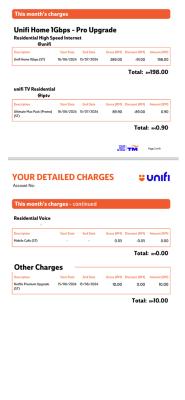
digita1tech and enduser liked this post
|
|
|
Jun 18 2024, 12:18 PM
|
|
Senior Member
1,441 posts Joined: Sep 2021
|
QUOTE(Ashren @ Jun 17 2024, 10:16 PM) Forget about lowering your MTU just go for the highest supported by your isp ie TM on PPPoE is 1492. That's where fragmentation come into play. There's no need to go into that. Stick with 1492 or you will have packet issues with your connected devices. 16 hopsAs for the ip range nothing can be done unless TM sort their area gateway properly vs total subscribers in that area and distance to the nearest exchange. They cant even deploy a proper standard on the OLT's. Some areas get the broken Fiberhome OLT and some get the less problematic ZTE. Port sharing in crowded areas is also a problem that contribute to the issue. You can tell now those with 42.xxx prefix are mostly either far south or up north. Very little to none in Klang Valley area nowadays. (Where are you from btw?) Do a traceroute and take note on the first 2-4 local hops and compare it with two different ip range and two different area. Most of the time it won't be the same. Hence the variable in latency and performance to the same site/server between two ip range and location. It has got nothing to do with TM international routing or peering. All ip get the same international treatment. Its the local gateway. Try this site and tell me what's your hop count under TCP/IP Fingerprint. Mine's 16. https://browserleaks.com/ip |
|
|
Jun 18 2024, 12:22 PM
|
|
Senior Member
1,441 posts Joined: Sep 2021
|
QUOTE(Ashren @ Jun 17 2024, 10:39 PM) The problem is on public ip but only to 42.xxx ip range. No other public ip range that Im aware of have this issue. seee that prefect 175.xxx can get down 10-12ms daam you so luckyThose who got assigned to that ip range gateway somehow treated like behind a cgnat system. You cant get out from that ip range no matter how many times you reconnect to the gateway. Like stuck in some broken internal cgnat LAN. No other subscribers can get that ip range vice versa, its not in the public range rotation. Isnt it weird? I was on that ip range before covid hit for over a year and my ping to vultr sg playing call of duty always hover around 28-30ms. The very day I get a 175.xxx ip my ping goes down to 10-12ms until now. I'm speaking from experience I know what that fellow forumer feels like locked to that broken ip range forever for no apparent reason. how possible my office 175.xxx biz smooth same area my home to walk shop take 30sec near that DP diffrent place my home DP BOX beside too DP TO MY HOME macam 20metter+++ that fiber very good but ip range bad |
|
|
Jun 18 2024, 06:05 PM
Show posts by this member only | IPv6 | Post
#3237
|

All Stars
12,039 posts Joined: Oct 2017
|
just share, nothing to discuss, 100mbps free upgrade 300mbps, up time 77days, wait for 100 days up time
TP link ax20, IP 115.135.x.x, yes router IP is 100.x.x.x i just click above link, hops is 17 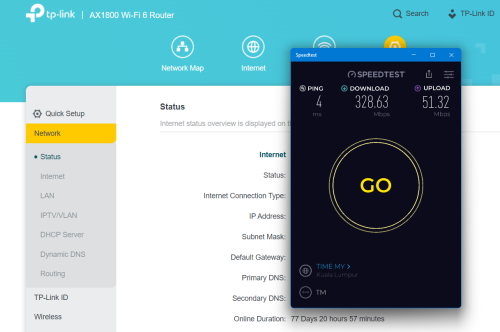 |
|
|
Jun 18 2024, 06:17 PM
|
|
Senior Member
1,208 posts Joined: Aug 2018
|
I get 18 hop! Waiting for expert to teach me how to interpret this.
I give screenshot complete with full location and IP address to help with interpretation. 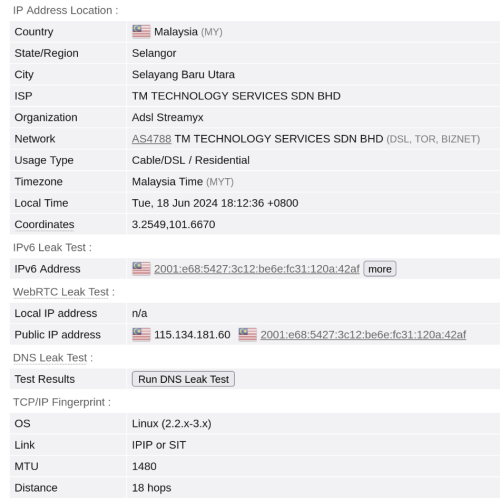 |
|
|
Jun 18 2024, 06:31 PM
Show posts by this member only | IPv6 | Post
#3239
|
|
Junior Member
87 posts Joined: Jun 2011
|
QUOTE(kwss @ Jun 18 2024, 07:17 PM) I get 18 hop! Waiting for expert to teach me how to interpret this. 18 hops too, from KL.I give screenshot complete with full location and IP address to help with interpretation. 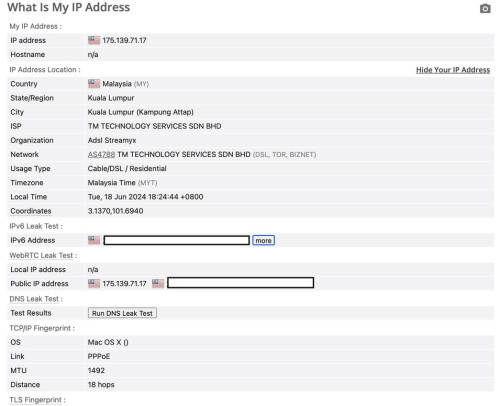 |
|
|
Jun 18 2024, 09:22 PM
|

Senior Member
4,231 posts Joined: Jan 2003 From: Selangor 
|
mine is 19 hops on 60.50.x.x
|
|
Topic ClosedOptions
|
| Change to: |  0.0227sec 0.0227sec
 0.52 0.52
 6 queries 6 queries
 GZIP Disabled GZIP Disabled
Time is now: 9th December 2025 - 04:27 AM |
 Quote
Quote