

Plan name = 300Mbps , Upgrade speed = to 500Mbps .. speedtest to TM server = 500Mbps , plan name is not changing after free speed upgrade
Unifi Official TM UniFi High Speed Broadband Thread V42, READ 1ST PAGE FOR RELEVANT WIFI INFO!
Unifi Official TM UniFi High Speed Broadband Thread V42, READ 1ST PAGE FOR RELEVANT WIFI INFO!
|
|
 Feb 1 2024, 11:27 AM Feb 1 2024, 11:27 AM
Return to original view | IPv6 | Post
#1
|
 
Junior Member
203 posts Joined: Feb 2008 
|
Plan name = 300Mbps , Upgrade speed = to 500Mbps .. speedtest to TM server = 500Mbps , plan name is not changing after free speed upgrade
|
|
|
|
|
|
May 8 2024, 07:52 AM
Return to original view | IPv6 | Post
#2
|
|
Junior Member
203 posts Joined: Feb 2008
|
Free.Mine "putus" 2 times.My friend fiber also "putus" once. ahlong liked this post
|
|
|
May 30 2024, 11:38 AM
Return to original view | IPv6 | Post
#3
|
|
Junior Member
203 posts Joined: Feb 2008
|
Mine using 300Mbps( free speed upgrade to 500Mbps)..and still on public ip...and actively using my public ip access.
|
|
|
Aug 17 2024, 12:37 PM
Return to original view | IPv6 | Post
#4
|
|
Junior Member
203 posts Joined: Feb 2008
|
QUOTE(Anime4000 @ Aug 17 2024, 12:24 PM) Now I know why TM not letting home to subnet IPv6 (/60). Which ISPs allow home ipv6 subnetting (/56 , /60)?TM intentional letting this. 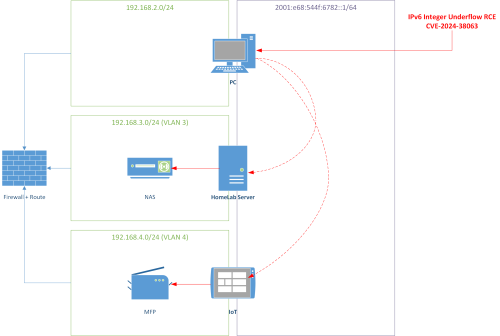 I going to disable IPv6 entirely, TM solution to share IPv6 subnet between IPv4 subnet, this what been told me. I closing MCMC case and give up  maxis? |
|
|
Aug 18 2024, 11:03 PM
Return to original view | IPv6 | Post
#5
|
|
Junior Member
203 posts Joined: Feb 2008
|
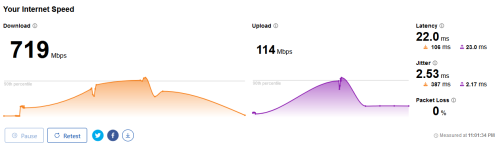
These were mine, 500mbps unifi package
 |
|
|
Aug 19 2024, 06:57 AM
Return to original view | IPv6 | Post
#6
|
|
Junior Member
203 posts Joined: Feb 2008
|
QUOTE(kwss @ Aug 18 2024, 11:12 PM) Your location please... kuching kwss liked this post
|
|
|
|
|
|
Sep 2 2024, 02:20 PM
Return to original view | IPv6 | Post
#7
|
|
Junior Member
203 posts Joined: Feb 2008
|
QUOTE(Jeffreynsx @ Sep 2 2024, 01:07 PM) Anyone can guide me how to configure QOS for Asus Router. If let's say I got 500mbps package, how to set the download and upload MB if select under Adaptive QOS with Manual Settings? I tried to set download and upload with 8% to 10% more than the bandwidth range, still cannot achieve the best result. If set exactly the same download and upload MB, the download speed will reduce by half. If no QOS, the upload latency will goes up. Maybe your asus router cpu cannot handle your internet speed.Try to lower to 250Mbps on the download and 100Mbps on the upload.Test again.BTW, this was my test against sydney server.QOS is disable. 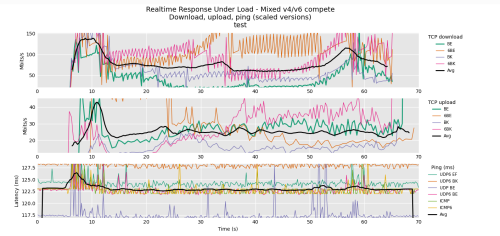 |
|
|
Sep 2 2024, 02:34 PM
Return to original view | IPv6 | Post
#8
|
|
Junior Member
203 posts Joined: Feb 2008
|
QUOTE(Jeffreynsx @ Sep 2 2024, 02:27 PM) I'm currently using Asus RT-AX3000 router. Will the Asus router unable to cope with 500mbps speed? Maybe..I dont know.Just give it a try by putting 250Mbps on the DL and maybe 95Mbps- 98Mbps on the UL.I did not enable QOS since very few device on my home network. 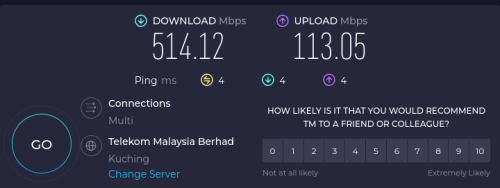 This post has been edited by hasmidzul_jojo: Sep 2 2024, 02:38 PM |
|
|
Sep 3 2024, 10:50 AM
Return to original view | IPv6 | Post
#9
|
|
Junior Member
203 posts Joined: Feb 2008
|
QUOTE(blackbox14 @ Sep 3 2024, 10:26 AM) For those more knowledgeable about these things: is there a way they can block DoH without just IP blocking the DNS provider (Google, Cloudflare, quad9, etc.)? Yes, DOH can be block.Blocks encrypted DNS, VPN, TOR, Proxies = 3k+ domain entries from what I read.I understand DoT can be blocked by blocking port 853. |
|
|
Sep 3 2024, 06:36 PM
Return to original view | IPv6 | Post
#10
|
|
Junior Member
203 posts Joined: Feb 2008
|
QUOTE(garbanicus @ Sep 3 2024, 05:48 PM) Chill guys, let me ask noob questions here. You can try to ask them for swu, in my case..i wanted to port to maxis but only then unifi counter offer me with swu 3. - What's the deal, should I wait for the so-called SWU 5.0? Or should I just go ask and try my luck. - With SWU they usually give new modem/router? Yes,only the router/wifi. I was given the fiberhome router wifi. garbanicus liked this post
|
|
|
Sep 7 2024, 02:55 PM
Return to original view | IPv6 | Post
#11
|
|
Junior Member
203 posts Joined: Feb 2008
|
QUOTE(jitbeng @ Sep 7 2024, 02:36 PM) I primary use the internet for playing online games. And paying a monthly subscription too! 2 online games currently playing: The Elder Scroll Online Tamriel Unlimited since 2016 & Fallout 76 Online since 2021. Secondary use for YT & Netflix & download movies. If you search for those black dlink gpon wifi AIO on the other thread, someone (kwss) found unpatch cve's and these router probably not safe to use. Get some serious equipement if you wish for better connectivity experiances (or use old onu) or you could ask and buy anime4000 for his router on stick solution.I seems to be happy with my Xbox Series X Console settings. Was abled to change DNS inside the Console to 1111 & 1001...don't know make any difference or not lol. But Cannot port forward in my console. Console Settings abled to get 1296mbps up & 533mbps down. Latency at 210ms as ecpected since I presumed the Servers are located in US. I am paying for 1000mbps up & 500mbps down for my pure Unifi package 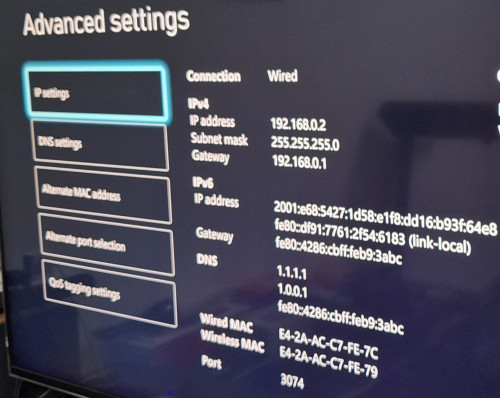 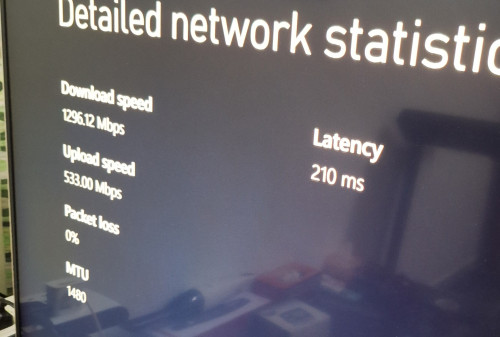 |
|
|
Jan 13 2025, 11:57 AM
Return to original view | IPv6 | Post
#12
|
|
Junior Member
203 posts Joined: Feb 2008
|
CODE 100.64.0.0/10 100.64.0.0–100.127.255.255 4194304 Private network Shared address space[4] for communications between a service provider and its subscribers when using a carrier-grade NAT |
|
Topic ClosedOptions
|
| Change to: |  0.0750sec 0.0750sec
 0.20 0.20
 7 queries 7 queries
 GZIP Disabled GZIP Disabled
Time is now: 9th December 2025 - 07:18 AM |
 Quote
Quote