

QUOTE(hussain @ May 31 2024, 09:23 AM)
Thanks so much bro.. appreciate your help.. cheers

Anytime bro no problem. If you have any issues after the upgrade feel free to ask around.Unifi Official TM UniFi High Speed Broadband Thread V42, READ 1ST PAGE FOR RELEVANT WIFI INFO!
|
|
 May 31 2024, 01:38 PM May 31 2024, 01:38 PM
|
 
Junior Member
156 posts Joined: Dec 2010 
|
QUOTE(hussain @ May 31 2024, 09:23 AM) Thanks so much bro.. appreciate your help.. cheers Anytime bro no problem. If you have any issues after the upgrade feel free to ask around. hussain liked this post
|
|
|
|
|
|
May 31 2024, 01:41 PM
|
|
Junior Member
156 posts Joined: Dec 2010
|
QUOTE(neekun @ May 31 2024, 09:37 AM) Mine 1gbps with white combo box that I don’t use and stil using my old Huawe modem by Telekom. The installer doesn’t know how to setup as bridge mode and me being not technical also blur haha. Now I want to call 100 to request for the black combo box but I need the installer to set as bridge mode, seems like the installers at my area all don’t know about this bridge mode setting. Yeah I think by default their deployment training for the model don't include the how-to on bridge mode and they're just suppose to set it as default. But some installers are tech savvy and kind enough to help you set it up. Just ask them nicely if they don't know then just do it ourself. |
|
|
May 31 2024, 01:43 PM
|
|
Junior Member
156 posts Joined: Dec 2010
|
QUOTE(cHiLdHo0drEaMz @ May 31 2024, 12:00 PM) Guys, from which number they call for free upgrade? My Truecaller auto rejected the calls due to classified spam. Either 79332400 or 21063000. Both are from HQ.This post has been edited by Ashren: May 31 2024, 01:44 PM cHiLdHo0drEaMz liked this post
|
|
|
May 31 2024, 02:12 PM
Show posts by this member only | IPv6 | Post
#2824
|

Senior Member
1,194 posts Joined: Sep 2018 
|
QUOTE(Ashren @ May 31 2024, 02:11 AM) You're welcome. You can ask your VOIP pass from the installer. I got mine through whatsapp from them. Thanks for details explaination. Will setup on weekend and let you know.You can switch back and forth anytime no problem it's legal and it's allowed. Just like how the installer let you continue using your current BTU after the upgrade. Usually they don't bind the BTU/ONU/ONR to our account, very rare occurence if they do. Only 1 fellow member here got his ONR binded so far it's RViN. I have no idea why they bind his account to allow only one BTU/ONU/ONR to connect. He choose the DLink and they bind it for him so he cannot use back his Fiberhome BTU. But he's fine with it eventhough he's stuck with the DLink forever he get 1gbps speed test so he should be fine. 😂 Maybe it's OLT dependent like ZTE/Alcatel-Nokia/Huawei/Fiberhome limitation I'm not sure. I think some OLT can only have 1 ONU profile registered so maybe that's why the installer have to bind his ONR in order to connect to the OLT. That's the reason why we use the PLOAM password, to authorize our BTU/ONU/ONR to the OLT before we can establish a link and dial PPPoE. Different areas use different OLT so it's down to luck. As per Anime research, Fiberhome OLT is the most troublesome. Example info from sifu Anime. 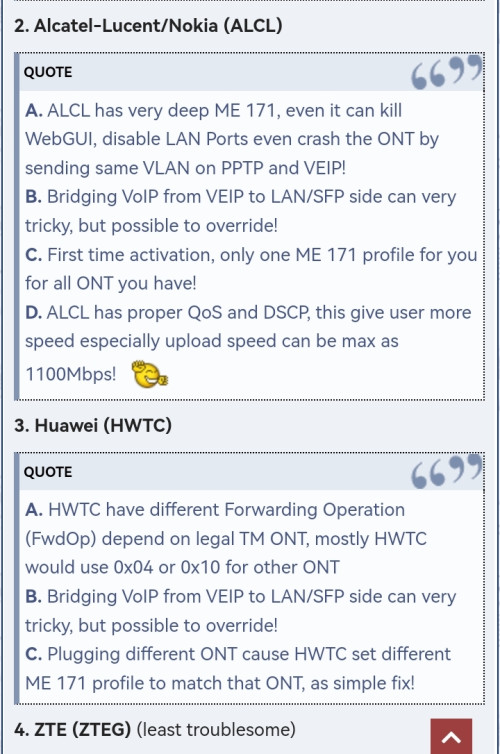 https://forum.lowyat.net/index.php?showtopi...ost&p=109782422 Ashren liked this post
|
|
|
May 31 2024, 02:13 PM
Show posts by this member only | IPv6 | Post
#2825
|

Junior Member
671 posts Joined: May 2019 
|
Can i actually login to Spotv Now using Unifi acc id? I tried but only came out login error. Unifi ID is the id used in PPPOE login? i.e. xxx@unifi
Here is the Spotv Now link : https://www.spotvnow.com/maintenance  This post has been edited by The.Lucas.DaY: May 31 2024, 02:14 PM |
|
|
May 31 2024, 04:28 PM
|
|
Senior Member
4,549 posts Joined: Jan 2003
|
QUOTE(The.Lucas.DaY @ May 31 2024, 02:13 PM) Can i actually login to Spotv Now using Unifi acc id? I tried but only came out login error. Unifi ID is the id used in PPPOE login? i.e. xxx@unifi Unifi ID is the xxx@unifi in your bill, should be the same as your PPPoE loginHere is the Spotv Now link : https://www.spotvnow.com/maintenance If you have those packs eligible for SPOTV should be able to login |
|
|
|
|
|
May 31 2024, 05:34 PM
|
|
Junior Member
156 posts Joined: Dec 2010
|
QUOTE(NagaK @ May 31 2024, 02:12 PM) Thanks for details explaination. Will setup on weekend and let you know. 👍 |
|
|
May 31 2024, 06:16 PM
Show posts by this member only | IPv6 | Post
#2828
|
|
Senior Member
1,524 posts Joined: Dec 2020 From: Perak
|
QUOTE(cHiLdHo0drEaMz @ May 31 2024, 12:00 PM) Guys, from which number they call for free upgrade? My Truecaller auto rejected the calls due to classified spam. 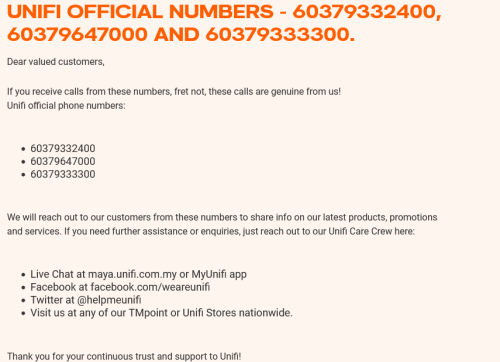 zeronehza and cHiLdHo0drEaMz liked this post
|
|
|
May 31 2024, 06:56 PM
|
|
Junior Member
156 posts Joined: Dec 2010
|
QUOTE(aniq8676 @ May 31 2024, 06:16 PM)  Also that number. I got my upgrade appt called from 79332400 and plan upgrade confirmation from 21063000 the same day after my installation is complete. cHiLdHo0drEaMz liked this post
|
|
|
May 31 2024, 08:33 PM
|

Senior Member
5,827 posts Joined: Jan 2003 From: Selayang, Selangor
|
QUOTE(Ashren @ May 25 2024, 08:09 PM) After few days of uptime since the 1gbps upgrade I can confirm no speed fluctuation observed at least for me. QUOTE(jiaen0509 @ May 26 2024, 01:51 AM) It seems that the black variant of the ONR can operate in Bridge mode without any speed drops (as reported by one of the members here). So, everything working well on your end yeah 👍 Have been so busy with work I haven't been checking my device and haven't followed up here also. But read through all the pages and seems like I'm still the unique case  Wondering if I'm just unlucky and it's a stupid OLT I'm stuck with, or if my ONR could be faulty. In the future I might open a ticket with TM to investigate this speed drop issue. Funny thing is I took a speed test measurement today and it's reading 1G which usually isn't the case by this time. I'm still restarting the ONR every 4am tho lol. |
|
|
May 31 2024, 11:04 PM
Show posts by this member only | IPv6 | Post
#2831
|

Senior Member
1,699 posts Joined: Jun 2011 From: Home of Bak Kut Teh! :)
|
Wow unifi speed is normal tonight. I must be dreaming.
Online game also no lag/delays |
|
|
Jun 1 2024, 12:34 AM
|

Junior Member
553 posts Joined: Aug 2017 
|
My friend being using 100 mbps for Rm 149 (no tv) from last August.
Is there any SWU plan that suitable for 100 mbps? Or better just take the 89 ringgit one? |
|
|
Jun 1 2024, 05:49 AM
|
|
Junior Member
90 posts Joined: May 2022
|
QUOTE(hussain @ May 30 2024, 11:44 AM) HI Guys.. Need some help.. I just got a call from unifi that finally i will get free upgrade from 800mbps to 1gbps. but they said have to installl their own router. Cant i continue to use my own router coz mine is new and is wifi 6 TP link Archer AX 73. My house is kinda large so previously using mesh did not help but after using this router speeds everywhere in the house is quite good even without mesh.. will their upgraded router be any better ?..appreciate some sifu advice.. thanks They won't really care if you want to keep your own router. They probably will still give you their router to meet their SOP though. Also, sometimes it is difficult to talk to those tech support on the phone as they can be lacking in knowledge. Last time I have to spend quite a bit of time convincing them the optical unit which I got more than 10 years ago can no longer support the higher speed as those old routers capped at max 100mbps only. But the onsite tech installer generally knows their job. When the tech installer comes you can always request him to keep using your existing router. Also will unifi be better or moving altogether to celcom fibre 1gbps? And even if the tech installer by chance that unable to get your existing router to work, and choose to complete the setup with TM provided router, they won't take away your existing router. You can always change it back to your own router once the tech installer left. One thing you need to watch out, is whether your existing router has a max speed limit that will cap your new speed. Very old routers might be limited to 100mbps for the LAN ports, and WiFi maxspeed is also slower. So if your existing router is a very old one, and you continue to use it after the speed upgrade, you might be getting lower speed due to hardware limitations. By the way, if they nowadays give you a combo unit that combine the optical unit and router together, then like other forum users suggested, you can ask the tech installer to continue to use your own router by setting the combo unit to bridge mode. This post has been edited by vhs: Jun 1 2024, 06:14 AM hussain liked this post
|
|
|
|
|
|
Jun 1 2024, 06:04 AM
|
|
Junior Member
90 posts Joined: May 2022
|
QUOTE(sp6068 @ May 30 2024, 03:05 PM) I have a feeling TM is throttling speed during this time. When I use the internet for browsing international sites after 2PM, speed is back to its normal state. Unifi has been known to have speed congestion issues during certain period of time and certain period of months since more than a decade ago. It will happen suddenly at certain hours, and then back to normal after certain hours. And the pattern is that some sites will slow down while some other sites remain the same. So it looks like it is a backhaul connection issue when the traffic suddenly get diverted to a congested backbone network. As the congestion affect a lot of normal sites in a certain region, therefore a lot of people will notice that.Slowness is peaked at night Using software like pingplotter will allow you to see which segment along the route starts to cause high ping time. Can TM do anything about it? I think they cannot deal with it easily for economic reasons. Probably has something to do with their agreement with other providers. How to work around it? There are services offering rerouting of your traffic through their own private nodes, so that your traffic can be tweaked to try to bypass all those congested nodes. But it requires your own manual tinkering and trials and errors, and sometimes maybe all nodes that you can access are all congested so no better performance can be achieved. Used to use those before but nowadays I am just too lazy to deal with that. So not sure how well that approach will work now. And the service is not free. Can TM itself setup its own "private nodes" all around the world and offer this service as additional premium service for those people who need it? I think it is a bad idea. First, it encourage TM to stop solving the problem and just charge more for usage. Secondly, different users have different needs, a big provider like TM with so many users may find that setting up so many private nodes are very costly and the different usage scenarios end up failing due to the fact that it is simply not cost effective to try to meet all the usage needs this way. It is better for TM just to find out how to reroute most of the traffic via a few major backbones without suffering from congestion. |
|
|
Jun 1 2024, 11:45 AM
Show posts by this member only | IPv6 | Post
#2835
|
|
Senior Member
1,194 posts Joined: Sep 2018
|
QUOTE(Ashren @ May 31 2024, 05:34 PM) 👍 One dude what is LOID and LOID password. I don't know either blame the installer or not giving ID password incomplete thing such a headache |
|
|
Jun 1 2024, 11:48 AM
Show posts by this member only | IPv6 | Post
#2836
|
|
Senior Member
1,194 posts Joined: Sep 2018
|
QUOTE(hussain @ May 30 2024, 11:44 AM) HI Guys.. Need some help.. I just got a call from unifi that finally i will get free upgrade from 800mbps to 1gbps. but they said have to installl their own router. Cant i continue to use my own router coz mine is new and is wifi 6 TP link Archer AX 73. My house is kinda large so previously using mesh did not help but after using this router speeds everywhere in the house is quite good even without mesh.. will their upgraded router be any better ?..appreciate some sifu advice.. thanks Ask your installer if they can install and and set up as bridge mode. If yes do it right away and you can use back your router. My case is different since I'm gotted first batch of black box my installer doesn't know about bridge setup on new box so he simply use back Fiberhome ONU but now with AX73 my speed limit was 930mbps. No full 1gbpsAlso will unifi be better or moving altogether to celcom fibre 1gbps? If they said can't .Keep your existing ONU ask them PLOAM password and VoIP ID and Password and do install yourself and set up in brigde mode Here's method on previous post https://forum.lowyat.net/topic/5424552/+2800# This post has been edited by NagaK: Jun 1 2024, 12:05 PM cHiLdHo0drEaMz liked this post
|
|
|
Jun 1 2024, 11:48 AM
|
|
Junior Member
932 posts Joined: Dec 2019
|
QUOTE(NagaK @ Jun 1 2024, 11:45 AM) One dude what is LOID and LOID password. I don't know either blame the installer or not giving ID password incomplete thing such a headache LOID is for EPON, TM is using GPON, so that doesn't matter to you |
|
|
Jun 1 2024, 02:31 PM
Show posts by this member only | IPv6 | Post
#2838
|

Senior Member
5,608 posts Joined: Jan 2010
|
any1 experiencing internet issue now?
slow in loading website and youtube |
|
|
Jun 1 2024, 02:36 PM
|

Senior Member
1,672 posts Joined: Jan 2003
|
QUOTE(tzxsean @ Jun 1 2024, 02:31 PM) any1 experiencing internet issue now? Yup, facing the same issues.slow in loading website and youtube |
|
|
Jun 1 2024, 02:42 PM
|

Junior Member
233 posts Joined: Mar 2007
|
Super lag since 12pm today... did some speedtest to local TM server around 100Mbps but <1Mbps to singapore n thailand servers... wtf
This post has been edited by shuin1986: Jun 1 2024, 02:43 PM |
|
Topic ClosedOptions
|
| Change to: |  0.0198sec 0.0198sec
 0.34 0.34
 6 queries 6 queries
 GZIP Disabled GZIP Disabled
Time is now: 13th December 2025 - 01:30 AM |
 Quote
Quote