Welcome Guest ( Log In | Register )

Bump Topic Topic Closed RSS Feed
495 Pages « < 139 140 141 142 143 > » Bottom

Outline · [ Standard ] · Linear+

Unifi Official TM UniFi High Speed Broadband Thread V42, READ 1ST PAGE FOR RELEVANT WIFI INFO!

views
     
AlexisStarZ
post May 30 2024, 07:17 PM

Casual
***
Junior Member
320 posts

Joined: Mar 2012
saw you guys talking about private and public ip

how to check whether I am using private or public ip?

currently using ip address start from 118.100.xxx.xxx
yenchenje
post May 30 2024, 07:28 PM

Enthusiast
*****
Junior Member
932 posts

Joined: Dec 2019
QUOTE(AlexisStarZ @ May 30 2024, 07:17 PM)
saw you guys talking about private and public ip

how to check whether I am using private or public ip?

currently using ip address start from 118.100.xxx.xxx
*
Google what is my IP, login to your router to see if your IP matches what is shown on Google

If yes, then you’re not under CGNAT, if no then you’re under CGNAT

Even easier way is to just check your plan speed, if your speed is under 500Mbps, you are under CGNAT

CGNAT means your IP is not dedicated only to you, instead you’re sharing it with multiple other users, and you can’t self host anything that requires port forwarding.
YoungMan
post May 30 2024, 09:00 PM

Look at all my stars!!
*******
Senior Member
6,808 posts

Joined: Oct 2008
From: Kuala Lumpur


QUOTE(hussain @ May 30 2024, 11:44 AM)
HI Guys.. Need some help.. I just got a call from unifi that finally i will get free upgrade from 800mbps to 1gbps. but they said have to installl their own router. Cant i continue to use my own router coz mine is new and is wifi 6 TP link Archer AX 73. My house is kinda large so previously using mesh did not help but after using this router speeds everywhere in the house is quite good even without mesh.. will their upgraded router be any better ?..appreciate some sifu advice.. thanks

Also will unifi be better or moving altogether to celcom fibre 1gbps?
*
Just choose which is cheaper between Unifi and Celcom, performance will not differ much since both are riding on the same infra.
And regarding the new router, do not expect it to be much better. ISP provided router is just enough to survive, you have to use own router for better performance.

Ashren
post May 30 2024, 09:20 PM

Getting Started
**
Junior Member
156 posts

Joined: Dec 2010
QUOTE(hussain @ May 30 2024, 04:10 PM)
Meaning? Sorry not very tech savvy
*
They give you the DLink modem with built in router combo box (ONR). So in order for you to use back your TPLink router just tell the installer to set the combo box to bridge mode. It'll act as a modem only and you can plug your TPLink router to it. Or you can use back your present setup without the combo modem. Speed is limited to 940mbps if use present setup. With the combo box set to bridge mode using own router can reach 1050-1100mbps if use with a 2.5gbps LAN port.

I suggest you do some simple search on the forum because lots of people already explain things like this including me. I got mine upgraded to 1gbps last week. I got the combo box set to bridge mode and I use back my Asus router and continue using my mesh setup as usual. When they come to install it for you make sure to ask for the black DLink combo box. If you get the white one tell them nicely you want the black one. If they refuse, go ham on them. Lol j/k

P/S: The black one better than the white one don't ask why I got tired explaning 😂

This post has been edited by Ashren: May 30 2024, 09:26 PM
sp6068
post May 30 2024, 09:24 PM

Lights Out and Away We Go!
******
Senior Member
1,699 posts

Joined: Jun 2011
From: Home of Bak Kut Teh! :)


shit hour just kicked in yo

peak slowness
Ashren
post May 30 2024, 09:27 PM

Getting Started
**
Junior Member
156 posts

Joined: Dec 2010
QUOTE(sp6068 @ May 30 2024, 09:24 PM)
shit hour just kicked in yo

peak slowness
*
The my 1000mbps feels like 100mbps time. Smh.
surrodox2001
post May 30 2024, 09:27 PM

Getting Started
**
Junior Member
273 posts

Joined: Apr 2019


QUOTE(kwss @ May 30 2024, 12:52 AM)
A lot of FOSS sites are slow. I am a Fedora contributor and all the backend stuff like bodhi, koji and pagure has been slow as well.
It is better to learn, experiment and prepare now than go into firefighting mode when it happens for real.

Example:
Kazakhstan roll out MITM overnight with rouge CA. No way you can defend against that if you do not have ready infrastructure.
Turkmenistan went all out clamping down the Internet overnight. Again, the unprepared will get caught.
*
(Apologies for late reply) Hello fellow FOSS users!

Yeah, if you got the resources, some preparations are good, like that's also why fault-tolerant network links uses satellite as backup?
olivur
post May 30 2024, 09:59 PM

ollie ollie oxen free
******
Senior Member
1,279 posts

Joined: Jul 2011
QUOTE(sp6068 @ May 30 2024, 09:24 PM)
shit hour just kicked in yo

peak slowness
*
haven't felt it this slow for a bit in pj area

from discord, twitter to even prime 🫠

chinese sns' not that bad .. yet
NagaK
post May 30 2024, 10:14 PM

Regular
******
Senior Member
1,194 posts

Joined: Sep 2018


Hi peeps does anyone give me step by step instructions as how to install D Link ONR combo box. With bridge mode setup to use own router..
I got PLOAM pass I know to install router but zero knowledge on ONR that's why

Thanks in advance
XeactorZ
post May 30 2024, 10:16 PM

♥ PandaDog ♥
*********
All Stars
31,608 posts

Joined: Aug 2010
QUOTE(sp6068 @ May 30 2024, 09:24 PM)
shit hour just kicked in yo

peak slowness
*
even use vpn also have to keep change few server only stable sweat.gif
AlexisStarZ
post May 30 2024, 10:17 PM

Casual
***
Junior Member
320 posts

Joined: Mar 2012
QUOTE(yenchenje @ May 30 2024, 07:28 PM)
Google what is my IP, login to your router to see if your IP matches what is shown on Google

If yes, then you’re not under CGNAT, if no then you’re under CGNAT

Even easier way is to just check your plan speed, if your speed is under 500Mbps, you are under CGNAT

CGNAT means your IP is not dedicated only to you, instead you’re sharing it with multiple other users, and you can’t self host anything that requires port forwarding.
*
is same, hence I am using public ip?

as for plan, I guess mine is 500mbps, last year subscribe RM 139 for 300mbps then waive 6 months bill
and seems auto upgrade to 500mbps hmm.gif
Ashren
post May 30 2024, 11:37 PM

Getting Started
**
Junior Member
156 posts

Joined: Dec 2010
QUOTE(NagaK @ May 30 2024, 10:14 PM)
Hi peeps does anyone give me step by step instructions as how to install D Link ONR combo box. With bridge mode setup to use own router..
I got PLOAM pass I know to install router but zero knowledge on ONR that's why

Thanks in advance
*
Connect to the ONR either with LAN or Wifi. Click Setup tab, in GPON settings fill in your PLOAM pass, Device Type choose Router, OMCI OLT Mode choose Default Mode. Click Wizard tab, choose GPON Bridge in the WAN Mode section. Key in your VOIP ID and password if you want to enable it. Can skip if you want. Then apply and connect your own router to LAN1.

This post has been edited by Ashren: May 30 2024, 11:39 PM
NagaK
post May 31 2024, 01:24 AM

Regular
******
Senior Member
1,194 posts

Joined: Sep 2018


QUOTE(Ashren @ May 30 2024, 11:37 PM)
Connect to the ONR either with LAN or Wifi. Click Setup tab, in GPON settings fill in your PLOAM pass, Device Type choose Router, OMCI OLT Mode choose Default Mode. Click Wizard tab, choose GPON Bridge in the WAN Mode section. Key in your VOIP ID and password if you want to enable it. Can skip if you want. Then apply and connect your own router to LAN1.
*
Thanks bro.

I don't have VOIP ID but I'm using phone life. Does TM can provide to us?
Also can I switch back to my old ONR if I dlink had issues as some members report that ONR tied with account

This post has been edited by NagaK: May 31 2024, 01:26 AM
kwss
post May 31 2024, 01:36 AM

Regular
******
Senior Member
1,208 posts

Joined: Aug 2018
QUOTE(Kadaj @ May 30 2024, 10:28 AM)
This is default plaintext method, which doesn't work for me.

This is when i connected to VPN and it works.

I tweak the unbound config to go through DoT method, and it works without vpn.

Just sharing my experience here.  thumbsup.gif
*
Hi, do you want to give my configuration a try? Stop unbound. Backup your /var/lib/unbound and /etc/unbound and replace with mine.
All my config is in /etc/unbound/conf.d/my-setup.conf

Everything under /var/lib/unbound is the DNSSEC public key and bootstrap address for root server

Test 1 (list root):
CODE

$ dig +short @127.0.0.1 -p 5335
h.root-servers.net.
i.root-servers.net.
j.root-servers.net.
k.root-servers.net.
l.root-servers.net.
m.root-servers.net.
a.root-servers.net.
b.root-servers.net.
c.root-servers.net.
d.root-servers.net.
e.root-servers.net.
f.root-servers.net.
g.root-servers.net.


Test 2 (DNSSEC OK):
CODE

$ dig +short @127.0.0.1 -p 5335 sigok.ippacket.stream
sigok.rsa2048-sha256.ippacket.stream.
195.201.14.36


Test 3 (DNSSEC Failure. There must be no output for the test to pass!):
CODE

$ dig +short @127.0.0.1 -p 5335 sigfail.ippacket.stream


QUOTE(go626201 @ May 30 2024, 11:57 AM)
Yes, it does resolve new address with domain name host. Should be follow the ttl, i think.
*
I gotta say upfront I have no knowledge on smokeping.
If you are a Cloudflare customer, open a ticket and see what they say?
Not exactly sure if you want to try calling TM NOC directly to complain.

QUOTE(surrodox2001 @ May 30 2024, 09:27 PM)
(Apologies for late reply) Hello fellow FOSS users!

Yeah, if you got the resources, some preparations are good, like that's also why fault-tolerant network links uses satellite as backup?
*
Hi to you!
Starlink would be great to have as a backup for all cases including censorship but I am not ready to pay the price yet considering I have Maxis fiber and Celcom mobile right now.
I think I will go with 2 anti-censorship method:
Obfs4 proxy:
It is resistant to probing and when combined with Tor, it is undetectable.
But I think it can be discovered if you are targeted. It cannot be possible that you only use 1 IP address all the time.

Domain fronting:
I already have a AWS Cloudfront Distribution. I just need to add another Origin under the Distribution. I am hoping to find something that can work with AWS Lambda so I pay nothing if I never use it. Just as a backup.
The downside is obvious. In the event of forceful MITM, it will be discovered.


Attached File(s)
Attached File  etc.unbound.tar.gz ( 28.47k ) Number of downloads: 4
Attached File  var.lib.unbound.tar.gz ( 1.5k ) Number of downloads: 4

Ashren
post May 31 2024, 02:11 AM

Getting Started
**
Junior Member
156 posts

Joined: Dec 2010
QUOTE(NagaK @ May 31 2024, 01:24 AM)
Thanks bro.

I don't have VOIP ID but I'm using phone life. Does TM can provide to us?
Also can I switch back to my old ONR if I dlink had issues as some members report that ONR tied with account
*
You're welcome. You can ask your VOIP pass from the installer. I got mine through whatsapp from them.

You can switch back and forth anytime no problem it's legal and it's allowed. Just like how the installer let you continue using your current BTU after the upgrade. Usually they don't bind the BTU/ONU/ONR to our account, very rare occurence if they do. Only 1 fellow member here got his ONR binded so far it's RViN. I have no idea why they bind his account to allow only one BTU/ONU/ONR to connect.

He choose the DLink and they bind it for him so he cannot use back his Fiberhome BTU. But he's fine with it eventhough he's stuck with the DLink forever he get 1gbps speed test so he should be fine. 😂

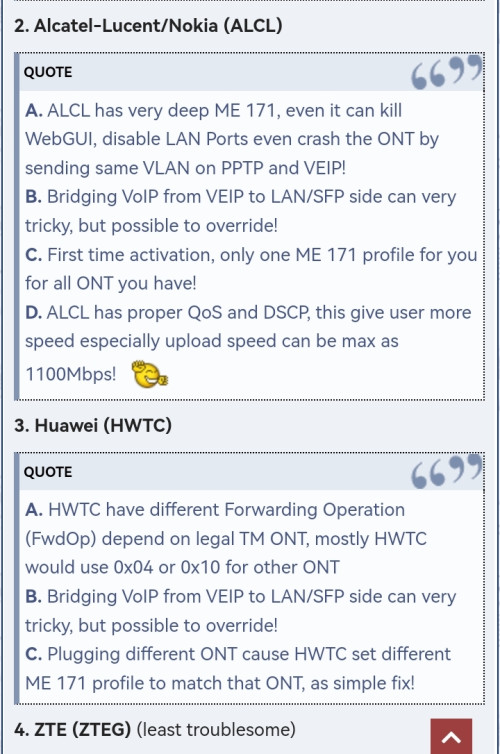
Maybe it's OLT dependent like ZTE/Alcatel-Nokia/Huawei/Fiberhome limitation I'm not sure. I think some OLT can only have 1 ONU profile registered so maybe that's why the installer have to bind his ONR in order to connect to the OLT. That's the reason why we use the PLOAM password, to authorize our BTU/ONU/ONR to the OLT before we can establish a link and dial PPPoE. Different areas use different OLT so it's down to luck. As per Anime research, Fiberhome OLT is the most troublesome.

Example info from sifu Anime.

user posted image

https://forum.lowyat.net/index.php?showtopi...ost&p=109782422

This post has been edited by Ashren: May 31 2024, 03:43 AM
hussain
post May 31 2024, 09:23 AM

Look at all my stars!!
*******
Senior Member
2,012 posts

Joined: Dec 2007
From: Malaysia


QUOTE(Ashren @ May 30 2024, 09:20 PM)
They give you the DLink modem with built in router combo box (ONR). So in order for you to use back your TPLink router just tell the installer to set the combo box to bridge mode. It'll act as a modem only and you can plug your TPLink router to it. Or you can use back your present setup without the combo modem. Speed is limited to 940mbps if use present setup. With the combo box set to bridge mode using own router can reach 1050-1100mbps if use with a 2.5gbps LAN port.

I suggest you do some simple search on the forum because lots of people already explain things like this including me. I got mine upgraded to 1gbps last week. I got the combo box set to bridge mode and I use back my Asus router and continue using my mesh setup as usual. When they come to install it for you make sure to ask for the black DLink combo box. If you get the white one tell them nicely you want the black one. If they refuse, go ham on them. Lol j/k

P/S: The black one better than the white one don't ask why I got tired explaning 😂
*
Thanks so much bro.. appreciate your help.. cheers
neekun
post May 31 2024, 09:37 AM

I'm a Mac
*******
Senior Member
2,570 posts

Joined: Jun 2006


QUOTE(Ashren @ May 30 2024, 11:37 PM)
Connect to the ONR either with LAN or Wifi. Click Setup tab, in GPON settings fill in your PLOAM pass, Device Type choose Router, OMCI OLT Mode choose Default Mode. Click Wizard tab, choose GPON Bridge in the WAN Mode section. Key in your VOIP ID and password if you want to enable it. Can skip if you want. Then apply and connect your own router to LAN1.
*
Mine 1gbps with white combo box that I don’t use and stil using my old Huawe modem by Telekom. The installer doesn’t know how to setup as bridge mode and me being not technical also blur haha. Now I want to call 100 to request for the black combo box but I need the installer to set as bridge mode, seems like the installers at my area all don’t know about this bridge mode setting.
Kadaj
post May 31 2024, 11:25 AM

On my way
****
Junior Member
586 posts

Joined: Mar 2006
QUOTE(kwss @ May 31 2024, 01:36 AM)
Hi, do you want to give my configuration a try? Stop unbound. Backup your /var/lib/unbound and /etc/unbound and replace with mine.
All my config is in /etc/unbound/conf.d/my-setup.conf
*
Your config file are identical to mine.
I think nothing wrong with the software part.

I doubt if something wrong with the D-Link DIR-X3060Z which tm installer swapped with my old router when i renew my unifi contract coz the plaintext unbound actually worked with my previous router.
It stopped to work after the DIR-X3060Z installed.

Please let me know if you know how to tweak the router for it to work.
It doesn't require to set port forward or firewall, does it?
cHiLdHo0drEaMz
post May 31 2024, 12:00 PM

#DBAP
******
Senior Member
1,031 posts

Joined: Jun 2011
From: #KajangTop


Guys, from which number they call for free upgrade? My Truecaller auto rejected the calls due to classified spam.

This post has been edited by cHiLdHo0drEaMz: May 31 2024, 12:02 PM
kwss
post May 31 2024, 12:46 PM

Regular
******
Senior Member
1,208 posts

Joined: Aug 2018
QUOTE(Kadaj @ May 31 2024, 11:25 AM)
Your config file are identical to mine.
I think nothing wrong with the software part.

I doubt if something wrong with the D-Link DIR-X3060Z which tm installer swapped with my old router when i renew my unifi contract coz the plaintext unbound actually worked with my previous router.
It stopped to work after the DIR-X3060Z installed.

Please let me know if you know how to tweak the router for it to work.
It doesn't require to set port forward or firewall, does it?
*
This is weird. We might have another TM router that misbehave. There is absolutely nothing to configure for DNS to work.
Can you try adding the following to your config and restart the service?
CODE

tcp-mss: 1280
outgoing-tcp-mss: 1280
forward-tcp-upstream: yes

CODE

tcp-upstream: yes


If it still doesn't work, can you wireshark and post your pcap file here?

EDIT:
I actually reproduced your problem using Coffee Bean WiFi and they are using TM too!
My packet capture shows all the root server return ServFail while using their WiFi after a long delay.
If I connect to my mobile data everything works fine.

Are you behind CGNAT?

EDIT 2:
After looking at the pcap file extensively, I cannot figure out what could go wrong. In fact the same packet works on Celcom.
I suspect the router or TM CGNAT somehow mangle the UDP packet and it gets rejected by the server.
But Celcom is using CGNAT as well so what do I know.

The only way to find out is to perform the packet capture after it leave your D-Link.
You have to setup a switch with 2 trunk port. One connect to D-Link, another connect to ONU.
Mirror one of the trunk port to your laptop and run the capture.

EDIT 3:
After thinking through the possible scenario, using "tcp-upstream: yes" might offer a workaround. Completely untested, purely brain debugging.
If it didn't work, login to your router and disable anything that remotely sounds like Firewall, SPI, etc and see how it goes.

This post has been edited by kwss: Jun 1 2024, 01:40 AM

495 Pages « < 139 140 141 142 143 > » Top
Topic ClosedOptions
 

Change to:
| Lo-Fi Version
0.0204sec    0.77    6 queries    GZIP Disabled
Time is now: 12th December 2025 - 08:17 AM