Welcome Guest ( Log In | Register )

Bump Topic Topic Closed RSS Feed
495 Pages « < 126 127 128 129 130 > » Bottom

Outline · [ Standard ] · Linear+

Unifi Official TM UniFi High Speed Broadband Thread V42, READ 1ST PAGE FOR RELEVANT WIFI INFO!

views
     
yayiyu99
post May 17 2024, 07:06 AM

Enthusiast
*****
Senior Member
958 posts

Joined: Feb 2008


QUOTE(icehart85 @ May 17 2024, 02:19 AM)
Hello everyone just got my latest Unifi May billing and I noticed increase in charges. Anyone know what this relates to? Is this a one time charge or its a monthly charge? Thanks.

user posted image
*
Call TM at 100 and ask about the additional charges on your bill.
cHiLdHo0drEaMz
post May 17 2024, 07:15 AM

#DBAP
******
Senior Member
1,031 posts

Joined: Jun 2011
From: #KajangTop


QUOTE(Anime4000 @ May 17 2024, 01:00 AM)
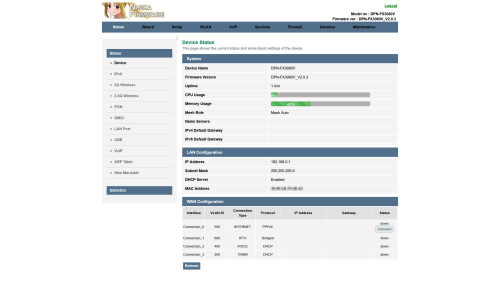
Today I received new ONR and straight away Reverse Engineer, this B1 hardware quite different layout but still using same SoC

user posted image
Also, I managed to extract out and repackage as firmware file, change the Theme to Lowyat Blue Theme rclxms.gif

planning to add Proprietary Huawei ME from my PON Stick, so, TIME and Maxis can use this ONR

Inside D-Link ONR B1

Firmware File: DPN-FX3060V-B1_V2.0.3_20240516_NIJIKA.bin


Size: 27.7 MB (29,112,320 bytes)
MD5: 2A8FE8991D673F8ED2CEFF5FC15E9CEC
SHA2: F89F4E78D8EB9007FF1AAFA94CD0426BB2A635D2DEE038D9308CB337ACB1AE31
This for B1 hardware, since my old D-Link no longer with me, can't test it, this has disable HW Check, before flash, please enable SSH just in case
Logo Sauce: Pixiv Id 103567703
*
Bug On Bridge Mode 🤦‍♂️. Hope they can release a patch to resolve it. Thanks Chief for your effort 🙏

This post has been edited by cHiLdHo0drEaMz: May 17 2024, 08:03 AM
toytoy
post May 17 2024, 09:45 AM

Enthusiast
*****
Senior Member
875 posts

Joined: Jan 2003


QUOTE(NagaK @ May 16 2024, 04:32 PM)
I'm using Fiberhome modem + TP LINK AX73 with 1G Lan port max I can reach was 930 to 950mbps. Keep Dlink Black ONR as backup option
If they said your Huawei Modem can support just stay with it keep your new modem+router for future use
*
Thanks for the info.


QUOTE(emilyngsc @ May 16 2024, 04:59 PM)
Which area? Johor still haven’t get it yet.
*
Menjalara Kepong. Hope u will get yours soon.

QUOTE(jiaen0509 @ May 16 2024, 05:29 PM)
You will receive the ONR combo box. After installation, simply unplug the fiber cable and connect it to your existing modem (ZTE/HUAWEI/FIBERHOME or others brand). Keep the D-Link combo box as a backup. You can set the Wi-Fi name and password to match your existing ones, so you won't need to reconnect any IoT devices. In case your modem spoiled, you can cucuk balik D-Link and use.
*
OK Great. Thanks for the info.
Omochao
post May 17 2024, 10:30 AM

Enthusiast
*****
Junior Member
835 posts

Joined: Nov 2007
From: Land of Forgotten
QUOTE(Anime4000 @ May 17 2024, 01:00 AM)
Today I received new ONR and straight away Reverse Engineer, this B1 hardware quite different layout but still using same SoC

user posted image
Also, I managed to extract out and repackage as firmware file, change the Theme to Lowyat Blue Theme rclxms.gif

planning to add Proprietary Huawei ME from my PON Stick, so, TIME and Maxis can use this ONR

Inside D-Link ONR B1

Firmware File: DPN-FX3060V-B1_V2.0.3_20240516_NIJIKA.bin
Size: 27.7 MB (29,112,320 bytes)
MD5: 2A8FE8991D673F8ED2CEFF5FC15E9CEC
SHA2: F89F4E78D8EB9007FF1AAFA94CD0426BB2A635D2DEE038D9308CB337ACB1AE31
This for B1 hardware, since my old D-Link no longer with me, can't test it, this has disable HW Check, before flash, please enable SSH just in case
Logo Sauce: Pixiv Id 103567703
*
good to know , hopefully there will be a highly customizable firmware with more options to set around it. But don't think TM will just let it slip pass by so easily. Subsequent firmware release might further lock it down to user mode.
Anime4000
post May 17 2024, 10:37 AM

Look at all my stars!!
*******
Senior Member
2,399 posts

Joined: Jul 2009
From: /dev/null


QUOTE(cHiLdHo0drEaMz @ May 17 2024, 07:15 AM)
Bug On Bridge Mode 🤦‍♂️. Hope they can release a patch to resolve it. Thanks Chief for your effort 🙏
*
I think might not a bug on Bridge Mode,

if read ME 171, for example on Alcatel Lucent/Nokia (ALCL) OLT, the ME 171 explicitly tell:
Disable Bridge Port
VLAN 500,209 on LAN 1 & PPP
Disable LAN 2
Disable LAN 3
Disable LAN 4
VLAN 209,400 on VEIP & POTS

this cause permanent settings on newer D-Link, cannot change back to Router Mode unless factory reset.

Enforced ME 171 can prevent bridge and Disabled Ports
Jjuggler
post May 17 2024, 10:38 AM

Narcissistic Genius
******
Senior Member
1,341 posts

Joined: Dec 2016
QUOTE(Anime4000 @ May 17 2024, 01:00 AM)
Today I received new ONR and straight away Reverse Engineer, this B1 hardware quite different layout but still using same SoC

user posted image
Also, I managed to extract out and repackage as firmware file, change the Theme to Lowyat Blue Theme rclxms.gif

planning to add Proprietary Huawei ME from my PON Stick, so, TIME and Maxis can use this ONR

Inside D-Link ONR B1

Firmware File: DPN-FX3060V-B1_V2.0.3_20240516_NIJIKA.bin
Size: 27.7 MB (29,112,320 bytes)
MD5: 2A8FE8991D673F8ED2CEFF5FC15E9CEC
SHA2: F89F4E78D8EB9007FF1AAFA94CD0426BB2A635D2DEE038D9308CB337ACB1AE31
This for B1 hardware, since my old D-Link no longer with me, can't test it, this has disable HW Check, before flash, please enable SSH just in case
Logo Sauce: Pixiv Id 103567703
*
I love the color theme there. Looks so visually appealing compared to the stock green shade. Also, the stock's D-Link logo is like someone who cropped the image with a fake .png image and slap into the firmware.
jiaen0509
post May 17 2024, 01:03 PM

Look at all my stars!!
*******
Senior Member
3,305 posts

Joined: Dec 2012
QUOTE(RViN @ May 12 2024, 08:02 PM)
I factory reset and set back to defaults with the correct PLOAM password also same, cant connect.

And the VOIP says "not registered". Although for some reason the VOIP not working with my current ONU also (which has working internet). Weird lah. And that one just now I disconnected the UPC cable to get to its admin menu to check the VOIP settings and the username/password seems correct.

Anyway told the technician the VOIP not working and I cant set up this new ONR, he said he will come over next week. I guess I have to side by side with him change it to bridge mode ... such a headache. Thing I'm thinking now is, if the devices are really binded, and I can't make bridge mode work when he's here then I have to either use that ONR until I manage to figure it out, or tell them to bind the old ONU again.

Or maybe they can just unbind it but for some reason on my account it was binded so they binded this new one again ... I've been using the same ONU for like 5 years I think, might have been an old policy. That's the only reason I can explain this strange behaviour with. Otherwise like ... what other explanation is there?
*
Any update sharing bro?
Ashren
post May 17 2024, 02:50 PM

Getting Started
**
Junior Member
156 posts

Joined: Dec 2010
QUOTE(RViN @ May 12 2024, 08:02 PM)
I factory reset and set back to defaults with the correct PLOAM password also same, cant connect.

And the VOIP says "not registered". Although for some reason the VOIP not working with my current ONU also (which has working internet). Weird lah. And that one just now I disconnected the UPC cable to get to its admin menu to check the VOIP settings and the username/password seems correct.

Anyway told the technician the VOIP not working and I cant set up this new ONR, he said he will come over next week. I guess I have to side by side with him change it to bridge mode ... such a headache. Thing I'm thinking now is, if the devices are really binded, and I can't make bridge mode work when he's here then I have to either use that ONR until I manage to figure it out, or tell them to bind the old ONU again.

Or maybe they can just unbind it but for some reason on my account it was binded so they binded this new one again ... I've been using the same ONU for like 5 years I think, might have been an old policy. That's the only reason I can explain this strange behaviour with. Otherwise like ... what other explanation is there?
*
QUOTE(jiaen0509 @ May 17 2024, 01:03 PM)
Any update sharing bro?
*
Isn't ploam pass tied to the gpon serial? Or is it a one pass for multiple devices?

zeronehza
post May 17 2024, 03:00 PM

Malaysian Real Madrid Supporter Club
******
Senior Member
1,704 posts

Joined: Jan 2003
From: Hogoh Pahang Hogoh

QUOTE(Ashren @ May 17 2024, 02:50 PM)
Isn't ploam pass tied to the gpon serial? Or is it a one pass for multiple devices?
*
not bind, if bind old onu cannot use with user own router (for user 1Gbps and above)
Ashren
post May 17 2024, 03:09 PM

Getting Started
**
Junior Member
156 posts

Joined: Dec 2010
QUOTE(zeronehza @ May 17 2024, 03:00 PM)
not bind, if bind old onu cannot use with user own router (for user 1Gbps and above)
*
I think RViN is binded because they replace his old alcatel with fiberhome during the black dlink upgrade installation and he can't switch back to use his old alcatel, didnt even change anything on his alcatel settings. He use the fiberhome ploam pass on his black dlink also cannot connect, the dlink wasnt configured fresh out of the box. Only his white fiberhome can connect, hmm.
sadlyfalways
post May 17 2024, 03:42 PM

Regular
******
Senior Member
1,185 posts

Joined: Nov 2020
QUOTE(blacktubi @ May 15 2024, 09:35 PM)
Maxis can offer 1Gbps for RM159 provided if you use Maxis postpaid RM60 and above

Won't be surprise if TM did something similar to counter offer
*
just applied to port into this plan. already have maxis fibre but barely 1 month with digi.
blacktubi
post May 17 2024, 04:21 PM

-
Group Icon
Elite
8,416 posts

Joined: Jul 2008

QUOTE(sadlyfalways @ May 17 2024, 03:42 PM)
just applied to port into this plan. already have maxis fibre but barely 1 month with digi.
*
How's the network quality of CelcomDiGi?

Better or worst than TM?
sadlyfalways
post May 17 2024, 04:32 PM

Regular
******
Senior Member
1,185 posts

Joined: Nov 2020
QUOTE(blacktubi @ May 17 2024, 04:21 PM)
How's the network quality of CelcomDiGi?

Better or worst than TM?
*
Sorry if not clear

I was using celcomdigi for my phone because of 50% off roaming discount

It was better than expected

My home fibre maxis 1gbps is out of contract already

I asked maxis if I can port in and combine to maxis one prime yesterday and they said I’ll still be eligible for 159 if I recontract so I agreed

Waiting for port in

So easy did verification and everything over WhatsApp, got esim photo in email
TakanoKyohei
post May 17 2024, 05:53 PM

101101010110100101011
*****
Senior Member
959 posts

Joined: Jun 2006
From: Uaaaaaaa Status: Machine Coding


QUOTE(Max2006 @ Apr 22 2024, 02:36 PM)
SWU 3.0 300mbps (free upgrade to 500mbps) user here. Last 6 months honeymoon period ended. 7th month bill came in today. RM119 + 6%tax = RM126.15

So I am happy to report that, it's confirmed RM119 for all coming months onwards.

For comrades who also took the same offer last 6 months, no need to worry anymore. No need to bother with those complicated calculation from TM. The correct figure will be reflected in 7th month. Cheers.
*
Bro.

may i know you unifi package name?

it is this name? :
QUOTE
Unifi 500Mbps - Home BB staywithUnifi 3.0 (M6)


Thanks

This post has been edited by TakanoKyohei: May 17 2024, 05:54 PM
Max2006
post May 17 2024, 07:46 PM

Look at all my stars!!
*******
Senior Member
4,099 posts

Joined: Mar 2006
QUOTE(TakanoKyohei @ May 17 2024, 05:53 PM)
Bro.

may i know you unifi package name?

it is  this name? : 
Thanks
*
Nope. The package name is still remained as 300Mbps SWU 3.0. The details do show the 500Mbps figure though.

As I mentioned before, although we got the free upgrade to 500Mbps, the package name will still be the same as the time when you registered to the package (300Mbps).
aneip
post May 17 2024, 08:26 PM

Look at all my stars!!
*******
Senior Member
2,466 posts

Joined: Nov 2004


QUOTE(icehart85 @ May 17 2024, 02:19 AM)
Hello everyone just got my latest Unifi May billing and I noticed increase in charges. Anyone know what this relates to? Is this a one time charge or its a monthly charge? Thanks.

user posted image
*
Seems like netflix upgrade.. it's RM27 to upgrade from basic to premium.
Anime4000
post May 17 2024, 10:35 PM

Look at all my stars!!
*******
Senior Member
2,399 posts

Joined: Jul 2009
From: /dev/null


QUOTE(Omochao @ May 17 2024, 10:30 AM)
good to know , hopefully there will be a highly customizable firmware with more options to set around it. But don't think TM will just let it slip pass by so easily. Subsequent firmware release might further lock it down to user mode.
*
That's possible, when D-Link use CramFS (like Nintendo Cartridge data layout) which more harder.
But, since has 256MB of NAND Flash, seem not practical to use such as that.

QUOTE(Jjuggler @ May 17 2024, 10:38 AM)
I love the color theme there. Looks so visually appealing compared to the stock green shade. Also, the stock's D-Link logo is like someone who cropped the image with a fake .png image and slap into the firmware.
*
I just copied Lowyat bar colour and looks good indeed. More stuff to study...

Another Update:
Take note that D-Link ONR has always on, always connect IoT Cloud (D-Link Air), that connect via Internet, VLAN 209 and OMCI
If you concerned about security (zero-day exploit, calling home), this IoT Cloud cannot disabled doh.gif

from UART Boot Logs:
CODE

0m.................................
  PK : [redacted]
  DN : [redacted]
  DS : [redacted]
 PID : Your company name
 MID : Your module name
 URL : https://iot-auth-global.aliyuncs.com/auth/bootstrap
  SM : TLS + Guider
  TS : 2524608000000
.................................
[prt] Loading the CA root certificate ...
[prt]  ok (0 skipped)
[prt] Connecting to /iot-auth-global.aliyuncs.com/443...
[prt] dns server: 223.5.5.5
send dns request message failed: : Network is unreachable
[prt] dns server: 223.6.6.6
send dns request message failed: : Network is unreachable
[prt] dns server: 8.8.8.8
send dns request message failed: : Network is unreachable
[prt] getaddrinfo error[1], res: Bad value for ai_flags, host: iot-auth-global.aliyuncs.com, port: 443
...
[prt] dns server: 223.5.5.5
send dns request message failed: : Network is unreachable
[prt] dns server: 223.6.6.6
send dns request message failed: : Network is unreachable
[prt] dns server: 8.8.8.8
send dns request message failed: : Network is unreachable
[prt] getaddrinfo error[2], res: Bad value for ai_flags, host: iot-auth-global.aliyuncs.com, port: 443
...
<repeated>


UART Log: https://gist.github.com/Anime4000/94613ee7f...bf1586f9edf92e3

Ebony & Ivory
post May 18 2024, 01:10 AM

Enthusiast
*****
Senior Member
962 posts

Joined: Jan 2016
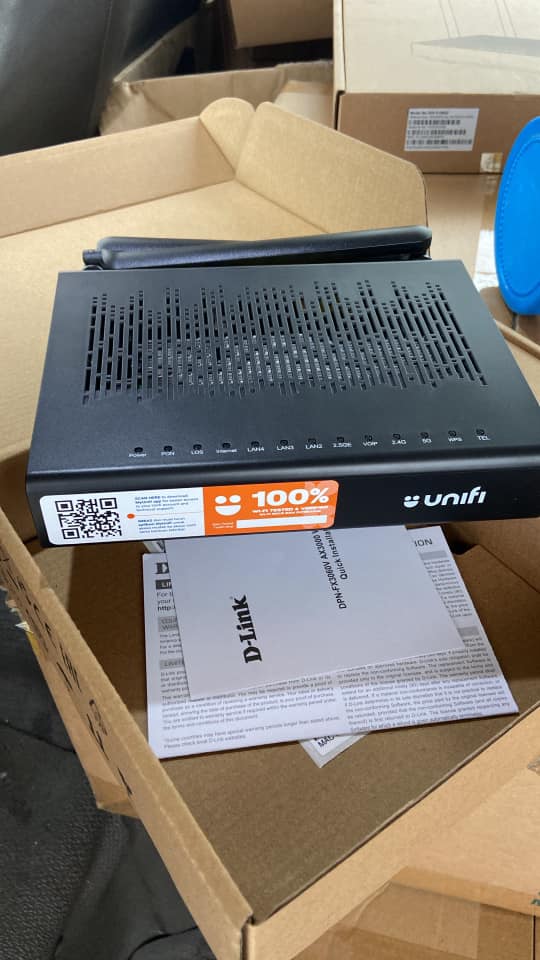
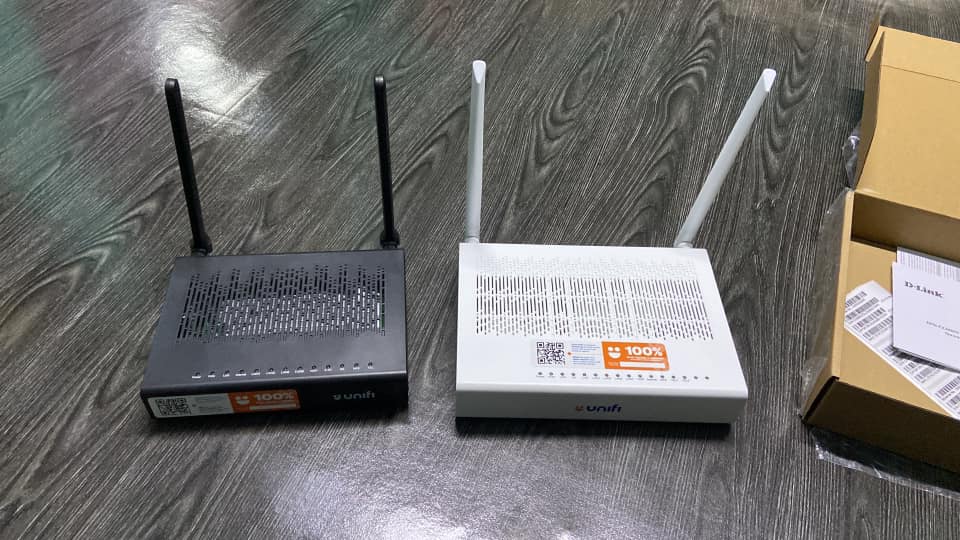
Someone shared in fb the new D-LINK ONR AX3000 for Unifi 100 - 800Mbps, the size is smaller compare to previous white model

user posted image

user posted image

This post has been edited by Ebony & Ivory: May 18 2024, 01:16 AM
Jjuggler
post May 18 2024, 01:59 AM

Narcissistic Genius
******
Senior Member
1,341 posts

Joined: Dec 2016
QUOTE(Ebony & Ivory @ May 18 2024, 01:10 AM)
Someone shared in fb the new D-LINK ONR AX3000 for Unifi 100 - 800Mbps, the size is smaller compare to previous white model

user posted image

user posted image
*
Yes saw this in the TM Unifi members group. The antenna design also is different compared to the white version. Personally, I prefer white casing with black form factor.
Jjuggler
post May 18 2024, 02:01 AM

Narcissistic Genius
******
Senior Member
1,341 posts

Joined: Dec 2016
» Click to show Spoiler - click again to hide... «


I am currently running the unit on RG mode. Disabled all TR-069 stuff. I am not a big fan router phoning home, especially stock ISP router. Did the same for D-Link DIR3060Z, Fiberhome, and any other unifi routers, previously.

495 Pages « < 126 127 128 129 130 > » Top
Topic ClosedOptions
 

Change to:
| Lo-Fi Version
0.0210sec    0.53    6 queries    GZIP Disabled
Time is now: 15th December 2025 - 06:52 AM