Outline ·
[ Standard ] ·
Linear+
Unifi Official TM UniFi High Speed Broadband Thread V42, READ 1ST PAGE FOR RELEVANT WIFI INFO!
|
Anime4000
|
 May 18 2024, 08:42 AM May 18 2024, 08:42 AM
|

|
QUOTE(Jjuggler @ May 18 2024, 02:01 AM) » Click to show Spoiler - click again to hide... « I am currently running the unit on RG mode. Disabled all TR-069 stuff. I am not a big fan router phoning home, especially stock ISP router. Did the same for D-Link DIR3060Z, Fiberhome, and any other unifi routers, previously. but that also lose ability to firmware update, also even disable in GUI, it still active as OMCI specified. Only way is remove the IoT without breaking/boot loop This post has been edited by Anime4000: May 18 2024, 08:48 AM |
|
|
|
|
|
Jjuggler
|
May 18 2024, 09:23 AM
|
|
|
QUOTE(Anime4000 @ May 18 2024, 08:42 AM) but that also lose ability to firmware update, also even disable in GUI, i t still active as OMCI specified----[1]. Only way is remove the IoT without breaking/boot loop ---[2] I don't mind loosing the ability to receive any form of new patch / firmware for any unifi router since I wont be using their default router anyway. Just tingling around for fun and learning purpose. As for [1], I agree. I am using as RG mode now. Still using my Alcatel Lucent / Nokia (black-slim unit) As for [2], I can agree with IoT is suffered from bootloop if messed up, its headache and almost all IoT devices are phoning home at unprecedented rate on daily basis. This post has been edited by Jjuggler: May 18 2024, 09:24 AM |
|
|
|
|
|
Anime4000
|
May 18 2024, 12:01 PM
|
|
|
QUOTE(Jjuggler @ May 18 2024, 09:23 AM) I don't mind loosing the ability to receive any form of new patch / firmware for any unifi router since I wont be using their default router anyway. Just tingling around for fun and learning purpose. As for [1], I agree. I am using as RG mode now. Still using my Alcatel Lucent / Nokia (black-slim unit) As for [2], I can agree with IoT is suffered from bootloop if messed up, its headache and almost all IoT devices are phoning home at unprecedented rate on daily basis. also, OMCI can override those which is very bad, so, I finding way to remove it safely. even the IoT is not exist inside firmware package, so, it should be somewhere in the partition, I try extract out and give to PON Hacking on Discord |
|
|
|
|
|
jiaen0509
|
May 18 2024, 12:27 PM
|
|
|
QUOTE(Anime4000 @ May 18 2024, 12:01 PM) also, OMCI can override those which is very bad, so, I finding way to remove it safely. even the IoT is not exist inside firmware package, so, it should be somewhere in the partition, I try extract out and give to PON Hacking on Discord Regarding the white/black ONR models, is there any possibility that Unifi will push firmware updates? I ask because I’m unsure if Unifi has previously pushed firmware updates for any of their stock routers. I am hoping Unifi releases firmware for the white variant to enable 2.5G on LAN1 if the hardware supports it, or for the black variant to allow bridge mode. Can anyone share their knowledge on this? |
|
|
|
|
|
Ashren
|
May 18 2024, 01:10 PM
|
Getting Started

|
QUOTE(jiaen0509 @ May 18 2024, 12:27 PM) Regarding the white/black ONR models, is there any possibility that Unifi will push firmware updates? I ask because I’m unsure if Unifi has previously pushed firmware updates for any of their stock routers. I am hoping Unifi releases firmware for the white variant to enable 2.5G on LAN1 if the hardware supports it, or for the black variant to allow bridge mode. Can anyone share their knowledge on this? They did push firmware update for some of their equipment but only for bugfixes stability and security fixes but never new features. The present white dlink ONR is missing its 2.5gbe controller chip the RTL8221B so i doubt any firmware update will turn the present LAN1 to 2.5gbe on that model. Also they separate the wifi chip for each 2.4ghz and 5ghz (RTL8832CR & RTL8192CR) on the new black ONR and slap a good chunck of heatsink on it meaning the present white ONR runs quite hot handling wifi using it's single chip (RTL8852CE). Any new feature enabled by firmware upgrade on the white ONR (especially enabling 2.5gbe without a dedicated controller chip) will push the device even hotter. They also remove one POTS in favor of a usb since who needs 2 POTS over usb. The black ONR clearly not a cost cutting hardware revision in fact it costs more to produce than the white one. Edit: On the bridge mode issue I doubt it's disabled only on that particular black model because if it's a ToS policy by TM it will be done on OLT auth level nationwide and not on certain devices only (there's bridge mode setup on that black ONR by TM). And if they don't allow bridging on their network, all present subscribers bridge setup from 30mbps to 2gbps cannot connect by now including the white ONR. So it has to be a bug or misconfig on that model. My upgrade installation is next week I'll update when it's done on the bridge issue. This post has been edited by Ashren: May 18 2024, 01:46 PM |
|
|
|
|
|
jiaen0509
|
May 18 2024, 01:28 PM
|
|
|
QUOTE(Ashren @ May 18 2024, 01:10 PM) They did push firmware update for some of their equipment but only for bugfixes stability and security fixes but never new features. The present white dlink ONR is missing its 2.5gbe controller chip the RTL8221B so i doubt any firmware update will turn the present LAN1 to 2.5gbe on that model. Also they separate the wifi chip for each 2.4ghz and 5ghz (RTL8832CR & RTL8192CR) on the new black ONR and slap a good chunck of heatsink on it meaning the present white ONR runs quite hot handling wifi on the single chip (RTL8852CE). Any new feature enabled by firmware upgrade on the white ONR (especially enabling 2.5gbe without a dedicated controller chip) will push the device even hotter. They also remove one POTS in favor of a usb since who needs 2 POTS over usb. The black ONR clearly not a cost cutting hardware revision in fact it costs more to produce than the white one. Edit: On the bridge mode issue I doubt it's disabled only on that particular black model because if it's a policy service by TM it will be done on OLT auth level and not individual device. If TM doesn't allow bridging, all present subscribers bridge setup from 30mbps to 2gbps cannot connect by now including the white ONR. So it has to be a bug or misconfig on that model. My upgrade installation is next week I'll update when it's done on the bridge issue. Thank you for the detailed information regarding the firmware updates and hardware differences. I agreed the black is more to enhanced version/model. Hope the bridge issue that highlights by some of the forums is really a bug or misconfig. So it can really helps the user to resolve the 1gbps limitations. |
|
|
|
|
|
Ashren
|
May 18 2024, 01:29 PM
|
Getting Started
|
QUOTE(jiaen0509 @ May 18 2024, 01:28 PM) Thank you for the detailed information regarding the firmware updates and hardware differences. I agreed the black is more to enhanced version/model. Hope the bridge issue that highlights by some of the forums is really a bug or misconfig. So it can really helps the user to resolve the 1gbps limitations. You're welcome, anytime. |
|
|
|
|
|
NagaK
|
May 18 2024, 01:47 PM
|
|
|
QUOTE(Ashren @ May 18 2024, 01:10 PM) They did push firmware update for some of their equipment but only for bugfixes stability and security fixes but never new features. The present white dlink ONR is missing its 2.5gbe controller chip the RTL8221B so i doubt any firmware update will turn the present LAN1 to 2.5gbe on that model. Also they separate the wifi chip for each 2.4ghz and 5ghz (RTL8832CR & RTL8192CR) on the new black ONR and slap a good chunck of heatsink on it meaning the present white ONR runs quite hot handling wifi using it's single chip (RTL8852CE). Any new feature enabled by firmware upgrade on the white ONR (especially enabling 2.5gbe without a dedicated controller chip) will push the device even hotter. They also remove one POTS in favor of a usb since who needs 2 POTS over usb. The black ONR clearly not a cost cutting hardware revision in fact it costs more to produce than the white one. Edit: On the bridge mode issue I doubt it's disabled only on that particular black model because if it's a ToS policy by TM it will be done on OLT auth level nationwide and not on certain devices only (there's bridge mode setup on that black ONR by TM). And if they don't allow bridging on their network, all present subscribers bridge setup from 30mbps to 2gbps cannot connect by now including the white ONR. So it has to be a bug or misconfig on that model. My upgrade installation is next week I'll update when it's done on the bridge issue. Try to update if your black box can enable bridge mode or not after installation |
|
|
|
|
|
Ashren
|
May 18 2024, 02:05 PM
|
Getting Started
|
QUOTE(NagaK @ May 18 2024, 01:47 PM) Try to update if your black box can enable bridge mode or not after installation Alright will do. Hope I get the black one. |
|
|
|
|
|
bobby25
|
May 18 2024, 02:56 PM
|
Getting Started
|
Guys , mine just got upgraded to the black box , but I’m not getting 1g, I’m only getting 930 mbps , I’ve connected to the 2.5G port .. any ideas
|
|
|
|
|
|
Ashren
|
May 18 2024, 02:58 PM
|
Getting Started
|
QUOTE(bobby25 @ May 18 2024, 02:56 PM) Guys , mine just got upgraded to the black box , but I’m not getting 1g, I’m only getting 930 mbps , I’ve connected to the 2.5G port .. any ideas Bridge to your own router? If router lan 1g then that's the expected speed. Both must be 2.5gbe to eliminate the overhead. This post has been edited by Ashren: May 18 2024, 03:05 PM |
|
|
|
|
|
bobby25
|
May 18 2024, 03:09 PM
|
Getting Started
|
QUOTE(Ashren @ May 18 2024, 02:58 PM) Bridge to your own router? If router lan 1g then that's the expected speed. Both must be 2.5gbe to eliminate the overhead. No bridge bro , just using tm block box model AX3000 |
|
|
|
|
|
Ashren
|
May 18 2024, 03:16 PM
|
Getting Started
|
QUOTE(bobby25 @ May 18 2024, 03:09 PM) No bridge bro , just using tm block box model AX3000 What's the NIC speed are you connecting to the black box 2.5gbe port is it 1g or 2.5gbe device? If 1g no matter router or pc will get around that speed result because of overhead/QoS etc. If switch back to your AX73 also same because it's a 1g router with 1g btu. Need 2.5gbe capable device to always break the 1g barrier speed. Try test wifi result on that black box, if never reach 1g at all or never hit at least 980-990 then maybe call tm ask them to check on the fiber reading. This post has been edited by Ashren: May 18 2024, 07:00 PM |
|
|
|
|
|
Oltromen Ripot
|
May 18 2024, 03:17 PM
|
|
|
QUOTE(jiaen0509 @ May 18 2024, 12:27 PM) Regarding the white/black ONR models, is there any possibility that Unifi will push firmware updates? I ask because I’m unsure if Unifi has previously pushed firmware updates for any of their stock routers. I am hoping Unifi releases firmware for the white variant to enable 2.5G on LAN1 if the hardware supports it, or for the black variant to allow bridge mode. Can anyone share their knowledge on this? My ONR, from subscribe 2Gbps until today, still 1.0.6 despite TR-069 enabled. i remember Anime4000 was joyful that his ONR received update on its own. Unifi and double standards. As usual. |
|
|
|
|
|
Anime4000
|
May 18 2024, 06:32 PM
|
|
|
QUOTE(Oltromen Ripot @ May 18 2024, 03:17 PM) My ONR, from subscribe 2Gbps until today, still 1.0.6 despite TR-069 enabled. i remember Anime4000 was joyful that his ONR received update on its own. Unifi and double standards. As usual. I plan to add Huawei Proprietary OMCI, so this ONR can be use on Huawei only network such as Maxis and TIME and some Allo then we have community build firmware |
|
|
|
|
|
Demonic Wrath
|
May 19 2024, 08:36 AM
|
|
|
Hmm noticed new unifi upgrade plan 300mbps download with 100mbps upload? https://unifi.com.my/upgrade |
|
|
|
|
|
Jjuggler
|
May 19 2024, 09:43 PM
|
|
|
QUOTE(Anime4000 @ May 18 2024, 12:01 PM) also, OMCI can override those which is very bad, so, I finding way to remove it safely. even the IoT is not exist inside firmware package, so, it should be somewhere in the partition, I try extract out and give to PON Hacking on Discord Thats the problem which I personally want to solve for. No point using the hardware provided by the ISP, especially brands like D-Link which has a very bad track record in terms of security. Got this from TM Unifi Members facebook page. According to the OP, 100 to 800Mbps users will receive this. Edit: Only for new subscribers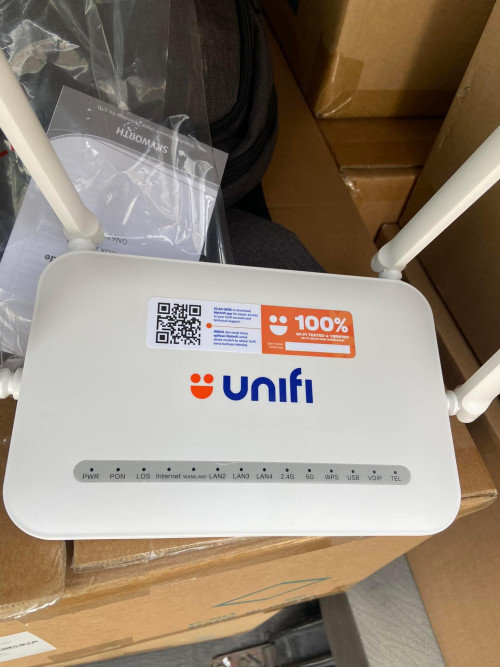 This post has been edited by Jjuggler: May 19 2024, 09:46 PM This post has been edited by Jjuggler: May 19 2024, 09:46 PM |
|
|
|
|
|
blacktubi
|
May 19 2024, 10:24 PM
|
-

|
QUOTE(Jjuggler @ May 19 2024, 09:43 PM) Thats the problem which I personally want to solve for. No point using the hardware provided by the ISP, especially brands like D-Link which has a very bad track record in terms of security. Got this from TM Unifi Members facebook page. According to the OP, 100 to 800Mbps users will receive this. Edit: Only for new subscribersGood luck to those getting this. WiFi on the D-Link DIR-X3060Z is better. CPU should be the same from Dual-Core 1GHz ARM A9 from ZXIC. |
|
|
|
|
|
Ashren
|
May 19 2024, 11:06 PM
|
Getting Started
|
QUOTE(Jjuggler @ May 19 2024, 09:43 PM) Thats the problem which I personally want to solve for. No point using the hardware provided by the ISP, especially brands like D-Link which has a very bad track record in terms of security. Got this from TM Unifi Members facebook page. According to the OP, 100 to 800Mbps users will receive this. Edit: Only for new subscribersThe equipment they supply getting worse... smh. Using Mediatek MT7976DN. https://en.skyworthdigital.com/products-detail/ProId/79.htmlThis post has been edited by Ashren: May 19 2024, 11:14 PM |
|
|
|
|
|
stella_purple
|
May 19 2024, 11:24 PM
|
|
|
QUOTE(Jjuggler @ May 19 2024, 09:43 PM) Thats the problem which I personally want to solve for. No point using the hardware provided by the ISP, especially brands like D-Link which has a very bad track record in terms of security. Got this from TM Unifi Members facebook page. According to the OP, 100 to 800Mbps users will receive this. Edit: Only for new subscribersthought they previously mention ZTE / D-LINK ONR Combo for 100 - 800 package, now suddenly change to skyworth  this one lousy |
|
|
|
|



 Quote
Quote





 0.0228sec
 0.57
0.57
 6 queries
 GZIP Disabled