Outline ·
[ Standard ] ·
Linear+
Unifi Official TM UniFi High Speed Broadband Thread V42, READ 1ST PAGE FOR RELEVANT WIFI INFO!
|
toytoy
|
 May 16 2024, 11:54 AM May 16 2024, 11:54 AM
|

|
Hi All, just received call from TM that my 800Mbps package will be upgraded to 1Gpbs. They told me only the router will be changed and modem will be changed only if required. I m currently having the Huawei modem, will they change it? Also i m using Xiaomi AX3600 mesh routers now with 1G LAN Port. Possible to get full 1Gbps speed? Thanks.
|
|
|
|
|
|
sHawTY
|
May 16 2024, 11:54 AM
|
|
|
QUOTE(Jjuggler @ May 16 2024, 12:10 AM) Just got this unit for RM70. Happy loot. Dem lucky  Saw the ad in FB marketplace too, they guy advertise it at RM90 right? |
|
|
|
|
|
zerorating
|
May 16 2024, 12:01 PM
|
|
|
QUOTE(Anime4000 @ May 15 2024, 03:57 PM) there is news 21st on-wards, Installer need to clear up RG6 Router and ONU, then use new stock: for 100 - 800Mbps will be using ZTE AX3000 Combo-Box like D-Link counter-part. No more ONU + Router  will the new box equipped with 2.5gbps ethernet port? |
|
|
|
|
|
Anime4000
|
May 16 2024, 12:06 PM
|
|
|
QUOTE(zerorating @ May 16 2024, 12:01 PM) will the new box equipped with 2.5gbps ethernet port? No, only 1G |
|
|
|
|
|
tng55
|
May 16 2024, 12:11 PM
|
|
|
QUOTE(zeronehza @ May 16 2024, 09:05 AM) its not confirm yet, but will update if any, consumer can change to sme (must have ssm) sme cannot change to consumer , unless user request relocating at home we don't need relocating i don't care because my stay old house and shop near can walk take 1min only so no worry to relocating SSM we have it my shop and we can request same SSM to home old address because my area shop lot so no worry please ask you friend TM and PM ME contact i will whatsapp i know you friend tm will get commission because i upgrade you friend job to apply package |
|
|
|
|
|
Rhetoric
|
May 16 2024, 12:50 PM
|
|
|
Twitter is very slow again. other websites seems fine
|
|
|
|
|
|
Jjuggler
|
May 16 2024, 12:56 PM
|
|
|
QUOTE(sHawTY @ May 16 2024, 11:54 AM) Dem lucky Saw the ad in FB marketplace too, they guy advertise it at RM90 right? Yes spot on. Hahaha. Just cod'd yesterday. Good price mah. sambar saja.  |
|
|
|
|
|
sHawTY
|
May 16 2024, 03:08 PM
|
|
|
QUOTE(Jjuggler @ May 16 2024, 12:56 PM) Yes spot on. Hahaha. Just cod'd yesterday. Good price mah. sambar saja. You lucky son of a gun. Never thought of browsing for modems in the marketplace |
|
|
|
|
|
Jjuggler
|
May 16 2024, 04:20 PM
|
|
|
QUOTE(sHawTY @ May 16 2024, 03:08 PM) You lucky son of a gun. Never thought of browsing for modems in the marketplace Nahh not lucky la man. I just buy stuffs to learn. Everyday must learn something new. So I just usha lor what product is interesting for my eyes. Never knew I can get the unit for dirt cheap. Hahaha. |
|
|
|
|
|
NagaK
|
May 16 2024, 04:32 PM
|
|
|
QUOTE(toytoy @ May 16 2024, 11:54 AM) Hi All, just received call from TM that my 800Mbps package will be upgraded to 1Gpbs. They told me only the router will be changed and modem will be changed only if required. I m currently having the Huawei modem, will they change it? Also i m using Xiaomi AX3600 mesh routers now with 1G LAN Port. Possible to get full 1Gbps speed? Thanks. I'm using Fiberhome modem + TP LINK AX73 with 1G Lan port max I can reach was 930 to 950mbps. Keep Dlink Black ONR as backup option If they said your Huawei Modem can support just stay with it keep your new modem+router for future use This post has been edited by NagaK: May 16 2024, 04:34 PM |
|
|
|
|
|
BladeRider88
|
May 16 2024, 04:47 PM
|
|
|
QUOTE(sHawTY @ May 16 2024, 03:08 PM) You lucky son of a gun. Never thought of browsing for modems in the marketplace i bought 2 units of AC68U for RM150 before it is in the marketplace after i pay the seller and 30 minutes later he called me, wanna buy back one of the router lol i told him i am long gone from his place  This post has been edited by BladeRider88: May 16 2024, 04:47 PM This post has been edited by BladeRider88: May 16 2024, 04:47 PM |
|
|
|
|
|
Jjuggler
|
May 16 2024, 04:52 PM
|
|
|
QUOTE(BladeRider88 @ May 16 2024, 04:47 PM) i bought 2 units of AC68U for RM150 before it is in the marketplace after i pay the seller and 30 minutes later he called me, wanna buy back one of the router lol i told him i am long gone from his place Wait what.. Why wanna buy back one of the router since he sold you two? |
|
|
|
|
|
emilyngsc
|
May 16 2024, 04:59 PM
|
|
|
QUOTE(toytoy @ May 16 2024, 11:54 AM) Hi All, just received call from TM that my 800Mbps package will be upgraded to 1Gpbs. They told me only the router will be changed and modem will be changed only if required. I m currently having the Huawei modem, will they change it? Also i m using Xiaomi AX3600 mesh routers now with 1G LAN Port. Possible to get full 1Gbps speed? Thanks. Which area? Johor still haven’t get it yet. |
|
|
|
|
|
jiaen0509
|
May 16 2024, 05:29 PM
|
|
|
QUOTE(toytoy @ May 16 2024, 11:54 AM) Hi All, just received call from TM that my 800Mbps package will be upgraded to 1Gpbs. They told me only the router will be changed and modem will be changed only if required. I m currently having the Huawei modem, will they change it? Also i m using Xiaomi AX3600 mesh routers now with 1G LAN Port. Possible to get full 1Gbps speed? Thanks. You will receive the ONR combo box. After installation, simply unplug the fiber cable and connect it to your existing modem (ZTE/HUAWEI/FIBERHOME or others brand). Keep the D-Link combo box as a backup. You can set the Wi-Fi name and password to match your existing ones, so you won't need to reconnect any IoT devices. In case your modem spoiled, you can cucuk balik D-Link and use. This post has been edited by jiaen0509: May 16 2024, 05:32 PM |
|
|
|
|
|
cHiLdHo0drEaMz
|
May 16 2024, 07:15 PM
|
|
|
QUOTE(NagaK @ May 16 2024, 04:32 PM) I'm using Fiberhome modem + TP LINK AX73 with 1G Lan port max I can reach was 930 to 950mbps. Keep Dlink Black ONR as backup option If they said your Huawei Modem can support just stay with it keep your new modem+router for future use QUOTE(jiaen0509 @ May 16 2024, 05:29 PM) You will receive the ONR combo box. After installation, simply unplug the fiber cable and connect it to your existing modem (ZTE/HUAWEI/FIBERHOME or others brand). Keep the D-Link combo box as a backup. You can set the Wi-Fi name and password to match your existing ones, so you won't need to reconnect any IoT devices. In case your modem spoiled, you can cucuk balik D-Link and use. Does this apply to 2Gbps plan as well? |
|
|
|
|
|
jiaen0509
|
May 16 2024, 07:32 PM
|
|
|
QUOTE(cHiLdHo0drEaMz @ May 16 2024, 07:15 PM) Does this apply to 2Gbps plan as well? You can do this, but Wi-Fi and LAN speeds will be capped at ~940 Mbps. If you are using the TM-provided ONR for a 2 Gbps plan, you might use that method since it the LAN port is 1 Gbps. No matter which method, LAN speed is 1gbps, unless you are on the black variant ONR where it provides 2.5G LAN. However, it’s better to use the provided ONR if you are on a 2 Gbps plan because Wi-Fi speeds are higher compared to using the old modem, where both Wi-Fi and LAN are limited to 1 Gbps. This post has been edited by jiaen0509: May 16 2024, 07:38 PM |
|
|
|
|
|
cHiLdHo0drEaMz
|
May 16 2024, 09:03 PM
|
|
|
QUOTE(jiaen0509 @ May 16 2024, 07:32 PM) You can do this, but Wi-Fi and LAN speeds will be capped at ~940 Mbps. If you are using the TM-provided ONR for a 2 Gbps plan, you might use that method since it the LAN port is 1 Gbps. No matter which method, LAN speed is 1gbps, unless you are on the black variant ONR where it provides 2.5G LAN. However, it’s better to use the provided ONR if you are on a 2 Gbps plan because Wi-Fi speeds are higher compared to using the old modem, where both Wi-Fi and LAN are limited to 1 Gbps. Thank you very much for the detailed explanation. Appreciate it alot 🙏🙏🙏 |
|
|
|
|
|
duabijitelur
|
May 16 2024, 10:08 PM
|
|
|
im on 300mbps plan, using Zyxel EX3220-T0 (this first floor)
if i wanna add mesh (ground floor), its better to get another zyxel ex3220? or any other options
|
|
|
|
|
|
Anime4000
|
May 17 2024, 01:00 AM
|
|
|
Today I received new ONR and straight away Reverse Engineer, this B1 hardware quite different layout but still using same SoC 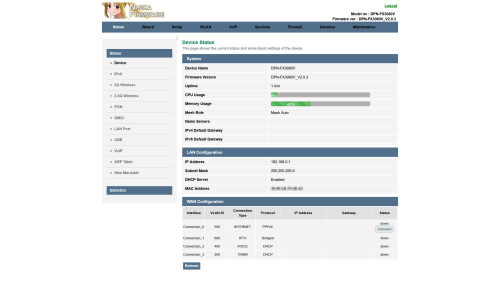 Also, I managed to extract out and repackage as firmware file, change the Theme to Lowyat Blue Theme  planning to add Proprietary Huawei ME from my PON Stick, so, TIME and Maxis can use this ONR Inside D-Link ONR B1Firmware File: DPN-FX3060V-B1_V2.0.3_20240516_NIJIKA.binSize: 27.7 MB (29,112,320 bytes) MD5: 2A8FE8991D673F8ED2CEFF5FC15E9CEC SHA2: F89F4E78D8EB9007FF1AAFA94CD0426BB2A635D2DEE038D9308CB337ACB1AE31 This for B1 hardware, since my old D-Link no longer with me, can't test it, this has disable HW Check, before flash, please enable SSH just in caseLogo Sauce: Pixiv Id 103567703This post has been edited by Anime4000: May 17 2024, 02:15 AM |
|
|
|
|
|
icehart85
|
May 17 2024, 02:19 AM
|
|
|
Hello everyone just got my latest Unifi May billing and I noticed increase in charges. Anyone know what this relates to? Is this a one time charge or its a monthly charge? Thanks.  |
|
|
|
|



 Quote
Quote










 0.0201sec
 0.86
0.86
 6 queries
 GZIP Disabled