Outline ·
[ Standard ] ·
Linear+
Unifi Official TM UniFi High Speed Broadband Thread V42, READ 1ST PAGE FOR RELEVANT WIFI INFO!
|
NagaK
|
 May 16 2024, 04:32 PM May 16 2024, 04:32 PM
|

|
QUOTE(toytoy @ May 16 2024, 11:54 AM) Hi All, just received call from TM that my 800Mbps package will be upgraded to 1Gpbs. They told me only the router will be changed and modem will be changed only if required. I m currently having the Huawei modem, will they change it? Also i m using Xiaomi AX3600 mesh routers now with 1G LAN Port. Possible to get full 1Gbps speed? Thanks. I'm using Fiberhome modem + TP LINK AX73 with 1G Lan port max I can reach was 930 to 950mbps. Keep Dlink Black ONR as backup option If they said your Huawei Modem can support just stay with it keep your new modem+router for future use This post has been edited by NagaK: May 16 2024, 04:34 PM |
|
|
|
|
|
BladeRider88
|
May 16 2024, 04:47 PM
|
|
|
QUOTE(sHawTY @ May 16 2024, 03:08 PM) You lucky son of a gun. Never thought of browsing for modems in the marketplace  i bought 2 units of AC68U for RM150 before it is in the marketplace after i pay the seller and 30 minutes later he called me, wanna buy back one of the router lol i told him i am long gone from his place  This post has been edited by BladeRider88: May 16 2024, 04:47 PM This post has been edited by BladeRider88: May 16 2024, 04:47 PM |
|
|
|
|
|
Jjuggler
|
May 16 2024, 04:52 PM
|
|
|
QUOTE(BladeRider88 @ May 16 2024, 04:47 PM) i bought 2 units of AC68U for RM150 before it is in the marketplace after i pay the seller and 30 minutes later he called me, wanna buy back one of the router lol i told him i am long gone from his place Wait what.. Why wanna buy back one of the router since he sold you two? |
|
|
|
|
|
emilyngsc
|
May 16 2024, 04:59 PM
|
|
|
QUOTE(toytoy @ May 16 2024, 11:54 AM) Hi All, just received call from TM that my 800Mbps package will be upgraded to 1Gpbs. They told me only the router will be changed and modem will be changed only if required. I m currently having the Huawei modem, will they change it? Also i m using Xiaomi AX3600 mesh routers now with 1G LAN Port. Possible to get full 1Gbps speed? Thanks. Which area? Johor still haven’t get it yet. |
|
|
|
|
|
jiaen0509
|
May 16 2024, 05:29 PM
|
|
|
QUOTE(toytoy @ May 16 2024, 11:54 AM) Hi All, just received call from TM that my 800Mbps package will be upgraded to 1Gpbs. They told me only the router will be changed and modem will be changed only if required. I m currently having the Huawei modem, will they change it? Also i m using Xiaomi AX3600 mesh routers now with 1G LAN Port. Possible to get full 1Gbps speed? Thanks. You will receive the ONR combo box. After installation, simply unplug the fiber cable and connect it to your existing modem (ZTE/HUAWEI/FIBERHOME or others brand). Keep the D-Link combo box as a backup. You can set the Wi-Fi name and password to match your existing ones, so you won't need to reconnect any IoT devices. In case your modem spoiled, you can cucuk balik D-Link and use. This post has been edited by jiaen0509: May 16 2024, 05:32 PM |
|
|
|
|
|
cHiLdHo0drEaMz
|
May 16 2024, 07:15 PM
|
|
|
QUOTE(NagaK @ May 16 2024, 04:32 PM) I'm using Fiberhome modem + TP LINK AX73 with 1G Lan port max I can reach was 930 to 950mbps. Keep Dlink Black ONR as backup option If they said your Huawei Modem can support just stay with it keep your new modem+router for future use QUOTE(jiaen0509 @ May 16 2024, 05:29 PM) You will receive the ONR combo box. After installation, simply unplug the fiber cable and connect it to your existing modem (ZTE/HUAWEI/FIBERHOME or others brand). Keep the D-Link combo box as a backup. You can set the Wi-Fi name and password to match your existing ones, so you won't need to reconnect any IoT devices. In case your modem spoiled, you can cucuk balik D-Link and use. Does this apply to 2Gbps plan as well? |
|
|
|
|
|
jiaen0509
|
May 16 2024, 07:32 PM
|
|
|
QUOTE(cHiLdHo0drEaMz @ May 16 2024, 07:15 PM) Does this apply to 2Gbps plan as well? You can do this, but Wi-Fi and LAN speeds will be capped at ~940 Mbps. If you are using the TM-provided ONR for a 2 Gbps plan, you might use that method since it the LAN port is 1 Gbps. No matter which method, LAN speed is 1gbps, unless you are on the black variant ONR where it provides 2.5G LAN. However, it’s better to use the provided ONR if you are on a 2 Gbps plan because Wi-Fi speeds are higher compared to using the old modem, where both Wi-Fi and LAN are limited to 1 Gbps. This post has been edited by jiaen0509: May 16 2024, 07:38 PM |
|
|
|
|
|
cHiLdHo0drEaMz
|
May 16 2024, 09:03 PM
|
|
|
QUOTE(jiaen0509 @ May 16 2024, 07:32 PM) You can do this, but Wi-Fi and LAN speeds will be capped at ~940 Mbps. If you are using the TM-provided ONR for a 2 Gbps plan, you might use that method since it the LAN port is 1 Gbps. No matter which method, LAN speed is 1gbps, unless you are on the black variant ONR where it provides 2.5G LAN. However, it’s better to use the provided ONR if you are on a 2 Gbps plan because Wi-Fi speeds are higher compared to using the old modem, where both Wi-Fi and LAN are limited to 1 Gbps. Thank you very much for the detailed explanation. Appreciate it alot 🙏🙏🙏 |
|
|
|
|
|
duabijitelur
|
May 16 2024, 10:08 PM
|
|
|
im on 300mbps plan, using Zyxel EX3220-T0 (this first floor)
if i wanna add mesh (ground floor), its better to get another zyxel ex3220? or any other options
|
|
|
|
|
|
Anime4000
|
May 17 2024, 01:00 AM
|
|
|
Today I received new ONR and straight away Reverse Engineer, this B1 hardware quite different layout but still using same SoC 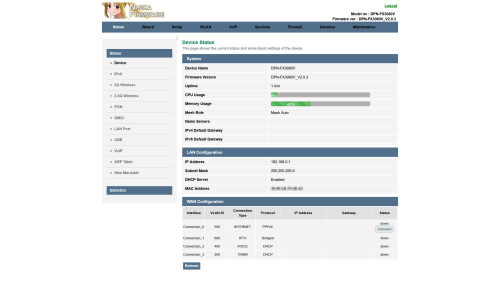 Also, I managed to extract out and repackage as firmware file, change the Theme to Lowyat Blue Theme  planning to add Proprietary Huawei ME from my PON Stick, so, TIME and Maxis can use this ONR Inside D-Link ONR B1Firmware File: DPN-FX3060V-B1_V2.0.3_20240516_NIJIKA.binSize: 27.7 MB (29,112,320 bytes) MD5: 2A8FE8991D673F8ED2CEFF5FC15E9CEC SHA2: F89F4E78D8EB9007FF1AAFA94CD0426BB2A635D2DEE038D9308CB337ACB1AE31 This for B1 hardware, since my old D-Link no longer with me, can't test it, this has disable HW Check, before flash, please enable SSH just in caseLogo Sauce: Pixiv Id 103567703This post has been edited by Anime4000: May 17 2024, 02:15 AM |
|
|
|
|
|
icehart85
|
May 17 2024, 02:19 AM
|
|
|
Hello everyone just got my latest Unifi May billing and I noticed increase in charges. Anyone know what this relates to? Is this a one time charge or its a monthly charge? Thanks.  |
|
|
|
|
|
yayiyu99
|
May 17 2024, 07:06 AM
|
|
|
QUOTE(icehart85 @ May 17 2024, 02:19 AM) Hello everyone just got my latest Unifi May billing and I noticed increase in charges. Anyone know what this relates to? Is this a one time charge or its a monthly charge? Thanks. Call TM at 100 and ask about the additional charges on your bill. |
|
|
|
|
|
cHiLdHo0drEaMz
|
May 17 2024, 07:15 AM
|
|
|
QUOTE(Anime4000 @ May 17 2024, 01:00 AM) Today I received new ONR and straight away Reverse Engineer, this B1 hardware quite different layout but still using same SoC Also, I managed to extract out and repackage as firmware file, change the Theme to Lowyat Blue Theme planning to add Proprietary Huawei ME from my PON Stick, so, TIME and Maxis can use this ONR Inside D-Link ONR B1Firmware File: DPN-FX3060V-B1_V2.0.3_20240516_NIJIKA.binSize: 27.7 MB (29,112,320 bytes) MD5: 2A8FE8991D673F8ED2CEFF5FC15E9CEC SHA2: F89F4E78D8EB9007FF1AAFA94CD0426BB2A635D2DEE038D9308CB337ACB1AE31 This for B1 hardware, since my old D-Link no longer with me, can't test it, this has disable HW Check, before flash, please enable SSH just in caseLogo Sauce: Pixiv Id 103567703Bug On Bridge Mode 🤦♂️. Hope they can release a patch to resolve it. Thanks Chief for your effort 🙏 This post has been edited by cHiLdHo0drEaMz: May 17 2024, 08:03 AM |
|
|
|
|
|
toytoy
|
May 17 2024, 09:45 AM
|
|
|
QUOTE(NagaK @ May 16 2024, 04:32 PM) I'm using Fiberhome modem + TP LINK AX73 with 1G Lan port max I can reach was 930 to 950mbps. Keep Dlink Black ONR as backup option If they said your Huawei Modem can support just stay with it keep your new modem+router for future use Thanks for the info. QUOTE(emilyngsc @ May 16 2024, 04:59 PM) Which area? Johor still haven’t get it yet. Menjalara Kepong. Hope u will get yours soon. QUOTE(jiaen0509 @ May 16 2024, 05:29 PM) You will receive the ONR combo box. After installation, simply unplug the fiber cable and connect it to your existing modem (ZTE/HUAWEI/FIBERHOME or others brand). Keep the D-Link combo box as a backup. You can set the Wi-Fi name and password to match your existing ones, so you won't need to reconnect any IoT devices. In case your modem spoiled, you can cucuk balik D-Link and use. OK Great. Thanks for the info. |
|
|
|
|
|
Omochao
|
May 17 2024, 10:30 AM
|
|
|
QUOTE(Anime4000 @ May 17 2024, 01:00 AM) Today I received new ONR and straight away Reverse Engineer, this B1 hardware quite different layout but still using same SoC Also, I managed to extract out and repackage as firmware file, change the Theme to Lowyat Blue Theme planning to add Proprietary Huawei ME from my PON Stick, so, TIME and Maxis can use this ONR Inside D-Link ONR B1Firmware File: DPN-FX3060V-B1_V2.0.3_20240516_NIJIKA.binSize: 27.7 MB (29,112,320 bytes) MD5: 2A8FE8991D673F8ED2CEFF5FC15E9CEC SHA2: F89F4E78D8EB9007FF1AAFA94CD0426BB2A635D2DEE038D9308CB337ACB1AE31 This for B1 hardware, since my old D-Link no longer with me, can't test it, this has disable HW Check, before flash, please enable SSH just in caseLogo Sauce: Pixiv Id 103567703good to know , hopefully there will be a highly customizable firmware with more options to set around it. But don't think TM will just let it slip pass by so easily. Subsequent firmware release might further lock it down to user mode. |
|
|
|
|
|
Anime4000
|
May 17 2024, 10:37 AM
|
|
|
QUOTE(cHiLdHo0drEaMz @ May 17 2024, 07:15 AM) Bug On Bridge Mode 🤦♂️. Hope they can release a patch to resolve it. Thanks Chief for your effort 🙏 I think might not a bug on Bridge Mode, if read ME 171, for example on Alcatel Lucent/Nokia (ALCL) OLT, the ME 171 explicitly tell: Disable Bridge Port VLAN 500,209 on LAN 1 & PPP Disable LAN 2 Disable LAN 3 Disable LAN 4 VLAN 209,400 on VEIP & POTS this cause permanent settings on newer D-Link, cannot change back to Router Mode unless factory reset. Enforced ME 171 can prevent bridge and Disabled Ports |
|
|
|
|
|
Jjuggler
|
May 17 2024, 10:38 AM
|
|
|
QUOTE(Anime4000 @ May 17 2024, 01:00 AM) Today I received new ONR and straight away Reverse Engineer, this B1 hardware quite different layout but still using same SoC Also, I managed to extract out and repackage as firmware file, change the Theme to Lowyat Blue Theme planning to add Proprietary Huawei ME from my PON Stick, so, TIME and Maxis can use this ONR Inside D-Link ONR B1Firmware File: DPN-FX3060V-B1_V2.0.3_20240516_NIJIKA.binSize: 27.7 MB (29,112,320 bytes) MD5: 2A8FE8991D673F8ED2CEFF5FC15E9CEC SHA2: F89F4E78D8EB9007FF1AAFA94CD0426BB2A635D2DEE038D9308CB337ACB1AE31 This for B1 hardware, since my old D-Link no longer with me, can't test it, this has disable HW Check, before flash, please enable SSH just in caseLogo Sauce: Pixiv Id 103567703I love the color theme there. Looks so visually appealing compared to the stock green shade. Also, the stock's D-Link logo is like someone who cropped the image with a fake .png image and slap into the firmware. |
|
|
|
|
|
jiaen0509
|
May 17 2024, 01:03 PM
|
|
|
QUOTE(RViN @ May 12 2024, 08:02 PM) I factory reset and set back to defaults with the correct PLOAM password also same, cant connect. And the VOIP says "not registered". Although for some reason the VOIP not working with my current ONU also (which has working internet). Weird lah. And that one just now I disconnected the UPC cable to get to its admin menu to check the VOIP settings and the username/password seems correct. Anyway told the technician the VOIP not working and I cant set up this new ONR, he said he will come over next week. I guess I have to side by side with him change it to bridge mode ... such a headache. Thing I'm thinking now is, if the devices are really binded, and I can't make bridge mode work when he's here then I have to either use that ONR until I manage to figure it out, or tell them to bind the old ONU again. Or maybe they can just unbind it but for some reason on my account it was binded so they binded this new one again ... I've been using the same ONU for like 5 years I think, might have been an old policy. That's the only reason I can explain this strange behaviour with. Otherwise like ... what other explanation is there? Any update sharing bro? |
|
|
|
|
|
Ashren
|
May 17 2024, 02:50 PM
|
Getting Started

|
QUOTE(RViN @ May 12 2024, 08:02 PM) I factory reset and set back to defaults with the correct PLOAM password also same, cant connect. And the VOIP says "not registered". Although for some reason the VOIP not working with my current ONU also (which has working internet). Weird lah. And that one just now I disconnected the UPC cable to get to its admin menu to check the VOIP settings and the username/password seems correct. Anyway told the technician the VOIP not working and I cant set up this new ONR, he said he will come over next week. I guess I have to side by side with him change it to bridge mode ... such a headache. Thing I'm thinking now is, if the devices are really binded, and I can't make bridge mode work when he's here then I have to either use that ONR until I manage to figure it out, or tell them to bind the old ONU again. Or maybe they can just unbind it but for some reason on my account it was binded so they binded this new one again ... I've been using the same ONU for like 5 years I think, might have been an old policy. That's the only reason I can explain this strange behaviour with. Otherwise like ... what other explanation is there? QUOTE(jiaen0509 @ May 17 2024, 01:03 PM) Isn't ploam pass tied to the gpon serial? Or is it a one pass for multiple devices? |
|
|
|
|
|
zeronehza
|
May 17 2024, 03:00 PM
|
|
|
QUOTE(Ashren @ May 17 2024, 02:50 PM) Isn't ploam pass tied to the gpon serial? Or is it a one pass for multiple devices? not bind, if bind old onu cannot use with user own router (for user 1Gbps and above) |
|
|
|
|



 Quote
Quote








 0.0252sec
 0.58
0.58
 6 queries
 GZIP Disabled