Outline ·
[ Standard ] ·
Linear+
Unifi Official TM UniFi High Speed Broadband Thread V41, READ 1ST PAGE FOR RELEVANT WIFI INFO
|
hjh87
|
 Oct 11 2023, 01:44 PM Oct 11 2023, 01:44 PM
|

|
Guys,
Need help, so after turning off the given dlink DIR-X306Z AX3000 WiFi 6 Router I do get 500mbps. But now plan to use back my ax73 router, try quick setup with all the same login and PW but keep getting no internet connection.
I not around when the installer came to do the installation, or else will ask him help to setup the ax73 as well.
@Blacktubi mind to share how to redo the setup for ax73 for this speed upgrade. Thank you.
|
|
|
|
|
|
Khan92
|
Oct 11 2023, 01:44 PM
|
|
|
QUOTE(wkn @ Oct 11 2023, 01:27 PM) i am one of those 100mb user & all i got was sms saying they are giving me free speed upgrade. until today, i still don't have any speed upgrade.  tmnut bullshitting 100mb users or what?! Patience, they are not bullshitting. |
|
|
|
|
|
VeeJay
|
Oct 11 2023, 01:51 PM
|
|
|
QUOTE(hjh87 @ Oct 11 2023, 01:44 PM) Guys, Need help, so after turning off the given dlink DIR-X306Z AX3000 WiFi 6 Router I do get 500mbps. But now plan to use back my ax73 router, try quick setup with all the same login and PW but keep getting no internet connection. I not around when the installer came to do the installation, or else will ask him help to setup the ax73 as well. @Blacktubi mind to share how to redo the setup for ax73 for this speed upgrade. Thank you. I could only guess the authentication password has changed. Did you get the password from the installer/technician? Maybe give him a call and ask. |
|
|
|
|
|
Oltromen Ripot
|
Oct 11 2023, 01:53 PM
|
|
|
QUOTE(anip94 @ Oct 11 2023, 12:52 PM) 100mbps users put on the back seat for the speed upgrading process? just a theory. those currently on <=100Mbps were given wifi5. so they might need to upgrade to wifi6 on 300Mbps, thus postponed just like 800Mbps going for ultra. |
|
|
|
|
|
beverlykho
|
Oct 11 2023, 01:56 PM
|
|
|
QUOTE(NimalKumar @ Oct 11 2023, 11:38 AM) My status since yesterday is Appointment Scheduled. My appointment is set for tomorrow @ 9.30 AM ... But still I haven't received any SMS confirming my appointment or any. Should I be worried? Nothing to worry about. I confirmed my appointment in the Unifi website and it was set for 9.30am-11.30am. My installer's name and phone number were not listed on the Unifi website but on the morning of the installation I received a SMS from TM saying the installer would be arriving in 30 minutes to 1 hour. This is the SMS:- "RM0 unifi: Hi. We would like to inform you that the unifi Care Crew is on the way for installation and will be there within 30 min - 1 hour. Thank you." And the installer appeared after about 45 minutes. This post has been edited by beverlykho: Oct 11 2023, 02:03 PM |
|
|
|
|
|
mywife
|
Oct 11 2023, 01:57 PM
|
Getting Started

|
QUOTE(joehann @ Oct 11 2023, 12:59 PM) Yours SWU1.0 or 2.0? got bill waiver when you subscribe? if yes, this is probably why then cant offer SWU3.0 for you. if let say currently you are with SWU1/2 for 1 year and previously got 6 month waiver, if they also offered you SWU3.0, then you will get total 1 year of bill waiver within 2 years of subscriptions. Not sure SWU1.0 or 2.0....it just states "unifi 300Mbps Basic - staywithunifi" in the plan name. Was on 100Mbps with Aneka (RM129) before they offer me SWU 300Mbps (with TV pack removed)....same monthly at RM129 with no bill waiver whatsoever. This post has been edited by mywife: Oct 11 2023, 01:59 PM |
|
|
|
|
|
hjh87
|
Oct 11 2023, 01:58 PM
|
|
|
QUOTE(VeeJay @ Oct 11 2023, 01:51 PM) I could only guess the authentication password has changed. Did you get the password from the installer/technician? Maybe give him a call and ask. My bad, login and PW correct. Cause lan 1 and 4 is set to IPTV and VoIP so after changing to lan 2 and 3 can get the internet. But now wireless can hit 500mbps, but Lan can only get 90mbps. What should I set for Lan to get max speed? |
|
|
|
|
|
PJng
|
Oct 11 2023, 02:04 PM
|
|
|
QUOTE(hjh87 @ Oct 11 2023, 01:58 PM) My bad, login and PW correct. Cause lan 1 and 4 is set to IPTV and VoIP so after changing to lan 2 and 3 can get the internet. But now wireless can hit 500mbps, but Lan can only get 90mbps. What should I set for Lan to get max speed? 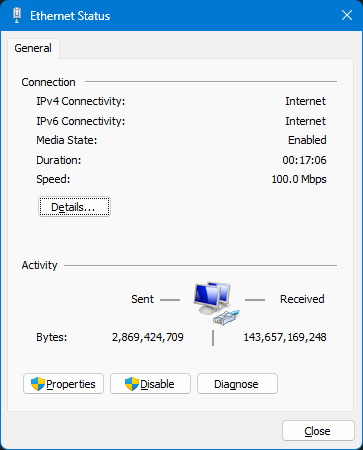 this show what? 100mbps? or router wrong set 100mbps? |
|
|
|
|
|
TongCN
|
Oct 11 2023, 02:08 PM
|
|
|
QUOTE(hjh87 @ Oct 11 2023, 01:58 PM) My bad, login and PW correct. Cause lan 1 and 4 is set to IPTV and VoIP so after changing to lan 2 and 3 can get the internet. But now wireless can hit 500mbps, but Lan can only get 90mbps. What should I set for Lan to get max speed? Check your LAN port model / naming? 10/100 or with 1000? Some old computer only has 100mbps ethernet port Modern TV ethernet port also 100mbps  |
|
|
|
|
|
hjh87
|
Oct 11 2023, 02:08 PM
|
|
|
QUOTE(PJng @ Oct 11 2023, 02:04 PM) this show what? 100mbps? or router wrong set 100mbps? Nope, I tested WiFi speed test get 500mbps. Where else my pc I run speed test both Telekom website and ookla for the lan only 90++ Mbps. |
|
|
|
|
|
hjh87
|
Oct 11 2023, 02:10 PM
|
|
|
QUOTE(TongCN @ Oct 11 2023, 02:08 PM) Check your LAN port model / naming? 10/100 or with 1000? Some old computer only has 100mbps ethernet port Modern TV ethernet port also 100mbps But when I plug back the given dlink router pc get 500mbps. Sure is the ax73 setting that mess this up. |
|
|
|
|
|
JayceOoi
|
Oct 11 2023, 02:10 PM
|
|
|
QUOTE(snowflax24 @ Oct 11 2023, 01:07 PM) Hi guys, Just wondering if we are on the 500mbps speed, how fast should the 2.4ghz achieve? I tried my speedtest and after the upgrade the maximum speed was 120mbps for my 2.4ghz and 500 on the 5ghz band. I was getting the same speed when I was on the 300mbps for the 2.4ghz. Should I call CS and complain? No need. This is the limitation of 2.4Ghz. Slower but wider range. |
|
|
|
|
|
soonwai
|
Oct 11 2023, 02:16 PM
|
|
|
My SWU3 referral code got reported.  https://forum.lowyat.net/index.php?showtopi...ost&p=108300693 https://forum.lowyat.net/index.php?showtopi...ost&p=108300693 QUOTE(hjh87 @ Oct 11 2023, 01:58 PM) My bad, login and PW correct. Cause lan 1 and 4 is set to IPTV and VoIP so after changing to lan 2 and 3 can get the internet. But now wireless can hit 500mbps, but Lan can only get 90mbps. What should I set for Lan to get max speed? 90Mbps sounds like cable or ethernet port problem. Try another cable or another port. This post has been edited by soonwai: Oct 11 2023, 02:29 PM |
|
|
|
|
|
crusher
|
Oct 11 2023, 02:16 PM
|
|
|
Anyone got upgrade for swu 3.0 300mbps to 500mbps already? If yes, does your plan remain shows 300mbps but speed at 500?
|
|
|
|
|
|
soonwai
|
Oct 11 2023, 02:21 PM
|
|
|
QUOTE(crusher @ Oct 11 2023, 02:16 PM) Anyone got upgrade for swu 3.0 300mbps to 500mbps already? If yes, does your plan remain shows 300mbps but speed at 500? SoonWaiUpgrade3 done yesterday. Speed 500Mbps. Plan shows as: 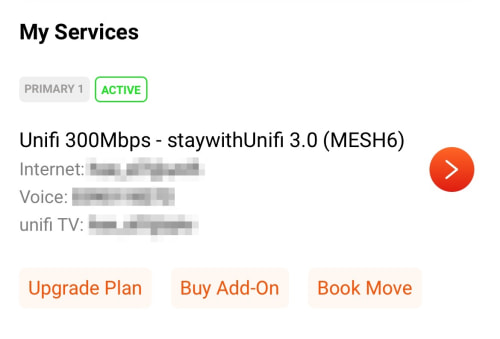 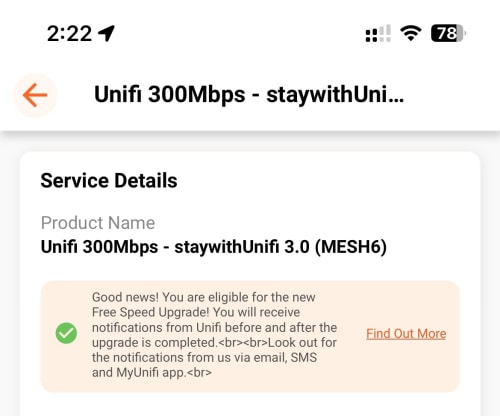 Eligible for Free Speed Upgrade notice still there. This post has been edited by soonwai: Oct 11 2023, 02:25 PM |
|
|
|
|
|
issac99289928
|
Oct 11 2023, 02:22 PM
|
Getting Started
|
QUOTE(Xanxeviera. @ Oct 11 2023, 01:37 PM) Installed my 100Mbps today, switched from maxis fibre
Retaining the same huawei BTU, TM gave me very lousy D-link Wifi 5 router lol.
they said, i will get free upgrade to 300Mbps within 2 months but 100Mbps alr enough for me
are you subscribing 100mbps/RM89 ? do you have a landline number ? free upgrade to 300 mbps for how long ? months or permanent ? |
|
|
|
|
|
PJng
|
Oct 11 2023, 02:23 PM
|
|
|
QUOTE(hjh87 @ Oct 11 2023, 02:08 PM) Nope, I tested WiFi speed test get 500mbps. Where else my pc I run speed test both Telekom website and ookla for the lan only 90++ Mbps. check that screen, check router set to 100 or 1000, last check cable |
|
|
|
|
|
sitescope
|
Oct 11 2023, 02:24 PM
|
|
|
QUOTE(soonwai @ Oct 11 2023, 10:55 AM) Everybody here should be heavy user cos most, probably all, of us don't turn off our routers. dl/ul berapa? 100/50 |
|
|
|
|
|
Oltromen Ripot
|
Oct 11 2023, 02:25 PM
|
|
|
QUOTE(hjh87 @ Oct 11 2023, 01:58 PM) My bad, login and PW correct. Cause lan 1 and 4 is set to IPTV and VoIP so after changing to lan 2 and 3 can get the internet. But now wireless can hit 500mbps, but Lan can only get 90mbps. What should I set for Lan to get max speed? CAT5 cable and/or LAN port is only FastEthernet 10/100. Gigabit Ethernet need CAT5e minimum, on top of GigabitEthernet ports on both sides. Also, check if you explicitly capped that LAN port to FastEthernet speed in Windows networking and/or BIOS. This post has been edited by Oltromen Ripot: Oct 11 2023, 02:30 PM |
|
|
|
|
|
soonwai
|
Oct 11 2023, 02:32 PM
|
|
|
QUOTE(Xanxeviera. @ Oct 11 2023, 01:37 PM) Installed my 100Mbps today, switched from maxis fibre Retaining the same huawei BTU, TM gave me very lousy D-link Wifi 5 router lol. Had to change to my AX20 after they left they said, i will get free upgrade to 300Mbps within 2 months but 100Mbps alr enough for me also a question, is 20ms a normal ping to singapore for Unifi user? I can get around 14-15ms with maxis 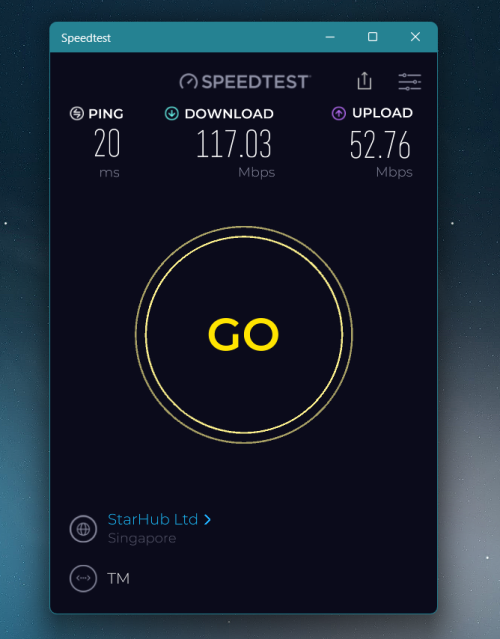 I normally test to Singtel from Klang Valley. 14 ms.  Let me try Starhub. This post has been edited by soonwai: Oct 11 2023, 02:33 PM |
|
|
|
|



 Quote
Quote





 0.0373sec
 0.17
0.17
 6 queries
 GZIP Disabled