Outline ·
[ Standard ] ·
Linear+
Unifi Official TM UniFi High Speed Broadband Thread V41, READ 1ST PAGE FOR RELEVANT WIFI INFO
|
soonwai
|
 Oct 11 2023, 03:51 PM Oct 11 2023, 03:51 PM
|

|
QUOTE(hjh87 @ Oct 11 2023, 03:39 PM) I am using CAT 8 Vandesail Cable. Funny thing is, using all same cable but with given TM Dlink router speed test in PC get 500mbps only when change to ax73 speed is just 90mbps. Tried going through TP-Link 192.168.0.. no setting for changing the high-speed thing. Anyone can help out? Maybe bad port on the AX73. Your Cat 8 cable is expensive right? If cheap, may have to look at that. I'm using Dintek Cat5E terminated by myself so I know my cables are good. |
|
|
|
|
|
PJng
|
Oct 11 2023, 04:00 PM
|
|
|
QUOTE(hjh87 @ Oct 11 2023, 03:39 PM) I am using CAT 8 Vandesail Cable. Funny thing is, using all same cable but with given TM Dlink router speed test in PC get 500mbps only when change to ax73 speed is just 90mbps. Tried going through TP-Link 192.168.0.. no setting for changing the high-speed thing. Anyone can help out? i think all tp link UI is same 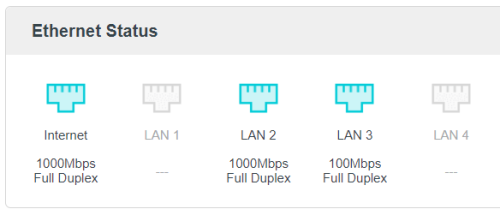 here say what? the only i can see here 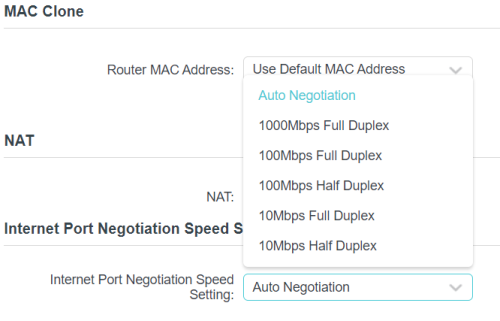 |
|
|
|
|
|
BenYeeHua
|
Oct 11 2023, 04:05 PM
|
|
|
QUOTE(soonwai @ Oct 11 2023, 01:26 PM) Wow, that is fantastic already. I only get max of about 90Mbps on 2.4Ghz. 70Mbps most of the time. Last tested probably with iPhone X. Forgot which router. I got tested with router's 2.4Ghz 2:2 antenna connect to another router, I can ensure you that yes, passing 4 thin wall(yes, thin wall, the 5G I can scan from 500m away lol.), still 100M lol. |
|
|
|
|
|
Tokik Siwok
|
Oct 11 2023, 04:11 PM
|
|
|
QUOTE(westlife @ Oct 11 2023, 01:41 PM) now no such thing anymore, if no coverage and u want to relocate, they will ask u to change ur plan to unifi air (using 5G) instead. or u pay the full fee for the remaining months of contract to terminate. but it is still possible to transfer my account to other user right? I'm tempted to renew my contract for the SWU3.0 but I'm likely to move to somewhere without Unifi coverage next year. Anyway, I have tried to contact their CS, awaiting their reply on this scenario. |
|
|
|
|
|
beverlykho
|
Oct 11 2023, 04:22 PM
|
|
|
QUOTE(crusher @ Oct 11 2023, 02:36 PM) I got the same screen. Just feel abit funny if I gets 500mbps but plan show otherwise. Hahaa Same here. Unifi system updated from 100M to 300M but I'm getting 500 already. Keep fingers crossed, with all the messiness caused by SWU3.0 maybe have hope system upgrade us to 800M.  |
|
|
|
|
|
Randomization
|
Oct 11 2023, 04:23 PM
|
|
|
QUOTE(Tokik Siwok @ Oct 11 2023, 04:11 PM) but it is still possible to transfer my account to other user right? I'm tempted to renew my contract for the SWU3.0 but I'm likely to move to somewhere without Unifi coverage next year. Anyway, I have tried to contact their CS, awaiting their reply on this scenario. I recall reading previous reply or somewhere that you can't transfer name for SWU. Could be wrong though.  |
|
|
|
|
|
TongCN
|
Oct 11 2023, 04:23 PM
|
|
|
QUOTE(PJng @ Oct 11 2023, 04:00 PM) i think all tp link UI is same here say what? the only i can see here Deco (same TPlink) doesnt have this XD So you manually set your Port 3 as 100mbps ? |
|
|
|
|
|
Tokik Siwok
|
Oct 11 2023, 04:24 PM
|
|
|
QUOTE(Randomization @ Oct 11 2023, 04:23 PM) I recall reading previous reply or somewhere that you can't transfer name for SWU. Could be wrong though. Thanks for the info, I didn't know that certain package have restriction on name transfer. Will try to ask around regarding this. |
|
|
|
|
|
PJng
|
Oct 11 2023, 04:26 PM
|
|
|
QUOTE(TongCN @ Oct 11 2023, 04:23 PM) Deco (same TPlink) doesnt have this XD So you manually set your Port 3 as 100mbps ? that is old router i use as AP, it only got 100mbps port, cannot set |
|
|
|
|
|
beverlykho
|
Oct 11 2023, 04:27 PM
|
|
|
QUOTE(Xanxeviera. @ Oct 11 2023, 03:14 PM) havent receive it yet, in next 2 months Aiks didn't you ask the TM Tech who did the installation to contact the Backend Team to open your 500M port? That's what I did. |
|
|
|
|
|
overfloe
|
Oct 11 2023, 04:28 PM
|
|
|
QUOTE(soonwai @ Oct 11 2023, 03:21 PM) SoonWaiUpgrade3 done yesterday. Speed 500Mbps. Plan shows as: 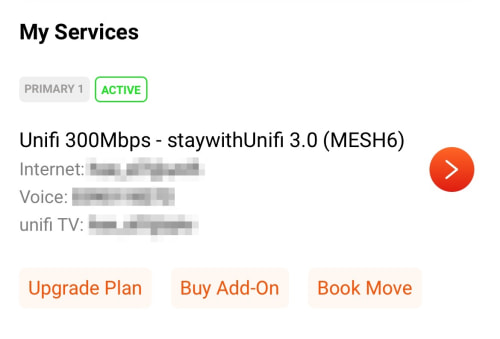 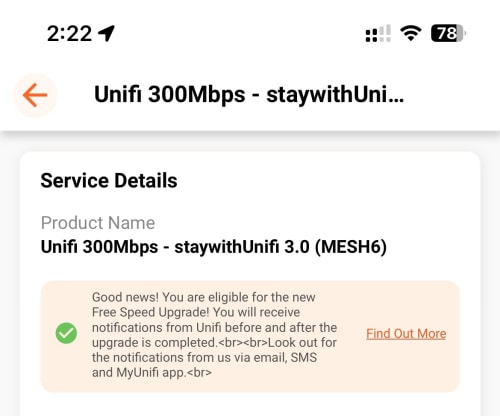 Eligible for Free Speed Upgrade notice still there. i believe the new plan will be reflected in the next billing. This post has been edited by overfloe: Oct 11 2023, 04:28 PM |
|
|
|
|
|
Oltromen Ripot
|
Oct 11 2023, 04:29 PM
|
|
|
QUOTE(Tokik Siwok @ Oct 11 2023, 04:11 PM) but it is still possible to transfer my account to other user right? I'm tempted to renew my contract for the SWU3.0 but I'm likely to move to somewhere without Unifi coverage next year. Anyway, I have tried to contact their CS, awaiting their reply on this scenario. 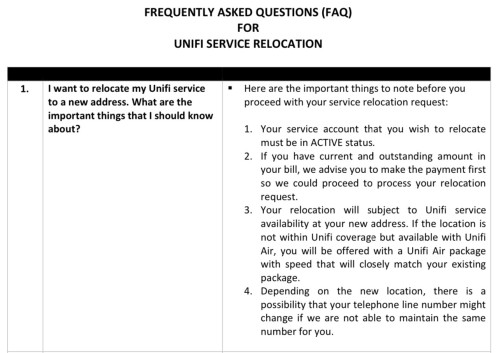 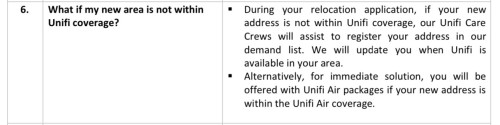  NGAM Campaign T&C 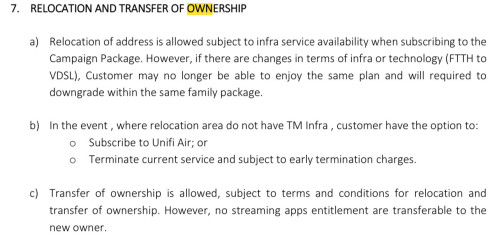 General T&C  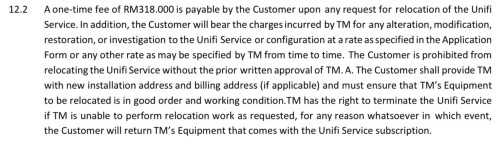  This post has been edited by Oltromen Ripot: Oct 11 2023, 04:30 PM This post has been edited by Oltromen Ripot: Oct 11 2023, 04:30 PM |
|
|
|
|
|
westlife
|
Oct 11 2023, 04:31 PM
|
|
|
QUOTE(Tokik Siwok @ Oct 11 2023, 04:11 PM) but it is still possible to transfer my account to other user right? I'm tempted to renew my contract for the SWU3.0 but I'm likely to move to somewhere without Unifi coverage next year. Anyway, I have tried to contact their CS, awaiting their reply on this scenario. can transfer to another user. the user will assume ur existing package with new 24 months contract. |
|
|
|
|
|
Verblassen
|
Oct 11 2023, 04:34 PM
|
Getting Started

|
QUOTE(fruitie @ Oct 11 2023, 03:18 PM) Thanks. I think 100Mbps is too little for today's standard.  I guess I will ask her to proceed with that application then. Still not too bad lah haha. Netflik recommends 100mbps 🤪 |
|
|
|
|
|
hjh87
|
Oct 11 2023, 04:40 PM
|
|
|
QUOTE(PJng @ Oct 11 2023, 04:00 PM) i think all tp link UI is same here say what? the only i can see here Yes, I've been playing with this setting, yet I still can't achieve the desired speed even after selecting 1000mbps full duplex. I came across an old thread discussing the same issue Routers Lan Ports Capped at 100Mbps, Need some inputs – the port is capped at 100mbps. The original TS making a warranty claim for the router. |
|
|
|
|
|
xjoshualaw29
|
Oct 11 2023, 04:42 PM
|
|
|
Ah finally... After making 4 technical reports and requesting to ask second level management to rectify the issue, kaotim finally got the speed upgrade. Technical team kept thinking my hardware but hardware still new lel. Issue: TM back end didn't apply the update properly. Saw them called their dedicated technical line to check and said already upgraded so they checked and reset everything again. 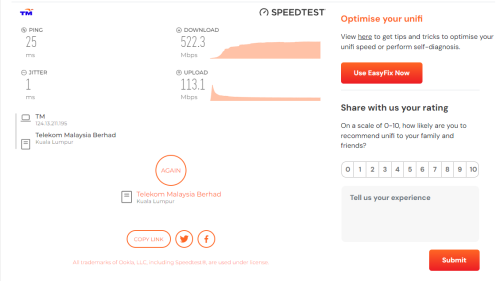 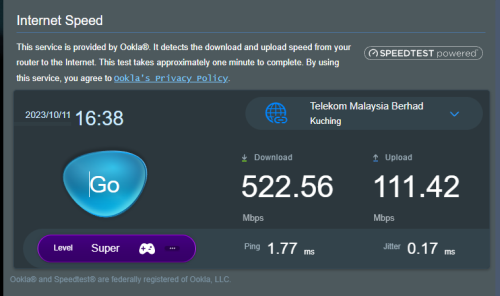 Hopefully those who received the SMS didn't have to go through this experience but it took me a while but worthwhile since paying same price as SWU 2.0 user here |
|
|
|
|
|
Tokik Siwok
|
Oct 11 2023, 04:42 PM
|
|
|
QUOTE(Oltromen Ripot @ Oct 11 2023, 04:29 PM) » Click to show Spoiler - click again to hide... « QUOTE(westlife @ Oct 11 2023, 04:31 PM) can transfer to another user. the user will assume ur existing package with new 24 months contract. thanks for the info, seems like its very troublesome to do this.  |
|
|
|
|
|
xjoshualaw29
|
Oct 11 2023, 04:44 PM
|
|
|
QUOTE(beverlykho @ Oct 11 2023, 04:27 PM) Aiks didn't you ask the TM Tech who did the installation to contact the Backend Team to open your 500M port? That's what I did. It took you how many reports to ask back end? Also from Kuching here. TM Kuching weird la. |
|
|
|
|
|
tevis31
|
Oct 11 2023, 04:46 PM
|
New Member
|
QUOTE(wkn @ Oct 11 2023, 01:27 PM) i am one of those 100mb user & all i got was sms saying they are giving me free speed upgrade. until today, i still don't have any speed upgrade.  tmnut bullshitting 100mb users or what?! Yup, I'm in the same situation as you. 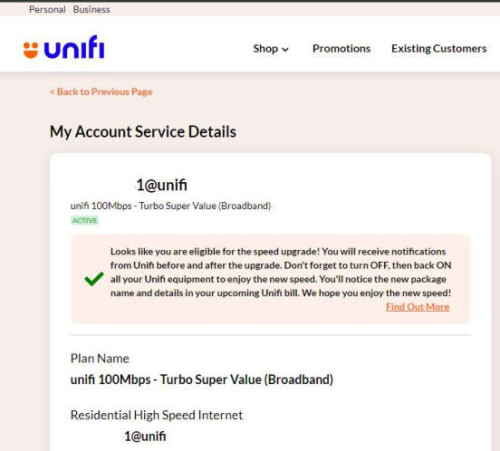 |
|
|
|
|
|
fruitie
|
Oct 11 2023, 04:56 PM
|
Rise and Shine

|
QUOTE(Verblassen @ Oct 11 2023, 04:34 PM) Still not too bad lah haha. Netflik recommends 100mbps 🤪 If more than one person is using at the same time, it struggles a bit la.  |
|
|
|
|



 Quote
Quote





 0.0203sec
 0.58
0.58
 6 queries
 GZIP Disabled