Outline ·
[ Standard ] ·
Linear+
Unifi Official TM UniFi High Speed Broadband Thread V41, READ 1ST PAGE FOR RELEVANT WIFI INFO
|
TongCN
|
 Oct 11 2023, 02:33 PM Oct 11 2023, 02:33 PM
|

|
QUOTE(hjh87 @ Oct 11 2023, 02:10 PM) But when I plug back the given dlink router pc get 500mbps. Sure is the ax73 setting that mess this up. U need to check both your PC lan port information and what CAT of Ethernet cable you using Try check as per above replies. |
|
|
|
|
|
Xanxeviera.
|
Oct 11 2023, 02:35 PM
|
Getting Started

|
QUOTE(issac99289928 @ Oct 11 2023, 02:22 PM) are you subscribing 100mbps/RM89 ? do you have a landline number ? free upgrade to 300 mbps for how long ? months or permanent ? 1. Yes 2. 6 Months only |
|
|
|
|
|
Xanxeviera.
|
Oct 11 2023, 02:36 PM
|
Getting Started
|
QUOTE(soonwai @ Oct 11 2023, 02:32 PM) I normally test to Singtel from Klang Valley. 14 ms.  Let me try Starhub. Even tested with TM KL server gave me 12ms already haiyaa |
|
|
|
|
|
crusher
|
Oct 11 2023, 02:36 PM
|
|
|
QUOTE(soonwai @ Oct 11 2023, 02:21 PM) SoonWaiUpgrade3 done yesterday. Speed 500Mbps. Plan shows as: 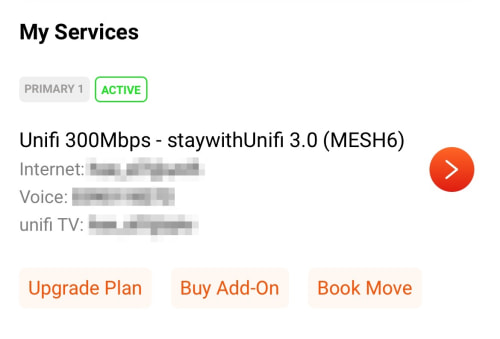 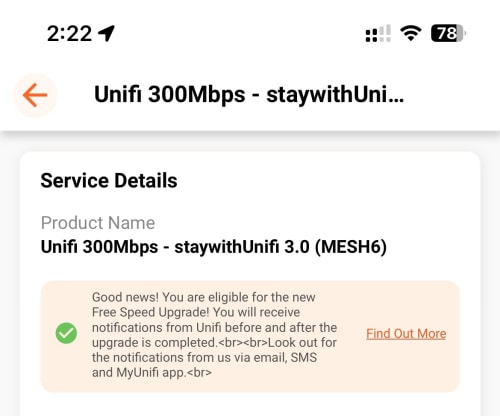 Eligible for Free Speed Upgrade notice still there. I got the same screen. Just feel abit funny if I gets 500mbps but plan show otherwise. Hahaa |
|
|
|
|
|
soonwai
|
Oct 11 2023, 02:39 PM
|
|
|
QUOTE(Xanxeviera. @ Oct 11 2023, 02:36 PM) Even tested with TM KL server gave me 12ms already haiyaa Starhub. Ignore speed. Testing on my laptop, wifi AP downstairs only wifi5. Previous Singtel test is on cable.  Are you testing from Klang Valley also? This post has been edited by soonwai: Oct 11 2023, 02:44 PM |
|
|
|
|
|
stormaker
|
Oct 11 2023, 02:39 PM
|
|
|
QUOTE(crusher @ Oct 11 2023, 02:36 PM) I got the same screen. Just feel abit funny if I gets 500mbps but plan show otherwise. Hahaa From TM FAQ : 12. I received communication informing me that my speed has been upgraded. However, I notice there is no changes in my profile in Unifi portal or MyUnifi apps. Why? We are performing our speed upgrade activity and profiling update by stages. Hence you may notice there is no changes in your profile yet while your speed has already been upgraded. The changes will be reflected soon. |
|
|
|
|
|
keithyan
|
Oct 11 2023, 02:40 PM
|
Getting Started
|
QUOTE(westlife @ Oct 11 2023, 02:41 PM) now no such thing anymore, if no coverage and u want to relocate, they will ask u to change ur plan to unifi air (using 5G) instead. or u pay the full fee for the remaining months of contract to terminate. Really depends the situation and get who handle the case. Sometime they do help to waive all the penalty or force using lesser plan. If the new place is like a jungle, they also can’t do anything except waive penalty , of cos need to show proof and this case consume quite lengthy process |
|
|
|
|
|
Xanxeviera.
|
Oct 11 2023, 02:44 PM
|
Getting Started
|
QUOTE(soonwai @ Oct 11 2023, 02:39 PM) Starhub. Ignore speed. Testing on my laptop, router downstairs only wifi5. Previous Singtel test is on cable. Are you testing from Klang Valley also? damn still much better than mine Nope, From Kuala Terengganu, but it should be more or less like maxis right? With maxis i can get 13-15ms to SG Servers |
|
|
|
|
|
The.Lucas.DaY
|
Oct 11 2023, 02:49 PM
|
|
|
QUOTE(Xanxeviera. @ Oct 11 2023, 02:36 PM) Even tested with TM KL server gave me 12ms already haiyaa QUOTE(soonwai @ Oct 11 2023, 02:39 PM) Starhub. Ignore speed. Testing on my laptop, wifi AP downstairs only wifi5. Previous Singtel test is on cable. Are you testing from Klang Valley also? Tested same ping as soonwai from KV, but high ping 39ms to Uni Malaysia Terengganu |
|
|
|
|
|
snowflax24
|
Oct 11 2023, 02:55 PM
|
Getting Started
|
QUOTE(stormaker @ Oct 11 2023, 02:39 PM) From TM FAQ : 12. I received communication informing me that my speed has been upgraded. However, I notice there is no changes in my profile in Unifi portal or MyUnifi apps. Why? We are performing our speed upgrade activity and profiling update by stages. Hence you may notice there is no changes in your profile yet while your speed has already been upgraded. The changes will be reflected soon. My profile on the myunifi portal is still the same as well. I did however received an email and sms confirming the upgrade. RM0 Unifi: Your New Free Speed Upgrade is completed! To enjoy the new speed, simply turn OFF, then back ON all your Unifi equipment. Your new package name and details will be updated in your Unifi bill by stages, however rest assured the new speed upgrade is effective. T&C applies. |
|
|
|
|
|
SUSAmeiN
|
Oct 11 2023, 03:00 PM
|
|
|
QUOTE(Xanxeviera. @ Oct 11 2023, 02:35 PM) Im newly installed too, did you immediately receive that 6m 300mbps speed upgrade after installation done? |
|
|
|
|
|
fruitie
|
Oct 11 2023, 03:12 PM
|
Rise and Shine

|
Any new promo for new registration? Otherwise, my colleague will proceed with RM 129 for 300Mbps (24 months) on Maxis.
|
|
|
|
|
|
Xanxeviera.
|
Oct 11 2023, 03:13 PM
|
Getting Started
|
QUOTE(The.Lucas.DaY @ Oct 11 2023, 02:49 PM) Tested same ping as soonwai from KV, but high ping 39ms to Uni Malaysia Terengganu Gosh, I kinda regret for switching to Unifi now haihhh |
|
|
|
|
|
Xanxeviera.
|
Oct 11 2023, 03:14 PM
|
Getting Started
|
QUOTE(AmeiN @ Oct 11 2023, 03:00 PM) Im newly installed too, did you immediately receive that 6m 300mbps speed upgrade after installation done? havent receive it yet, in next 2 months |
|
|
|
|
|
soonwai
|
Oct 11 2023, 03:16 PM
|
|
|
QUOTE(fruitie @ Oct 11 2023, 03:12 PM) Any new promo for new registration? Otherwise, my colleague will proceed with RM 129 for 300Mbps (24 months) on Maxis. 100Mbps RM89 permanent. That's the only thing cheaper. Maxis 300Mbps is RM129 permanent or back to RM149 after 2yrs? Friend sent me this but dunno from when. 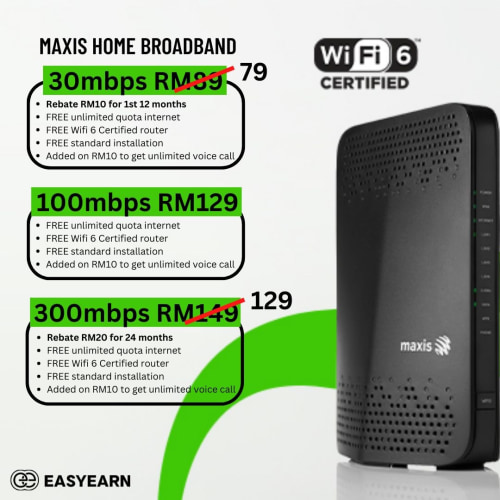 This post has been edited by soonwai: Oct 11 2023, 03:19 PM This post has been edited by soonwai: Oct 11 2023, 03:19 PM |
|
|
|
|
|
fruitie
|
Oct 11 2023, 03:18 PM
|
Rise and Shine
|
QUOTE(soonwai @ Oct 11 2023, 03:16 PM) 100Mbps RM89? That's the only thing cheaper. Thanks. I think 100Mbps is too little for today's standard.  I guess I will ask her to proceed with that application then. |
|
|
|
|
|
westlife
|
Oct 11 2023, 03:25 PM
|
|
|
QUOTE(keithyan @ Oct 11 2023, 02:40 PM) Really depends the situation and get who handle the case. Sometime they do help to waive all the penalty or force using lesser plan. If the new place is like a jungle, they also can’t do anything except waive penalty , of cos need to show proof and this case consume quite lengthy process unless one is really living in jungle, else i think unifi air will likely be available.  |
|
|
|
|
|
hjh87
|
Oct 11 2023, 03:39 PM
|
|
|
QUOTE(TongCN @ Oct 11 2023, 02:33 PM) U need to check both your PC lan port information and what CAT of Ethernet cable you using Try check as per above replies. I am using CAT 8 Vandesail Cable. Funny thing is, using all same cable but with given TM Dlink router speed test in PC get 500mbps only when change to ax73 speed is just 90mbps. Tried going through TP-Link 192.168.0.. no setting for changing the high-speed thing. Anyone can help out? |
|
|
|
|
|
bobkiit
|
Oct 11 2023, 03:43 PM
|
Getting Started
|
QUOTE(crusher @ Oct 11 2023, 02:36 PM) I got the same screen. Just feel abit funny if I gets 500mbps but plan show otherwise. Hahaa Mine also the same |
|
|
|
|
|
xperiaVuser
|
Oct 11 2023, 03:47 PM
|
|
|
QUOTE(hjh87 @ Oct 11 2023, 03:39 PM) I am using CAT 8 Vandesail Cable. Funny thing is, using all same cable but with given TM Dlink router speed test in PC get 500mbps only when change to ax73 speed is just 90mbps. Tried going through TP-Link 192.168.0.. no setting for changing the high-speed thing. Anyone can help out? Which LAN port you plugged in on the router? |
|
|
|
|



 Quote
Quote







 0.0255sec
 0.42
0.42
 6 queries
 GZIP Disabled