Outline ·
[ Standard ] ·
Linear+
Unifi Official TM UniFi High Speed Broadband Thread V41, READ 1ST PAGE FOR RELEVANT WIFI INFO
|
hjh87
|
 Sep 27 2023, 08:43 AM Sep 27 2023, 08:43 AM
|

|
Guy, I'm a bit confused.
An agent contacted me a few days ago and offered to upgrade my 30mbps package. The offer is as follows:
1. 100mbps + Netflix for RM129
2. 100mbps + a Selected TV Pack for RM149
3. 300mbps + Ultimate Pack for RM179 (with free 500mbps for 1 year)
I expressed my desire to have the permanent 500mbps with the Ultimate Pack, and the agent quoted a price of RM249.
My question is, if I choose the 300mbps + Ultimate Pack for RM179, will I eventually receive the permanent 500mbps? In other words, does choosing the SWU 3.0 300mbps plan mean that all users will eventually receive the permanent 500mbps upgrade?
Would it be best to visit a TM Point directly to inquire about the specific offer they can provide me?
|
|
|
|
|
|
hjh87
|
Sep 27 2023, 04:23 PM
|
|
|
QUOTE(ppfoong @ Sep 27 2023, 10:38 AM) SWU not available to agent and reseller. Only TM own outlet have that. QUOTE(NightFelix @ Sep 27 2023, 10:38 AM) Don't know what name is that, maybe is SWU3.5 or SWU3.0B? One of my friend from my chat group share that, if they ask you to sign up RM39 Postpaid (ZERO contract) for the RM119 MESH6 will get permanent 24 months of 500Mbps. You can terminated it later afterward via livechat/call in. The SWU3.0 or what StayWithUnifi are EXCLUSIVELY for TM Point only. No single agent able to get that package. They are still selling old package, and Yes you might ask, why TM do that? Is because TM have to pay Agent commission. TM point no need to pay anyone because there is no MIDDLEMAN. Cool, I will head down to the nearest TM point. By the way, I'm using my own TP-Link Archer AX73 router. Should I switch back to the stock UniFi router when the installer comes? This post has been edited by hjh87: Sep 27 2023, 04:26 PM |
|
|
|
|
|
hjh87
|
Oct 2 2023, 08:06 PM
|
|
|
Just visited TM point for SWU 3.0, created order and been informed installer will call within next few days.
So, just a moment ago, I went to the Unifi app and checked my activity tab. I saw the order was created, but the problem is the service installation address displayed is my old home address. Haha, I don't know if it's a system error or something else. I hope the installer is smart enough to come to my current, active Unifi address.
|
|
|
|
|
|
hjh87
|
Oct 2 2023, 09:36 PM
|
|
|
QUOTE(AVFAN @ Oct 2 2023, 08:17 PM) i advise u to call or go back to TMpoint to clarify this. i once had trouble with old ic, old address with them. Yes, I've already contacted the staff handling my order today. I just have to wait for her reply. |
|
|
|
|
|
hjh87
|
Oct 3 2023, 03:58 PM
|
|
|
Hi,
Is there anyone here who has successfully upgraded to SWU 3.0 broadband only, specifically the RM119 300mbps with 1 year of free 500mbps?
After the installation and all that, did any of you sign up for unifiTV?
When I placed my order that day, I did inquire about adding unifiTV to SWU3.0.
Perhaps TM is working on a new plan for it, which is why the lady couldn't provide any information on SWU3.0 with unifiTV.
|
|
|
|
|
|
hjh87
|
Oct 3 2023, 08:15 PM
|
|
|
QUOTE(July 2nd @ Oct 3 2023, 08:01 PM) 119 + ultimate plus 69.90 (30/9) at ioi city here but no m6.😞 Great that you gotten the promo pricing for ultimate plus, think now without promo cost RM99.90. |
|
|
|
|
|
hjh87
|
Oct 3 2023, 10:43 PM
|
|
|
QUOTE(July 2nd @ Oct 3 2023, 08:35 PM) Yep, catched the last boat! And as long as 6 months waived applied here is never better than the absence of m6. They explained that I'm already using wifi6 router that they provided since last year when they launched so no extra mesh here. It's good to have the perpetual 500mbps but yet to come official. Btw, the order is still pending since last Saturday and no update after live chat twice with more and more issue from the unifi app. Suddenly the service info and product details show old plan name instead of new one today.👎 Haha, the same thing happened to me too. But I've already clarified with the staff, and they asked me not to bother with the UniFi app details; the actual order still applies. |
|
|
|
|
|
hjh87
|
Oct 4 2023, 08:39 PM
|
|
|
For those who have already installed and started using RM119: 300Mbps - staywithUnifi 3.0 (MESH6), will the free upgrade to 500Mbps be reflected in their account details? Or it only shows 300Mbps - staywithUnifi 3.0 (MESH6)?
|
|
|
|
|
|
hjh87
|
Oct 4 2023, 08:48 PM
|
|
|
QUOTE(Max2006 @ Oct 4 2023, 08:40 PM) Not yet reflected. But after the announcement of new pricing plan, I think it will be showed up soon. According the news, it will take 3 months to implement, stage by stage.  thanks. I've already received the scheduled installation date, and it's tomorrow, yet haven't received any call from the crew. I hope they didn't cancel last minute on the scheduled time. |
|
|
|
|
|
hjh87
|
Oct 5 2023, 02:59 PM
|
|
|
Hi Guys,
Inside My Activity (under order status), and it shows that the installation appointment has been set. Is this appointment confirmed, or do I still need to wait for SMS or email confirmation? The scheduled time has already passed, and the installer is nowhere to be seen.
|
|
|
|
|
|
hjh87
|
Oct 5 2023, 03:12 PM
|
|
|
QUOTE(Max2006 @ Oct 5 2023, 03:04 PM) Normally the installer will call you before they come to your house. Checked your unifi app. Look for the order progress. What it says? Checked yesterday, appointment set today 2.30pm. But now can't view the My Activity tab anymore,  "We are currently undergoing maintenance at the moment" |
|
|
|
|
|
hjh87
|
Oct 5 2023, 03:35 PM
|
|
|
QUOTE(Max2006 @ Oct 5 2023, 03:17 PM) 2 possible scenarios. The installer still busy on other case and he will call you once he finish it Or Your appointment has been rescheduled or crew team reassigned due to the installer cannot make it today. Both scenarios could be verified through unifi app. But too bad the app is crashed. That's why i said in my last post. CHAOS! Those who applied for SWU 3.0 after last night announcement, do prepare for some inevitable delay. Haha, I can wait, but I hope they don't delay for too long. Later router is out of stock, or the mesh 6 is also out of stock. Need to wait for a few months.  |
|
|
|
|
|
hjh87
|
Oct 6 2023, 09:26 PM
|
|
|
Hey guys, what's the average timeframe for a technician to confirm the installation date for order SWU3.0 RM119 placed on October 4th? My appointment was initially scheduled for the 5th, but I never received any confirmation, so the day passed, and the appointment was automatically postponed according to the Progress Updates. However, yesterday, I received a blank TM Service Acceptance Form in my email. Has anyone else experienced this? Would you mind sharing what your next course of action?
I tried to talk to Maya Chat, but the queue isn't moving at all.
Updates:
Haha, I scrolled down the form and saw the technician signed on my behalf and put the remark as "Me" requesting a postponement of the installation date.
This post has been edited by hjh87: Oct 6 2023, 09:31 PM
|
|
|
|
|
|
hjh87
|
Oct 6 2023, 09:35 PM
|
|
|
QUOTE(idoloveyou @ Oct 6 2023, 09:31 PM) do you press confirm appointment at unifi portal? Nope, all the order statuses in the apps automatically updated without my knowledge. |
|
|
|
|
|
hjh87
|
Oct 11 2023, 12:23 PM
|
|
|
Guys,
Want to check, so for anyone signing up for the SWU 3.0 RM119 300mbps free 500mbps 1 year. After installation done, you straight away get 500mbps or have to wait several days after that only upgraded to 500mbps.
The technician said mine is 300mbps only for the free upgrade to 500mbps ask me to check back with the staff that I deal with in TM point.
|
|
|
|
|
|
hjh87
|
Oct 11 2023, 01:44 PM
|
|
|
Guys,
Need help, so after turning off the given dlink DIR-X306Z AX3000 WiFi 6 Router I do get 500mbps. But now plan to use back my ax73 router, try quick setup with all the same login and PW but keep getting no internet connection.
I not around when the installer came to do the installation, or else will ask him help to setup the ax73 as well.
@Blacktubi mind to share how to redo the setup for ax73 for this speed upgrade. Thank you.
|
|
|
|
|
|
hjh87
|
Oct 11 2023, 01:58 PM
|
|
|
QUOTE(VeeJay @ Oct 11 2023, 01:51 PM) I could only guess the authentication password has changed. Did you get the password from the installer/technician? Maybe give him a call and ask. My bad, login and PW correct. Cause lan 1 and 4 is set to IPTV and VoIP so after changing to lan 2 and 3 can get the internet. But now wireless can hit 500mbps, but Lan can only get 90mbps. What should I set for Lan to get max speed? |
|
|
|
|
|
hjh87
|
Oct 11 2023, 02:08 PM
|
|
|
QUOTE(PJng @ Oct 11 2023, 02:04 PM) 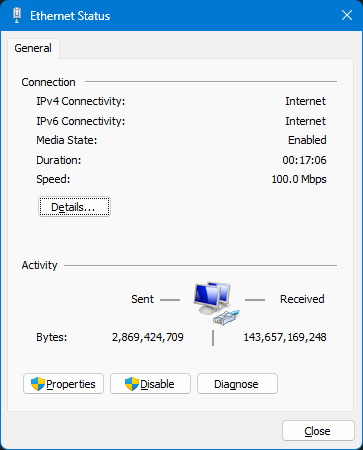 this show what? 100mbps? or router wrong set 100mbps? Nope, I tested WiFi speed test get 500mbps. Where else my pc I run speed test both Telekom website and ookla for the lan only 90++ Mbps. |
|
|
|
|
|
hjh87
|
Oct 11 2023, 02:10 PM
|
|
|
QUOTE(TongCN @ Oct 11 2023, 02:08 PM) Check your LAN port model / naming? 10/100 or with 1000? Some old computer only has 100mbps ethernet port Modern TV ethernet port also 100mbps  But when I plug back the given dlink router pc get 500mbps. Sure is the ax73 setting that mess this up. |
|
|
|
|
|
hjh87
|
Oct 11 2023, 03:39 PM
|
|
|
QUOTE(TongCN @ Oct 11 2023, 02:33 PM) U need to check both your PC lan port information and what CAT of Ethernet cable you using Try check as per above replies. I am using CAT 8 Vandesail Cable. Funny thing is, using all same cable but with given TM Dlink router speed test in PC get 500mbps only when change to ax73 speed is just 90mbps. Tried going through TP-Link 192.168.0.. no setting for changing the high-speed thing. Anyone can help out? |
|
|
|
|



 Quote
Quote

 0.2073sec
 0.52
0.52
 7 queries
 GZIP Disabled