Welcome Guest ( Log In | Register )

Bump Topic Topic Closed RSS Feed
413 Pages « < 372 373 374 375 376 > » Bottom

Outline · [ Standard ] · Linear+

 Official TM UniFi High Speed Broadband Thread V39, READ 1ST PAGE FOR RELEVANT WIFI INFO

views
     
tungfunglaw
post Jan 30 2022, 09:45 AM

Getting Started
**
Junior Member
259 posts

Joined: Aug 2008


QUOTE(xxboxx @ Jan 29 2022, 11:42 PM)
Do you use browser that is not Google Chrome?
Other browser is hit or miss with Youtube.
If use Brave and Autoplay is blocked, it will have this auto pausing issue.
*
is a chrome. whatever video encounters this intermittent issue hmm.gif

nvm, maybe due to the infra.


tungfunglaw
post Jan 30 2022, 09:47 AM

Getting Started
**
Junior Member
259 posts

Joined: Aug 2008


QUOTE(akhito @ Jan 30 2022, 08:03 AM)
that one is youtube own purposed setup. It ensures the user is there so that they can make sure ads will be received usually happen in hourish  video or music playlist. kinda annoying when u just wanna listen to music while working on something else

*
already block97 all youtube ads laugh.gif

dont think u can listen to any music now on youtube if not using adblocker. the amount of ads is ridiculous.


YoungMan
post Jan 30 2022, 10:17 AM

Look at all my stars!!
*******
Senior Member
6,818 posts

Joined: Oct 2008
From: Kuala Lumpur


QUOTE(aniq8676 @ Jan 30 2022, 02:33 AM)
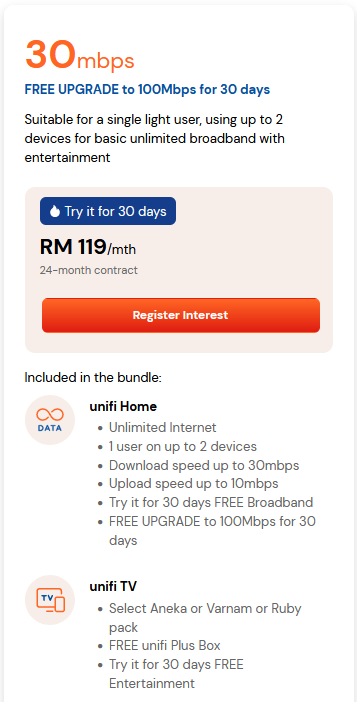
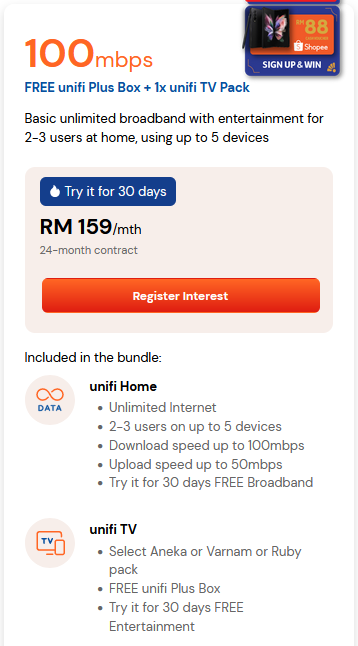
TM launched two new plans, which are not worth it at all.  doh.gif

user posted image user posted image

For those who want to subscribe, I recommend you subscribe to the RM129 100mbps which comes with the RM30 UnifiPlayTV pack, can be use on smartphones/Tablets and Android TV.
*
What a rediculous plan. People are already getting 300mbps for RM129 under SWU, and they still want to milk out new subscribers.
QuantumEdge
post Jan 30 2022, 11:24 AM

Regular
******
Senior Member
1,598 posts

Joined: Jan 2016


QUOTE(YoungMan @ Jan 30 2022, 10:17 AM)
What a rediculous plan. People are already getting 300mbps for RM129 under SWU, and they still want to milk out new subscribers.
*
user posted image
Seems like they've pulled the calling plan off the regular 100mbps plan as well
No idea why people just keep on subscribing to unifi

This post has been edited by QuantumEdge: Jan 30 2022, 11:25 AM
Odinn
post Jan 30 2022, 11:48 AM

Say what?!?&!%@
******
Senior Member
1,167 posts

Joined: Dec 2004
From: K.L.
Back on Unifi after moving into new place, was given the stock router, white Fibre Home one. Should I replace it with own router, or is the provided one enough? Thinking of getting TPLink AX20. Subscribed to 300mbps, and coming from 500mbps on Time previously, the speed performance is noticeable.


PJng
post Jan 30 2022, 12:47 PM

10k Club
********
All Stars
12,047 posts

Joined: Oct 2017


QUOTE(MyProLife @ Jan 30 2022, 05:36 AM)
This might be the reason why new subscribe/upgrade 100m rm129 removed unifi tv bundle. I don't think playtv is even included anymore for rm129 version

pjng sudah kena after just upgraded to 100m 129, wanted to redeem iqiyi but found out nothing to redeem because no tv pack and end up accidentally subscribe to ala carte iqiyi worth rm8.90/mo
*
Wrong time to upgrade, and TM stiil treat as new subrciber
aniq8676
post Jan 30 2022, 12:59 PM

Regular
******
Senior Member
1,524 posts

Joined: Dec 2020
From: Perak


QUOTE(MyProLife @ Jan 30 2022, 05:36 AM)
This might be the reason why new subscribe/upgrade 100m rm129 removed unifi tv bundle. I don't think playtv is even included anymore for rm129 version

pjng sudah kena after just upgraded to 100m 129, wanted to redeem iqiyi but found out nothing to redeem because no tv pack and end up accidentally subscribe to ala carte iqiyi worth rm8.90/mo
*
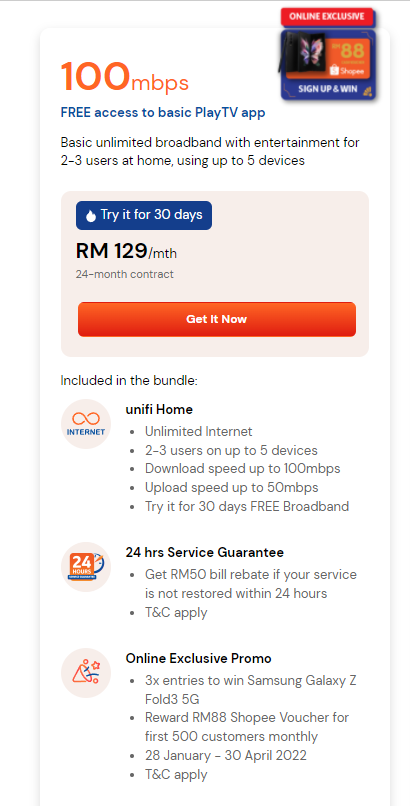
RM129 100mbps plan still includes the Unifiplaytv (V, A, R) plan if you change plans through the portal or myunifi

user posted image
QuantumEdge
post Jan 30 2022, 02:28 PM

Regular
******
Senior Member
1,598 posts

Joined: Jan 2016


QUOTE(Odinn @ Jan 30 2022, 11:48 AM)
Back on Unifi after moving into new place, was given the stock router, white Fibre Home one. Should I replace it with own router, or is the provided one enough? Thinking of getting TPLink AX20. Subscribed to 300mbps, and coming from 500mbps on Time previously, the speed performance is noticeable.
*
It's always recommended to switch from an ISP-provided router to your own
More functions, faster firmware updates, and less monitoring
Especially that fibre home router...pure garbage
MyProLife
post Jan 30 2022, 02:33 PM

I bully wumao & MPKL
*******
Senior Member
2,075 posts

Joined: Sep 2021
From: nowhere

QUOTE(aniq8676 @ Jan 30 2022, 12:59 PM)
RM129 100mbps plan still includes the Unifiplaytv (V, A, R) plan if you change plans through the portal or myunifi

user posted image
*
Notice the word "from 129" probably the V/A/R plan is rm30 extra on top of rm129

This is just a request form and then unifi CS will later call customer for confirmation about changing plan (including asking whether need to add on tv pack and refresh contract for next 2 years)

This post has been edited by MyProLife: Jan 30 2022, 02:34 PM
aniq8676
post Jan 30 2022, 02:42 PM

Regular
******
Senior Member
1,524 posts

Joined: Dec 2020
From: Perak


QUOTE(MyProLife @ Jan 30 2022, 02:33 PM)
Notice the word "from 129" probably the V/A/R plan is rm30 extra on top of rm129

This is just a request form and then unifi CS will later call customer for confirmation about changing plan (including asking whether need to add on tv pack and refresh contract for next 2 years)
*
For those who change their plan to RM129 100mbps with Unifiplaytv on myunifi, the Unifiplaytv (VAR) pack will be included.
There is no charge of RM30.
kcl2006ch
post Jan 30 2022, 02:45 PM

Getting Started
**
Junior Member
288 posts

Joined: Sep 2020


QUOTE(MyProLife @ Jan 30 2022, 02:33 PM)
Notice the word "from 129" probably the V/A/R plan is rm30 extra on top of rm129

This is just a request form and then unifi CS will later call customer for confirmation about changing plan (including asking whether need to add on tv pack and refresh contract for next 2 years)
*
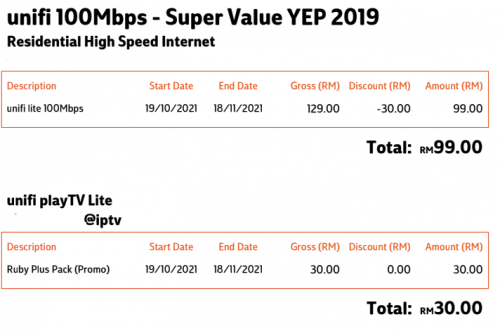
actually they calculate like this:

100Mbps RM 99
Uniif TV pack(aneka+/ruby+ or varnam+) : Rm30
total RM 129
refer to the picture attached , this before i UPGRADE to SWU package

user posted image

This post has been edited by kcl2006ch: Jan 30 2022, 02:46 PM
akhito
post Jan 30 2022, 02:47 PM

Enthusiast
*****
Junior Member
749 posts

Joined: Jul 2016


QUOTE(Odinn @ Jan 30 2022, 11:48 AM)
Back on Unifi after moving into new place, was given the stock router, white Fibre Home one. Should I replace it with own router, or is the provided one enough? Thinking of getting TPLink AX20. Subscribed to 300mbps, and coming from 500mbps on Time previously, the speed performance is noticeable.
*
actually depend on ur own usage if the router serve u well can reach subscribed speed no frequent disconnection there is no point paying extra for better one. Of course own router will be better in term firmware upgrade and no isp remote-control
Jjuggler
post Jan 30 2022, 03:41 PM

Narcissistic Genius
******
Senior Member
1,341 posts

Joined: Dec 2016
QUOTE(Odinn @ Jan 30 2022, 11:48 AM)
Back on Unifi after moving into new place, was given the stock router, white Fibre Home one. Should I replace it with own router, or is the provided one enough? Thinking of getting TPLink AX20. Subscribed to 300mbps, and coming from 500mbps on Time previously, the speed performance is noticeable.
*
I believe you received a unit of Wifi 6 Router (FiberHome - rounded shape). I just toy with the router yesterday. The router is kinda decent for regular home use, especially with superadmin access. Just login to superadmin account, disable TR-069, and change the DNS setting. The only problem is, even if you changed the DNS servers, the dashboard still displays TM's DNS server. However, using sites like dnsleaktest and ipleak, those sites showing cloudflare ip (I normally pick cloudflare over google dns). Otherwise, the router works just like how regular home router works. This router way better than those router supplied by TM previously especially the C1200. No reboot. Able to handle 800Mbps like charm. Downloaded test file (~20GB) maintains around ~86MiB/s - 100MiB/s.
failed.hashcheck
post Jan 30 2022, 06:03 PM

Neighborhood plant pathologist
*******
Senior Member
2,096 posts

Joined: Aug 2009
From: Shithole Klang
QUOTE(Jjuggler @ Jan 30 2022, 03:41 PM)
I believe you received a unit of Wifi 6 Router (FiberHome - rounded shape). I just toy with the router yesterday. The router is kinda decent for regular home use, especially with superadmin access. Just login to superadmin account, disable TR-069, and change the DNS setting. The only problem is, even if you changed the DNS servers, the dashboard still displays TM's DNS server. However, using sites like dnsleaktest and ipleak, those sites showing cloudflare ip (I normally pick cloudflare over google dns). Otherwise, the router works just like how regular home router works. This router way better than those router supplied by TM previously especially the C1200. No reboot. Able to handle 800Mbps like charm. Downloaded test file (~20GB) maintains around ~86MiB/s - 100MiB/s.
*
try reset. I did a full reset, and everything worked fine.

now if only I can find factory firmware to get rid of that @unifi suffix.
Odinn
post Jan 30 2022, 07:03 PM

Say what?!?&!%@
******
Senior Member
1,167 posts

Joined: Dec 2004
From: K.L.
QUOTE(QuantumEdge @ Jan 30 2022, 02:28 PM)
It's always recommended to switch from an ISP-provided router to your own
More functions, faster firmware updates, and less monitoring
Especially that fibre home router...pure garbage
*
Not so familiar with router settings to be able to change them and know what's going to happen. laugh.gif but the consideration that there may be monitoring, throttling or limiting me is what's making me think of the need to get my own.

QUOTE(akhito @ Jan 30 2022, 02:47 PM)
actually depend on ur own usage if the router serve u well can reach subscribed speed no frequent disconnection there is no point paying extra for better one. Of course own router will be better in term firmware upgrade and no isp remote-control
*
Just over a month using it, so far no disconnections but not being able to access the router settings (if the need to change anything happens, can't even change WIFI name and password now) is something can't be overlooked over the long term.

QUOTE(Jjuggler @ Jan 30 2022, 03:41 PM)
I believe you received a unit of Wifi 6 Router (FiberHome - rounded shape). I just toy with the router yesterday. The router is kinda decent for regular home use, especially with superadmin access. Just login to superadmin account, disable TR-069, and change the DNS setting. The only problem is, even if you changed the DNS servers, the dashboard still displays TM's DNS server. However, using sites like dnsleaktest and ipleak, those sites showing cloudflare ip (I normally pick cloudflare over google dns). Otherwise, the router works just like how regular home router works. This router way better than those router supplied by TM previously especially the C1200. No reboot. Able to handle 800Mbps like charm. Downloaded test file (~20GB) maintains around ~86MiB/s - 100MiB/s.
*
Yes the round shape, like a giant bar of soap. As it is, I don't even have access to the console, so can't change my Wifi name and password. The usual admin/admin and administrator/administrator combos don't work, and was told by customer care to contact their technicians to make the changes if needed. mega_shok.gif

aniq8676
post Jan 30 2022, 07:07 PM

Regular
******
Senior Member
1,524 posts

Joined: Dec 2020
From: Perak


QUOTE(Odinn @ Jan 30 2022, 07:03 PM)
Yes the round shape, like a giant bar of soap. As it is, I don't even have access to the console, so can't change my Wifi name and password. The usual admin/admin and administrator/administrator combos don't work, and was told by customer care to contact their technicians to make the changes if needed.  mega_shok.gif

*
username: superadmin
password: f1ber@dm!n
Odinn
post Jan 30 2022, 07:12 PM

Say what?!?&!%@
******
Senior Member
1,167 posts

Joined: Dec 2004
From: K.L.
QUOTE(aniq8676 @ Jan 30 2022, 07:07 PM)
username: superadmin
password: f1ber@dm!n
*
Accessed. LOL thank you biggrin.gif thumbsup.gif
tzxsean
post Jan 30 2022, 10:29 PM

Lonely Driver
*******
Senior Member
5,608 posts

Joined: Jan 2010


QUOTE(F_F@PANG @ Jan 19 2022, 02:31 PM)
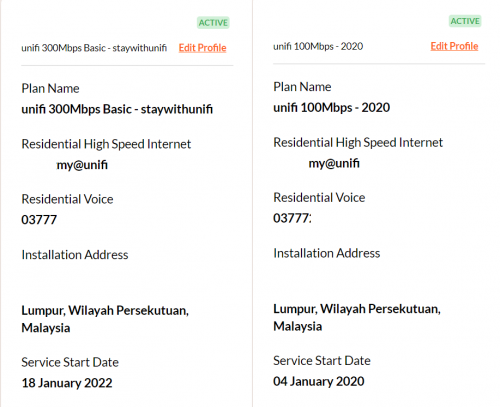
This morning TM installer calling upgrade installment for my SWU 300Mbps, I request the installer confirm does my upgrade include (free voice STD20), but the installer unable to check.

Than I call 100 to confirm and getting answer my upgrade was included the free voice STD20  rclxm9.gif  rclxm9.gif , so who wan free voice STD20 try just ask for it. who know after next few month we can ask removed the free voice STD20 since it was addon services which cost RM20.
below screen print are my package before and after.


user posted image
*
received the call few days back and no follow-up as of now ..guess will have to wait until after CNY now all holiday perhaps
PJng
post Jan 31 2022, 12:14 AM

10k Club
********
All Stars
12,047 posts

Joined: Oct 2017


QUOTE(kcl2006ch @ Jan 30 2022, 02:45 PM)
actually they calculate like this:

100Mbps RM 99
Uniif TV pack(aneka+/ruby+ or varnam+) : Rm30
total RM 129
refer to the picture attached , this before i UPGRADE to SWU package

user posted image
*
Are sure? Maybe can take back my ruby pack?
Jjuggler
post Jan 31 2022, 12:49 AM

Narcissistic Genius
******
Senior Member
1,341 posts

Joined: Dec 2016
QUOTE(failed.hashcheck @ Jan 30 2022, 06:03 PM)
try reset. I did a full reset, and everything worked fine.

now if only I can find factory firmware to get rid of that @unifi suffix.
*
Thanks for the suggestion. Will do that. BTW, are you enjoy using the router? If you asked me, the only thing that potong stim for me is the @unifi suffix, unless you hide the ssid and manually connect to the wireless network.

413 Pages « < 372 373 374 375 376 > » Top
Topic ClosedOptions
 

Change to:
| Lo-Fi Version
0.0210sec    0.48    6 queries    GZIP Disabled
Time is now: 15th December 2025 - 09:28 AM