Welcome Guest ( Log In | Register )

Bump Topic Topic Closed RSS Feed
413 Pages « < 242 243 244 245 246 > » Bottom

Outline · [ Standard ] · Linear+

 Official TM UniFi High Speed Broadband Thread V39, READ 1ST PAGE FOR RELEVANT WIFI INFO

views
     
firadaboss
post Oct 6 2021, 09:30 AM

New Member
*
Junior Member
30 posts

Joined: May 2006


QUOTE(haturaya @ Oct 5 2021, 06:59 PM)
Same fate... It happens around 2am today.

[attachmentid=11000702]
All my Mikrotik NAT receive nothing (zero byte / packet), like sitting behind one firewall  rclxub.gif  No VPNs, no web (HTTP & HTTPS) and some other custom port for my hobby.  sweat.gif

Dang I need this to be operational.

And the given IP stuck with 115.135.x.y Multiple reboot still same.
*
Unifi tech called my yesterday around 8pm (overtime?) and explain to me about the Unifi IP address assigned to me is in private range, (which means I'm behind the NAT?) hence why it is not accessible directly from outside world.
It has to be released by TM for it to be assigned with public IP. He request me to send an email with my VPN config to help@tm.com.my. I had sent a screenshot of my Mikrotik setting (below) last night around 11pm, so far no reply.
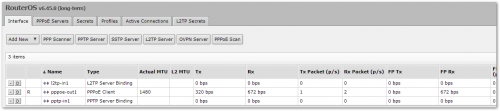
user posted image

At the same time I am getting to understand the problem here. I saw from another old thread the discussion about private IP range and public IP range assigned by TM to customers affecting this connectivity scenarios.
I understand that public IP range is a scarce resource and need to be assigned only to those unifi customers who are actually using it.
However it is not reliable for me to rely on TM to assign me those as in the future anyone with higher authority or priority might override the policy and no one might end up getting any of it.

Therefore I am researching a bit and found out about SoftEther VPN. Am going to give it a try.
Refs:
SoftEther VPN in serverfault
SoftEther VPN


firadaboss
post Oct 6 2021, 09:33 AM

New Member
*
Junior Member
30 posts

Joined: May 2006


QUOTE(heLL_bOy @ Oct 5 2021, 05:09 PM)
can you reach your vpn server? via ping ?
*
cannot
firadaboss
post Oct 6 2021, 09:34 AM

New Member
*
Junior Member
30 posts

Joined: May 2006


QUOTE(soonwai @ Oct 5 2021, 10:31 PM)
I just checked. I can connect to my L2TP server in another house running on Mikrotik also. Kajang to PJ, Unifi to Unifi.

Tried with Maxis 4G to Unifi, also ok.
*
What is your publicIP starts with?
asellus
post Oct 6 2021, 03:16 PM

#gompusas
Group Icon
Elite
4,541 posts

Joined: Jan 2003
From: BSRPPG51 Access Concentrator


QUOTE(firadaboss @ Oct 6 2021, 09:30 AM)
» Click to show Spoiler - click again to hide... «

*
What Unifi package did you subscribed to?
haturaya
post Oct 6 2021, 03:24 PM

Look at all my stars!!
Group Icon
Elite
2,553 posts

Joined: Jan 2003
QUOTE(firadaboss @ Oct 6 2021, 09:30 AM)
Unifi tech called my yesterday around 8pm (overtime?) and explain to me about the Unifi IP address assigned to me is in private range, (which means I'm behind the NAT?) hence why it is not accessible directly from outside world.
It has to be released by TM for it to be assigned with public IP. He request me to send an email with my VPN config to help@tm.com.my. I had sent a screenshot of my Mikrotik setting (below) last night around 11pm, so far no reply.
user posted image

At the same time I am getting to understand the problem here. I saw from another old thread the discussion about private IP range and public IP range assigned by TM to customers affecting this connectivity scenarios.
I understand that public IP range is a scarce resource and need to be assigned only to those unifi customers who are actually using it.
However it is not reliable for me to rely on TM to assign me those as in the future anyone with higher authority or priority might override the policy and no one might end up getting any of it.

Therefore I am researching a bit and found out about SoftEther VPN. Am going to give it a try.
Refs:
SoftEther VPN in serverfault
SoftEther VPN
*
Keep updating about this.
soonwai
post Oct 6 2021, 04:01 PM


********
All Stars
11,456 posts

Joined: Oct 2007
From: KL


QUOTE(firadaboss @ Oct 6 2021, 09:30 AM)
Unifi tech called my yesterday around 8pm (overtime?) and explain to me about the Unifi IP address assigned to me is in private range, (which means I'm behind the NAT?) hence why it is not accessible directly from outside world.
It has to be released by TM for it to be assigned with public IP. He request me to send an email with my VPN config to help@tm.com.my. I had sent a screenshot of my Mikrotik setting (below) last night around 11pm, so far no reply.
user posted image

At the same time I am getting to understand the problem here. I saw from another old thread the discussion about private IP range and public IP range assigned by TM to customers affecting this connectivity scenarios.
I understand that public IP range is a scarce resource and need to be assigned only to those unifi customers who are actually using it.
However it is not reliable for me to rely on TM to assign me those as in the future anyone with higher authority or priority might override the policy and no one might end up getting any of it.

Therefore I am researching a bit and found out about SoftEther VPN. Am going to give it a try.
Refs:
SoftEther VPN in serverfault
SoftEther VPN
*
But 115.135.x.y is not private IP/CGNAT address. You see this IP on the Mikrotik right? And it corresponds to https://www.whatismyip.com?
westlife
post Oct 6 2021, 04:46 PM

10k Club
********
All Stars
14,248 posts

Joined: Jan 2011
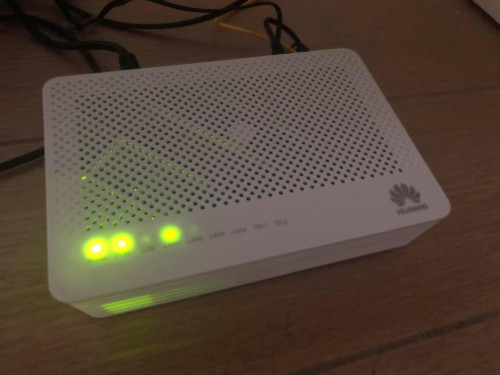
ONT used by ISPs in lion city. Much smaller and compact than unifi one.

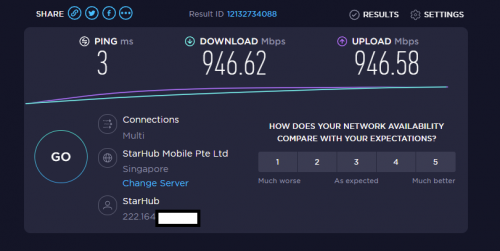
user posted image

1Gbps plan
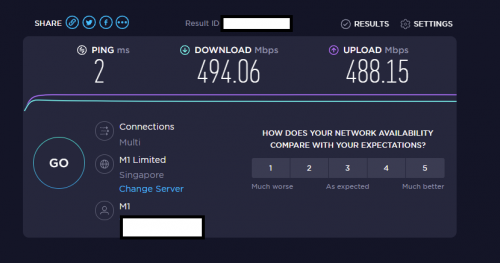
user posted image

500Mbps plan
user posted image

This post has been edited by westlife: Oct 6 2021, 04:50 PM
go626201
post Oct 6 2021, 05:22 PM

Regular
******
Senior Member
1,882 posts

Joined: Sep 2017
QUOTE(westlife @ Oct 6 2021, 04:46 PM)
ONT used by ISPs in lion city. Much smaller and compact than unifi one.

user posted image

1Gbps plan
user posted image

500Mbps plan
user posted image
*
I think newer user also might get the same ONT for unifi.
Seems like it is the same with my cousin using one. (Installed on last year)
aniq8676
post Oct 6 2021, 06:03 PM

Regular
******
Senior Member
1,524 posts

Joined: Dec 2020
From: Perak


QUOTE(westlife @ Oct 6 2021, 04:46 PM)
ONT used by ISPs in lion city. Much smaller and compact than unifi one.

user posted image

1Gbps plan
user posted image

500Mbps plan
user posted image
*
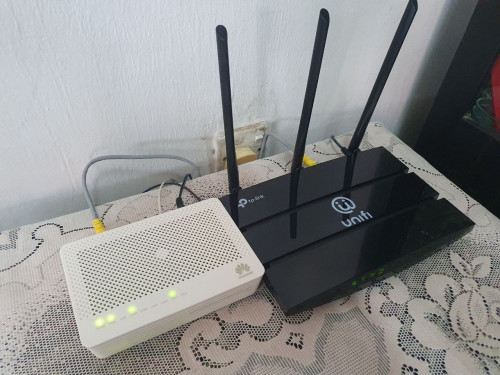
unifi also give the same model to new users

user posted image
westlife
post Oct 6 2021, 06:25 PM

10k Club
********
All Stars
14,248 posts

Joined: Jan 2011
QUOTE(aniq8676 @ Oct 6 2021, 06:03 PM)
unifi also give the same model to new users

user posted image
*
ic. that's good. haha.
xCryptik
post Oct 6 2021, 08:24 PM

On my way
****
Junior Member
584 posts

Joined: May 2013
QUOTE(westlife @ Oct 6 2021, 07:25 PM)
ic. that's good. haha.
*
Which one better? confused.gif
Alcatel? Huawei? Fiberhome? Nokia?
heLL_bOy
post Oct 6 2021, 08:25 PM

Regular
******
Senior Member
1,350 posts

Joined: Nov 2004
From: HEAVEN & HELL


QUOTE(haturaya @ Oct 5 2021, 07:00 PM)
Nothing, not even TCP handshaking. whistling.gif
*
QUOTE(firadaboss @ Oct 6 2021, 09:33 AM)
cannot
*
possible that TM block specific port on certain ip range. as far i know unifi fiber doesn't on cgnat (private ip) only unifi lite was.


HumanExtinction
post Oct 6 2021, 08:42 PM

Casual
***
Junior Member
364 posts

Joined: Jan 2018
From: Tim Apple
You guys so lucky, i get this sh** router AZ-tech. Now waiting for mesh to arrive and see if can solve my wifi issue or not.
westlife
post Oct 6 2021, 09:52 PM

10k Club
********
All Stars
14,248 posts

Joined: Jan 2011
QUOTE(xCryptik @ Oct 6 2021, 08:24 PM)
Which one better?  confused.gif
Alcatel? Huawei? Fiberhome? Nokia?
*
huawei should be the best.
soonwai
post Oct 6 2021, 10:31 PM


********
All Stars
11,456 posts

Joined: Oct 2007
From: KL


QUOTE(firadaboss @ Oct 6 2021, 09:34 AM)
What is your publicIP starts with?
*
Yesterday when I did the test, I was 124.82.0.0/16 and vpn was 115.132.0.0/16.

Just did a checked again. IP still same, still can connect.
haturaya
post Oct 6 2021, 11:09 PM

Look at all my stars!!
Group Icon
Elite
2,553 posts

Joined: Jan 2003
QUOTE(heLL_bOy @ Oct 6 2021, 08:25 PM)
possible that TM block specific port on certain ip range. as far i know unifi fiber doesn't on cgnat (private ip) only unifi lite was.
*
They do now. That's the internal info that I got from someone higher up in TM. sweat.gif Running thin on IPv4. And new subscriber might no get any public ip at all. IPv6 to go.
firadaboss
post Oct 7 2021, 12:38 AM

New Member
*
Junior Member
30 posts

Joined: May 2006


QUOTE(haturaya @ Oct 6 2021, 11:09 PM)
They do now. That's the internal info that I got from someone higher up in TM.  sweat.gif  Running thin on IPv4. And new subscriber might no get any public ip at all. IPv6 to go.
*
If going for IPv6 means we all can get Public again, is this thinking correct?
firadaboss
post Oct 7 2021, 12:42 AM

New Member
*
Junior Member
30 posts

Joined: May 2006


QUOTE(soonwai @ Oct 6 2021, 10:31 PM)
Yesterday when I did the test, I was 124.82.0.0/16 and vpn was 115.132.0.0/16.

Just did a checked again. IP still same, still can connect.
*
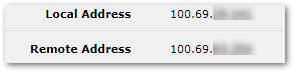
in whatsmyip is 115.135.x.x but in mikrotik pppoe interface it's user posted image
soonwai
post Oct 7 2021, 02:01 AM


********
All Stars
11,456 posts

Joined: Oct 2007
From: KL


QUOTE(firadaboss @ Oct 7 2021, 12:42 AM)
in whatsmyip is 115.135.x.x but in mikrotik pppoe interface it's user posted image
*
Ahh. Yes, you’re being assigned private IP. 100.69.x.x is inside 100.64.0.0/10.

This post has been edited by soonwai: Oct 7 2021, 02:05 AM
firadaboss
post Oct 7 2021, 02:05 AM

New Member
*
Junior Member
30 posts

Joined: May 2006


QUOTE(firadaboss @ Oct 7 2021, 12:42 AM)
in whatsmyip is 115.135.x.x but in mikrotik pppoe interface it's user posted image
*
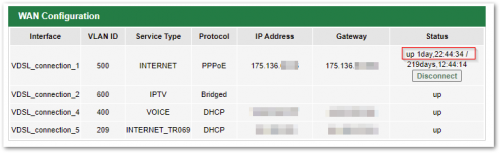
Meanwhile, I just realized the IP address on my other account is now seems to be public.
I gave up on setting up VPN in this location because it never work. Turns out the IP was 'private' all this while.

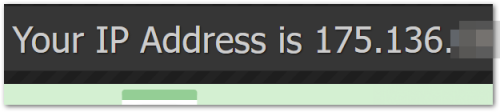
The IP address in this other location, in my TM DSL(copper) modem router is currently the same as in whatsmyip.
user posted image

Maybe they released the wrong port of mine.

user posted image

This post has been edited by firadaboss: Oct 7 2021, 02:07 AM

413 Pages « < 242 243 244 245 246 > » Top
Topic ClosedOptions
 

Change to:
| Lo-Fi Version
0.0227sec    0.23    6 queries    GZIP Disabled
Time is now: 4th December 2025 - 10:35 PM