Welcome Guest ( Log In | Register )

Bump Topic Topic Closed RSS Feed

Outline · [ Standard ] · Linear+

 Official TM UniFi High Speed Broadband Thread V39, READ 1ST PAGE FOR RELEVANT WIFI INFO

views
     
firadaboss
post Oct 5 2021, 03:41 PM

New Member
*
Junior Member
30 posts

Joined: May 2006


I am unable to connect to my UniFi Home fiber at home via PPTP and IPSec VPN from outside since today. It was working fine yesterday.
I also received SMS about the service may be affected by network maintenance between 1am and 5am early morning today.
Contacted Unifi chat and they reset port for me. Then asked me to turn off modem and router for 30 seconds.
After back up, the VPN is still not connected. The traffic never reach my router.

firadaboss
post Oct 6 2021, 09:30 AM

New Member
*
Junior Member
30 posts

Joined: May 2006


QUOTE(haturaya @ Oct 5 2021, 06:59 PM)
Same fate... It happens around 2am today.

[attachmentid=11000702]
All my Mikrotik NAT receive nothing (zero byte / packet), like sitting behind one firewall  rclxub.gif  No VPNs, no web (HTTP & HTTPS) and some other custom port for my hobby.  sweat.gif

Dang I need this to be operational.

And the given IP stuck with 115.135.x.y Multiple reboot still same.
*
Unifi tech called my yesterday around 8pm (overtime?) and explain to me about the Unifi IP address assigned to me is in private range, (which means I'm behind the NAT?) hence why it is not accessible directly from outside world.
It has to be released by TM for it to be assigned with public IP. He request me to send an email with my VPN config to help@tm.com.my. I had sent a screenshot of my Mikrotik setting (below) last night around 11pm, so far no reply.
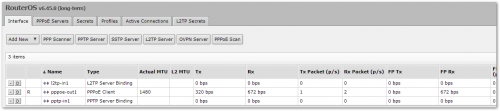
user posted image

At the same time I am getting to understand the problem here. I saw from another old thread the discussion about private IP range and public IP range assigned by TM to customers affecting this connectivity scenarios.
I understand that public IP range is a scarce resource and need to be assigned only to those unifi customers who are actually using it.
However it is not reliable for me to rely on TM to assign me those as in the future anyone with higher authority or priority might override the policy and no one might end up getting any of it.

Therefore I am researching a bit and found out about SoftEther VPN. Am going to give it a try.
Refs:
SoftEther VPN in serverfault
SoftEther VPN


firadaboss
post Oct 6 2021, 09:33 AM

New Member
*
Junior Member
30 posts

Joined: May 2006


QUOTE(heLL_bOy @ Oct 5 2021, 05:09 PM)
can you reach your vpn server? via ping ?
*
cannot
firadaboss
post Oct 6 2021, 09:34 AM

New Member
*
Junior Member
30 posts

Joined: May 2006


QUOTE(soonwai @ Oct 5 2021, 10:31 PM)
I just checked. I can connect to my L2TP server in another house running on Mikrotik also. Kajang to PJ, Unifi to Unifi.

Tried with Maxis 4G to Unifi, also ok.
*
What is your publicIP starts with?
firadaboss
post Oct 7 2021, 12:38 AM

New Member
*
Junior Member
30 posts

Joined: May 2006


QUOTE(haturaya @ Oct 6 2021, 11:09 PM)
They do now. That's the internal info that I got from someone higher up in TM.  sweat.gif  Running thin on IPv4. And new subscriber might no get any public ip at all. IPv6 to go.
*
If going for IPv6 means we all can get Public again, is this thinking correct?
firadaboss
post Oct 7 2021, 12:42 AM

New Member
*
Junior Member
30 posts

Joined: May 2006


QUOTE(soonwai @ Oct 6 2021, 10:31 PM)
Yesterday when I did the test, I was 124.82.0.0/16 and vpn was 115.132.0.0/16.

Just did a checked again. IP still same, still can connect.
*
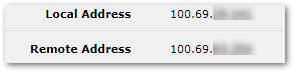
in whatsmyip is 115.135.x.x but in mikrotik pppoe interface it's user posted image
firadaboss
post Oct 7 2021, 02:05 AM

New Member
*
Junior Member
30 posts

Joined: May 2006


QUOTE(firadaboss @ Oct 7 2021, 12:42 AM)
in whatsmyip is 115.135.x.x but in mikrotik pppoe interface it's user posted image
*
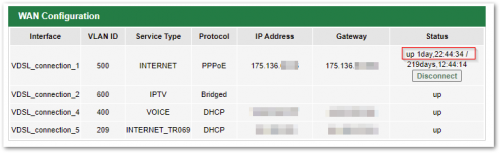
Meanwhile, I just realized the IP address on my other account is now seems to be public.
I gave up on setting up VPN in this location because it never work. Turns out the IP was 'private' all this while.

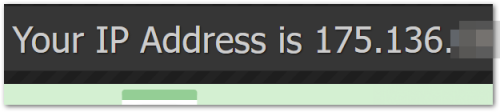
The IP address in this other location, in my TM DSL(copper) modem router is currently the same as in whatsmyip.
user posted image

Maybe they released the wrong port of mine.

user posted image

This post has been edited by firadaboss: Oct 7 2021, 02:07 AM
firadaboss
post Oct 19 2021, 08:59 PM

New Member
*
Junior Member
30 posts

Joined: May 2006


QUOTE(haturaya @ Oct 6 2021, 03:24 PM)
Keep updating about this.
*
Not sure if anyone has posted about this, while researching on CGNAT after the TM Unifi announcement of assigning private IP/meNATe'ing poor people, I discover ZeroTier.
My life has change now. Let me know if it is no good.

firadaboss
post Oct 19 2021, 11:38 PM

New Member
*
Junior Member
30 posts

Joined: May 2006


QUOTE(go626201 @ Oct 19 2021, 09:56 PM)
Currently still consider as good thing as it is free..haha... tongue.gif
I had used zerotier for years,but i think if after changing to CGNAT ip,the data transfer will need to go through the Zerotier relay server and go to the device. (Not direct connect,and speed might slower)
if using the relay server and feels the connection not good,u might need to setup your own Moons server to use as your private zerotier relay server. (Custom android app can use self-host moons server) (Official zerotier app seems like still didn't have the settings)
*
notworthy.gif thank you for the feedback and suggestions....

ranting.gif angry of many years that have been lost due to missing out of this technology.

Topic ClosedOptions
 

Change to:
| Lo-Fi Version
0.2059sec    0.20    7 queries    GZIP Disabled
Time is now: 8th December 2025 - 08:01 AM