Welcome Guest ( Log In | Register )

Bump Topic Topic Closed RSS Feed
413 Pages « < 182 183 184 185 186 > » Bottom

Outline · [ Standard ] · Linear+

 Official TM UniFi High Speed Broadband Thread V39, READ 1ST PAGE FOR RELEVANT WIFI INFO

views
     
heLL_bOy
post Jul 14 2021, 05:27 PM

Regular
******
Senior Member
1,350 posts

Joined: Nov 2004
From: HEAVEN & HELL


QUOTE(zioburosky13 @ Jul 14 2021, 05:05 PM)
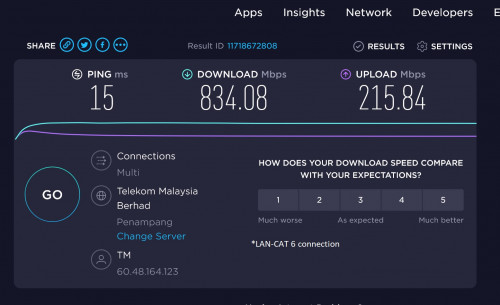
Promised speed on a cable connection.
user posted image
*
meaning no problem with ur 800Mbps. only when you download steam couldn't get full speed at certain time or day which is normal sometime problem might occur from steam server side or TM bottleneck the speed due many user downloading on that timing.

if you got VPN.. you can try what the speed you can get and do a comparison

This post has been edited by heLL_bOy: Jul 14 2021, 05:28 PM
ck0403my
post Jul 14 2021, 06:59 PM

Casual
***
Junior Member
374 posts

Joined: Jun 2005


QUOTE(YoungMan @ Jul 10 2021, 07:43 PM)
The TP-Link should be able to handle 300mbps on wired connection. Do you have any other PC or laptop to test? Or try turn off antivirus and test again just to make sure it is not the culprid.
What about the speed if test using smartphone?
Also I would like to quote this post for your reference once you receive the mesh.
*
end up i folo tm instruction lol, because i need to use more lan ports, the M4 only has 2, but i disable the wifi on the archer c1200

so far so good
PRSXFENG
post Jul 14 2021, 07:54 PM

Look at all my stars!!
*******
Senior Member
2,611 posts

Joined: Nov 2020


QUOTE(ck0403my @ Jul 14 2021, 06:59 PM)
end up i folo tm instruction lol,  because i need to use more lan ports, the M4 only has 2, but i disable the wifi on the archer c1200

so far so good
*
Still not a great way to do it, better if replace c1200, can get gigabit switch for like RM40 or so
zioburosky13
post Jul 14 2021, 07:58 PM

On my way
****
Junior Member
554 posts

Joined: Jan 2003


QUOTE(heLL_bOy @ Jul 14 2021, 05:27 PM)
meaning no problem with ur 800Mbps. only when you download steam couldn't get full speed at certain time or day which is normal sometime problem might occur from steam server side or TM bottleneck the speed due many user downloading on that timing.

if you got VPN.. you can try what the speed you can get and do a comparison
*
Same thing, still could not achieve full download speed with both methods.
user posted image
user posted image
LostAndFound
post Jul 14 2021, 08:30 PM

Look at all my stars!!
*******
Senior Member
6,266 posts

Joined: Jul 2005
From: UEP Subang Jaya


QUOTE(zioburosky13 @ Jul 14 2021, 05:12 PM)
Wonder do those who has 1Gbps get full download speed at all.
*
Why would you even want/need full download speed from a single source? High speeds are meant to cater to multiple users rather than for one user to be happy about some arbitrarily high number.
go626201
post Jul 14 2021, 10:55 PM

Regular
******
Senior Member
1,882 posts

Joined: Sep 2017
QUOTE(zioburosky13 @ Jul 14 2021, 07:58 PM)
Same thing, still could not achieve full download speed with both methods.
user posted image
user posted image
*
With Steam,It always download compressed file,and extract at the same time,so if you see your harddisk usage hit almost full which mean the throttle is on your harddisk or CPU.
I can confirm TM can get full speed from steam server but not every time as every game file is not same.
And if you confirm your harddisk usage not full,then u can try to change the download region from the Steam setting.
Sometime local steam server is highly utilized,and speed might not get full,and u can try to change to SG or other region like HK or JP.
And suddenly u might see the speed higher.
But for this sometimes will not faster as the data is from international not local or SG steam cache server.So peak hour might also slow.

Normally for high speed (100+mbps),i dont think all vpn can hit high speed,as those vpn server only got 1G port,and it might still shared by multiple user.
But 10G vpn server might not having this problem,but of course the problem will be on between TM and the vpn server.

This post has been edited by go626201: Jul 14 2021, 10:58 PM
ck0403my
post Jul 14 2021, 10:58 PM

Casual
***
Junior Member
374 posts

Joined: Jun 2005


QUOTE(PRSXFENG @ Jul 14 2021, 07:54 PM)
Still not a great way to do it, better if replace c1200, can get gigabit switch for like RM40 or so
*
thanks for the suggestion, will try to get one from shopee thumbup.gif
badai
post Jul 15 2021, 10:53 AM

Enthusiast
*****
Senior Member
998 posts

Joined: Jan 2003
QUOTE(YoungMan @ Jul 14 2021, 02:16 PM)
Thanks for info. So no way to request public IP?
Not all. Maxis and Celcom can request for public IP after installation.
*
how long would it take after request? any additional cost?
aniq8676
post Jul 15 2021, 11:02 AM

Regular
******
Senior Member
1,524 posts

Joined: Dec 2020
From: Perak


QUOTE(badai @ Jul 15 2021, 10:53 AM)
how long would it take after request? any additional cost?
*
For all Unifi users, Public IP is assigned by default.
For Maxis users have to wait within 2-3 working days after request. While for Celcom is not sure.
BenYeeHua
post Jul 15 2021, 12:03 PM

Regular
******
Senior Member
1,873 posts

Joined: Nov 2010


QUOTE(comet2232 @ Jul 14 2021, 11:43 AM)
I was offered by TM unifi (via their calling me ) yesterday and I took up their offer immediately.
RM 139 - 300mbps , No Mesh, No Unifi TV

This is after I emailed them 2 days earlier about porting to Digi Home Fibre 300Mbps from Unifi 100Mbps
*
And I got RM 129 100M and RM 1x9(forgot tongue.gif ) 100M+UniFi TV, nearly loled when I hear nothing changed and stopped the conversation at UniFi TV package, I thought it gonna be like 100M with RM 99 or RM 109, then okay with it. biggrin.gif

I could be wrong la, because she got saying something like RM 139 300M at the beginning, then suddenly talking about 100M...

While for me, I always weak at hearing conversation but good at reading words, and so far, I only need 100M instead of 300M, because
1. My laptop adapter got issues, unstable with 1Gbps but okay with 100M.
2. WiFi interference is a bit heavy here.
3. No sharing of WiFi, price is target on family la
4. Only requiring high speed network 1% of month, like downloading Windows ISO or GitHub or 4K live stream, which is rare and acceptable solution will be lower price of 100M... sweat.gif

Last 2 months also contacting me about UniFi Mobile, look like their big data is not that great, or getting limited by MCMC customer data law, because I got Prepaid UniFi Mobile, if I want postpaid sure already register la... tongue.gif


-----
Guess they are trying to renew my contract as well, because TM is pulling lot of fiber in Melaka, they just got lorry outside my Taman for lot of fiber putting there.

Can be TNB allo scaring them, because Melaka is first one got smart meter, which means TNB fiber is everywhere in Melaka, just, TM is faster and having higher coverage, and Time already covering lot of "new" apartment around here, after that, TNB allo showing out a bit late.... hmm.gif


---
Anyways, hope they provide better price with 100M la, I guess they are pushing 300M because they know, lot of people staying with family, WFM, and suitable with 300M(video ma).

I still think 100M is better and suitable with noob/average people, because not many people know about IT, will default to whatever the router default setup, which causing heavy WiFi interference and not even reaching 300M with WiFi 5Ghz single antenna on their smartphone or old laptop.

In history with RM 159 300M, to reaching 300M, you need
1. 1Gbps with cable, yeah~
2. Need tweaking the WiFi channel, which kicked out lot of normal people by WiFi interference, and people mostly at home too...
3. After tweaking, need your WiFi device supporting of 2 antenna for MU-MIMO, to counter WiFi interference over 80MHz, better with 40MHz.
4. Wall, yes, wall is reducing the speed
5. Having 2 router, 1 for 5Ghz 36 channel, another for 5Gzh 149 channel, having different people's device connecting to each routers, while the highest speed still connect directly with cable, load-balance la thumbsup.gif

The interesting with 300M is, you know your smartphone gonna limited by WiFi speed to like 150-200M, and left your computer with 100M at least and lowest latency, which is good feeling, at the expensive of price. nod.gif


So, hope they really promoting 100M with better price la, because of WiFi interference and 1 antenna with most smartphone, not gonna think it will be good experience with normal people/family... sweat.gif

heLL_bOy
post Jul 15 2021, 02:03 PM

Regular
******
Senior Member
1,350 posts

Joined: Nov 2004
From: HEAVEN & HELL


QUOTE(zioburosky13 @ Jul 14 2021, 07:58 PM)
Same thing, still could not achieve full download speed with both methods.
user posted image
user posted image
*
try after 1230am see whether any changed?


simmarjit
post Jul 15 2021, 02:45 PM

Enthusiast
*****
Junior Member
980 posts

Joined: Dec 2011


QUOTE(zioburosky13 @ Jul 14 2021, 07:58 PM)
Same thing, still could not achieve full download speed with both methods.
user posted image
user posted image
*
In the settings you can change your download region, change to AUS or NZ area, you will get much better speeds.
YoungMan
post Jul 15 2021, 02:45 PM

Look at all my stars!!
*******
Senior Member
6,818 posts

Joined: Oct 2008
From: Kuala Lumpur


QUOTE(badai @ Jul 15 2021, 11:53 AM)
how long would it take after request? any additional cost?
*
For Maxis it is within the same day. Not sure about Celcom.
zioburosky13
post Jul 15 2021, 07:44 PM

On my way
****
Junior Member
554 posts

Joined: Jan 2003


Update on the STeam download speed eh, test.

user posted image
user posted image

Full speed in the morning, roughly 50% of the promised speed in the evening. Guess Tmnet is still throttling now
zioburosky13
post Jul 15 2021, 07:46 PM

On my way
****
Junior Member
554 posts

Joined: Jan 2003


QUOTE(simmarjit @ Jul 15 2021, 02:45 PM)
In the settings you can change your download region, change to AUS or NZ area, you will get much better speeds.
*
Let's see how it will be next time. Low on storage space at the moment. Lol.
go626201
post Jul 15 2021, 08:35 PM

Regular
******
Senior Member
1,882 posts

Joined: Sep 2017
QUOTE(zioburosky13 @ Jul 15 2021, 07:44 PM)
Update on the STeam download speed eh, test.

user posted image
user posted image

Full speed in the morning, roughly 50% of the promised speed in the evening. Guess Tmnet is still throttling now
*
Did you check your harddisk usage when download the steam game?
Sometimes your pc doing other thing will causing harddisk slow at that time.

This post has been edited by go626201: Jul 15 2021, 08:36 PM
sadlyfalways
post Jul 16 2021, 12:09 AM

Regular
******
Senior Member
1,185 posts

Joined: Nov 2020
Hello everyone! just want to ask, did tm stop deep packet inspection recently? i found i am able to access "certain websites" (ph, xvid) again without vpn or secure DNS. google dns on router level enough
jhleo1
post Jul 16 2021, 12:30 AM

Look at all my stars!!
*******
Senior Member
4,382 posts

Joined: Jan 2003
Ya your are right. No idea what TM did.

QUOTE(sadlyfalways @ Jul 16 2021, 12:09 AM)
Hello everyone! just want to ask, did tm stop deep packet inspection recently? i found i am able to access "certain websites" (ph, xvid) again without vpn or secure DNS. google dns on router level enough
*
twice1020
post Jul 16 2021, 12:35 AM

Getting Started
**
Junior Member
109 posts

Joined: Apr 2020
QUOTE(sadlyfalways @ Jul 16 2021, 12:09 AM)
Hello everyone! just want to ask, did tm stop deep packet inspection recently? i found i am able to access "certain websites" (ph, xvid) again without vpn or secure DNS. google dns on router level enough
*
they forgot to blackhole the ip maybe?
sHawTY
post Jul 16 2021, 01:58 AM

Frequent Reporter
********
All Stars
14,909 posts

Joined: Jul 2005

UniFi is down?

413 Pages « < 182 183 184 185 186 > » Top
Topic ClosedOptions
 

Change to:
| Lo-Fi Version
0.0392sec    0.36    6 queries    GZIP Disabled
Time is now: 15th December 2025 - 05:22 PM