Welcome Guest ( Log In | Register )

Bump Topic Topic Closed RSS Feed
413 Pages « < 109 110 111 112 113 > » Bottom

Outline · [ Standard ] · Linear+

 Official TM UniFi High Speed Broadband Thread V39, READ 1ST PAGE FOR RELEVANT WIFI INFO

views
     
SUSXXXOOOXXXOOO
post Apr 19 2021, 08:32 PM

Regular
******
Senior Member
1,471 posts

Joined: Apr 2019
QUOTE(aniq8676 @ Apr 19 2021, 08:19 PM)
TM is now making a promotion by giving away a 42inch LCD TV or Samsung Galaxy Tab A for free to any user from another ISP who moves to Unifi (make sure the old ISP account is still active)
*
going for that ... just not sure 30m or 100m ... hahhah
RiriRuruRara
post Apr 19 2021, 09:36 PM

Regular
******
Senior Member
1,011 posts

Joined: Aug 2014


Anyone keep losing internet connection??? Keep happening since after 8pm like that..
Sam Leong
post Apr 19 2021, 09:56 PM

On my way
****
Junior Member
679 posts

Joined: Mar 2016


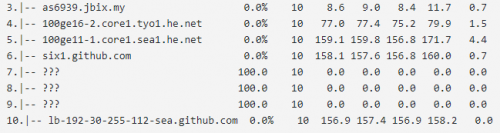
Anyone notice Github official site routed to US Github?
Terrible experience on US Github through AMS-IX and Zayo
I tot Github will auto routed to SG and JP for APAC Users?
user posted image
https://share.pingplotter.com/Qq5c418sy2S
Sam Leong
post Apr 19 2021, 10:05 PM

On my way
****
Junior Member
679 posts

Joined: Mar 2016


QUOTE(Sam Leong @ Apr 19 2021, 09:56 PM)
Anyone notice Github official site routed to US Github?
Terrible experience on US Github through AMS-IX and Zayo
I tot Github will auto routed to SG and JP for APAC Users?
user posted image
https://share.pingplotter.com/Qq5c418sy2S
*
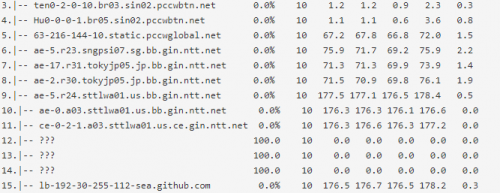
Looks like the samething that like AWS US last time
user posted imagehttps://i.imgur.com/JjZPK1Z.png
https://share.pingplotter.com/DupFyZUruZd
XeactorZ
post Apr 19 2021, 10:34 PM

♥ PandaDog ♥
*********
All Stars
31,608 posts

Joined: Aug 2010
QUOTE(RiriRuruRara @ Apr 19 2021, 09:36 PM)
Anyone keep losing internet connection??? Keep happening since after 8pm like that..
*
I didn't facing any internet connection
heLL_bOy
post Apr 19 2021, 11:05 PM

Regular
******
Senior Member
1,350 posts

Joined: Nov 2004
From: HEAVEN & HELL


QUOTE(Sam Leong @ Apr 19 2021, 10:05 PM)
Looks like the samething that like AWS US last time
user posted imagehttps://i.imgur.com/JjZPK1Z.png
https://share.pingplotter.com/DupFyZUruZd
*
this github ip belong to USA Seattle region.

TM using ZAYO transit is only via NL only and its been long time ago. usually high ping on this transit whenever goes to USA sometimes even going to EU also would be the same.


MY server ping latency
user posted image


SG server ping latency
user posted image

This post has been edited by heLL_bOy: Apr 19 2021, 11:06 PM
heLL_bOy
post Apr 19 2021, 11:07 PM

Regular
******
Senior Member
1,350 posts

Joined: Nov 2004
From: HEAVEN & HELL


QUOTE(RiriRuruRara @ Apr 19 2021, 09:36 PM)
Anyone keep losing internet connection??? Keep happening since after 8pm like that..
*
no issue here.
coolguy_0925
post Apr 19 2021, 11:24 PM

Look at all my stars!!
*******
Senior Member
4,549 posts

Joined: Jan 2003
QUOTE(RiriRuruRara @ Apr 19 2021, 09:36 PM)
Anyone keep losing internet connection??? Keep happening since after 8pm like that..
*
So far so good here
klangboy83
post Apr 19 2021, 11:49 PM

Casual
***
Junior Member
438 posts

Joined: Apr 2007
QUOTE(YoungMan @ Apr 19 2021, 07:48 PM)
Don't need other router. Just connect the first unit to BTU and setup your Unifi connection.
Check if your UniFi TV can connect using wireless? If it is those 4k box, can use Wifi.
Both Maxis and Unifi same price if you take the 30mbps or 100mbps. Check either Celcom or Digi if you don't intend to go 100mbps plan.
*
My unifi tv box can connect to wireless, but when I try to play tv, it shows no ethernet connection (black screen with crossed out ethernet icon), even though in settings, it says connected to wireless already.
coolguy_0925
post Apr 19 2021, 11:57 PM

Look at all my stars!!
*******
Senior Member
4,549 posts

Joined: Jan 2003
QUOTE(klangboy83 @ Apr 19 2021, 11:49 PM)
My unifi tv box can connect to wireless, but when I try to play tv, it shows no ethernet connection (black screen with crossed out ethernet icon), even though in settings, it says connected to wireless already.
*
If your STB is the white color one, then the only way is using LAN cable

Even if it is connected to wifi it won't work for unifi tv
RiriRuruRara
post Apr 20 2021, 09:37 AM

Regular
******
Senior Member
1,011 posts

Joined: Aug 2014


QUOTE(XeactorZ @ Apr 19 2021, 10:34 PM)
I didn't facing any internet connection
*
QUOTE(heLL_bOy @ Apr 19 2021, 11:07 PM)
no issue here.
*
QUOTE(coolguy_0925 @ Apr 19 2021, 11:24 PM)
So far so good here
*
Do you guys happen to know what could be causing my Internet to keep losing connection frequently? I called tm they already did something on their side but still same. They want to send technician over but the covid cases in my area is high so not really keen on them coming over.
heLL_bOy
post Apr 20 2021, 01:09 PM

Regular
******
Senior Member
1,350 posts

Joined: Nov 2004
From: HEAVEN & HELL


QUOTE(RiriRuruRara @ Apr 20 2021, 09:37 AM)
Do you guys happen to know what could be causing my Internet to keep losing connection frequently? I called tm they already did something on their side but still same. They want to send technician over but the covid cases in my area is high so not really keen on them coming over.
*
your disconnection is from modem or router?


HariszKilz
post Apr 20 2021, 04:15 PM

Getting Started
**
Junior Member
239 posts

Joined: Feb 2016


QUOTE(RiriRuruRara @ Apr 20 2021, 09:37 AM)
Do you guys happen to know what could be causing my Internet to keep losing connection frequently? I called tm they already did something on their side but still same. They want to send technician over but the covid cases in my area is high so not really keen on them coming over.
*
For me, it was my router's fault. The TP Link AC1200. It keeps restarting on it's own and DC around 8PM and 2AM in the morning. I changed my router already. Hopefully it will not happen after this. If you use the same router as mine previously, I suggest you change to another router.
RiriRuruRara
post Apr 20 2021, 06:08 PM

Regular
******
Senior Member
1,011 posts

Joined: Aug 2014


QUOTE(heLL_bOy @ Apr 20 2021, 01:09 PM)
your disconnection is from modem or router?
*
Sorry I also don't know this. But I when the dc happens I see router lights either
1.1st light from left blinking then the 3 other light slowly appeared.
2. First 3 lights from left are on but the 4th light is red. For this case need to turn off router and modem manually then only it get solved.

QUOTE(HariszKilz @ Apr 20 2021, 04:15 PM)
For me, it was my router's fault. The TP Link AC1200. It keeps restarting on it's own and DC around 8PM and 2AM in the morning. I changed my router already. Hopefully it will not happen after this. If you use the same router as mine previously, I suggest you change to another router.
*
Yes I am using that router that you mention. Can I just buy a better one from tm then they come and fix and install??
Bcs the IT shops near my house all unfriendly money face people, don't want to do business with them.
coolguy_0925
post Apr 20 2021, 06:13 PM

Look at all my stars!!
*******
Senior Member
4,549 posts

Joined: Jan 2003
QUOTE(RiriRuruRara @ Apr 20 2021, 06:08 PM)
Sorry I also don't know this. But I when the dc happens I see router lights either
1.1st light from left blinking then the 3 other light slowly appeared.
2. First 3 lights from left are on but the 4th light is red. For this case need to turn off router and modem manually then only it get solved.
Yes I am using that router that you mention. Can I just buy a better one from tm then they come and fix and install??
Bcs the IT shops near my house all unfriendly money face people, don't want to do business with them.
*
err buying from TM again is like you're back to square one

No other shops nearby? Or buy online? Or you are afraid you are not familiar with setting up the router?
enduser
post Apr 20 2021, 06:38 PM

Regular
******
Senior Member
1,280 posts

Joined: Jan 2003
QUOTE(RiriRuruRara @ Apr 20 2021, 06:08 PM)
Sorry I . Can I just buy a better one from tm then they come and fix and install??
Bcs the IT shops near my house all unfriendly money face people, don't want to do business with them.
*
Dun ever get tm to replace ur router ,u will be tied for another 24month contract

Get from lazada or shoppe

For router selection read here https://www.blacktubi.com/
XeactorZ
post Apr 20 2021, 06:43 PM

♥ PandaDog ♥
*********
All Stars
31,608 posts

Joined: Aug 2010
QUOTE(RiriRuruRara @ Apr 20 2021, 09:37 AM)
Do you guys happen to know what could be causing my Internet to keep losing connection frequently? I called tm they already did something on their side but still same. They want to send technician over but the covid cases in my area is high so not really keen on them coming over.
*
you facing disconnect issue is on wifi or lan cable?
ellim33
post Apr 20 2021, 06:46 PM

New Member
*
Newbie
29 posts

Joined: Oct 2018


QUOTE(RiriRuruRara @ Apr 20 2021, 06:08 PM)
Sorry I also don't know this. But I when the dc happens I see router lights either
1.1st light from left blinking then the 3 other light slowly appeared.
2. First 3 lights from left are on but the 4th light is red. For this case need to turn off router and modem manually then only it get solved.
Yes I am using that router that you mention. Can I just buy a better one from tm then they come and fix and install??
Bcs the IT shops near my house all unfriendly money face people, don't want to do business with them.
*
I suspect the ac adapter is not good. Please try with other ac adapter with same voltage rating, current rating can be about the same or higher.
aniq8676
post Apr 20 2021, 06:53 PM

Regular
******
Senior Member
1,524 posts

Joined: Dec 2020
From: Perak


QUOTE(RiriRuruRara @ Apr 20 2021, 06:08 PM)
Sorry I also don't know this. But I when the dc happens I see router lights either
1.1st light from left blinking then the 3 other light slowly appeared.
2. First 3 lights from left are on but the 4th light is red. For this case need to turn off router and modem manually then only it get solved.
Yes I am using that router that you mention. Can I just buy a better one from tm then they come and fix and install??
Bcs the IT shops near my house all unfriendly money face people, don't want to do business with them.
*
Yes, you can buy a new router through TM for RM188 without any contract renewal. But the type of router is given randomly depending on the stock available in an area.

The type of router that will be given to you through randomly

NETIS DL4480V (Unifi firmware)
AZtech DS244WSGV (Unifi firmware)
TP-LINK Archer C1200 (Unifi firmware)
TP-LINK Archer C6 (TP-Link firmware)
D-LINK DIR-842 (Unifi firmware)
D-LINK Covr-1100 (D-Link firmware)
D-LINK DIR-825M (D-Link firmware)
fiberhome sr120-a (Fiberhome firmware)
ZTE Unknown model (ZTE firmware)

I suggest you buy a router from outside

HariszKilz
post Apr 20 2021, 07:06 PM

Getting Started
**
Junior Member
239 posts

Joined: Feb 2016


[/quote]
Yes I am using that router that you mention. Can I just buy a better one from tm then they come and fix and install??
Bcs the IT shops near my house all unfriendly money face people, don't want to do business with them.

I recommend you if you buy through Shopee or Lazada if you can wait a bit. I bought TP Link AX20 at Shopee to replace the router and it works fine for now and speed still remains the same but it's a bit stable and it's also Wifi 6. If you don't want to spend much on router, AX20 is already enough if you're planning to change it. I really don't recommend you to change through TM as people already mentioned it, their router is a bit 'kayu' and the same thing may happen again. Just buy outside TM.

This post has been edited by HariszKilz: Apr 20 2021, 07:06 PM

413 Pages « < 109 110 111 112 113 > » Top
Topic ClosedOptions
 

Change to:
| Lo-Fi Version
0.0464sec    0.41    6 queries    GZIP Disabled
Time is now: 13th December 2025 - 03:18 AM