Welcome Guest ( Log In | Register )

Bump Topic Topic Closed RSS Feed

Outline · [ Standard ] · Linear+

 Official TM UniFi High Speed Broadband Thread V39, READ 1ST PAGE FOR RELEVANT WIFI INFO

views
     
HariszKilz
post Jan 19 2021, 12:03 PM

Getting Started
**
Junior Member
239 posts

Joined: Feb 2016


QUOTE(syaidimhnfz @ Jan 18 2021, 06:08 PM)
user posted image

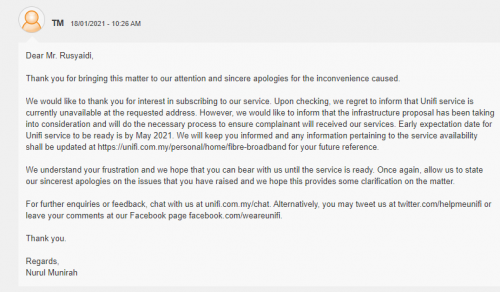
hey guys , does this mean Unifi is coming to my residence?? usually i was replied with the generic Unifi is unavailable and infrastructure proposal have been escalated to upper management without any ETA. but today , i got this response (image) complete with an ETA. i don't wanna get my hopes up. really tough working with 512kbps upload speed here.
*
Mine also replied like this when I reported to MCMC last year. They said that the infrastructure will be available in March 2021. Around November, I already saw they started pulling Fibre to the pole and last week, all DP's are already up on the pole in my taman. Now, it's waiting for activation. The contractor said that everyone can use it within next month. That's a good news. So, probably yours will be like that too. Keep an eye on your telephone pole.
HariszKilz
post Feb 4 2021, 10:40 PM

Getting Started
**
Junior Member
239 posts

Joined: Feb 2016


QUOTE(AjkR06 @ Feb 4 2021, 06:22 PM)
After continuously complaining to MCMC for about 5 years, finally TM brings fibre to my rural taman.

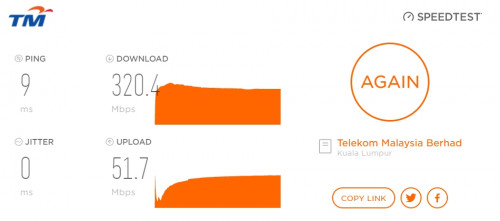
Took 300mbps package for RM199/month and managed to installed it yesterday.

Expensive but no other choice available other than Unifi here  sweat.gif

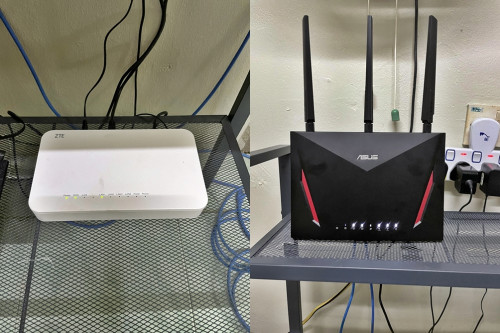
Got the really cheap looking 'FibreHome' router and ZTE BTU.

Nevermind, I got my own Asus AC-86U to replace the 'FibreHome' one  biggrin.gif 

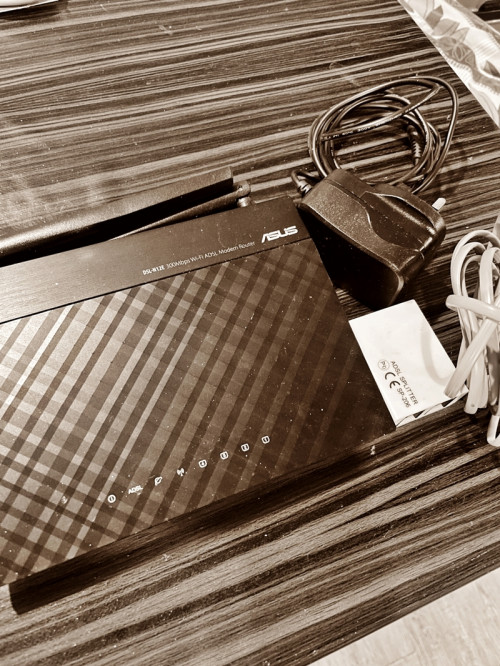
The difference from Streamyx 8mbps ADSL is like day and night

Streamyx has been automatically terminated today and my phone line also transferred from PSTN to VoIP.

user posted image

user posted image

user posted image
*
Same. Looks like MCMC did the job. I just started complaining last year and they did brought Fibre into my taman. Wish I knew this earlier. Anyway, how long would they activate your DP for installation ? Mine is already a month after finish installing all the Fibre component in my taman (DP, FDC, Joint) and until now still not activated yet. I already reached TM for the status and speed up the process since this WFH and people need fast internet to work and they said they will acknowledge it and until now, no news like 2 weeks now. I asked TMPoint and they said the guy who supposed to verify the DP etc still not showing up until today. What a joke sia this TM in my area. Haizzz
HariszKilz
post Apr 10 2021, 02:40 PM

Getting Started
**
Junior Member
239 posts

Joined: Feb 2016


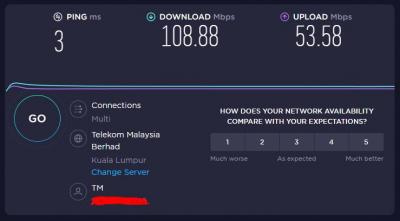
Guys, I want to ask something. Last month I upgraded from Streamyx to Unifi since it's finally available in my taman but yesterday, my speed got downgraded from 100Mbps to 1Mbps suddenly but the upload speed remains 50Mbps. So, I contacted TM and asked them to refresh but still the same and suddenly it is fixed around 2AM like that so I contacted them back and they said it's probably the router. The router probably could not handle high traffic and usage. I'm currently using the TP Link AC1200 provided by TM. They asked me to upgrade to Wifi 6 router their chipset is much more better and can handle heavy usage. Is it true tho that it's the router's fault ? I really want to upgrade anyway but asking for a confirmation first.

This post has been edited by HariszKilz: Apr 10 2021, 02:41 PM


Attached thumbnail(s)
Attached Image Attached Image
HariszKilz
post Apr 10 2021, 03:33 PM

Getting Started
**
Junior Member
239 posts

Joined: Feb 2016


QUOTE(ideaplus @ Apr 10 2021, 02:48 PM)
I don't think the speed is due to router. As what you can see from speed test, ur line drop to 1Mbps and ping increased intil 100ms++. Probably is the line. Non related with wifi 5 or 6 router issue tongue.gif
*
QUOTE(izhamsatria @ Apr 10 2021, 02:50 PM)
Not router's problem. TM rerouted the traffic for whom connected via ibse02.bat (BATU). My kampung is also affected but problem resolved around the same time.
*
QUOTE(yongtjunkit @ Apr 10 2021, 02:54 PM)
If no one is using the internet/wifi at that time then it shouldn't go down all the way to 1 mbps by itself.
*
Thanks for the replies guys. I think that it was TM fault's too because my friend in the same taman also facing the same problem like me but he didn't even use internet that much. I just hoarded around 1.2TB usage this month. That's why I think that the CS might be right because of the usage. Strange that TM didn't mentioned a thing about their rerouting. Anyway, do you guys think investing for a Wifi-6 router is good ? I'm currently aiming for Asus AX55. My house is a single storey house and only 4 people currently using the wifi. Only me is hoarding the wifi at maximum usage. Others just use Youtube and Netflix only.
HariszKilz
post Apr 10 2021, 10:45 PM

Getting Started
**
Junior Member
239 posts

Joined: Feb 2016


QUOTE(jacktiew @ Apr 10 2021, 08:31 PM)
I used average 2TB per month. No issue at all. wink.gif

If you're using stock router than just replace it, otherwise you won't see much difference unless you have devices that support wifi 6.
*
I see. I don't really mind the Wifi 6 since none of my device supports it but I plan to upgrade to an AX PCIE card soon. I see that it has a good chipset and ram compare to the one TM provided. Also, the AC1200 turns on very very slow. Huhuhu

QUOTE(xCryptik @ Apr 10 2021, 10:09 PM)
Usage?!
I want to purchase AX55 just because of the looks but don't have usb ports.
AX56U have usb port but looks ugly.  blush.gif
*
Yep. My usage is pretty high this month since I formatted my PC and need to redownload everything. Hence the 1.2TB usage. Usually it's only around an average of 500GB per month.
You're right about the USB port but I don't mind because I never bother to use it ever since the Streamyx days. AX56U design disturbs me a bit and the price is very expensive. Add a little bit and you could get an Asus Tuf AX3000.
HariszKilz
post Apr 20 2021, 04:15 PM

Getting Started
**
Junior Member
239 posts

Joined: Feb 2016


QUOTE(RiriRuruRara @ Apr 20 2021, 09:37 AM)
Do you guys happen to know what could be causing my Internet to keep losing connection frequently? I called tm they already did something on their side but still same. They want to send technician over but the covid cases in my area is high so not really keen on them coming over.
*
For me, it was my router's fault. The TP Link AC1200. It keeps restarting on it's own and DC around 8PM and 2AM in the morning. I changed my router already. Hopefully it will not happen after this. If you use the same router as mine previously, I suggest you change to another router.
HariszKilz
post Apr 20 2021, 07:06 PM

Getting Started
**
Junior Member
239 posts

Joined: Feb 2016


[/quote]
Yes I am using that router that you mention. Can I just buy a better one from tm then they come and fix and install??
Bcs the IT shops near my house all unfriendly money face people, don't want to do business with them.

I recommend you if you buy through Shopee or Lazada if you can wait a bit. I bought TP Link AX20 at Shopee to replace the router and it works fine for now and speed still remains the same but it's a bit stable and it's also Wifi 6. If you don't want to spend much on router, AX20 is already enough if you're planning to change it. I really don't recommend you to change through TM as people already mentioned it, their router is a bit 'kayu' and the same thing may happen again. Just buy outside TM.

This post has been edited by HariszKilz: Apr 20 2021, 07:06 PM
HariszKilz
post Apr 21 2021, 12:42 AM

Getting Started
**
Junior Member
239 posts

Joined: Feb 2016


[quote=RiriRuruRara,Apr 20 2021, 10:38 PM]
Yes I am using that router that you mention. Can I just buy a better one from tm then they come and fix and install??
Bcs the IT shops near my house all unfriendly money face people, don't want to do business with them.

I recommend you if you buy through Shopee or Lazada if you can wait a bit. I bought TP Link AX20 at Shopee to replace the router and it works fine for now and speed still remains the same but it's a bit stable and it's also Wifi 6. If you don't want to spend much on router, AX20 is already enough if you're planning to change it. I really don't recommend you to change through TM as people already mentioned it, their router is a bit 'kayu' and the same thing may happen again. Just buy outside TM.
*

[/quote]
Thanks everyone for replying, too many people to quote.
I will buy myself since everyone recommend it. But me and my entire family are not tech savy people, so installing it will be a problem if need to do a lot of things..

Surprised that all the routers tm are selling are not up to standard...
*

[/quote]

TM router is a basic router. It only provides connection to the internet. The installer once mentioned if you want more than that, need to upgrade to a better router.

HariszKilz
post Apr 21 2021, 12:44 AM

Getting Started
**
Junior Member
239 posts

Joined: Feb 2016


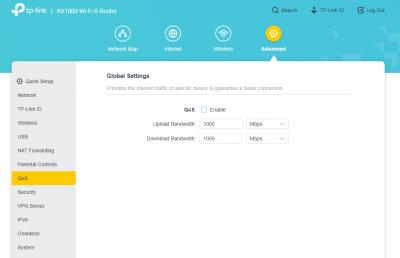
Guys. I want to asked. What is this QoS thing ? I never turn on QoS on my router and yet this thing is here and this seems to make my connection lost for like 10 seconds like that. Is it coming from the BTU ?


Attached image(s)
Attached Image
HariszKilz
post Apr 21 2021, 03:01 PM

Getting Started
**
Junior Member
239 posts

Joined: Feb 2016


QUOTE(SilentVampire @ Apr 21 2021, 10:09 AM)
It is coming from the router. You must have QoS enabled. QoS is Quality of Service. Basically, it prioritises certain traffic such as gaming, voice, or video, based on your preference. Try to check if you have it enabled somehow.
*
I checked it and I found that it's turned off. Kinda weird that is suddenly in my log when it's off.


Attached thumbnail(s)
Attached Image

Topic ClosedOptions
 

Change to:
| Lo-Fi Version
0.2371sec    0.86    7 queries    GZIP Disabled
Time is now: 9th December 2025 - 10:40 PM