

QUOTE(sHawTY @ Mar 28 2021, 03:19 AM)
You didn't answer my 2nd question

my pc more than enough 
Official TM UniFi High Speed Broadband Thread V39, READ 1ST PAGE FOR RELEVANT WIFI INFO
|
|
 Mar 28 2021, 08:09 AM Mar 28 2021, 08:09 AM
|
 
Senior Member
4,480 posts Joined: Jan 2003 From: The capital of Soviet Sarawak - Pusak City   
|
QUOTE(sHawTY @ Mar 28 2021, 03:19 AM) You didn't answer my 2nd question my pc more than enough |
|
|
|
|
|
Mar 28 2021, 09:05 AM
|

Senior Member
1,524 posts Joined: Dec 2020 From: Perak
|
QUOTE(Lescotesco @ Mar 28 2021, 02:58 AM) guys finally i got my deco m9 plus, but when i want to speed test using lan cable the 2nd port is not working even i had configure it with custom profile, 500 for vlan tagging and didnt not switch on the iptv option. how to use the second port for lan if i dont intend to use unifi tv? 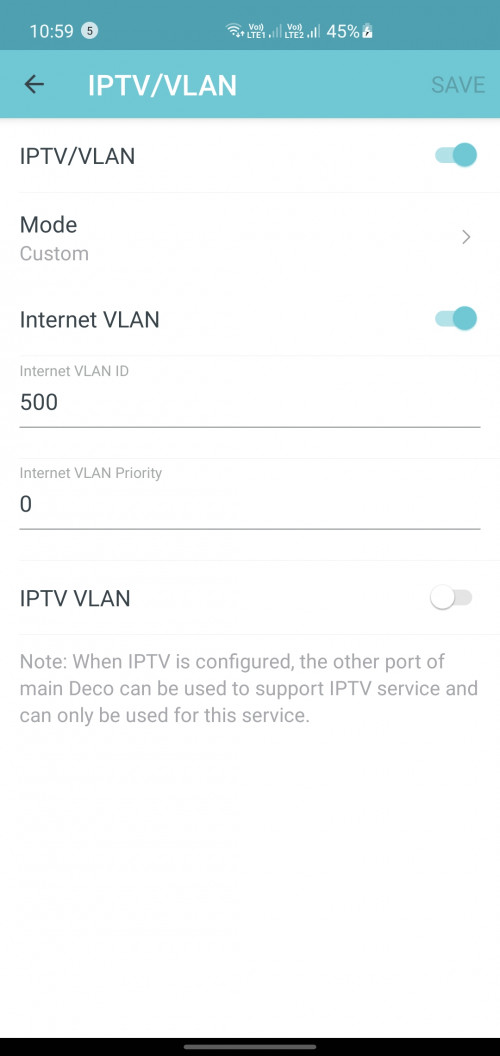 have you tried another deco ? have you tried update latest firmware ? |
|
|
Mar 28 2021, 10:55 AM
|
|
Junior Member
231 posts Joined: Feb 2019
|
QUOTE(aniq8676 @ Mar 28 2021, 09:05 AM) have you tried another deco ? have you tried update latest firmware ? 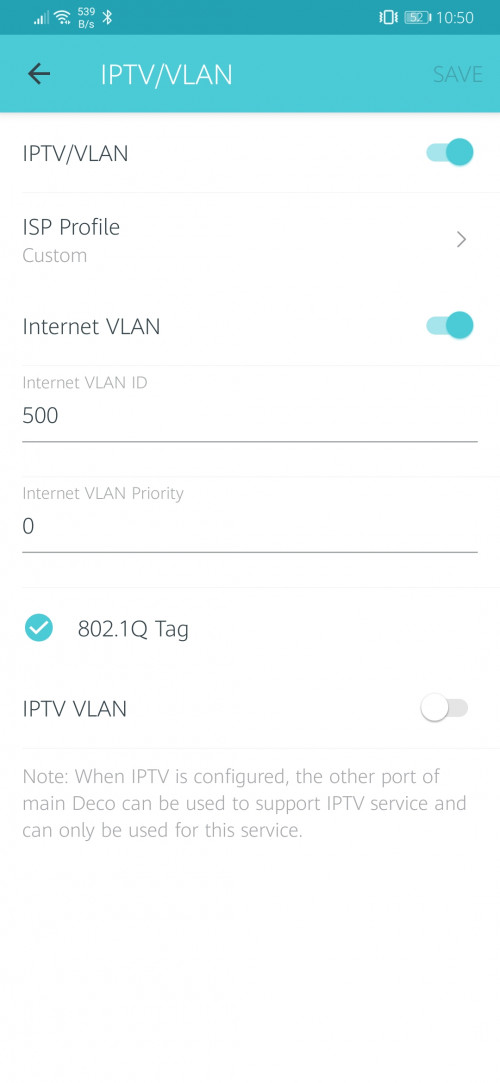 |
|
|
Mar 28 2021, 10:56 AM
Show posts by this member only | IPv6 | Post
#1844
|

Senior Member
4,454 posts Joined: Apr 2006
|
Anyone here using usenet?
Can you get max speed when downloading from newsgroup? |
|
|
Mar 28 2021, 10:57 AM
Show posts by this member only | IPv6 | Post
#1845
|

Senior Member
2,570 posts Joined: Jun 2006
|
QUOTE(sHawTY @ Mar 23 2021, 09:19 PM) That's why. Crappy routers Good speed there!Also what is the specs of the computer that you use to do the speedtest? Computers with very slow processor & very slow storage such as HDD won't get you full 800Mb/s This is my speed on ASUS GT-AC5300 on CAT 7 cable  Below is my speed on Wi-Fi. 15 meter away & behind 2 walls  I am upgrading my router from Apple AirPort Extreme to ax11000 by ASUS. Hope can get better wifi speed and stronger signals for connections from upstairs. |
|
|
Mar 28 2021, 12:21 PM
|
|
Junior Member
257 posts Joined: Nov 2009
|
Hi sifus here, can I know for LAN cable, is there a difference with using cat8 or cat 7 or cat 6 cable from the TM fibre port to our router/modem?
Or there is only difference when we use cat 8 from router to devices with LAN? |
|
|
|
|
|
Mar 28 2021, 12:42 PM
|

Junior Member
584 posts Joined: May 2013
|
QUOTE(ONGEDWIN @ Mar 28 2021, 01:21 PM) Hi sifus here, can I know for LAN cable, is there a difference with using cat8 or cat 7 or cat 6 cable from the TM fibre port to our router/modem? But they're using Fibre Cable?Or there is only difference when we use cat 8 from router to devices with LAN? |
|
|
Mar 28 2021, 12:45 PM
|
|
Junior Member
257 posts Joined: Nov 2009
|
QUOTE(xCryptik @ Mar 28 2021, 12:42 PM) But they're using Fibre Cable? Oh, sorry noob here 😅Just wondering. So means only cat 8 LAN cable is use from router to our other devices right? How about inside our house, there is the TM 2 ports FTTH fibreoptic terminal box, from there to our router do we need to use cat 8 LAN cable? This post has been edited by ONGEDWIN: Mar 28 2021, 12:49 PM |
|
|
Mar 28 2021, 01:00 PM
Show posts by this member only | IPv6 | Post
#1849
|
|
Senior Member
1,524 posts Joined: Dec 2020 From: Perak
|
QUOTE(ONGEDWIN @ Mar 28 2021, 12:45 PM) Oh, sorry noob here 😅 not necessary. CAT6 is enoughJust wondering. So means only cat 8 LAN cable is use from router to our other devices right? How about inside our house, there is the TM 2 ports FTTH fibreoptic terminal box, from there to our router do we need to use cat 8 LAN cable? |
|
|
Mar 28 2021, 01:20 PM
|
|
Junior Member
257 posts Joined: Nov 2009
|
QUOTE(aniq8676 @ Mar 28 2021, 01:00 PM) not necessary. CAT6 is enough I see. Ok. Understood. Thanks. |
|
|
Mar 28 2021, 09:25 PM
|

Senior Member
4,454 posts Joined: Jan 2003
|
reddit seems to be having issues today
https://istheservicedown.co.uk/status/reddit/map in case anyone wondering if their internet is having issues, seems this is a world wide problem o-O; something is up with reddit itself today. |
|
|
Mar 29 2021, 09:07 AM
|

Senior Member
6,621 posts Joined: Aug 2008 From: Malaysia 
|
QUOTE(ckimsem @ Mar 26 2021, 07:42 PM) The bill is prorated, do remember you paid first (advanced) only then you use. Yea, but then when i try to re-calculate, i cant get the figure which they macam over count :\EDIT: Nvm, lazy count d, lolz This post has been edited by TongCN: Mar 29 2021, 09:12 AM |
|
|
Mar 29 2021, 11:34 AM
|

Junior Member
382 posts Joined: Jul 2006
|
QUOTE(aniq8676 @ Mar 27 2021, 06:18 PM) special promotion for existing unifi users Yeah available, 300mbps Loyalty Super Value - RM 159 (FREE MESH) 500mbps Loyalty Super Value - RM 199 (FREE MESH) 800mbps Loyalty Super Value - RM 239 (FREE MESH) Just call 100 to get this promotion. |
|
|
|
|
|
Mar 29 2021, 02:32 PM
Show posts by this member only | IPv6 | Post
#1854
|

Junior Member
391 posts Joined: Apr 2008 From: Kuala Lumpur
|
QUOTE(aniq8676 @ Mar 23 2021, 05:38 PM) can we know, what kind of technology is used in your premises? Fiber or VDSL? There is fibre cable being run from 10th floor box to multiple units in my condo. I'm on 12th floor.to subscribe to 100mbps and above, the High-rise must have fiber optics By the way, I asked a technician here who was installing the fibre cable. He said he is charging the neighbours rm150 for cable installation. My router to the box is only 17meters away, (measured by measuring tape where the cable should run). I read that unifi includes certain length for the free installation. Is it fair to be charged rm120 (his estimate) even tho I'm only 17meter away from the box? |
|
|
Mar 29 2021, 03:57 PM
|
|
Senior Member
1,524 posts Joined: Dec 2020 From: Perak
|
QUOTE(win44 @ Mar 29 2021, 02:32 PM) There is fibre cable being run from 10th floor box to multiple units in my condo. I'm on 12th floor. Free of charge for standard installation. While for non-standard installation will be charged, depending on the installation processBy the way, I asked a technician here who was installing the fibre cable. He said he is charging the neighbours rm150 for cable installation. My router to the box is only 17meters away, (measured by measuring tape where the cable should run). I read that unifi includes certain length for the free installation. Is it fair to be charged rm120 (his estimate) even tho I'm only 17meter away from the box? |
|
|
Mar 29 2021, 06:16 PM
|
|
Junior Member
40 posts Joined: Feb 2006
|
Not sure if I have the right forum but I’m looking for some help because I’m stuck overseas get currently unable to get back to Malaysia.
Today my wife said TM visited my condo unit and upgraded the line into the apartment which I presume is fibre to allow faster speeds than VDSL. We currently have the Netis DL4480V router and I previously set up some port forwarding to access my Synology NAS which also runs the CCTV system. I cant be 100% sure but I think the router IP was set to 192.168.0.1 TM “reset” the router and now I cannot access the NAS box remotely and my wife cannot from the Lan. For starters the IP changed to 192.168.1.1 however when she changed it to 192.168.0.1 the internet didn’t work and the TM guy onsite doesn’t understand routers. 1. Is there a restriction on changing the IP to 192.168.0.1? 2. I’m guess the port forwarding rules have been wiped 3. Does the Netis box allow for remote admin? 4. Can I map the ports to another subnet? If yes then great because can access it and update the fixed IP I don’t have a manual so any help would be appreciated because I will need to talk my non tech wife through the changes from overseas. |
|
|
Mar 29 2021, 06:29 PM
Show posts by this member only | IPv6 | Post
#1857
|

Senior Member
1,878 posts Joined: Apr 2019
|
QUOTE(win44 @ Mar 29 2021, 02:32 PM) There is fibre cable being run from 10th floor box to multiple units in my condo. I'm on 12th floor. The fibre cable which runs through the common walkway area to the entry point/hole into your house from the outside wall should be free. Only from there onwards inside your house to your preferred installation point should be measured?By the way, I asked a technician here who was installing the fibre cable. He said he is charging the neighbours rm150 for cable installation. My router to the box is only 17meters away, (measured by measuring tape where the cable should run). I read that unifi includes certain length for the free installation. Is it fair to be charged rm120 (his estimate) even tho I'm only 17meter away from the box? |
|
|
Mar 29 2021, 07:36 PM
|
|
Senior Member
6,793 posts Joined: Oct 2008 From: Kuala Lumpur
|
QUOTE(Rob W @ Mar 29 2021, 07:16 PM) Not sure if I have the right forum but I’m looking for some help because I’m stuck overseas get currently unable to get back to Malaysia. Most likely the TM tech reset your router. Can try use teamviewer to remote and check first. Probably can enable remote management function and then you can remote access the router using the Unifi IP.Today my wife said TM visited my condo unit and upgraded the line into the apartment which I presume is fibre to allow faster speeds than VDSL. We currently have the Netis DL4480V router and I previously set up some port forwarding to access my Synology NAS which also runs the CCTV system. I cant be 100% sure but I think the router IP was set to 192.168.0.1 TM “reset” the router and now I cannot access the NAS box remotely and my wife cannot from the Lan. For starters the IP changed to 192.168.1.1 however when she changed it to 192.168.0.1 the internet didn’t work and the TM guy onsite doesn’t understand routers. 1. Is there a restriction on changing the IP to 192.168.0.1? 2. I’m guess the port forwarding rules have been wiped 3. Does the Netis box allow for remote admin? 4. Can I map the ports to another subnet? If yes then great because can access it and update the fixed IP I don’t have a manual so any help would be appreciated because I will need to talk my non tech wife through the changes from overseas. |
|
|
Mar 29 2021, 08:02 PM
|
|
Senior Member
1,524 posts Joined: Dec 2020 From: Perak
|
QUOTE(Rob W @ Mar 29 2021, 06:16 PM) Not sure if I have the right forum but I’m looking for some help because I’m stuck overseas get currently unable to get back to Malaysia. every router supplied by the ISP (Unifi/Celcom/Maxis/TIME etc.) has been given permission to access the settings on the router remotely from the center.Today my wife said TM visited my condo unit and upgraded the line into the apartment which I presume is fibre to allow faster speeds than VDSL. We currently have the Netis DL4480V router and I previously set up some port forwarding to access my Synology NAS which also runs the CCTV system. I cant be 100% sure but I think the router IP was set to 192.168.0.1 TM “reset” the router and now I cannot access the NAS box remotely and my wife cannot from the Lan. For starters the IP changed to 192.168.1.1 however when she changed it to 192.168.0.1 the internet didn’t work and the TM guy onsite doesn’t understand routers. 1. Is there a restriction on changing the IP to 192.168.0.1? 2. I’m guess the port forwarding rules have been wiped 3. Does the Netis box allow for remote admin? 4. Can I map the ports to another subnet? If yes then great because can access it and update the fixed IP I don’t have a manual so any help would be appreciated because I will need to talk my non tech wife through the changes from overseas. |
|
|
Mar 29 2021, 08:10 PM
|
|
Senior Member
1,230 posts Joined: Dec 2009
|
Guys, Unifi is blocking a lot of websites now. Actually all the Malaysian telcos are doing this now (more or less) and it started back maybe less than 2 months ago.
Even a health products website like iHerb.com is blocked by Unifi (their Malaysia version). iHerb has the cheapest vitamins and minerals and herbs you can get anywhere (in the world). Confirmed already by iHerb thru email. This post has been edited by Hobbez: Mar 29 2021, 09:52 PM |
|
Topic ClosedOptions
|
| Change to: |  0.0292sec 0.0292sec
 0.77 0.77
 6 queries 6 queries
 GZIP Disabled GZIP Disabled
Time is now: 1st December 2025 - 06:11 PM |
 Quote
Quote