

Please include this list of new fibre modems(ONTs) introduced by TM in 2020:
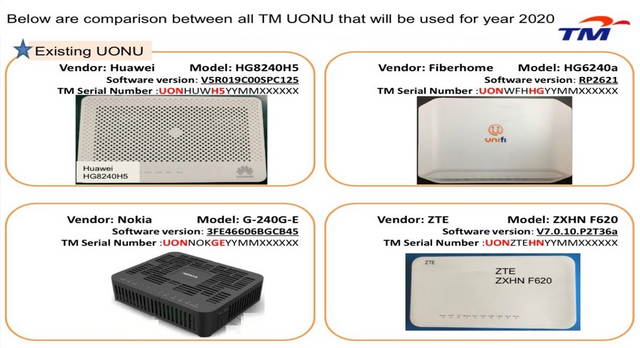
Universal ONU Configurations for 4 New TM Modems Introduced in 2020
Source: QusyairiRamli Youtube Channel
https://www.youtube.com/c/QusyairiRamli/videos
Official TM UniFi High Speed Broadband Thread V39, READ 1ST PAGE FOR RELEVANT WIFI INFO
|
|
 Jan 13 2021, 08:34 PM Jan 13 2021, 08:34 PM
Return to original view | IPv6 | Post
#1
|
 
Senior Member
1,878 posts Joined: Apr 2019 
|
SilentVampire Please include this list of new fibre modems(ONTs) introduced by TM in 2020: Universal ONU Configurations for 4 New TM Modems Introduced in 2020 Source: QusyairiRamli Youtube Channel https://www.youtube.com/c/QusyairiRamli/videos SilentVampire liked this post
|
|
|
|
|
|
Jan 14 2021, 06:06 PM
Return to original view | IPv6 | Post
#2
|
|
Senior Member
1,878 posts Joined: Apr 2019
|
Anyone using the ZTE ZXHN F620 ONT here? It seems to have the least complaints after the Huawei set and has one of the nicest and user friendly GUI among all the other models offered by TM.
How is the performance? If you're coming from 4G modems, its interface is very familiar to many. Many telcos in Malaysia especially the mobile segment is using ZTE equipment. DiGi and uMobile are among them. Maxis MiFi sets and USB dongles are also ZTE branded? |
|
|
Jan 27 2021, 08:20 PM
Return to original view | IPv6 | Post
#3
|
|
Senior Member
1,878 posts Joined: Apr 2019
|
QUOTE(Maxieos @ Jan 26 2021, 11:32 PM) Sorry to tag , hope you can help me to find a few picture on standard installtion for unifi also if you have other isp also can ? What you saw in the video is already an example of a standard installation. The black wire comes into the house pinned along the wall to where you desire to install the modem, then terminated with a fast(blue colored connector) to plug into the fibre modem.Candy12, SilentVampire  You're only supplied with 2 devices: Black wire coming into home------>Fibre Modem(ONT)----->Router(Netis orange colored) Both are shown in the video. Some places they don't offer that orange colored router but a white colored one shown earlier on a table above which is even a much lousier brand named A-Z Technology. Depending on your area, the fibre modem and router supplied by TM may vary with different models/brands. |
|
|
Feb 3 2021, 01:42 AM
Return to original view | IPv6 | Post
#4
|
|
Senior Member
1,878 posts Joined: Apr 2019
|
Did TM installed some kind of transparent proxy behind their IPv4 network?
|
|
|
Feb 3 2021, 05:33 PM
Return to original view | IPv6 | Post
#5
|
|
Senior Member
1,878 posts Joined: Apr 2019
|
QUOTE(sadlyfalways @ Feb 3 2021, 11:52 AM) What do you mean? You changed your DNS apart from using TM's own DNS did you and still the images are not loading as intended?Did you use a VPN and the problem was resolved? |
|
|
Feb 4 2021, 08:15 PM
Return to original view | Post
#6
|
|
Senior Member
1,878 posts Joined: Apr 2019
|
Any Northern region Unifi users noticed any ping spikes recently with your own TM test server?
Like getting 2-3X the normal ping on a good day? You can ping this over a random period of time say morning once, afternoon once, evening once and early morning once. Do you see any fluctuation in latency? TM Speedtest server QUOTE speedtest.tm.com.my - 58.26.239.30 |
|
|
|
|
|
Feb 17 2021, 07:38 PM
Return to original view | IPv6 | Post
#7
|
|
Senior Member
1,878 posts Joined: Apr 2019
|
QUOTE(heLL_bOy @ Feb 17 2021, 06:32 PM) thanks for the update Maxis network also affected. no wonder TM transit via telia and peering to london internet xchange was not working. weird sg starhub no issue to london internet xchange Latency to certain Western Europe countries such as Belgium, Germany and UK as high as >400ms with most averaging >280ms Just few days back latency on average was ~170ms. Since yesterday noticed it spiked to over 270-350ms on NTT Europe nodes(Paris, Luxembourg and Frankfurt). |
|
|
Mar 1 2021, 06:56 PM
Return to original view | IPv6 | Post
#8
|
|
Senior Member
1,878 posts Joined: Apr 2019
|
QUOTE(mecheng @ Mar 1 2021, 05:25 PM) Hi All, i have managed to connect to internet after doing the VLAN settings. Thanks alot! There's a condominium in Ipoh using that provider XcessComm open network.But i still facing 1 issue- If i connect my new router directly with the modem, i can connect to internet - I live in condo, the modem is installed at my front door, ethernet cable is connected to the building's cable to a ethernet outlet in the living room. So when I try to connect the new router via the ethernet cable, no internet again. Can i conclude that: 1. If i can connect to internet means my PPPoE password and other settings are correct 2. Connecting my old router to the ethernet cable in living room works okay - means the building's cable is okay too. 3. I tried clone MAC address, couldnt work too. For this, do i need to do some settings to the Modem at my door? 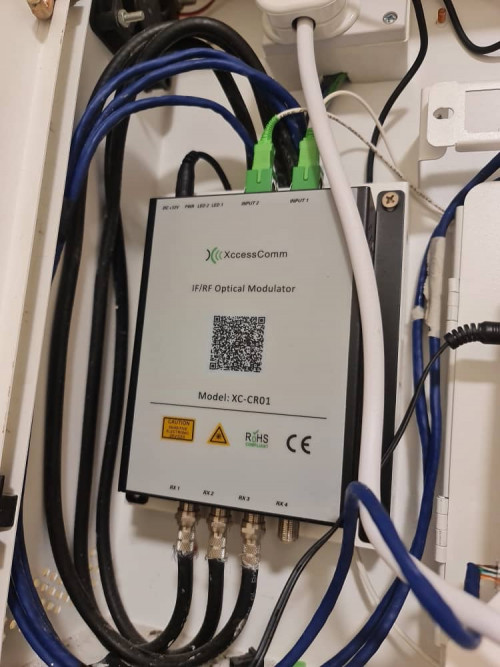 Thanks all So how's the service at your place? That's a RFoG splitter to split cable TV signals to coax and FTTH data with just 1 single fibre coming into your house. |
|
|
Mar 1 2021, 07:23 PM
Return to original view | IPv6 | Post
#9
|
|
Senior Member
1,878 posts Joined: Apr 2019
|
QUOTE(mecheng @ Mar 1 2021, 07:14 PM) Actually it's okay for my previous router. As we don't watch TV so not sure about how the cable TV performs though. Is there an ethernet port on the Xcesscomm RFog Modulator/Splitter?Now just headache.. no Internet if connect via the ethernet outlet  If there is, then it's not for TM Unifi but your own building's bundled internet plan right? Your TM Unifi Huawei router has a separate fibre line for to it with blue colored connector? |
|
|
Mar 1 2021, 07:57 PM
Return to original view | IPv6 | Post
#10
|
|
Senior Member
1,878 posts Joined: Apr 2019
|
QUOTE(mecheng @ Mar 1 2021, 07:43 PM) Nope there is only an ethernet cable connected to the LAN1 of the modem. Other cables I believe is connected directly to the buildings wiring upto the ethernet outlet in the living room. I see that means it's just a structured cabling modulator unit which combines different signals into coax cables which serves ports across your house. This is to allow you to plug your TM supplied "router" at other ethernet ports connected to your home's modulator for convenience(living hall/rooms). The authentication and DHCP is still done by your router which is relayed from your Huawei modem. |
|
|
Mar 1 2021, 09:11 PM
Return to original view | Post
#11
|
|
Senior Member
1,878 posts Joined: Apr 2019
|
QUOTE(mecheng @ Mar 1 2021, 08:37 PM) Yes I believe so. That's why I am scratching my head, why Internet is available when connected directly to modem, but not through the ethernet outlet in the living room... I think I know why. Do you see the 2 fibre connectors (green in color) as inputs on your modulator box? It's supposed to bring in internet access from some other ISP in your building and coupled it into your condo unit's structured cabling. Ask your building management if such internet service provider exists in your building. The fibre cables are supposed to bring in a mixed of cable TV/satellite TV and internet access into your unit by some other providers separate from TM. So when you subscribe to TM you need to map the blue colored(ethernet cables) the one which links to the living hall ethernet socket where your router is placed correct? Obviously you have to bypass the modulator and plug the correct ethernet cable(linked to your living hall) directly to your Huawei ONT. The modulator was not meant for your TM line. |
|
|
Mar 2 2021, 12:09 AM
Return to original view | IPv6 | Post
#12
|
|
Senior Member
1,878 posts Joined: Apr 2019
|
QUOTE(mecheng @ Mar 1 2021, 09:16 PM) I got your point, but thinking back, my old router is working just fine, with the current setup. When the contractor installed the modem, they have mapped to the correct cable I believe, that is why it is still working. Or I do need to trial an error now to switch the cables abit haha.. Brief us a bit on your old router setup. Did you have a Huawei ONT box back then? The one you shown in the picture looks new. Did you have an older ONT box installed previously?From my experience the kind of setup in your condo has a pair of fibre strands (2 incoming fibres with green APC connectors which hooks you up to a switch in the MDF riser room). This pair of duplex fibre is basically a P2P connection which combines data/RF video/cable TV signals in different wavelengths which terminates at a switch in the MDF riser room. It reduces the need to pull multiple types of cables such as coax, copper phone wiring, CAT5E/6 LAN cables to each unit, all combined into just 1 pair of fibre cables point to point between your unit to the MDF riser room. So you don't even need a separate ONT at your condo unit. Just plug in a router will do for authentication.But older modulators only allow upto 100M ports. When you first purchase the condo unit, the developer will usually bundle a few years of free internet for the tenant. You sure you were using Unifi previously? Why did the newer setup came with an ONT instead, how about the old router setup? I'm also uncertain if your modulator box has unmanaged switch capabilities with its ethernet ports. |
|
|
Mar 2 2021, 12:12 AM
Return to original view | IPv6 | Post
#13
|
|
Senior Member
1,878 posts Joined: Apr 2019
|
QUOTE(heLL_bOy @ Mar 1 2021, 11:22 PM) there is no FUP limit for unlimited package, unless your are using 30Mbps which got FUP limit. They might say no or not admit it but secretly managed your speed if your usage is excessive. I think it's clearly written in the T&C to protect their interests.We'll never know what is the FUP limit because the telco can change the limit from season to season during busy months. |
|
|
|
|
|
Mar 2 2021, 12:42 AM
Return to original view | IPv6 | Post
#14
|
|
Senior Member
1,878 posts Joined: Apr 2019
|
QUOTE(go626201 @ Mar 2 2021, 12:36 AM) I dont think tm got hard limit for unifi,bcs dont really see anyone said his or her unifi totally speed limited before, The local Malaysian are not obligated to tell. They've clearly stated in their T&Cs that they've all the right to managed and throttle users if they discover the subscriber has excessive usage habits from their billing system.but of course sometimes tm doing maintenances and speed drop then that is true. By doing so they're immune to any charges against them by law. When approach they'd just say didn't you agree when you signed on the dotted line? |
|
|
Mar 2 2021, 12:49 AM
Return to original view | IPv6 | Post
#15
|
|
Senior Member
1,878 posts Joined: Apr 2019
|
QUOTE(mecheng @ Mar 2 2021, 12:46 AM) I see. That's why the Unifi installer went into the room to do some settings. I guess is to turn on the port for my unit. If you want to subscribe to higher speed plan above 100M, probably you need a dedicated ONT(fibre modem).So basically the whole setup with the old router was what you see in the pic. Nothing is new. Plug in old router- works fine. New router, unable to connect to Internet- via ethernet outlet In living room. I'm on 300mpbs plan, and was advised to change my router to WiFi 6 to get most of what I paid haha. If not I'm just getting less than 30mbps consistently via WiFi. Contacted Unifi to have a look on the issue. But waiting time is crazy. Headache headache. Really don't know what's the problem |
|
|
Mar 3 2021, 01:44 PM
Return to original view | IPv6 | Post
#16
|
|
Senior Member
1,878 posts Joined: Apr 2019
|
QUOTE(Hobbez @ Mar 2 2021, 10:38 PM) With our Bolehland connection quality, you can expect this kind of problem to happen within 2 years or less with ANYONE of them. Previously I was having with Maxis Fiber and terminated for the same reason as now. Bad quality connection. Now the irony is if I join Maxis, the connection will be "good" again. Until the next time this happens............. Every year each of them will take turns to claim the best performance award and the favor to offer competitive plans just like a musical chair game. So you see it's a basically an lucrative oligopoly cash cow industry that even our Financial Ministry wants a slice of it with their entry into the 5G general SPV entity it's establishing. Last time you came from Maxis, now to move out of TM, next probably will be DiGi or Celcom?  You know why they keep playing this musical chair game? To get customers to renew their contracts and secure their revenues/income from various baskets instead of placing all efforts into one. |
|
|
Mar 3 2021, 01:50 PM
Return to original view | IPv6 | Post
#17
|
|
Senior Member
1,878 posts Joined: Apr 2019
|
QUOTE(QuantumEdge @ Mar 2 2021, 05:30 PM) US-East (Virginia) ping nearly 800ms.... Mind asking why insist on using an US-East server when they're many options such as US-West servers located in California and Oregon?others are normal for me, IP range 115.135 Oracle has servers in San Jose and Arizona, why not chose those servers? It's more strategic for SEA countries to connect across the Pacific than to cross the other "way" around the world via Europe than via the Atlantic ocean. |
|
|
Mar 3 2021, 01:59 PM
Return to original view | IPv6 | Post
#18
|
|
Senior Member
1,878 posts Joined: Apr 2019
|
QUOTE(go626201 @ Mar 3 2021, 01:52 PM) Maybe free aws server only available on AWS East server? (I dont know much about AWS,didn't use it before.) That's why I'm curious, from Malaysia it's logical only to choose either West US cities or Continental Europe as transit locations for VPN servers to get you elsewhere.For Europe, Belgium, Austria, Switerland and Frankfurt Germany are the best central locations to reach other parts of the continent. It is not practical to choose Sweden, Norway or even UK which is at the far West of the continent. Italy also is a good chocie because Xiaomi Cloud's only Global server outside China is based there?? |
|
|
Mar 3 2021, 02:16 PM
Return to original view | IPv6 | Post
#19
|
|
Senior Member
1,878 posts Joined: Apr 2019
|
QUOTE(go626201 @ Mar 3 2021, 02:07 PM) I thought Xiaomi mainly using Kingsoft Cloud for their services? The Cloud home services have 2 locations to choose from Global Europe server or China for Asia. That's why Italy is very crucial country which Maxis strategically choose TI-Sparkle to be one of its major peering partner. Italy is also a major entry point coming in from the ME besides southern France if you're aiming to reach Central Europe.That's why when the SEA-WE-ME cable broke-down, Italy became the choking point of entry into Europe resulting in the high latency issues. |
|
|
Mar 3 2021, 02:34 PM
Return to original view | IPv6 | Post
#20
|
|
Senior Member
1,878 posts Joined: Apr 2019
|
QUOTE(go626201 @ Mar 3 2021, 02:16 PM) Oh thanks for the information. All traffic being routed from Asia and the ME the major landing site is via Italy.Because last year i trying route to Xiaomi XiaoAi Server by VPN and found out hosted on Kingsoft Cloud in CN. 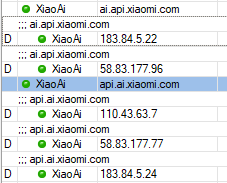 MI Home users have the choice to either choose CN server or the EU Global server. https://xiaomi.eu/community/threads/how-to-...e-server.51287/ |
|
Topic ClosedOptions
|
| Change to: |  0.0258sec 0.0258sec
 0.46 0.46
 7 queries 7 queries
 GZIP Disabled GZIP Disabled
Time is now: 2nd December 2025 - 08:25 AM |
 Quote
Quote