

QUOTE(go626201 @ Mar 2 2021, 05:49 PM)
I dont think SMW-5 fixed will fix the connection to US region...

why do you say so?Official TM UniFi High Speed Broadband Thread V39, READ 1ST PAGE FOR RELEVANT WIFI INFO
|
|
 Mar 2 2021, 06:29 PM Mar 2 2021, 06:29 PM
|
 
Senior Member
1,350 posts Joined: Nov 2004 From: HEAVEN & HELL  
|
QUOTE(go626201 @ Mar 2 2021, 05:49 PM) I dont think SMW-5 fixed will fix the connection to US region... why do you say so? |
|
|
|
|
|
Mar 2 2021, 06:33 PM
Show posts by this member only | IPv6 | Post
#1262
|

Newbie
29 posts Joined: Oct 2018
|
QUOTE(QuantumEdge @ Mar 2 2021, 05:30 PM) US-East (Virginia) ping nearly 800ms.... others are normal for me, IP range 115.135 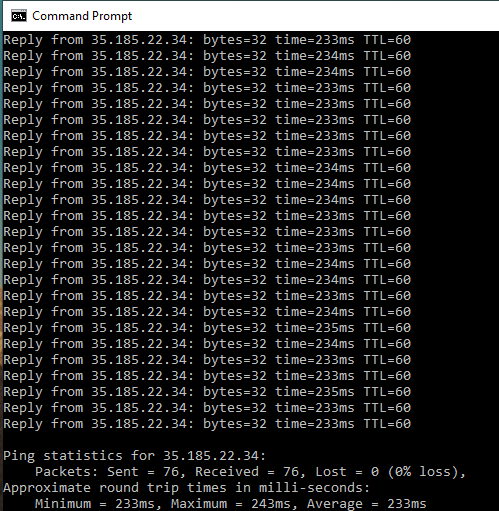 ping from 203.106.. , from Kedah using google dns. moment ago. |
|
|
Mar 2 2021, 06:52 PM
|

Senior Member
1,882 posts Joined: Sep 2017
|
QUOTE(heLL_bOy @ Mar 2 2021, 06:29 PM) why do you say so? SMW-5(South East Asia–Middle East–Western Europe 5) is mainly for Southeast Asia to Europe,but for TM Unifi to amazon us east one,that problem long long time like this already. As for the past years, EpicGames Web is hosted on AWS US East,and sometimes access the site is load very slow or totally inaccessible. (This problem happens randomly in past and long long time ago got this problem) U see when submarine cable broken,ISP will reroute the connection to another peering connection, at the same time the destination server will be connectable again. (But with higher ping or packet loss by different route) AWS US East is at US,normally the connection will just go through by TM> HK or SG or somewhere on Asia by AAG or others submarine cable(which one i don't know) > US ,the routing normally not going by EU to US. So the final problem is still on TM side. QUOTE(ellim33 @ Mar 2 2021, 06:33 PM) ping from 203.106.. , from Kedah using google dns. moment ago. Google got their own peering connection so normally routing is good enough for 98%. This post has been edited by go626201: Mar 2 2021, 07:25 PM ellim33 liked this post
|
|
|
Mar 2 2021, 07:59 PM
|
|
Newbie
49 posts Joined: Feb 2009
|
QUOTE(AV_2018 @ Mar 2 2021, 02:38 PM) From what I see, this seems to be for astro/DVB-T2 and nothing to do with Unifi. Both the white fibres are connected to input port and the fibres are not connected to Huawei modem which is yellow colour fibre right? Hello. Yes. Fiber connected to the huawei modem is yellow in color.So if I understand correctly, you have successfully configured your new router and it works when connected directly to the Huawei modem via a short Ethernet cable. However, when connected via the long Ethernet cable in the wall, it does not work but the old router used to work. In this case, there is no configuration problem with the modem or new router. If you are very sure both ends of the in-wall cable are connected correctly then I believe the in-wall Ethernet cable may be faulty. If connected exactly the same as the old router but the old router works, it might be because the cable so happen is good enough just for the old router to establish a connection. Faulty cable might also cause speed to drop below 100Mbps or lower. From your modem photos, it looks like the Ethernet cables are not terminated in the best way. Usually a Ethernet cable capable of 1Gbps is terminated so that there are no internal colourful wires exposed outside the plug. I see. Yes you got it right. Yea with the old router, everything is working fine. Unfortunately i do not have a device that i can test with a Lan cable from the LAN outlet. It might be like what you say, the in building cable is just enough to provide connection to old router, but not the new one. If this is the case then headache. Need to involve management sommore. Or who should i engage to solve this issue? haha Im thinking, to actually set the old router as a bridge, and connect my new router to it to provide wifi. Would this be a solution? |
|
|
Mar 2 2021, 08:22 PM
Show posts by this member only | IPv6 | Post
#1265
|
|
Junior Member
451 posts Joined: Apr 2018
|
QUOTE(mecheng @ Mar 2 2021, 07:59 PM) Hello. Yes. Fiber connected to the huawei modem is yellow in color. Suggest that you find a way to test the concealed Ethernet cable. For my case, I'm not in condo, all the Ethernet cable from modem to router and router to PC etc. is all done by myself using Cat6 cable mounted to wall surface. My modem and router is not in the same location and I'm using my own router as well. No issues and can support 800Mbps+ speed all throughout.I see. Yes you got it right. Yea with the old router, everything is working fine. Unfortunately i do not have a device that i can test with a Lan cable from the LAN outlet. It might be like what you say, the in building cable is just enough to provide connection to old router, but not the new one. If this is the case then headache. Need to involve management sommore. Or who should i engage to solve this issue? haha Im thinking, to actually set the old router as a bridge, and connect my new router to it to provide wifi. Would this be a solution? |
|
|
Mar 2 2021, 09:15 PM
Show posts by this member only | IPv6 | Post
#1266
|

Junior Member
679 posts Joined: Mar 2016
|
QUOTE(go626201 @ Mar 2 2021, 06:52 PM) SMW-5(South East Asia–Middle East–Western Europe 5) is mainly for Southeast Asia to Europe,but for TM Unifi to amazon us east one,that problem long long time like this already. AWS US got high ping + packet loss again and again.As for the past years, EpicGames Web is hosted on AWS US East,and sometimes access the site is load very slow or totally inaccessible. (This problem happens randomly in past and long long time ago got this problem) U see when submarine cable broken,ISP will reroute the connection to another peering connection, at the same time the destination server will be connectable again. (But with higher ping or packet loss by different route) AWS US East is at US,normally the connection will just go through by TM> HK or SG or somewhere on Asia by AAG or others submarine cable(which one i don't know) > US ,the routing normally not going by EU to US. So the final problem is still on TM side. OMFG Srsly 400ms+? Maxis fibre only 270ms+ CODE Pinging docs.aws.amazon.com [54.239.24.117] with 32 bytes of data: Reply from 54.239.24.117: bytes=32 time=366ms TTL=221 Reply from 54.239.24.117: bytes=32 time=434ms TTL=221 Reply from 54.239.24.117: bytes=32 time=365ms TTL=221 Reply from 54.239.24.117: bytes=32 time=452ms TTL=221 Reply from 54.239.24.117: bytes=32 time=366ms TTL=221 Request timed out. Request timed out. Reply from 54.239.24.117: bytes=32 time=406ms TTL=221 Reply from 54.239.24.117: bytes=32 time=413ms TTL=221 Reply from 54.239.24.117: bytes=32 time=366ms TTL=221 Request timed out. Reply from 54.239.24.117: bytes=32 time=363ms TTL=221 Reply from 54.239.24.117: bytes=32 time=389ms TTL=221 Reply from 54.239.24.117: bytes=32 time=366ms TTL=221 Request timed out. Reply from 54.239.24.117: bytes=32 time=366ms TTL=221 Request timed out. Request timed out. Reply from 54.239.24.117: bytes=32 time=426ms TTL=221 Reply from 54.239.24.117: bytes=32 time=435ms TTL=221 Reply from 54.239.24.117: bytes=32 time=445ms TTL=221 Reply from 54.239.24.117: bytes=32 time=457ms TTL=221 Reply from 54.239.24.117: bytes=32 time=464ms TTL=221 Request timed out. Reply from 54.239.24.117: bytes=32 time=364ms TTL=221 Request timed out. Reply from 54.239.24.117: bytes=32 time=407ms TTL=221 Reply from 54.239.24.117: bytes=32 time=364ms TTL=221 Request timed out. Reply from 54.239.24.117: bytes=32 time=365ms TTL=221 Reply from 54.239.24.117: bytes=32 time=364ms TTL=221 Request timed out. Reply from 54.239.24.117: bytes=32 time=365ms TTL=221 Reply from 54.239.24.117: bytes=32 time=445ms TTL=221 Request timed out. Reply from 54.239.24.117: bytes=32 time=391ms TTL=221 Reply from 54.239.24.117: bytes=32 time=365ms TTL=221 Ping statistics for 54.239.24.117: Packets: Sent = 37, Received = 26, Lost = 11 (29% loss), Approximate round trip times in milli-seconds: Minimum = 363ms, Maximum = 464ms, Average = 396ms |
|
|
|
|
|
Mar 2 2021, 09:24 PM
Show posts by this member only | IPv6 | Post
#1267
|
|
Junior Member
679 posts Joined: Mar 2016
|
Anyway , complaint has been lodged to MCMC through https://aduan.skmm.gov.my about High Ping and Packet Loss from Unifi to AWS US 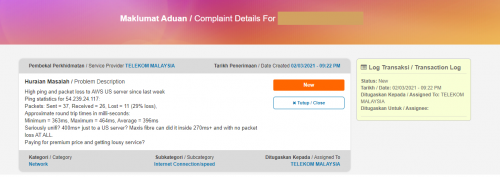 Btw , u guys expect what reponse (excuses) they will reply me  MeowZ liked this post
|
|
|
Mar 2 2021, 09:42 PM
|

Junior Member
570 posts Joined: Jan 2003 From: /k/ isle 
|
...
This post has been edited by Avex: Mar 2 2021, 10:19 PM |
|
|
Mar 2 2021, 09:45 PM
Show posts by this member only | IPv6 | Post
#1269
|

Senior Member
1,597 posts Joined: Jan 2016
|
QUOTE(Sam Leong @ Mar 2 2021, 09:24 PM) Anyway , complaint has been lodged to MCMC through https://aduan.skmm.gov.my about High Ping and Packet Loss from Unifi to AWS US Excuses? Btw , u guys expect what reponse (excuses) they will reply me Customer using 3rd party equipment (Bad wifi, old PC, USB Wifi card something like that) Someone hacking their network Random shark ate their under-sea cable ISP only guarantees connection quality within Malaysia "We're looking into it" and closed the case, I'm going to place my bet on this  John42 liked this post
|
|
|
Mar 2 2021, 09:50 PM
|
|
Senior Member
1,882 posts Joined: Sep 2017
|
Just open your vpn and dont angry anymore.
This problem need enough people to report to tm and mcmc together,otherwise next week fixed and next month problem come back again. They just free this pipe and put the stress to another pipe and causing another connection problem... Conclusion to those who cant accept the situation: Get your own VPN and start your smooth connection. Dont waste too many time and health to get angry at this problem. This post has been edited by go626201: Mar 2 2021, 09:51 PM |
|
|
Mar 2 2021, 09:52 PM
Show posts by this member only | IPv6 | Post
#1271
|
|
Junior Member
679 posts Joined: Mar 2016
|
QUOTE(QuantumEdge @ Mar 2 2021, 09:45 PM) Excuses? if they use the excuses for the first one : customer using 3rd party equipment i definitely wont close the mcmc case and open again. Im not fk using the DIR-850L given by TM (useless sucks router which lead me to dc from dual band connection consistently when im joining anything that require massive transfer of the data such as Google Meet , Zoom) , just get a Tenda AC10U and its much better than DIR-850L. and i tested it through my Desktop connected to CAT 6 cable and through one ONU supplied by TM as Internet Switch and then reach ZTE H267A which provided for unifi VDSL2 users from TMCustomer using 3rd party equipment (Bad wifi, old PC, USB Wifi card something like that) Someone hacking their network Random shark ate their under-sea cable ISP only guarantees connection quality within Malaysia "We're looking into it" and closed the case, I'm going to place my bet on this I dun think these 3rd party equipment "will be the problem of getting high latency and packet loss ONLY TO US SERVER".  anyway just wait for the response aka excuses awaiting them to reply but i expect after 2 month  |
|
|
Mar 2 2021, 09:55 PM
Show posts by this member only | IPv6 | Post
#1272
|
|
Junior Member
679 posts Joined: Mar 2016
|
QUOTE(go626201 @ Mar 2 2021, 09:50 PM) Just open your vpn and dont angry anymore. ya , using v2ray now , connection to US become smoother after go through with GCP SG. This problem need enough people to report to tm and mcmc together,otherwise next week fixed and next month problem come back again. They just free this pipe and put the stress to another pipe and causing another connection problem... Conclusion to those who cant accept the situation: Get your own VPN and start your smooth connection. Dont waste too many time and health to get angry at this problem. So good for being see the ping drop to 270ms+ again and no packet loss with full speed. But shouldn't we get the services since we paid to ISP , and unifi is the ISP charge most expensive service fee among so many ISP in Malaysia but presenting this kind of services. |
|
|
Mar 2 2021, 09:59 PM
Show posts by this member only | IPv6 | Post
#1273
|
|
Senior Member
1,597 posts Joined: Jan 2016
|
QUOTE(Sam Leong @ Mar 2 2021, 09:55 PM) ya , using v2ray now , connection to US become smoother after go through with GCP SG. Hardest to get along, most expensive to say bye-bye withSo good for being see the ping drop to 270ms+ again and no packet loss with full speed. But shouldn't we get the services since we paid to ISP , and unifi is the ISP charge most expensive service fee among so many ISP in Malaysia[B] but presenting this kind of services. Just like that horrible ex  |
|
|
|
|
|
Mar 2 2021, 10:00 PM
Show posts by this member only | IPv6 | Post
#1274
|
|
Junior Member
679 posts Joined: Mar 2016
|
QUOTE(QuantumEdge @ Mar 2 2021, 09:45 PM) Excuses? unifi just DM me on Twitter just now for tweeting @helpmeunifi at Feb 27 about high ping + packet loss to US serverCustomer using 3rd party equipment (Bad wifi, old PC, USB Wifi card something like that) Someone hacking their network Random shark ate their under-sea cable ISP only guarantees connection quality within Malaysia "We're looking into it" and closed the case, I'm going to place my bet on this Guess what , they tell me run the test at TM Speedtest server Holy shit. Their cs wont see comment or what? wont see details one ah 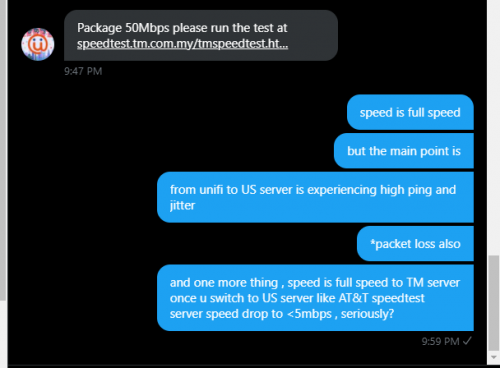 This post has been edited by Sam Leong: Mar 2 2021, 10:01 PM QuantumEdge liked this post
|
|
|
Mar 2 2021, 10:08 PM
Show posts by this member only | IPv6 | Post
#1275
|
|
Senior Member
1,597 posts Joined: Jan 2016
|
QUOTE(Sam Leong @ Mar 2 2021, 10:00 PM) unifi just DM me on Twitter just now for tweeting @helpmeunifi at Feb 27 about high ping + packet loss to US server I worked as a CS rep previously, not for TM but for another company.Guess what , they tell me run the test at TM Speedtest server Holy shit. Their cs wont see comment or what? wont see details one ah We could only reply with prefabricated messages, just modify user details (name, numbers, amounts etc) and send them out; That's why every time you chat or email CS you'll get similar replies. Had to work with SOP, sometimes saying "we'll look into it" actually means "we'll do nothing' and straightaway close your case. That's customer service for you  Not sure about TM  |
|
|
Mar 2 2021, 10:10 PM
Show posts by this member only | IPv6 | Post
#1276
|
|
Junior Member
679 posts Joined: Mar 2016
|
Made another TCP ping test to slideshare.net
guess what , maximum ping horrible than ICMP CODE Ping statistics for 52.86.117.182:80 918 probes sent. 809 successful, 109 failed. (11.87% fail) Approximate trip times in milli-seconds (successful connections only): Minimum = 363.066ms, Maximum = 1639.599ms, Average = 670.842ms Average 600+ms to US from Unifi imma speechless |
|
|
Mar 2 2021, 10:13 PM
Show posts by this member only | IPv6 | Post
#1277
|
|
Junior Member
679 posts Joined: Mar 2016
|
QUOTE(QuantumEdge @ Mar 2 2021, 10:08 PM) I worked as a CS rep previously, not for TM but for another company. i understand CS rep situation since my parents work for Digi CS last time.We could only reply with prefabricated messages, just modify user details (name, numbers, amounts etc) and send them out; That's why every time you chat or email CS you'll get similar replies. Had to work with SOP, sometimes saying "we'll look into it" actually means "we'll do nothing' and straightaway close your case. That's customer service for you Not sure about TM just wonder them unable to see the tweet or comment i wrote? Theres already mentioned clearly to US AWS and they still ask me to proceed to speedtest to unifi server. lol QuantumEdge liked this post
|
|
|
Mar 2 2021, 10:38 PM
|
|
Senior Member
1,235 posts Joined: Dec 2009
|
QUOTE(Sam Leong @ Mar 2 2021, 09:52 PM) if they use the excuses for the first one : customer using 3rd party equipment i definitely wont close the mcmc case and open again. Im not fk using the DIR-850L given by TM (useless sucks router which lead me to dc from dual band connection consistently when im joining anything that require massive transfer of the data such as Google Meet , Zoom) , just get a Tenda AC10U and its much better than DIR-850L. and i tested it through my Desktop connected to CAT 6 cable and through one ONU supplied by TM as Internet Switch and then reach ZTE H267A which provided for unifi VDSL2 users from TM Not just only to US server.I dun think these 3rd party equipment "will be the problem of getting high latency and packet loss ONLY TO US SERVER". anyway just wait for the response aka excuses awaiting them to reply but i expect after 2 month But to EU server also terrible. I was considering to terminate my Unifi line if this carries on. But shit, all of the Fiber providers have contract for 2 years. Cannot lah. With our Bolehland connection quality, you can expect this kind of problem to happen within 2 years or less with ANYONE of them. Previously I was having with Maxis Fiber and terminated for the same reason as now. Bad quality connection. Now the irony is if I join Maxis, the connection will be "good" again. Until the next time this happens............. This post has been edited by Hobbez: Mar 2 2021, 10:39 PM |
|
|
Mar 2 2021, 11:02 PM
Show posts by this member only | IPv6 | Post
#1279
|
|
Senior Member
1,597 posts Joined: Jan 2016
|
QUOTE(Hobbez @ Mar 2 2021, 10:38 PM) Not just only to US server. I'm waiting for Allo to finish laying their fiber, took them 2 weeks from zero to poles planted behind my house, and fibers being pulled just outside the taman.But to EU server also terrible. I was considering to terminate my Unifi line if this carries on. But shit, all of the Fiber providers have contract for 2 years. Cannot lah. With our Bolehland connection quality, you can expect this kind of problem to happen within 2 years or less with ANYONE of them. Previously I was having with Maxis Fiber and terminated for the same reason as now. Bad quality connection. Now the irony is if I join Maxis, the connection will be "good" again. Until the next time this happens............. If they're here, I'll surely terminate Unifi regardless of my remaining 20 months of the contract. Enough means enough  BTW, here's a ping test from a fellow Allo user. Not great, but at least better than T* at the moment 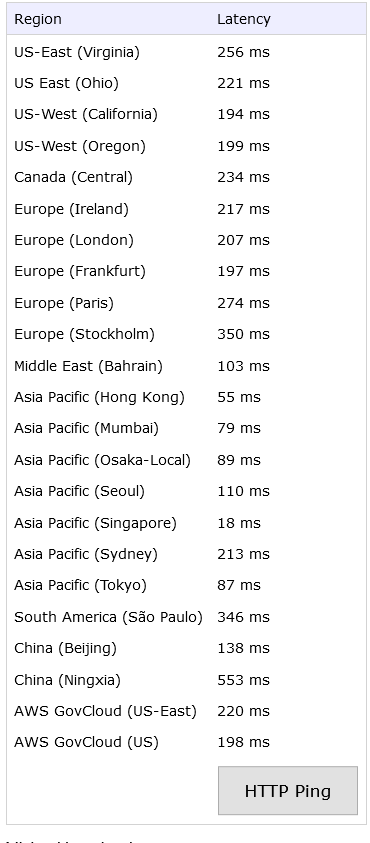 |
|
|
Mar 2 2021, 11:21 PM
|
|
Senior Member
1,350 posts Joined: Nov 2004 From: HEAVEN & HELL
|
QUOTE(go626201 @ Mar 2 2021, 09:50 PM) Just open your vpn and dont angry anymore. but not all content can bypass VPN also. This problem need enough people to report to tm and mcmc together,otherwise next week fixed and next month problem come back again. They just free this pipe and put the stress to another pipe and causing another connection problem... Conclusion to those who cant accept the situation: Get your own VPN and start your smooth connection. Dont waste too many time and health to get angry at this problem.  QUOTE(QuantumEdge @ Mar 2 2021, 09:45 PM) Excuses? this is the shit happen when they saying only guarantee local connection quality to protect themselves. Are they expecting 90% speed use on local? and what do local have to do with this speed if those content are hosted in overseas?Customer using 3rd party equipment (Bad wifi, old PC, USB Wifi card something like that) Someone hacking their network Random shark ate their under-sea cable ISP only guarantees connection quality within Malaysia "We're looking into it" and closed the case, I'm going to place my bet on this unlike other country there are specific terms that they are covering at least 50% international speed on your subscribing package. |
|
Topic ClosedOptions
|
| Change to: |  0.0186sec 0.0186sec
 0.60 0.60
 6 queries 6 queries
 GZIP Disabled GZIP Disabled
Time is now: 13th December 2025 - 11:16 AM |
 Quote
Quote