Welcome Guest ( Log In | Register )

Bump Topic Topic Closed RSS Feed

Outline · [ Standard ] · Linear+

 Official TM UniFi High Speed Broadband Thread V39, READ 1ST PAGE FOR RELEVANT WIFI INFO

views
     
mecheng
post Feb 27 2021, 02:19 PM

New Member
*
Newbie
49 posts

Joined: Feb 2009
Hi Sifus. Need help troubleshooting my new TP Link AX73.

Replaced it with my old router, and got a new PPPoE password from Unifi already. But still can't connect to the Internet. Teied reconfigure a few times still failed.

But when I connect my old router back, everything works fine (I haven't even updare the new PPPoE password with my old router)

Called TM, and TM say will send people to troubleshoot. WTF.

Can anyone help or guide me with some tips? Would it be this router does not suit my condo's network/infra?

Thanks alot!
mecheng
post Mar 1 2021, 05:25 PM

New Member
*
Newbie
49 posts

Joined: Feb 2009
QUOTE(aniq8676 @ Feb 27 2021, 02:59 PM)
make sure you put the correct id and password, make sure the VLAN tag is enable
*
QUOTE(doomed151 @ Feb 27 2021, 03:56 PM)
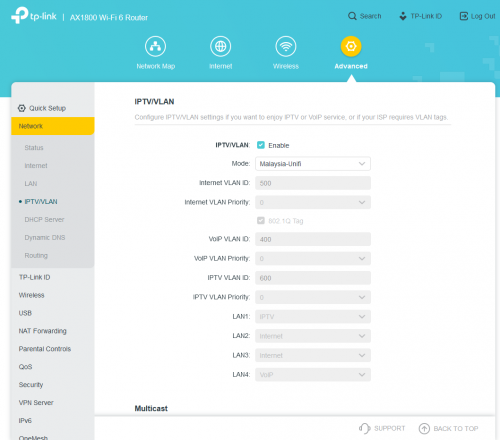
Did you configure the IPTV settings?

user posted image

Unifi won't connect without it.
*
Hi All, i have managed to connect to internet after doing the VLAN settings. Thanks alot!

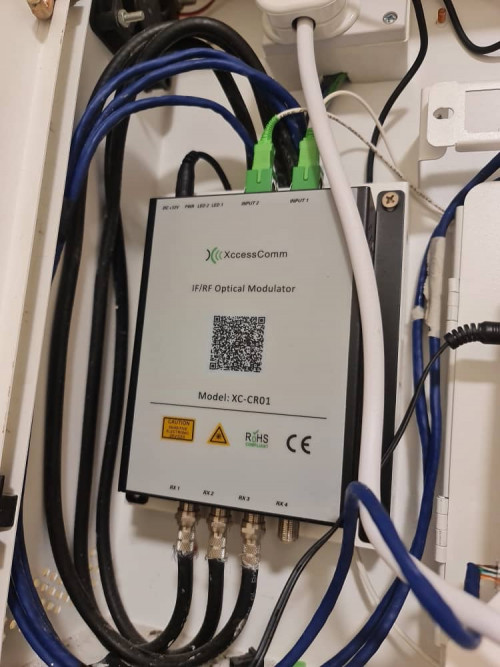
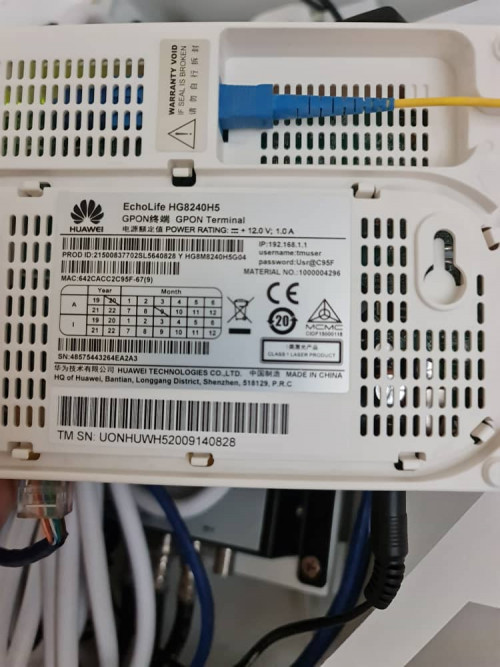
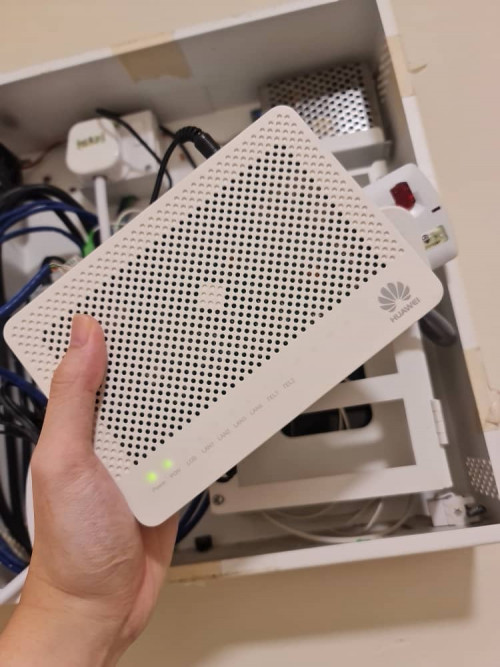
But i still facing 1 issue- If i connect my new router directly with the modem, i can connect to internet - I live in condo, the modem is installed at my front door, ethernet cable is connected to the building's cable to a ethernet outlet in the living room. So when I try to connect the new router via the ethernet cable, no internet again.

Can i conclude that:
1. If i can connect to internet means my PPPoE password and other settings are correct
2. Connecting my old router to the ethernet cable in living room works okay - means the building's cable is okay too.
3. I tried clone MAC address, couldnt work too.

For this, do i need to do some settings to the Modem at my door?

user posted image
user posted image
user posted image

Thanks all
mecheng
post Mar 1 2021, 07:13 PM

New Member
*
Newbie
49 posts

Joined: Feb 2009
QUOTE(QuantumEdge @ Mar 1 2021, 06:36 PM)
That white Huawei thingy is an ONU, the green and yellow cables are both optical fiber cables.
Basically, it converts the optical signal to electronic signals that your wifi router can read.
Hence your wifi router connects to it via ethernet cable.

Be sure you're not connected to LAN 1 and LAN 4, those 2 are for IPTV and VOIP... no internet connection
You don't need to change any settings to the modem at your door when changing to a new wifi router, just key in PPPoE details, select Unifi VLAN, and boom it is done wink.gif
*
I see. I have connected the WAN port in new router to the ethernet outlet already. Still no Internet:(
mecheng
post Mar 1 2021, 07:14 PM

New Member
*
Newbie
49 posts

Joined: Feb 2009
QUOTE(Candy12 @ Mar 1 2021, 06:56 PM)
There's a condominium in Ipoh using that provider XcessComm open network.

So how's the service at your place?

That's a RFoG splitter to split cable TV signals to coax and FTTH data with just 1 single fibre coming into your house.
*
Actually it's okay for my previous router. As we don't watch TV so not sure about how the cable TV performs though.

Now just headache.. no Internet if connect via the ethernet outlet sad.gif
mecheng
post Mar 1 2021, 07:40 PM

New Member
*
Newbie
49 posts

Joined: Feb 2009
QUOTE(QuantumEdge @ Mar 1 2021, 07:19 PM)
Ah, your old router still works right?
2 months ago my friend request for PPPoE details, TM did send him and we entered them into the new router.
The new router won't connect with the new PPPoE details but oddly the old router with the default password still works...
Guess TM forgot to update the password in their system somehow?
*
Yea it works. I have check the password of the old router. They have updated the password in the old router surprisingly.

Also, I managed to connect to the Internet with the new password. So I think it is correct.
mecheng
post Mar 1 2021, 07:43 PM

New Member
*
Newbie
49 posts

Joined: Feb 2009
QUOTE(Candy12 @ Mar 1 2021, 07:23 PM)
Is there an ethernet port on the Xcesscomm RFog Modulator/Splitter?

If there is, then it's not for TM Unifi but your own building's bundled internet plan right?

Your TM Unifi Huawei router has a separate fibre line for to it with blue colored connector?
*
Nope there is only an ethernet cable connected to the LAN1 of the modem. Other cables I believe is connected directly to the buildings wiring upto the ethernet outlet in the living room.
mecheng
post Mar 1 2021, 08:37 PM

New Member
*
Newbie
49 posts

Joined: Feb 2009
QUOTE(Candy12 @ Mar 1 2021, 07:57 PM)
I see that means it's just a structured cabling modulator unit which combines different signals into coax cables which serves ports across your house.

This is to allow you to plug your TM supplied "router" at other ethernet ports connected to your home's modulator for convenience(living hall/rooms).

The authentication and DHCP is still done by your router which is relayed from your Huawei modem.
*
Yes I believe so. That's why I am scratching my head, why Internet is available when connected directly to modem, but not through the ethernet outlet in the living room... sad.gif
mecheng
post Mar 1 2021, 09:16 PM

New Member
*
Newbie
49 posts

Joined: Feb 2009
QUOTE(Candy12 @ Mar 1 2021, 09:11 PM)
I think I know why.

Do you see the 2 fibre connectors (green in color) as inputs on your modulator box?
It's supposed to bring in internet access from some other ISP in your building and coupled it into your condo unit's structured cabling.

Ask your building management if such internet service provider exists in your building.
The fibre cables are supposed to bring in a mixed of cable TV/satellite TV and internet access into your unit by some other providers separate from TM.

So when you subscribe to TM you need to map the blue colored(ethernet cables) the one which links to the living hall ethernet socket where your router is placed correct?

Obviously you have to bypass the modulator and plug the correct ethernet cable(linked to your living hall) directly to your Huawei ONT. The modulator was not meant for your TM line.
*
I got your point, but thinking back, my old router is working just fine, with the current setup. When the contractor installed the modem, they have mapped to the correct cable I believe, that is why it is still working. Or I do need to trial an error now to switch the cables abit haha..

mecheng
post Mar 2 2021, 12:46 AM

New Member
*
Newbie
49 posts

Joined: Feb 2009
QUOTE(Candy12 @ Mar 2 2021, 12:09 AM)
Brief us a bit on your old router setup. Did you have a Huawei ONT box back then? The one you shown in the picture looks new. Did you have an older ONT box installed previously?

From my experience the kind of setup in your condo has a pair of fibre strands (2 incoming fibres with green APC connectors which hooks you up to a switch in the MDF riser room).

This pair of duplex fibre is basically a P2P connection which combines data/RF video/cable TV signals in different wavelengths which terminates at a switch in the MDF riser room. It reduces the need to pull multiple types of cables such as coax, copper phone wiring, CAT5E/6 LAN cables to each unit, all combined into just 1 pair of fibre cables point to point between your unit to the MDF riser room.

So you don't even need a separate ONT at your condo unit. Just plug in a router will do for authentication.But older modulators only allow upto 100M ports.

When you first purchase the condo unit, the developer will usually bundle a few years of free internet for the tenant. You sure you were using Unifi previously? Why did the newer setup came with an ONT instead, how about the old router setup?

I'm also uncertain if your modulator box has unmanaged switch capabilities with its ethernet ports.
*
I see. That's why the Unifi installer went into the room to do some settings. I guess is to turn on the port for my unit.

So basically the whole setup with the old router was what you see in the pic. Nothing is new. Plug in old router- works fine. New router, unable to connect to Internet- via ethernet outlet In living room.

I'm on 300mpbs plan, and was advised to change my router to WiFi 6 to get most of what I paid haha. If not I'm just getting less than 30mbps consistently via WiFi.

Contacted Unifi to have a look on the issue. But waiting time is crazy. Headache headache. Really don't know what's the problem sad.gif
mecheng
post Mar 2 2021, 10:46 AM

New Member
*
Newbie
49 posts

Joined: Feb 2009
QUOTE(Candy12 @ Mar 2 2021, 12:49 AM)
If you want to subscribe to higher speed plan above 100M, probably you need a dedicated ONT(fibre modem).
*
The speed im getting - wirelessly from new router is 300mbps. Should be ok right?

Im thinking of an alternative, whether can i use the old router as a bridge, and connect my new router to the lan port for internet for WIfi. Anyone has done this before? hahaha
mecheng
post Mar 2 2021, 07:59 PM

New Member
*
Newbie
49 posts

Joined: Feb 2009
QUOTE(AV_2018 @ Mar 2 2021, 02:38 PM)
From what I see, this seems to be for astro/DVB-T2 and nothing to do with Unifi. Both the white fibres are connected to input port and the fibres are not connected to Huawei modem which is yellow colour fibre right?
So if I understand correctly, you have successfully configured your new router and it works when connected directly to the Huawei modem via a short Ethernet cable. However, when connected via the long Ethernet cable in the wall, it does not work but the old router used to work. In this case, there is no configuration problem with the modem or new router. If you are very sure both ends of the in-wall cable are connected correctly then I believe the in-wall Ethernet cable may be faulty. If connected exactly the same as the old router but the old router works, it might be because the cable so happen is good enough just for the old router to establish a connection. Faulty cable might also cause speed to drop below 100Mbps or lower. From your modem photos, it looks like the Ethernet cables are not terminated in the best way. Usually a Ethernet cable capable of 1Gbps is terminated so that there are no internal colourful wires exposed outside the plug.
*
Hello. Yes. Fiber connected to the huawei modem is yellow in color.

I see. Yes you got it right.

Yea with the old router, everything is working fine. Unfortunately i do not have a device that i can test with a Lan cable from the LAN outlet. It might be like what you say, the in building cable is just enough to provide connection to old router, but not the new one. If this is the case then headache. Need to involve management sommore. Or who should i engage to solve this issue? haha

Im thinking, to actually set the old router as a bridge, and connect my new router to it to provide wifi. Would this be a solution?

Topic ClosedOptions
 

Change to:
| Lo-Fi Version
0.0280sec    0.88    7 queries    GZIP Disabled
Time is now: 12th December 2025 - 09:55 AM