Welcome Guest ( Log In | Register )

83 Pages « < 51 52 53 54 55 > » Bottom

Outline · [ Standard ] · Linear+

Home Networking Ditch ONU, use GPON SFP on Business Grade Router, 2.5G ONU for Unifi & Maxis, NO NEED VLAN

views
     
YoungMan
post Dec 5 2023, 02:46 PM

Look at all my stars!!
*******
Senior Member
6,796 posts

Joined: Oct 2008
From: Kuala Lumpur


QUOTE(paultantk @ Dec 4 2023, 09:01 PM)
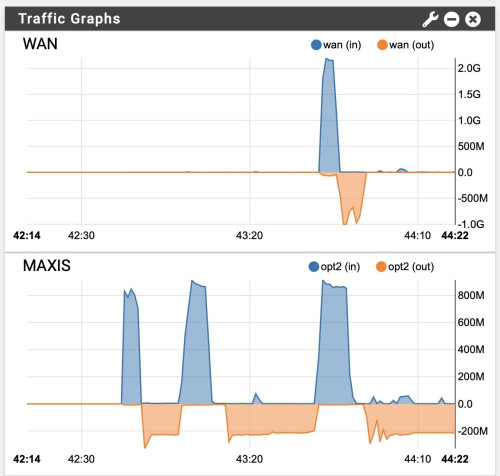
this is maxis in the same house as my unifi2gbps plan, maxis is 800/200 plan

user posted image
*
Good for you can get +100%. Did they pull seperate line for your 2gbps?

QUOTE(Anime4000 @ Dec 4 2023, 10:25 PM)
You know what, non-Unifi pay TM for fiber access is RM5/month/user
This very reasons speed are some 90%, some are +100%

Next Gen PON will be Unifi exclusive only, meanwhile non-Unifi stuck at GPON indefinitely (eg: unless TM rise monthly access fee to Maxis to access Next Gen PON)
*
But that has been what is agreed between both parties. They could have sort it out during the price revision in October.
the 90+% and 100+% shows that the way they provision the network is inconsistent. I login to my ONU yesterday and the lan2 which previously use for Digi fibre is still with vlan 629, meanwhile lan3 and lan4 is Maxis vlan.

This post has been edited by YoungMan: Dec 5 2023, 02:48 PM
kwss
post Dec 5 2023, 02:49 PM

Regular
******
Senior Member
1,207 posts

Joined: Aug 2018
QUOTE(Anime4000 @ Dec 3 2023, 07:53 PM)
D-Link DPN-FX3060V has new firmware (V1.1.2)

my PON Stick also get new update to follow change of V1.1.2 ensure follow TM Standard.

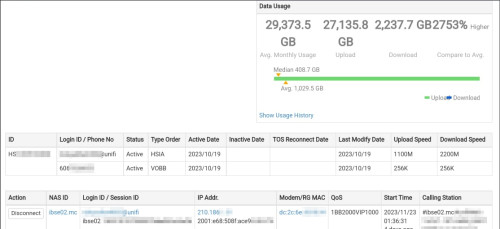
TM show me this:
user posted image

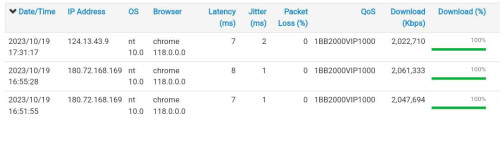
TM toke notice that my first 2Gbps Install speedtest result was amazing, rise suspicious brows.gif 
user posted image

We have run several testing on PON Stick that I experiment,
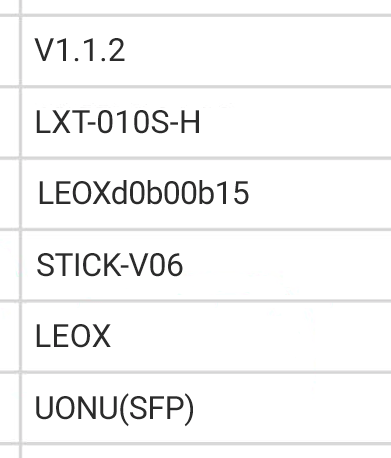
Then TM show this when my PON Stick is set doesn't reflect back properly, I forgot one command doh.gif
user posted image
^^^ TM can find who improper Stick DIY, in-case your PON Stick cannot use, it's forbidden for me to help rclxub.gif > NDA

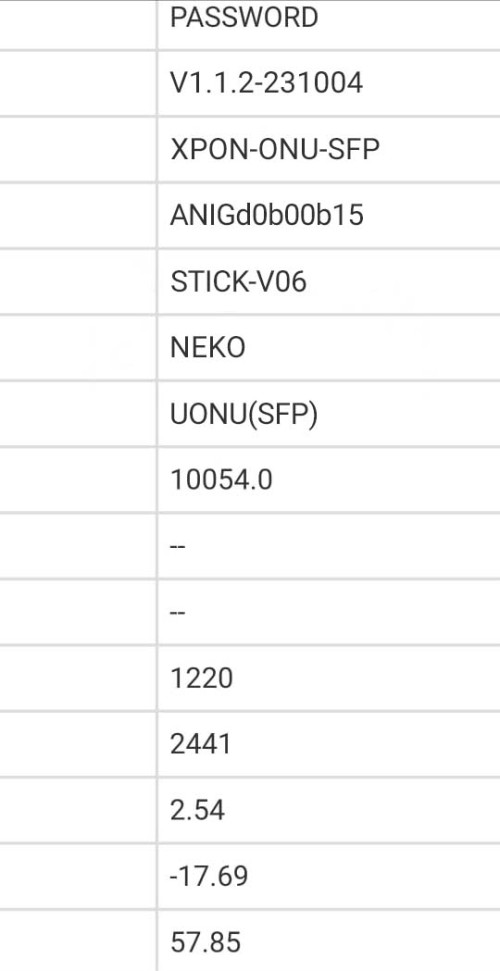
Also suggest a unique VendorId and special MIB Entity to validate my PON Stick

I do this to TM panel:
user posted image

not sure either I want to use ANIG (Anime GPON) or NEKO or NEMU,

so I put ANIG VendorId as ONT S/N and NEKO as VendorId

Another bad happening... ranting.gif
There already one case that disturb whole Taman Internet,
they didn't tell what cause, but upon checking the user live is not from me (I compare to shipping address)
so, I safe from this trouble at least...

You must know, Fiber Internet is SHARED line,

from one stranding fiber split into multiple subscriber, one rouge ONT can disturb other internet!

Bad ONT can broke OLT QoS and you giving unfair to others!!

Event like this just not nice!
*
QUOTE(Anime4000 @ Dec 4 2023, 10:25 PM)
You know what, non-Unifi pay TM for fiber access is RM5/month/user
This very reasons speed are some 90%, some are +100%

Next Gen PON will be Unifi exclusive only, meanwhile non-Unifi stuck at GPON indefinitely (eg: unless TM rise monthly access fee to Maxis to access Next Gen PON)
*
That open up a lot of questions. I hope you don't mind answering.

What PON technology are they moving towards? XGPON? XGSPON? Or straight to 50GPON?

Any idea when it is coming?

Does it means 800Mbps FSU will get the new tech? Or it is reserved for new packages with even faster speed next year?

For users of your GPON stick, does it means you will have to provide firmware update? What will the mechanism like?

I am also curious on what is the arrangement between you and TM. If what you said is true, that means the remaining lifespan of your GPON stick business is short unless you expect lower speed tier customer to be interested in GPON stick but I am sure we all know this is a nerd thing.

On the other hand, have you consider working on a future version of xPON stick right now, before TM launch whatever new service down the road?

I am also wondering if their new generation network will actually say goodbye to PPPoE, offer static IPv6 Prefix like /56 or shorter.
TSAnime4000
post Dec 5 2023, 03:42 PM

Look at all my stars!!
*******
Senior Member
2,399 posts

Joined: Jul 2009
From: /dev/null


QUOTE(kwss @ Dec 5 2023, 02:49 PM)
That open up a lot of questions. I hope you don't mind answering.

What PON technology are they moving towards? XGPON? XGSPON? Or straight to 50GPON?

Any idea when it is coming?

Does it means 800Mbps FSU will get the new tech? Or it is reserved for new packages with even faster speed next year?

For users of your GPON stick, does it means you will have to provide firmware update? What will the mechanism like?

I am also curious on what is the arrangement between you and TM. If what you said is true, that means the remaining lifespan of your GPON stick business is short unless you expect lower speed tier customer to be interested in GPON stick but I am sure we all know this is a nerd thing.

On the other hand, have you consider working on a future version of xPON stick right now, before TM launch whatever new service down the road?

I am also wondering if their new generation network will actually say goodbye to PPPoE, offer static IPv6 Prefix like /56 or shorter.
*
1. What PON technology are they moving towards? XGPON? XGSPON? Or straight to 50GPON?
> I don't know, maybe this

2. Does it means 800Mbps FSU will get the new tech? Or it is reserved for new packages with even faster speed next year?
> No, what been told: under <= 800M will stay with GPON

3. I am also curious on what is the arrangement between you and TM. If what you said is true, that means the remaining lifespan of your GPON stick business is short unless you expect lower speed tier customer to be interested in GPON stick but I am sure we all know this is a nerd thing.
> Thats secret, I here just to help and ease with the setup, so I can ensure to TM that my device not doing some nasty stuff (not to trust user capable to setup properly)

4. On the other hand, have you consider working on a future version of xPON stick right now, before TM launch whatever new service down the road?
4a. Any idea when it is coming?
> No ETA on this, they told start with Business first in KL (trial run), there are around ~500K of 2Gbps subscriber, use of PON Stick not even 0.01%, many stay with stock D-Link and they are just fine with 1+1 configuration

5. I am also wondering if their new generation network will actually say goodbye to PPPoE, offer static IPv6 Prefix like /56 or shorter.
> No, PPPoE is to stay, there are PPPoE Hardware Acceleration Router like Mikrotik. /56 for business only, for home use NAT64

Like I said before, take this info grain of salt, I still hard to believe, if TM did, there will take longer even longer to upgrade the OLT

Also, many just want 1Gbps upload (system/hosting), they don't mind 1+1 download like SG

This post has been edited by Anime4000: Dec 5 2023, 03:55 PM
kwss
post Dec 5 2023, 04:03 PM

Regular
******
Senior Member
1,207 posts

Joined: Aug 2018
QUOTE(Anime4000 @ Dec 5 2023, 03:42 PM)
1. What PON technology are they moving towards? XGPON? XGSPON? Or straight to 50GPON?
> I don't know, maybe this

2. Does it means 800Mbps FSU will get the new tech? Or it is reserved for new packages with even faster speed next year?
> No, what been told: under <= 800M will stay with GPON

3. I am also curious on what is the arrangement between you and TM. If what you said is true, that means the remaining lifespan of your GPON stick business is short unless you expect lower speed tier customer to be interested in GPON stick but I am sure we all know this is a nerd thing.
> Thats secret, I here just to help and ease with the setup, so I can ensure to TM that my device not doing some nasty stuff (not to trust user capable to setup properly)

4. On the other hand, have you consider working on a future version of xPON stick right now, before TM launch whatever new service down the road?
4a. Any idea when it is coming?
> No ETA on this, they told start with Business first in KL (trial run), there are around ~500K of 2Gbps subscriber, use of PON Stick not even 0.01%, many stay with stock D-Link and they are just fine with 1+1 configuration

5. I am also wondering if their new generation network will actually say goodbye to PPPoE, offer static IPv6 Prefix like /56 or shorter.
> No, PPPoE is to stay, there are PPPoE Hardware Acceleration Router like Mikrotik. /56 for business only, for home use NAT64

Like I said before, take this info grain of salt, I my self not believe, if TM did, there will take longer even longer to upgrade the OLT

Also, many just want 1Gbps upload (system/hosting), they don't mind 1+1 download
*
Okay, so that would be 50GPON.

800Mbps after FSU will be 1Gbps, 2Gbps, etc. The target speed is unknown right now. Based your your statement then it's better to just wait till FSU is to decide what to buy.

What about firmware update to current user?

The arrangement between you and TM matters when it comes to support.
Right now the demarc is the ONU. Everything before the ONU is TM's responsibility. Everything after that is customers responsibility. Now if you have a business arrangement and TM says your product is okay on their network, that would fix a lot of ambiguity.
But as of now, it's not quite clear if that's the case. You only mention your product didn't mess with the network, but TM never provide any endorsement.

No, Mikrotik cannot offload PPPoE. That's why I asked. 2Gbps, fine. 5Gbps, maybe. 8Gbps onwards? Not sure
Refer discussion below:
https://forum.mikrotik.com/viewtopic.php?t=192960
https://forum.mikrotik.com/viewtopic.php?t=163839

Actually for Mikrotik, once you enable jumbo frame, hardware offload is disabled too.
yenchenje
post Dec 5 2023, 04:16 PM

Enthusiast
*****
Junior Member
932 posts

Joined: Dec 2019
QUOTE(Anime4000 @ Dec 3 2023, 07:53 PM)
D-Link DPN-FX3060V has new firmware (V1.1.2)

my PON Stick also get new update to follow change of V1.1.2 ensure follow TM Standard.

TM show me this:
--redacted--

TM toke notice that my first 2Gbps Install speedtest result was amazing, rise suspicious brows.gif 
--redacted--

We have run several testing on PON Stick that I experiment,
Then TM show this when my PON Stick is set doesn't reflect back properly, I forgot one command doh.gif
--redacted--
^^^ TM can find who improper Stick DIY, in-case your PON Stick cannot use, it's forbidden for me to help rclxub.gif > NDA

Also suggest a unique VendorId and special MIB Entity to validate my PON Stick

I do this to TM panel:
--redacted--

not sure either I want to use ANIG (Anime GPON) or NEKO or NEMU,

so I put ANIG VendorId as ONT S/N and NEKO as VendorId

Another bad happening... ranting.gif
There already one case that disturb whole Taman Internet,
they didn't tell what cause, but upon checking the user live is not from me (I compare to shipping address)
so, I safe from this trouble at least...

You must know, Fiber Internet is SHARED line,

from one stranding fiber split into multiple subscriber, one rouge ONT can disturb other internet!

Bad ONT can broke OLT QoS and you giving unfair to others!!

Event like this just not nice!
*
whistling.gif

I’m off GPON stick for now, hopefully not referring to me

Hopefully can get everything prepped for 2Gbps upgrade in 2024 biggrin.gif
paultantk
post Dec 5 2023, 04:26 PM

Casual
***
Junior Member
407 posts

Joined: Jan 2003


QUOTE(YoungMan @ Dec 5 2023, 02:46 PM)
Good for you can get +100%. Did they pull seperate line for your 2gbps?
i've had two lines and two ONU in my house for a few years now. maybe this is no longer possible with the latest rules. last time when i subscribed both maxis and unifi 800mbps they decided not to share one ONU and pull an extra one for the second 800mbps line. im not sure how the "ports" work but i guess theres excess capacity on my road, the green box thing only has to serve like 8 houses.
TSAnime4000
post Dec 5 2023, 04:26 PM

Look at all my stars!!
*******
Senior Member
2,399 posts

Joined: Jul 2009
From: /dev/null


QUOTE(kwss @ Dec 5 2023, 04:03 PM)
Okay, so that would be 50GPON.

800Mbps after FSU will be 1Gbps, 2Gbps, etc. The target speed is unknown right now. Based your your statement then it's better to just wait till FSU is to decide what to buy.

What about firmware update to current user?

The arrangement between you and TM matters when it comes to support.
Right now the demarc is the ONU. Everything before the ONU is TM's responsibility. Everything after that is customers responsibility. Now if you have a business arrangement and TM says your product is okay on their network, that would fix a lot of ambiguity.
But as of now, it's not quite clear if that's the case. You only mention your product didn't mess with the network, but TM never provide any endorsement.

No, Mikrotik cannot offload PPPoE. That's why I asked. 2Gbps, fine. 5Gbps, maybe. 8Gbps onwards? Not sure
Refer discussion below:
https://forum.mikrotik.com/viewtopic.php?t=192960
https://forum.mikrotik.com/viewtopic.php?t=163839

Actually for Mikrotik, once you enable jumbo frame, hardware offload is disabled too.
*
1. Okay, so that would be 50GPON.
> that for ZTE OLT, TM use many other brand OLT, not all brand have 50G PON support yet
> if ONT it self quite expensive, then TM wont use it.

2. 800Mbps after FSU will be 1Gbps, 2Gbps, etc. The target speed is unknown right now. Based your your statement then it's better to just wait till FSU is to decide what to buy.
> ETA is not known, it can be very long wait. I ask what PON tech, they didn't tell anything, and what speed after 2Gbps, I ask on multiple sources, some are symmetrical, some are asymmetrical, either they want to feed me with wrong info or just rumor

3. What about firmware update to current user?
> Once my Firmware is complete, I remote (desktop) and manually update (user need use WiFi Hotspot temporary)
> If required blob is same from 1.1.0 to 1.1.2, then no firmware update is required

4. The arrangement between you and TM matters ... but TM never provide any endorsement.
> of course TM wont make this as official, but it doesn't mean completely illegal to replace to get expected speed. It just they don't trust customer can DIY without make mess with the Fiber, traffic scheduling and OLT. That is the reason I try reverse engineering and transplant the blob from D-LINK ONR to my PON Stick. But I have ask to whitelist my PON Stick, so no need to clone D-LINK Information.

5. No, Mikrotik cannot offload PPPoE. That's why I asked. 2Gbps, fine. 5Gbps, maybe. 8Gbps onwards? Not sure
> So far many Mikrotik RB5009 and CCR2004 can handle 2Gbps+ with default settings with little CPU usage (IPv4), what I know, TM will stay with PPPoE

This post has been edited by Anime4000: Dec 5 2023, 06:16 PM

tng55
post Dec 6 2023, 11:39 AM

Regular
******
Senior Member
1,440 posts

Joined: Sep 2021


QUOTE(Anime4000 @ Dec 5 2023, 04:26 PM)
1. Okay, so that would be 50GPON.
> that for ZTE OLT, TM use many other brand OLT, not all brand have 50G PON support yet
> if ONT it self quite expensive, then TM wont use it.

2. 800Mbps after FSU will be 1Gbps, 2Gbps, etc. The target speed is unknown right now. Based your your statement then it's better to just wait till FSU is to decide what to buy.
> ETA is not known, it can be very long wait. I ask what PON tech, they didn't tell anything, and what speed after 2Gbps, I ask on multiple sources, some are symmetrical, some are asymmetrical, either they want to feed me with wrong info or just rumor

3. What about firmware update to current user?
> Once my Firmware is complete, I remote (desktop) and manually update (user need use WiFi Hotspot temporary)
> If required blob is same from 1.1.0 to 1.1.2, then no firmware update is required

4. The arrangement between you and TM matters ... but TM never provide any endorsement.
> of course TM wont make this as official, but it doesn't mean completely illegal to replace to get expected speed. It just they don't trust customer can DIY without make mess with the Fiber, traffic scheduling and OLT. That is the reason I try reverse engineering and transplant the blob from D-LINK ONR to my PON Stick. But I have ask to whitelist my PON Stick, so no need to clone D-LINK Information.

5. No, Mikrotik cannot offload PPPoE. That's why I asked. 2Gbps, fine. 5Gbps, maybe. 8Gbps onwards? Not sure
> So far many Mikrotik RB5009 and CCR2004 can handle 2Gbps+ with default settings with little CPU usage (IPv4), what I know, TM will stay with PPPoE
*
Mikrotik RB5009 and CCR2004 any other high end Mikrotik like CPU Higher then RB5009 and CCR2004
TSAnime4000
post Dec 6 2023, 02:10 PM

Look at all my stars!!
*******
Senior Member
2,399 posts

Joined: Jul 2009
From: /dev/null


I check the D-Link ONR 1.1.2, the PON blob still remain same, I notice it fix about Realtek PPPoE Client (not using rp-pppoe.so on the kernel driver)
paultantk
post Dec 6 2023, 05:47 PM

Casual
***
Junior Member
407 posts

Joined: Jan 2003


tried to run speedtest on both the 2gbps unifi and 800mbps maxis at once, to see how the pfsense router cpu would take processing 2800mbps of pppoe.

result - cpu usage spiked to around 45% usage.

the pfsense router is using pentium gold g7400 cpu.

user posted image
TSAnime4000
post Dec 7 2023, 12:55 PM

Look at all my stars!!
*******
Senior Member
2,399 posts

Joined: Jul 2009
From: /dev/null


QUOTE(paultantk @ Dec 6 2023, 05:47 PM)
tried to run speedtest on both the 2gbps unifi and 800mbps maxis at once, to see how the pfsense router cpu would take processing 2800mbps of pppoe.

result - cpu usage spiked to around 45% usage.

the pfsense router is using pentium gold g7400 cpu.

user posted image
*
if you have 10G LAN, try create PPPoE Server then iperf two end points, see how PPPoE client use CPU
paultantk
post Dec 7 2023, 01:49 PM

Casual
***
Junior Member
407 posts

Joined: Jan 2003


QUOTE(Anime4000 @ Dec 7 2023, 12:55 PM)
if you have 10G LAN, try create PPPoE Server then iperf two end points, see how PPPoE client use CPU
*
sadly i got no 10G capable client side yet at the moment 🄲 only 10G on the router and switch
QuantumEdge
post Dec 7 2023, 08:11 PM

Regular
******
Senior Member
1,595 posts

Joined: Jan 2016


Any updates on BE800+SPF+ combo?
Kinda wanna swap out my AX58u for that monster of a router with SPF module to declutter my tv rack
TSAnime4000
post Dec 7 2023, 10:37 PM

Look at all my stars!!
*******
Senior Member
2,399 posts

Joined: Jul 2009
From: /dev/null


QUOTE(QuantumEdge @ Dec 7 2023, 08:11 PM)
Any updates on BE800+SPF+ combo?
Kinda wanna swap out my AX58u for that monster of a router with SPF module to declutter my tv rack
*
TP-Link Archer BE800 cannot support 2500Base-X and HiSGMII.

only support:
1000Base-T
1000Base-X
NBase-T
10GBase-T
10GBase-X
chong601
post Dec 13 2023, 09:24 AM

New Member
*
Newbie
11 posts

Joined: Aug 2017
I have returned.

I have a bad news.

So starting from September, I get constant packet loss issue whenever my uploads are close to Gigabit and sometimes it will terminate the PPPoE session and re-establishes pretty soon after.

Two months of back-and-forth with TM yields nothing but constant frustration and two fiber repairs that cost me RM 150 each as well as unsolved case.

I got fed up and finally reported to MCMC on November 10 and told them that they kind of already given up with this because even the TMpoint peeps at IOI City Mall told me to report to MCMC after they saw the ticket status.

It is now one month since that and TM did not reply to my MCMC complaint.


SOOOOOOO with that, I have created a beautiful website called https://howfuccedis.my/ping/charts to show them how it looks like from the customer point of view about the internet experience.

These charts are 100% live and interactive, and instructions on how to utilize the chart interaction are included. History should go up to one month back (except on Optiplex 5050 because I just recently updated the router, so the chart data is gone)

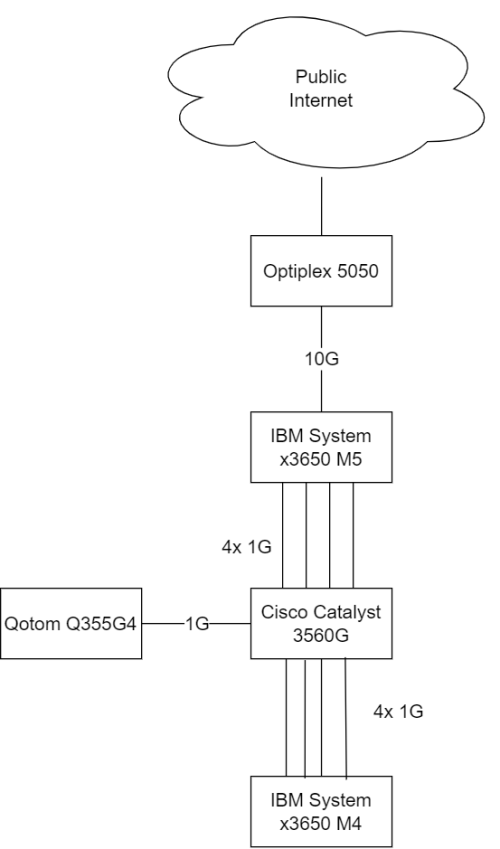
Network is something like this:
user posted image


For everyone here, enjoy the shitfuckery known as UniFi """""Ultra""""" Experience!

For TM people that lurks here, hi, and CAN YOU FIND SOMEONE COMPETENT ENOUGH TO LOOK AT MY ISSUE. My MCMC report ID is TC231110-00050.

Edit: updated network map

This post has been edited by chong601: Dec 13 2023, 10:04 AM
Oltromen Ripot
post Dec 13 2023, 09:41 AM

šŸ‘ 999999 person Likes this member
*******
Senior Member
4,034 posts

Joined: Dec 2019
QUOTE(chong601 @ Dec 13 2023, 09:24 AM)
It is now one month since that and TM did not reply to my MCMC complaint.
SOOOOOOO with that, I have created a beautiful website called https://howfuccedis.my/ping/charts to show them how it looks like from the customer point of view about the internet experience.

These charts are 100% live and interactive, and instructions on how to utilize the chart interaction are included. History should go up to one month back (except on Optiplex 5050 because I just recently updated the router, so the chart data is gone)

For everyone here, enjoy the shitfuckery known as UniFi """""Ultra""""" Experience!

For TM people that lurks here, hi, and CAN YOU FIND SOMEONE COMPETENT ENOUGH TO LOOK AT MY ISSUE. My MCMC report ID is TC230110-00050.
*
my advices:
• remove the OS and version info (avoid getting attack specific to OS and version)
• highlight large LARGE that the internet is supplied by TM who had promised ULTRA experience but delivered --redacted expletive--.
• put a simple network map (as it is, i can't determine where your fibre is connected to and through) so that people can make sense of the network flow. or at least draw a map of how your network edge is connected to unifi.

chong601
post Dec 13 2023, 09:56 AM

New Member
*
Newbie
11 posts

Joined: Aug 2017
QUOTE(Oltromen Ripot @ Dec 13 2023, 09:41 AM)
my advices:
• remove the OS and version info (avoid getting attack specific to OS and version)
• highlight large LARGE that the internet is supplied by TM who had promised ULTRA experience but delivered --redacted expletive--.
• put a simple network map (as it is, i can't determine where your fibre is connected to and through) so that people can make sense of the network flow. or at least draw a map of how your network edge is connected to unifi.
*
- these hardware are not exposed to the internet, but fair.
- planned.
- added.
TSAnime4000
post Dec 13 2023, 09:56 AM

Look at all my stars!!
*******
Senior Member
2,399 posts

Joined: Jul 2009
From: /dev/null


QUOTE(chong601 @ Dec 13 2023, 09:24 AM)
I have returned.

I have a bad news.

So starting from September, I get constant packet loss issue whenever my uploads are close to Gigabit and sometimes it will terminate the PPPoE session and re-establishes pretty soon after.

Two months of back-and-forth with TM yields nothing but constant frustration and two fiber repairs that cost me RM 150 each as well as unsolved case.

I got fed up and finally reported to MCMC on November 10 and told them that they kind of already given up with this because even the TMpoint peeps at IOI City Mall told me to report to MCMC after they saw the ticket status.

It is now one month since that and TM did not reply to my MCMC complaint.
SOOOOOOO with that, I have created a beautiful website called https://howfuccedis.my/ping/charts to show them how it looks like from the customer point of view about the internet experience.

These charts are 100% live and interactive, and instructions on how to utilize the chart interaction are included. History should go up to one month back (except on Optiplex 5050 because I just recently updated the router, so the chart data is gone)

For everyone here, enjoy the shitfuckery known as UniFi """""Ultra""""" Experience!

For TM people that lurks here, hi, and CAN YOU FIND SOMEONE COMPETENT ENOUGH TO LOOK AT MY ISSUE. My MCMC report ID is TC230110-00050.
*
This issue, sound similar to my old post:
https://forum.lowyat.net/topic/4722820

please take a look
System Error Message
post Dec 13 2023, 12:06 PM

Regular
******
Senior Member
1,781 posts

Joined: Jul 2010
QUOTE(chong601 @ Dec 13 2023, 09:24 AM)
I have returned.

I have a bad news.

So starting from September, I get constant packet loss issue whenever my uploads are close to Gigabit and sometimes it will terminate the PPPoE session and re-establishes pretty soon after.

Two months of back-and-forth with TM yields nothing but constant frustration and two fiber repairs that cost me RM 150 each as well as unsolved case.

I got fed up and finally reported to MCMC on November 10 and told them that they kind of already given up with this because even the TMpoint peeps at IOI City Mall told me to report to MCMC after they saw the ticket status.

It is now one month since that and TM did not reply to my MCMC complaint.
SOOOOOOO with that, I have created a beautiful website called https://howfuccedis.my/ping/charts to show them how it looks like from the customer point of view about the internet experience.

These charts are 100% live and interactive, and instructions on how to utilize the chart interaction are included. History should go up to one month back (except on Optiplex 5050 because I just recently updated the router, so the chart data is gone)

Network is something like this:
user posted image
For everyone here, enjoy the shitfuckery known as UniFi """""Ultra""""" Experience!

For TM people that lurks here, hi, and CAN YOU FIND SOMEONE COMPETENT ENOUGH TO LOOK AT MY ISSUE. My MCMC report ID is TC231110-00050.

Edit: updated network map
*
i have a similar switch but with POE instead. can see everyone is already pounding your network to view your usage.
May want to consider streaming to an external host and everyone can view from that instead.
TSAnime4000
post Dec 13 2023, 02:00 PM

Look at all my stars!!
*******
Senior Member
2,399 posts

Joined: Jul 2009
From: /dev/null


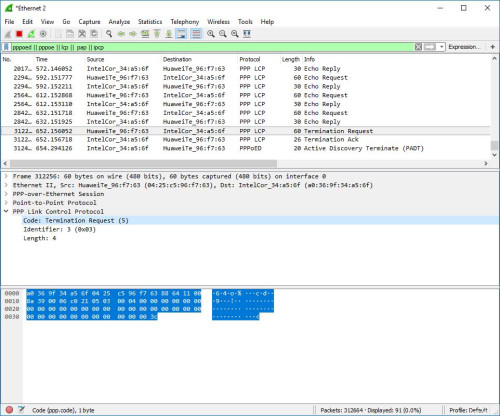
Looking back during my Streamyx era, that issue very similar to chong601 facing:
user posted image

Log will tell us:
LCP terminated by peer

What other been told
QUOTE(buraqdunia @ Oct 4 2018, 01:58 PM)
If one sees the LCP Terminated by Peer - that means the remote end initiated the disconnect... in other words, they hung up the session...
*
QUOTE(SilentVampire @ Oct 4 2018, 02:46 PM)
Your ISP is doing that, probably some throttling going on.
*
Perhaps you put PPP log on howfuccedis.my publicly, it would be nice if you can highlight LCP terminated by peer, show TM PPPoE AC MAC Address

CODE

Unifi PPPoE AC       Router
--------------------------------------
00:00:5E:00:01:54 -> 00:00:5E:00:00:00


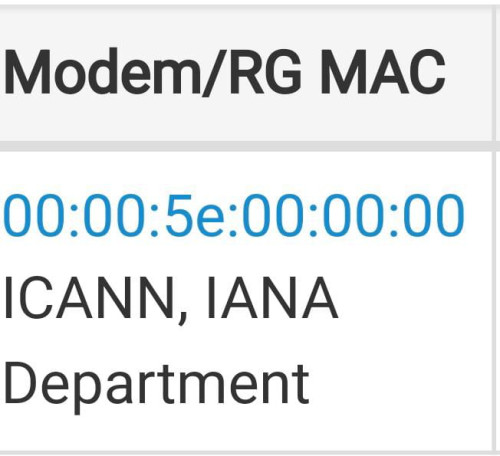
for me, I change WAN Interface Mac Address and ask TM friend to screenshot what TM sees:
user posted image

Yes, TM know what Brand Router you are using, also PPPoE Sessions also recorded,
and yes, I have asked my TM to check his, in Unifi CP, chong601 acount show many frequent disconnect and xxx TB of upload to proof of PPP disconnect request...

yet even his OLT Upload bandwidth reduced from usual 1100Mbps to 1000Mbps still show same issue.

If...
TM configured PPPoE didn't receive ACK from client in one second (due to lag/bufferbloat/packet loss) then issue LCP terminate

TM (or company who manage it) not suppose configure such a way, give some grace period, let say 60 second wait ACK from client, then terminate the sessions.

We can't do anything, this clearly equipment fault or configured quite strict.

To company to manage TM equipment, please do some grace period, don't expect Fiber connection is free from packet drop...

83 Pages « < 51 52 53 54 55 > » Top
 

Change to:
| Lo-Fi Version
0.0865sec    0.48    6 queries    GZIP Disabled
Time is now: 4th December 2025 - 01:17 PM