Welcome Guest ( Log In | Register )

Outline · [ Standard ] · Linear+

Home Networking Ditch ONU, use GPON SFP on Business Grade Router, 2.5G ONU for Unifi & Maxis, NO NEED VLAN

views
     
YoungMan
post Feb 27 2022, 03:57 PM

Look at all my stars!!
*******
Senior Member
6,794 posts

Joined: Oct 2008
From: Kuala Lumpur


Hi, just asking if anyone know how to access the ZTE F620 ONU provided by TM? I can already set the IP and open the UI page just do not have the username and pw to login.
YoungMan
post Feb 27 2022, 08:26 PM

Look at all my stars!!
*******
Senior Member
6,794 posts

Joined: Oct 2008
From: Kuala Lumpur


QUOTE(Anime4000 @ Feb 27 2022, 08:43 PM)
have you try:
tmadmin, Adm@XXXX

X is last 4 Mac address digit in upper case
*
I tried tmadmin and also admin for both username and pw. Will have a look at the modem to see if there's any mac address sticker on it.
YoungMan
post Feb 28 2022, 10:02 AM

Look at all my stars!!
*******
Senior Member
6,794 posts

Joined: Oct 2008
From: Kuala Lumpur


QUOTE(Anime4000 @ Feb 27 2022, 11:01 PM)
1. Learn how xPON (GPON) works
2. Directly attach fiber to Business Router like Ubiquiti EdgeRouter 12 or Mikrotik RB5009
3. More control own equipment, no restriction
4. Hacking...
5. Do This:
[attachmentid=11102406]

6. Also this, I just found VLAN 629 is DiGi Fiber, I called DiGi and my area is covered biggrin.gif
[attachmentid=11102407]

7. Hack OMCI, OAM command for more control, I managed to unlock download but not upload~
[attachmentid=11102408]

everything is learning,

with more knowledge TM cannot mess with us, like my previous streamyx PPPoE keep disconnect, with Wireshark proof TM know his fault not soon after Unifi cover my Taman, which is very WIN for me

as my self as Technician, as usual I will blame customer biggrin.gif so I need info to counter this
*
Haha true. Digi fibre is on VLAN 629 and I'm using it.
YoungMan
post Mar 12 2022, 06:51 PM

Look at all my stars!!
*******
Senior Member
6,794 posts

Joined: Oct 2008
From: Kuala Lumpur


QUOTE(Anime4000 @ Feb 27 2022, 08:43 PM)
have you try:
tmadmin, Adm@XXXX

X is last 4 Mac address digit in upper case
*
Update: manage to login to my ZTE F620 BTU with the Adm@xxxx. I was just browsing every pages to try and make sense of what's around, and also downloaded a copy of backup settings. Since I'm on Digi fibre, what I notice:
1. For LAN 1 is tagged with VLAN 400, 500, 600 as well as the TR-069 (can't remember what vlan).
2. LAN 2 is only tagged with VLAN 629 for Digi fibre while Lan 3 and 4 is empty.
3. Saw that the TR-069 page has username and password. Is that the same as OLT password?
4. What happen if I turn off the TR-069, since I saw the option to enable/disable it in the GUI?
5. is the port information like speed cap etc actually set on the OLT or somewhere inside BTU that will be override by OMCY? I'm just curious as sometimes for downgrade/upgrade they still need to send technician although our router clearly can support the speed.
Not planning to replace the ONU for now, but just to play around and understand it.
YoungMan
post Mar 12 2022, 08:02 PM

Look at all my stars!!
*******
Senior Member
6,794 posts

Joined: Oct 2008
From: Kuala Lumpur


QUOTE(PRSXFENG @ Mar 12 2022, 08:48 PM)
1. sounds like vlans for unifi
2. expected, rarely lan4 could be used for hypptv I heard
3. dont think so
4. it's for them to remotely change settings, you will also find TR-069 on your router, somtimes called CWMP or other names
5. supposedly it's OLT send commands to the BTU to tell it to limit speed
*
I believe can use lan 4 for HyppTv. Just need to add the vlan.
The firewall on ONU is also enabled. Wouldn't that cause double filter since router already has firewall enabled?

YoungMan
post Apr 5 2022, 07:35 PM

Look at all my stars!!
*******
Senior Member
6,794 posts

Joined: Oct 2008
From: Kuala Lumpur


QUOTE(tng55 @ Apr 5 2022, 01:16 PM)
i using tm unifi can hack speed uncapped ??
i am on 100m can hack 1gbps like 800m free
*
Wait for TM to offer you 800mbps lah bro. No need to hack since your speed test definitely can go more than 100mbps already. Only provider that use TM infra will get cap.

This post has been edited by YoungMan: Apr 5 2022, 07:36 PM
YoungMan
post Jun 4 2022, 09:43 PM

Look at all my stars!!
*******
Senior Member
6,794 posts

Joined: Oct 2008
From: Kuala Lumpur


QUOTE(mamakap @ Jun 4 2022, 07:08 PM)
Just got my xPON work with DiGi on RB5009. Thanks Anime4000 for the support, I appreciate that.  biggrin.gif

user posted image

user posted image
*
So Digi not getting symmetrical speed like Maxis account capping?
YoungMan
post Jun 5 2022, 10:59 AM

Look at all my stars!!
*******
Senior Member
6,794 posts

Joined: Oct 2008
From: Kuala Lumpur


QUOTE(ChenKaiWen @ Jun 4 2022, 11:58 PM)
I'm on TM-Maxis too.
300mbps plan. And I get extra speed on both directions

user posted image
*
This is on TM's ONU or custom GPON?

QUOTE(Anime4000 @ Jun 5 2022, 02:46 AM)
nice, mine just download, haha
*
Using Digi on TM infra, download max 99mbps and upload can go a bit beyond 50mbps. Using TM's ONU.

QUOTE(ChenKaiWen @ Jun 5 2022, 08:25 AM)
I did switch directly from TM to Maxis. All they changed was my ONU from unifi logo to TM logo. Maybe that could be the reason.
*
The new ZTE ONU?
YoungMan
post Jun 5 2022, 08:05 PM

Look at all my stars!!
*******
Senior Member
6,794 posts

Joined: Oct 2008
From: Kuala Lumpur


QUOTE(ChenKaiWen @ Jun 5 2022, 12:24 PM)
TM's ONU, HG8240H

Don't have the equipment for custom GPON
*
Means you are lucky because TM capped your port higher. For most users their port is capped at exact speed or slightly lower if you subscribe from other providers.
YoungMan
post May 1 2023, 02:54 PM

Look at all my stars!!
*******
Senior Member
6,794 posts

Joined: Oct 2008
From: Kuala Lumpur


QUOTE(liquid.D @ May 1 2023, 01:23 AM)
Hi @anime4000, thanks for your info, i just manage to watch some youtube and able to get in my onu and screenshot all that needed, kind of funny the ploam using very basic numbers and passwords, even the voip (400) manage to get the info,  i tot using account number, now I’m became keen to try this with 2.5gbps sfp+, you done this using sfp router right bro?

Am thinking using the sfp xonu with media converters since I’ve already have x86 openwrt router with couple of 2.5Gbps port, Hope using this pon stick inside media converter in bridge mode will be flowless and unlock extra speed 🙂

Btw If anyone here have try 2gbps unifi that have aggregated 1gbps x 2 can confirm if using 2.5Gbps pon stick will get 2gbps single rather then split 2 using unifi supplied gpon… hehe
*
Which method you use to extract the ploam password from ZTE 620?
YoungMan
post May 1 2023, 09:47 PM

Look at all my stars!!
*******
Senior Member
6,794 posts

Joined: Oct 2008
From: Kuala Lumpur


QUOTE(Anime4000 @ May 1 2023, 08:52 PM)
1. turn off ZTE ONU
2. unplug fiber
3. turn on ZTE ONU
4. set pc ip 192.168.1.2/24
5. login 192.168.1.1 with tmadamin, Adm@XXXX (last 4 hex mac address)
6. profit
*
My ZTE 620 can login without disconnect fibre. Except the password section, i cannot find it even though using the developer option.
YoungMan
post Oct 19 2023, 08:04 PM

Look at all my stars!!
*******
Senior Member
6,794 posts

Joined: Oct 2008
From: Kuala Lumpur


QUOTE(Anime4000 @ Oct 19 2023, 06:23 PM)
user posted image
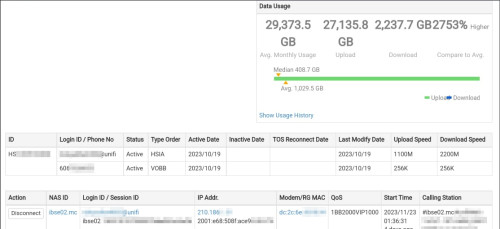
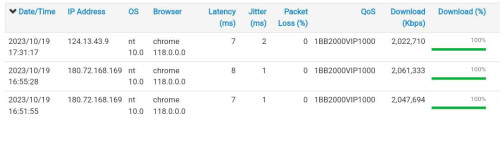
Today TM installer installed my 2Gbps

Since I from Maxis to Unifi, they had to move my fiber to new DB (black)

Status:
user posted image

OLT:
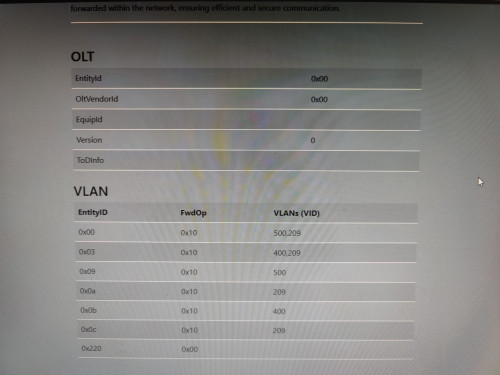
Good news, I no longer under dumb Nokia OLT rclxms.gif , I have double check what OLT, it just Generic OLT (conformed from D-Link ONR, Realtek Stick, Intel Stick)
user posted image
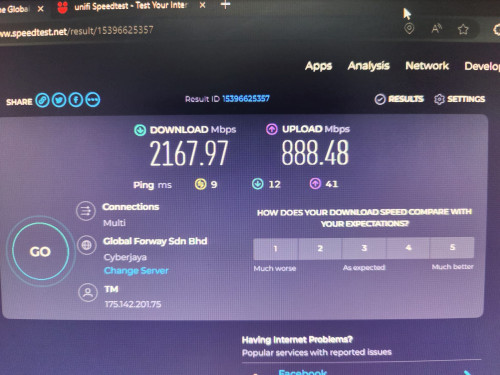
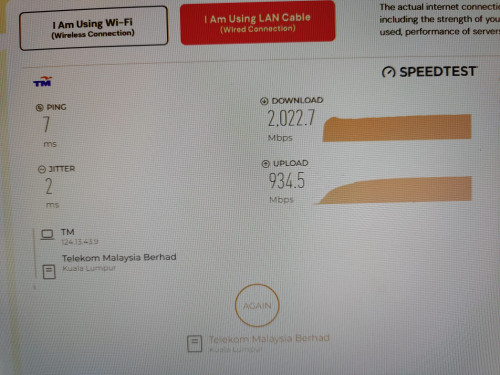
Speedtest:
user posted image
user posted image

I help the technician which D-Link ONR Speedtest didn't show TM server,
so I plug my PON Stick and speedtest inside VM and use these screenshot as proof
my GPON ONU SFP with RB5009
Now plan to find good ATA and Desktop SIP Phone, new thread will created.
*
Your Maxis not on TM infra? Just curious about moving the fibre to another DB.
YoungMan
post Nov 15 2023, 08:15 PM

Look at all my stars!!
*******
Senior Member
6,794 posts

Joined: Oct 2008
From: Kuala Lumpur


QUOTE(Anime4000 @ Nov 15 2023, 01:09 AM)
also TM priority it's Unifi 2Gbps first. I have checked that Unifi Ultra didn't have Pbits traffic shaping meanwhile Maxis on TM have predefined Pbits traffic shaping with wide gaps in between, Maxis likely get high ping when Unifi Ultra in use same PON network.

Maxis 2Gbps better off on Maxis own infra
*
How bad is the Pbits traffic shaping for non 2gbps users?
YoungMan
post Nov 16 2023, 08:46 AM

Look at all my stars!!
*******
Senior Member
6,794 posts

Joined: Oct 2008
From: Kuala Lumpur


QUOTE(Anime4000 @ Nov 16 2023, 12:13 AM)
I checked all SG speedtest, StarHub give me 7ms and full 2Gbps/1Gbps speed
same ping to TM Klang...

that server having nice route with maxis indeed
Then I don't know why TM choose UPC.
if didn't effect speed, I think TM keep using it
What OLT are you under?
Mine here I run 2Gbps 24 hours between VPS, avg is 1910Mbps download, max is 2111Mbps

TM enforced DSCP P-Bits on Maxis, this taken from Skyworth ONT (OLT: 0x414c434c)
» Click to show Spoiler - click again to hide... «

User from Bahau, complained his Maxis didn't reach expected bandwidth.
Tried his neighborhood Unifi (non 2Gbps) no P-bits present...

I didn't open the Skyworth internal, diag says EcoNet EN75 series... I not sure unless own the ONT
*
So any easy way to find out this P-bits thing? I'm not savvy about all this technical stuff you mentioned.
YoungMan
post Dec 3 2023, 10:06 PM

Look at all my stars!!
*******
Senior Member
6,794 posts

Joined: Oct 2008
From: Kuala Lumpur


QUOTE(Anime4000 @ Dec 3 2023, 07:53 PM)
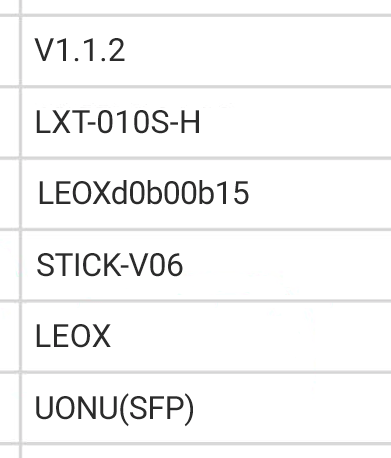
D-Link DPN-FX3060V has new firmware (V1.1.2)

my PON Stick also get new update to follow change of V1.1.2 ensure follow TM Standard.

TM show me this:
user posted image

TM toke notice that my first 2Gbps Install speedtest result was amazing, rise suspicious brows.gif 
user posted image

We have run several testing on PON Stick that I experiment,
Then TM show this when my PON Stick is set doesn't reflect back properly, I forgot one command doh.gif
user posted image
^^^ TM can find who improper Stick DIY, in-case your PON Stick cannot use, it's forbidden for me to help rclxub.gif > NDA

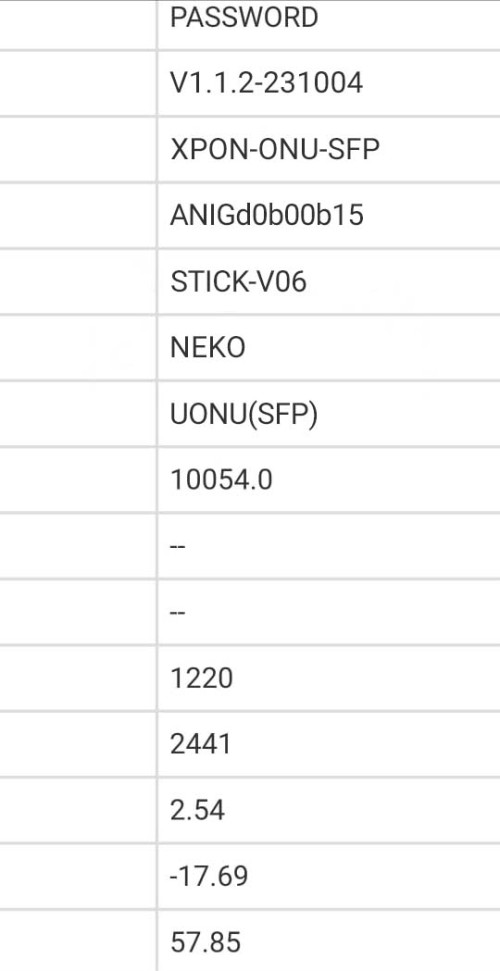
Also suggest a unique VendorId and special MIB Entity to validate my PON Stick

I do this to TM panel:
user posted image

not sure either I want to use ANIG (Anime GPON) or NEKO or NEMU,

so I put ANIG VendorId as ONT S/N and NEKO as VendorId

Another bad happening... ranting.gif
There already one case that disturb whole Taman Internet,
they didn't tell what cause, but upon checking the user live is not from me (I compare to shipping address)
so, I safe from this trouble at least...

You must know, Fiber Internet is SHARED line,

from one stranding fiber split into multiple subscriber, one rouge ONT can disturb other internet!

Bad ONT can broke OLT QoS and you giving unfair to others!!

Event like this just not nice!
*
Wah... looks like you can collab with TM already. Anyway there is good and bad when people starts using their own PON stick. TM should not try to enforce 5-10% QoS to other provider... That way it somehow encourage ppl to try to break it through unauthorise ONT.
YoungMan
post Dec 4 2023, 10:02 AM

Look at all my stars!!
*******
Senior Member
6,794 posts

Joined: Oct 2008
From: Kuala Lumpur


QUOTE(Anime4000 @ Dec 3 2023, 11:36 PM)
Indeed, that my experience with Maxis, and this can happen as did back then (12/Aug/2022) to get 2Gbps by 800x4 PPPoE

thing is, I don't want be responsible for bad thing, I been instruct to not help DIY and keep the release modified firmware that I made private
*
Maybe if you have the chance, can try to influence TM on this. We as consumer also didn't ask for more than subscribed speed, just nice if the speed for other provider is capped properly base on what they subscribe instead of 5-10% lower.
YoungMan
post Dec 4 2023, 07:47 PM

Look at all my stars!!
*******
Senior Member
6,794 posts

Joined: Oct 2008
From: Kuala Lumpur


QUOTE(ChenKaiWen @ Dec 4 2023, 03:44 PM)
For my experience, I still get 10% extra speed when I was on Maxis. I transferred from Unifi to Maxis, don't know if that's why I got 10% extra. Or just because of my area.
*
It is very much depend on area. When I transfer my Unifi to Digi fibre 100mbps, I get 99mbps to 100mbps. Then transfered to Maxis last month, I get 92-95mbps. On Unifi it is always around 103-105mbps.
YoungMan
post Dec 5 2023, 02:46 PM

Look at all my stars!!
*******
Senior Member
6,794 posts

Joined: Oct 2008
From: Kuala Lumpur


QUOTE(paultantk @ Dec 4 2023, 09:01 PM)
this is maxis in the same house as my unifi2gbps plan, maxis is 800/200 plan

user posted image
*
Good for you can get +100%. Did they pull seperate line for your 2gbps?

QUOTE(Anime4000 @ Dec 4 2023, 10:25 PM)
You know what, non-Unifi pay TM for fiber access is RM5/month/user
This very reasons speed are some 90%, some are +100%

Next Gen PON will be Unifi exclusive only, meanwhile non-Unifi stuck at GPON indefinitely (eg: unless TM rise monthly access fee to Maxis to access Next Gen PON)
*
But that has been what is agreed between both parties. They could have sort it out during the price revision in October.
the 90+% and 100+% shows that the way they provision the network is inconsistent. I login to my ONU yesterday and the lan2 which previously use for Digi fibre is still with vlan 629, meanwhile lan3 and lan4 is Maxis vlan.

This post has been edited by YoungMan: Dec 5 2023, 02:48 PM
YoungMan
post Mar 5 2024, 09:47 AM

Look at all my stars!!
*******
Senior Member
6,794 posts

Joined: Oct 2008
From: Kuala Lumpur


QUOTE(Anime4000 @ Mar 4 2024, 10:54 PM)
Today early morning, TM tech come to my house, in attempt to change DP back to old Maxis port that I use before.

sadly my Maxis old port was taken sad.gif

this mean I stuck with Fiberhome OLT, not Nokia/ALCL OLT sad.gif no 1024Mbps Upload sad.gif

In other news;
TM no longer allow to Add and Improvement fiber in Whole Negeri Sembilan, this has been take over by TNB/Allo. Order by current administration.

TM only allow to do maintenance only.

So, adding new fiber line is not allowed sad.gif
adding new OLT also not allowed...

There are chance Unifi going to ride Allo Fiber, this give me mixed feeling;
1st: It's good for the competition among Maxis and other ISP
2nd: I worried that Allo play dirty on Unifi where QoS will capped as is

If Unifi ride on Allo Fiber, PPPoE going away? As far I know lwk523 using UMobile Fiber under Allo network:
1. Connection is Layer 2 instead of Layer 3 (PPPoE)
2. Internet gateway is Allo, not UMobile

And, replacing ONU with Stick would be issue with Allo, reasons:
1. In Cyberjaya, I have tested many PON Stick on Pendakwah Teknologi office, Allo there using Calix OLT.
2. Calix use GPON as usual, but OMCI MIB 84, 171 are empty, PPTP and VEIP entry also empty, I suspect using GPON as like Normal Ethernet?
3. Calix ONT doesn't allow admin login to view PLOAM/SLID/LOID

If that case, suck bad.... need hack the ONT.

as other place might using Huawei ONT, I hope Allo avoid using obscure device.

Then, Allo is not like TM allow user properly replace ONT. Allo is more like TIME, there will be Propriety OMCI where Standard OMCI ONT cannot use...

If like this, TM have leeway and it's good thing compared with TIME and Allo
*
Yeah good for other ISP not to be controll by only one entity. But why need to restrict fibre deployment by TM, instead should let both allo and TM to continue expanding fibre and ensure each house in each taman is accounted for, so that no issue of port full.

2nd: I worried that Allo play dirty on Unifi where QoS will capped as is
TM has also done this to many of their non Unifi subs. Unless this gets regulated, any provider would just do the same to protect their own interest.

YoungMan
post Jun 29 2024, 10:36 AM

Look at all my stars!!
*******
Senior Member
6,794 posts

Joined: Oct 2008
From: Kuala Lumpur


QUOTE(tng55 @ Jun 28 2024, 09:02 PM)
ohhh i think must safety 4GB RAM
because i want heavy downloader that i don't want trouble ram not enough
4GB RAM are safe because enough heavy usage

seen all port 1GBPS  sad.gif  they not update alll Port 2.5G any idea for CCR2004 4GB RAM

if want use AdGuard Container is running do need storage ???
CCR2004 storage 128MB Possible to use AdGuard Container
*
In all honesty, you will also not use up all the ram all the time.

2 Pages  1 2 >Top
 

Change to:
| Lo-Fi Version
0.0991sec    0.62    7 queries    GZIP Disabled
Time is now: 3rd December 2025 - 09:50 AM