Welcome Guest ( Log In | Register )

3 Pages  1 2 3 >Bottom

Outline · [ Standard ] · Linear+

Home Networking Ditch ONU, use GPON SFP on Business Grade Router, 2.5G ONU for Unifi & Maxis, NO NEED VLAN

views
     
kwss
post Nov 5 2023, 03:22 AM

Regular
******
Senior Member
1,208 posts

Joined: Aug 2018
I have successfully made voip call works on Android phone using the built-in SIP client. Router is Mikrotik.

High level Steps:
1. Add a VLAN. I use name "voip", tag it to ID 400.
2. Attach DHCP client to VLAN "voip". Don't use peer DNS, NTP or default route.
3. Once the DHCP client successfully get an address, check the Status and get it's default gateway address.
4. Add a static route with Dst Address 10.225.0.0/16, and put the default gateway address you copied above. Immediate Gateway should show something like this: 10.40.255.254%voip
5.Add a NAT rule. Chain=srcnat. Out Interface=voip. Action=masquerade
6. Add another NAT rule. Chain=dstnat. In Interface=voip. Action=dst-nat. To Addresses=<IP address of your phone>

Step 6 is necessary for RTP packet to reach you. For Cisco IOS, use the following instead:
ip nat service allow-sip-even-rtp-ports

Obviously for Mikrotik you can only use 1 phone. Cisco allow you to use multiple phone with one router configuration.

Android phone overview:
1. I use the Phone app
2. Go to Settings
3. Calling accounts
4. SIP accounts

I set "Send keep-alive" to "Always send"
After that just enable "Receive incoming calls"

Go to "All calling accounts" and enable the voip account.
kwss
post Nov 27 2023, 02:48 AM

Regular
******
Senior Member
1,208 posts

Joined: Aug 2018
QUOTE(aztech @ Nov 25 2023, 05:48 PM)
This is how it works for me previously - using ODI XPON stick. but i route/fwd the VLAN and bridge it to 1 eth port and assigned FreePBX raspberry PI to get the VLAN400 IP.

Now it's not working - seems like VLAN400 is not able to get IP anymore. Torching the sfp1-plus interface I can see that the DHCP server from VLAN400 is sending offer but without tagged VLAN id 400.

Another weird observation - I could get the IP from DHCP after I bridge VLAN400+sfp1-plus+any eth port or i put dhcp client on that new bridge - but it won't be able to route/traffic not working even after static route added.
*
It seems like you have at least 2 separate issues.
First one is DHCP. Instead of using Torch, you need to use Packet Sniffer to see how packets traverse your network.
Sniff at the ONU port to see if things are working. Then sniff again at your bridged eth port.

The second issue is a common one. TM will change the Outbound Proxy of the VoIP once in a while. For me it has happened twice. Put back the TM ONU and verify VoIP is working. Then login the ONU and get the new Outbound Proxy. Configure the static route and your FreePBX accordingly.


[Firmware Feature Request]
Maybe a method to list configuration for VoIP?
kwss
post Dec 5 2023, 02:49 PM

Regular
******
Senior Member
1,208 posts

Joined: Aug 2018
QUOTE(Anime4000 @ Dec 3 2023, 07:53 PM)
D-Link DPN-FX3060V has new firmware (V1.1.2)

my PON Stick also get new update to follow change of V1.1.2 ensure follow TM Standard.

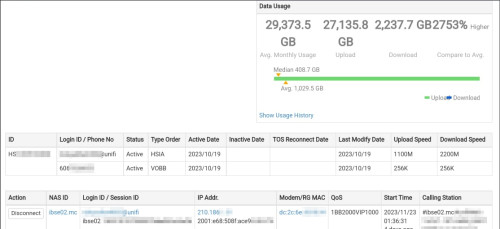
TM show me this:
user posted image

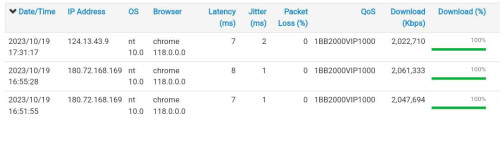
TM toke notice that my first 2Gbps Install speedtest result was amazing, rise suspicious brows.gif 
user posted image

We have run several testing on PON Stick that I experiment,
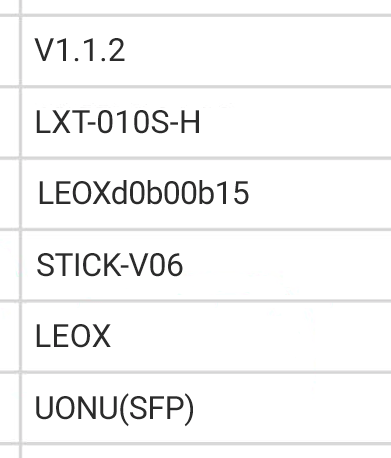
Then TM show this when my PON Stick is set doesn't reflect back properly, I forgot one command doh.gif
user posted image
^^^ TM can find who improper Stick DIY, in-case your PON Stick cannot use, it's forbidden for me to help rclxub.gif > NDA

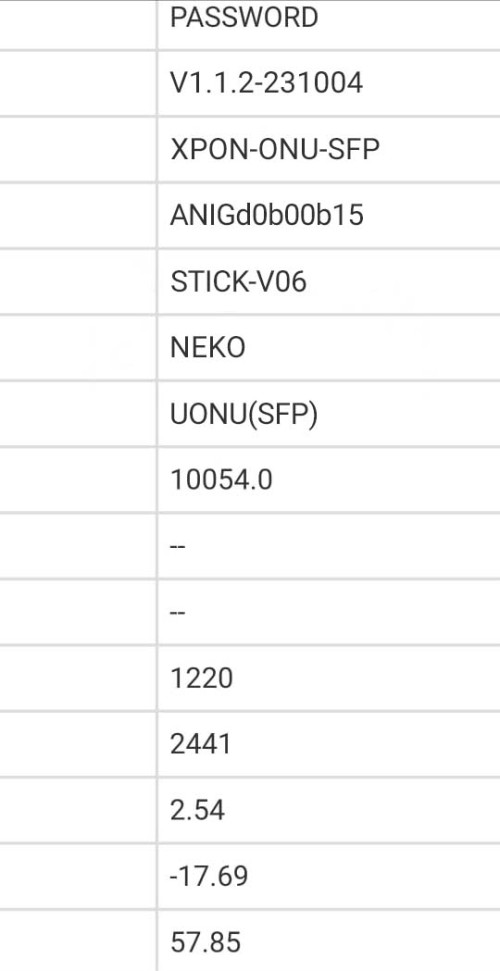
Also suggest a unique VendorId and special MIB Entity to validate my PON Stick

I do this to TM panel:
user posted image

not sure either I want to use ANIG (Anime GPON) or NEKO or NEMU,

so I put ANIG VendorId as ONT S/N and NEKO as VendorId

Another bad happening... ranting.gif
There already one case that disturb whole Taman Internet,
they didn't tell what cause, but upon checking the user live is not from me (I compare to shipping address)
so, I safe from this trouble at least...

You must know, Fiber Internet is SHARED line,

from one stranding fiber split into multiple subscriber, one rouge ONT can disturb other internet!

Bad ONT can broke OLT QoS and you giving unfair to others!!

Event like this just not nice!
*
QUOTE(Anime4000 @ Dec 4 2023, 10:25 PM)
You know what, non-Unifi pay TM for fiber access is RM5/month/user
This very reasons speed are some 90%, some are +100%

Next Gen PON will be Unifi exclusive only, meanwhile non-Unifi stuck at GPON indefinitely (eg: unless TM rise monthly access fee to Maxis to access Next Gen PON)
*
That open up a lot of questions. I hope you don't mind answering.

What PON technology are they moving towards? XGPON? XGSPON? Or straight to 50GPON?

Any idea when it is coming?

Does it means 800Mbps FSU will get the new tech? Or it is reserved for new packages with even faster speed next year?

For users of your GPON stick, does it means you will have to provide firmware update? What will the mechanism like?

I am also curious on what is the arrangement between you and TM. If what you said is true, that means the remaining lifespan of your GPON stick business is short unless you expect lower speed tier customer to be interested in GPON stick but I am sure we all know this is a nerd thing.

On the other hand, have you consider working on a future version of xPON stick right now, before TM launch whatever new service down the road?

I am also wondering if their new generation network will actually say goodbye to PPPoE, offer static IPv6 Prefix like /56 or shorter.
kwss
post Dec 5 2023, 04:03 PM

Regular
******
Senior Member
1,208 posts

Joined: Aug 2018
QUOTE(Anime4000 @ Dec 5 2023, 03:42 PM)
1. What PON technology are they moving towards? XGPON? XGSPON? Or straight to 50GPON?
> I don't know, maybe this

2. Does it means 800Mbps FSU will get the new tech? Or it is reserved for new packages with even faster speed next year?
> No, what been told: under <= 800M will stay with GPON

3. I am also curious on what is the arrangement between you and TM. If what you said is true, that means the remaining lifespan of your GPON stick business is short unless you expect lower speed tier customer to be interested in GPON stick but I am sure we all know this is a nerd thing.
> Thats secret, I here just to help and ease with the setup, so I can ensure to TM that my device not doing some nasty stuff (not to trust user capable to setup properly)

4. On the other hand, have you consider working on a future version of xPON stick right now, before TM launch whatever new service down the road?
4a. Any idea when it is coming?
> No ETA on this, they told start with Business first in KL (trial run), there are around ~500K of 2Gbps subscriber, use of PON Stick not even 0.01%, many stay with stock D-Link and they are just fine with 1+1 configuration

5. I am also wondering if their new generation network will actually say goodbye to PPPoE, offer static IPv6 Prefix like /56 or shorter.
> No, PPPoE is to stay, there are PPPoE Hardware Acceleration Router like Mikrotik. /56 for business only, for home use NAT64

Like I said before, take this info grain of salt, I my self not believe, if TM did, there will take longer even longer to upgrade the OLT

Also, many just want 1Gbps upload (system/hosting), they don't mind 1+1 download
*
Okay, so that would be 50GPON.

800Mbps after FSU will be 1Gbps, 2Gbps, etc. The target speed is unknown right now. Based your your statement then it's better to just wait till FSU is to decide what to buy.

What about firmware update to current user?

The arrangement between you and TM matters when it comes to support.
Right now the demarc is the ONU. Everything before the ONU is TM's responsibility. Everything after that is customers responsibility. Now if you have a business arrangement and TM says your product is okay on their network, that would fix a lot of ambiguity.
But as of now, it's not quite clear if that's the case. You only mention your product didn't mess with the network, but TM never provide any endorsement.

No, Mikrotik cannot offload PPPoE. That's why I asked. 2Gbps, fine. 5Gbps, maybe. 8Gbps onwards? Not sure
Refer discussion below:
https://forum.mikrotik.com/viewtopic.php?t=192960
https://forum.mikrotik.com/viewtopic.php?t=163839

Actually for Mikrotik, once you enable jumbo frame, hardware offload is disabled too.

kwss
post Dec 15 2023, 12:43 AM

Regular
******
Senior Member
1,208 posts

Joined: Aug 2018
QUOTE(chong601 @ Dec 13 2023, 09:24 AM)
I have returned.

I have a bad news.

So starting from September, I get constant packet loss issue whenever my uploads are close to Gigabit and sometimes it will terminate the PPPoE session and re-establishes pretty soon after.

Two months of back-and-forth with TM yields nothing but constant frustration and two fiber repairs that cost me RM 150 each as well as unsolved case.

I got fed up and finally reported to MCMC on November 10 and told them that they kind of already given up with this because even the TMpoint peeps at IOI City Mall told me to report to MCMC after they saw the ticket status.

It is now one month since that and TM did not reply to my MCMC complaint.
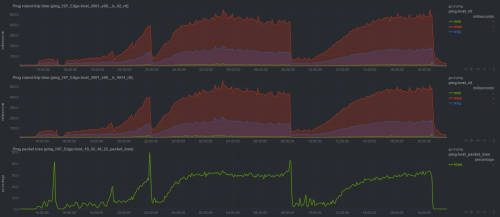
SOOOOOOO with that, I have created a beautiful website called https://howfuccedis.my/ping/charts to show them how it looks like from the customer point of view about the internet experience.

These charts are 100% live and interactive, and instructions on how to utilize the chart interaction are included. History should go up to one month back (except on Optiplex 5050 because I just recently updated the router, so the chart data is gone)

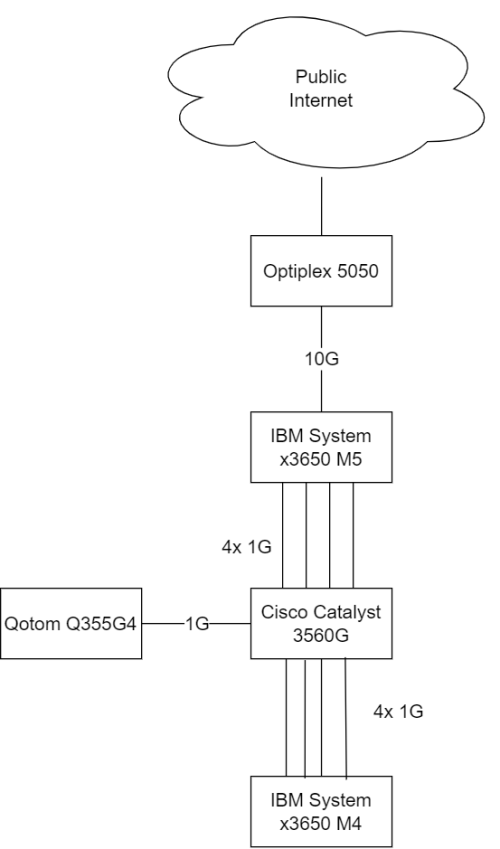
Network is something like this:
user posted image
For everyone here, enjoy the shitfuckery known as UniFi """""Ultra""""" Experience!

For TM people that lurks here, hi, and CAN YOU FIND SOMEONE COMPETENT ENOUGH TO LOOK AT MY ISSUE. My MCMC report ID is TC231110-00050.

Edit: updated network map
*
I had the same problem. I called 100 and ask for a new ONU. Problem solved.
I assume they check your fiber input power? If you can login to your ONU, what's the reading?

Anyway, just ask for a new ONU if you haven't. Its FOC.
kwss
post Dec 15 2023, 01:13 AM

Regular
******
Senior Member
1,208 posts

Joined: Aug 2018
QUOTE(chong601 @ Dec 15 2023, 12:55 AM)
Fiber receive is between -18 to -20 dBm, so that's sorted. Already did two fiber repairs due to broken fiber and too many splices (5 from DP to the ONU)
For changing the ONU, I tried.

They wanted to change my router, but they decided to do firmware upgrades first which the last upgrade was two weeks ago, which obviously doesn't work.

They upgraded the firmware from V1.0.6 to V1.1.0 to V1.1.2 within two weeks since I reported to MCMC.

V1.1.2 firmware is so bad that it did this to itself:
user posted image

Now they completely ghosted me and had zero communication with me.

I have completely removed their router away from the whole equation at this point as I will probably commit warcrime on that router if I use it again.

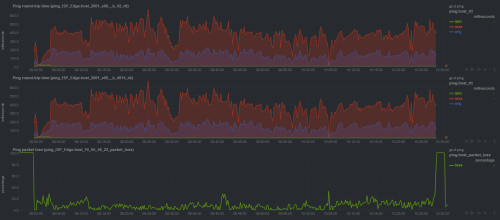
I even tried the old ZTE F620 last week which doesn't help much either.
user posted image

This is just pure cursed.
*
Your new firmware graph gave me a hint: Forward Error Correction.
The problem is very well on the physical fiber cable. Is it possible to replace the whole fiber instead of splicing it?
How did the repair the fiber? Using fusion splicer? Did they heat seal the splice or how?

How long is the cable run? Is it buried or hang on tree / pole?
Did the technician sniff the fiber with PON Analyzer? eg: GPON Doctor

Long time back when I work at this telco, there was a customer who got random disconnect. It took a long time but eventually we figured out if some really heavy truck cross the road, he will get disconnected. Yea, broken cable.

I read your full PPPoE log. Sometimes your router do the disconnect because the LCP-echo has no reply. Sometimes it is TM that did it.
kwss
post Dec 15 2023, 01:41 AM

Regular
******
Senior Member
1,208 posts

Joined: Aug 2018
Try your luck in making them do the following for you:
1. Replace the fiber cable from your ONU all the way to the optical splitter.
2. Replace the optical splitter.

It is an everyday job for technician so maximize the use of your charisma.
kwss
post Jun 4 2024, 05:44 AM

Regular
******
Senior Member
1,208 posts

Joined: Aug 2018
QUOTE(Anime4000 @ Jun 3 2024, 08:07 PM)
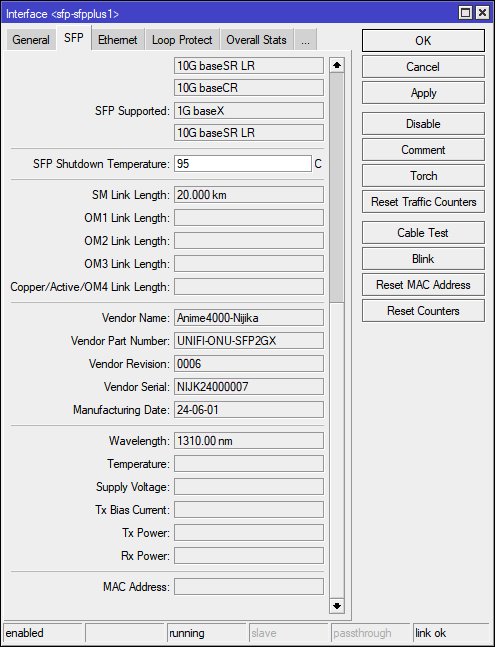
Apparently Mikrotik detect differently on SFP Supported

user posted image

I think making Addr 0x06:0x00 treated as 10G baseSR LR

need read more on think, in meantime, might ask Mikrotik to backport
*
I think this change is pretty recent?
https://github.com/torvalds/linux/commit/fd...542563730658efe

I don't think Mikrotik will do the backport as they use a very old kernel + they have a lot of proprietary customization on top.
They took almost 1 year to solve the graph problem.
I still have an open ticket with them about PPPoE cannot use MTU 1500, complete with packet capture to show it is their problem. They acknowledged it but cannot provide a timeline when it will be fixed. This was in April 2022.

Somehow they can find a lot of time to do container support when their core business should be networking.
I mean sure they don't charge for support like Cisco, Juniper and the rest but erm...
kwss
post Jun 4 2024, 03:36 PM

Regular
******
Senior Member
1,208 posts

Joined: Aug 2018
QUOTE(Anime4000 @ Jun 4 2024, 02:55 PM)
Yea right, perhaps buy Mikrotik MultiGig RJ45 and examine the EEPROM that way

so far HiSGMII and 2500Base-X only used by GPON, no typical transceiver ever use it
*
From my very limited understanding, mGig RJ45 is supported by a different commit:
https://github.com/torvalds/linux/commit/0f...831fec47bc5e9a2

You might wanna refer to SFF-8024 and set the connector type to 0x08 or 0x22 to see if it works. I am not sure if the SerDes signalling is the same.
I don't think Mikrotik come out with their own magic.

You can buy one if you are genuinely interested.

This post has been edited by kwss: Jun 4 2024, 03:41 PM
kwss
post Jun 15 2024, 09:32 PM

Regular
******
Senior Member
1,208 posts

Joined: Aug 2018
QUOTE(Anime4000 @ Jun 14 2024, 01:05 PM)
Upon checking VLAN400, didn't get IP Address from Mikrotik for awhile, I thought VLAN400 no longer bridged,

come to mind, how about bridge it and test from Proxmox VM
user posted image

and check in the OS, got IP address here, but not on Mikrotik
user posted image

I thought my Nijika Firmware can't bridge VLAN400 from VEIP (0x601/0xe01), apparently it has DHCP Filter which prevent Mikrotik from request, none of DHCP Option (12 & 61) works

so, to test, must bridge and test from the PC or D-Link RG Mode it self
*
I checked mine and sure enough, same problem as yours. I tried cloning the MAC address for ZTE and it didn't work too.
Did a packet capture and RouterOS just send DHCP Discover but never get a reply.

Is it possible you provide a packet capture of a successful DHCP session from the D-Link? I would like to see what is different.
RouterOS by default will use Option 53, 55, 255 which cannot be disabled. I think the filtering is based on the this, or some other flags that only RouterOS use.

The only parameter that can identify it as Mikrotik is Option 55 which specify Parameter Request List Item: (138) CAPWAP Access Controllers.
I removed that parameter in Option 55 and it still didn't work. Verified that parameter is gone via packet capture.

This post has been edited by kwss: Jun 15 2024, 09:50 PM
kwss
post Jun 17 2024, 12:10 AM

Regular
******
Senior Member
1,208 posts

Joined: Aug 2018
QUOTE(Anime4000 @ Jun 16 2024, 03:06 PM)
Here Wireshark Capture that run on VM which is able to get IP Address
Later I try capture D-Link
*
Thanks man. Tried it but didn't work. Mikrotik don't allow me to override Option 53.
Your Option 53 = 0x03 while Mikrotik = 0x01 but I am not sure if this is the problem.
I copied all the other options, including all the paddings.
I get no reply at all, like a blackhole.

I remember you wrote somewhere that TM can choose not to bridge VLAN 400 to port 1 is it? I am using ZTE F620 with ALC OLT so not too sure if that is the factor as well.

This post has been edited by kwss: Jun 17 2024, 12:14 AM
kwss
post Jun 17 2024, 12:18 AM

Regular
******
Senior Member
1,208 posts

Joined: Aug 2018
QUOTE(Anime4000 @ Jun 16 2024, 11:29 PM)
Research on D-Link DPN-FX3060V to find proprietary OMCI and Emulate for PON Stick get side track...😅

They managed to add Wireguard and Dante SOCKS Proxy inside D-Link DPN-FX3060V,
Using my RTL960x Firmware tool and they start reverse engineer ARM64 build,

as ARM64 is well known, documentation is everywhere, no need to use Buildroot, so compiling is quite simple and rebuild the Kernel

They send me this
user posted image

Speed Results 194.124.38.17 (CGNAT)
user posted image

SSH from WAN
user posted image

They plan to infect all DPN-FX3060 including both and all version, the IoT daemon has little (or none) on the instruction, buffer overflow exploit can be done, so RCE easier.
Since most Router has two rootfs, flashing infected inactive rootfs and reboot to infected rootfs, then "dd" from active rootfs to another rootfs, this way infecting only do once only.

tldr;
1. RCE the DPN-FX3060
2. scp "infected_rootfs" to /tmp
3. dd "/tmp/infected_rootfs" to "/dev/mtdX" (depend which is active and not)
4. change non volatile to instruct to boot infected_rootfs
5. reboot
6. once boot, dd the infected_rootfs to previous rootfs

they plan to modify the uboot making resistance from flashing good firmware.

should submit and report this? I guess they don't really give me how they do it...

Well, both use same SDK, Reverse Engineer RTL960x has been done before COVID, up to this point understand well,
Thing is, more and more RTL960x based router on the market, up to OEM how they wrote
*
I am just wondering, can the OS be changed to use upstream OpenWRT?
If TM give me this thing, I am not too keen on running anything from D-LINK.

Another question: What kernel version is it running? Does the SDK depends on specific modified kernel version or it can works with vanilla kernel?

This post has been edited by kwss: Jun 17 2024, 12:22 AM
kwss
post Jun 17 2024, 01:08 AM

Regular
******
Senior Member
1,208 posts

Joined: Aug 2018
QUOTE(Anime4000 @ Jun 17 2024, 12:58 AM)
LTS Linux Kernel 5.10.70

the Kernel and Firmware has Proprietary driver such as OMCI, PON Driver, LAN, 2.5GbE, WiFi, VoIP

need decompile whole thing and build for OpenWRT, but for OMCI and PON is very hard, need deep understanding

the Kernel can be updated as follow latest Linux glibc, as for now using version 2.30 (year 2018-2019)

being old kernel, highly suspected exploit if found or even more RCE entry.
*
Thanks for the info.
I guess the answer is no then. Back in the days when I did embedded board firmware, the manufacturer just gave the whole binary blob of the kernel in squashfs + SDK. There is no way to rebuild and make it work with the hardware. They basically violate GPL.

About the VLAN, I will try when I am free as I used up all the ports already. I don't have a spare port to bridge VLAN 400.
Unless I tag it to one port, where I then add a macvlan to my machine and DHCP from there. Kinda lazy now.
kwss
post Jul 27 2024, 05:49 PM

Regular
******
Senior Member
1,208 posts

Joined: Aug 2018
QUOTE(yenchenje @ Jul 27 2024, 03:53 PM)
Even with private VLAN 400 only?

Currently my setup is ONU stick to converter to 2.5G switch, pass through port 1 tagged, 400 port 3 untagged, 500 port 5 untagged

Does it still have the ability to hop through all those to reach the D-Link ONU?
*
As of now, your setup seems safe, provided you didn't misconfigure anything.
You need to audit to make sure only VLAN 400 reach your D-Link.
You also need to audit VLAN 400 is only allowed access to 10.225.0.0/16. Meaning everything else is blocked on VLAN400. This is to prevent ACS from connecting from any VLAN, effectively doing a VLAN bypass.
On top of that you need to block access to port 80. 443, 8082 (both ingress and egress) for VLAN400. This is to prevent ACS traffic leaking into VoIP VLAN.

If you cannot make sure of the above, I suggest not using the D-Link.
Generally Anime4000 advice is correct. If we are not sure if people can set it up securely, we just tell people no. Afterall there are plenty of used Huawei. You can even reuse your ZTE ONU or whatever old ONU you had.
kwss
post Aug 13 2024, 04:58 PM

Regular
******
Senior Member
1,208 posts

Joined: Aug 2018
QUOTE(skywardsword @ Aug 13 2024, 02:56 PM)
Geez.... Those fellas are beyond thick....

I started to set up my ROS 7++... Router (L009) using the old Subtel YouTube... Also damn sakit kepala...

I gave up thinking I could do the Pon thing.
Managed to get the CAP AX SETUP as AP, after 3-4 weeks. Lulz.... Mikrotik is not that easy.
*
I never believe what TM said. I am sure everyday people call and ask for PPPoE password but they still insist on using it.
Do you think their legal department is so free to work on him just because one guy call and enquire about PON stick?

TM is doing it to hide something, that is the D-Link firmware. It has kill-switch inside, loaded with security vulnerabilities and maybe some other bad stuff too.
kwss
post Aug 14 2024, 12:21 AM

Regular
******
Senior Member
1,208 posts

Joined: Aug 2018
QUOTE(skywardsword @ Aug 13 2024, 05:29 PM)
woooo... that is an interesting take.
yeah, the noobs who buy Pon stick probably have those adventurer type of mindset.... why would they call tm for tech support.... grinding it out and making it happen!!!!

but surely like ants in hot pans.... while doing the setup, I had to make sure, I do not impact anyone else who might need internet.... it is hectic.... any personally, I had to have another phone/tablet with internet while I did my half ass setup.

at the end of it, I was happy, but the process is definitely something to talk about.  ROS7 changed quite a bit of setting different from ROS6.
*
Congratulations on your new setup.
The more you think about it, the more absurd the excuse is.
As far as I can tell, he made sure all his PON stick work. There is no need for his customer to call TM.
Those who go out and buy their own PON stick, flash it or do whatever they want, don't need to call TM either. Their ONU will surely works.
The question is... Why is TM so sure it is his PON stick? So many people are selling them online.

Let's say someone really call 100 and talk about PON stick, I am sure their response is the same as people using their own router: Not officially supported.
None of them requires escalation and involvement of legal team.

From my experience dealing with call center folks, they don't care either. Their KPI is how many calls they answered per day. Just say it is not supported, hang up = KPI + 1.
kwss
post Aug 14 2024, 10:25 PM

Regular
******
Senior Member
1,208 posts

Joined: Aug 2018
QUOTE(Anime4000 @ Aug 14 2024, 09:55 PM)
I got multiple call from TM (maintenance and vendor) saying (roughly)

» Click to show Spoiler - click again to hide... «


after 5 days++, I forgot that guy, suddenly so called OLT Vendor has contacted me
» Click to show Spoiler - click again to hide... «


last year have issue like this, then now happening again...

Thing is... every area OLT is build different, configured different even same OLT brands

TM has outsourced to vendor for managing OLT, even look so "Universal"

Actually not so "Universal"

Fiberhome is the most notorious to work with, 2nd place Alcatel/Lucent (Nokia)

There are many private OMCI, this what I had to delete from online because it disturb their OLT according to OLT Vendor
creating unnecessary error that had them to investigate even come one subscriber, vendor need reach their Key Performance Indicators ensure OLT less downtime, if not there will be consequences

That's the beauty of Out Sourcing, TM can cut RM to vendor when their KPI is low, this how customer can get a rebate~
*
So what now? Do you still want to sell PON stick? Anyone can claim they know you.
Since TM know who is that, why not just give him a visit?
Did you give that guy a call and see what he says?

Or... Maybe TM should just stick to vendor that don't suck.
Or... Learn from other country and have PON stick as an option instead of ONR.
Or... Learn from other country and lock everything down and make the ONU a demarc.
kwss
post Aug 15 2024, 12:19 AM

Regular
******
Senior Member
1,208 posts

Joined: Aug 2018
QUOTE(Anime4000 @ Aug 15 2024, 12:09 AM)
Like I said before, have two side (two team),
one is allow as long setup is correct and customer are happy
one is dislike as make their work harder

I did call it after OLT vendor called, I told him not to sell my name just solve the issue,
because calling 100, it involved multiple party and I willing swap his PON Stick just for solve Technician and Vendor issue and clear my name on TM sweat.gif
still, I haven't received his PON Stick yet (I guess he using Black D-Link?, no need to use PON Stick)

vendor said is clear, OLT cannot accept and whitelist the PON Stick

we have discussed, most of them insist to support of selling PON Stick as long OLT not making any false Alarm and got few friend who work at TM can help me to assist when issue come

as long as customer is happy with their fancy equipment, they don't mind.

if PON stick issue, I can ask my friend to check customer via PPPoE Id or PLOAM Password what is the issue so I can fix and prepare OMCI,
basically outside of official help, but I still can try make it work

OLT Vendor Id 0x00 can be FHTT (Fiberhome) or other brand, mostly 100% is FHTT I facing behaving odd issue, still can solve by adjusting OMCI.ini file

If happening again, I got my backup plan.
*
Well I hope you don't receive any more legal letter because PON stick is available easily. OMCI table is also not a secret. Everything is ITU standard.

So nice of you to swap his PON stick. Maybe I should order some online and swap with you. LOL.
kwss
post Sep 11 2024, 09:19 PM

Regular
******
Senior Member
1,208 posts

Joined: Aug 2018
You forget to say, using PON stick allow forwarding VLAN 400... If you do asterisk and other custom stuff, this is the only way that works
kwss
post Sep 11 2024, 11:38 PM

Regular
******
Senior Member
1,208 posts

Joined: Aug 2018
QUOTE(Anime4000 @ Sep 11 2024, 11:18 PM)
This depend on the OLT, because VEIP is very troublesome to deal with especially with ALCL OLT

for me, VLAN400 exclusive on VEIP only
some user on ALCL, VLAN400 exist on PPTP and VEIP
some user on ALCL even all VLAN exist on both PPTP & VEIP <-- this make D-Link bricked when bridge mode, need to backup D-Link MAC Address and License Key and erase config partition.

if VLAN400 exist only on VEIP, need to hack and bridge on VLAN209 PPTP (Merge the T-CONT), it can clash DHCP, but the hack works

Yes, merging VLAN209 and 400 can trigger the Alarm, don't worry about it as I told the Technician to mark ignore (as they can't assign VLAN400 on PPTP, it appear ALCL random assignment even same profile is set)
*
From my limited understanding of PON, providers are supposed to configure either VEIP or PPTP. Using both at the same time will indeed cause trouble.
You know of any reason why this is done?
I suspect my VLAN 400 is not forwarded by my ONU. Maybe I will post a modified DHCP setting and you test for me to see if it works.

3 Pages  1 2 3 >Top
 

Change to:
| Lo-Fi Version
0.0608sec    0.45    7 queries    GZIP Disabled
Time is now: 9th December 2025 - 03:24 PM