Welcome Guest ( Log In | Register )

83 Pages « < 52 53 54 55 56 > » Bottom

Outline · [ Standard ] · Linear+

Home Networking Ditch ONU, use GPON SFP on Business Grade Router, 2.5G ONU for Unifi & Maxis, NO NEED VLAN

views
     
chong601
post Dec 13 2023, 02:23 PM

New Member
*
Newbie
11 posts

Joined: Aug 2017
QUOTE(System Error Message @ Dec 13 2023, 12:06 PM)
i have a similar switch but with POE instead. can see everyone is already pounding your network to view your usage.
May want to consider streaming to an external host and everyone can view from that instead.
*
Nah it's fine, this is one of the host VPN tunnel where the chart is being streamed.
user posted image

Those traffic you see are from my own simulated uploads for them to check out anytime they want.

QUOTE(Anime4000 @ Dec 13 2023, 2:00 PM)
Perhaps you put PPP log on howfuccedis.my publicly, it would be nice if you can highlight LCP terminated by peer, show TM PPPoE AC MAC Address.
I can try, but that would need me to think how to stream that nicely....
Added my latest log below.

But if you want a quick excerpt of the logs....
CODE
vyos@vyos:~$ journalctl -eu ppp@pppoe0 | grep "LCP terminated"
Dec 13 07:05:21 vyos pppd[113758]: LCP terminated by peer
Dec 13 07:34:49 vyos pppd[113758]: LCP terminated by peer
Dec 13 07:43:37 vyos pppd[113758]: LCP terminated by peer
Dec 13 07:59:25 vyos pppd[113758]: LCP terminated by peer
Dec 13 08:11:13 vyos pppd[113758]: LCP terminated by peer
Dec 13 08:34:40 vyos pppd[113758]: LCP terminated by peer
Dec 13 09:07:07 vyos pppd[113758]: LCP terminated by peer
Dec 13 10:13:54 vyos pppd[113758]: LCP terminated by peer
Dec 13 13:10:22 vyos pppd[113758]: LCP terminated by peer
Dec 13 13:54:50 vyos pppd[113758]: LCP terminated by peer
vyos@vyos:~$ journalctl -eu ppp@pppoe0 | grep "No response"
Dec 13 05:05:17 vyos pppd[4737]: No response to 3 echo-requests
Dec 13 05:16:04 vyos pppd[4737]: No response to 3 echo-requests
Dec 13 05:42:11 vyos pppd[4737]: No response to 3 echo-requests


Attached File(s)
Attached File  vyos_pppd_logs.txt ( 77.54k ) Number of downloads: 5
System Error Message
post Dec 13 2023, 03:44 PM

Regular
******
Senior Member
1,781 posts

Joined: Jul 2010
QUOTE(chong601 @ Dec 13 2023, 02:23 PM)
Nah it's fine, this is one of the host VPN tunnel where the chart is being streamed.
user posted image

Those traffic you see are from my own simulated uploads for them to check out anytime they want.
I can try, but that would need me to think how to stream that nicely....
Added my latest log below.

But if you want a quick excerpt of the logs....
CODE
vyos@vyos:~$ journalctl -eu ppp@pppoe0 | grep "LCP terminated"
Dec 13 07:05:21 vyos pppd[113758]: LCP terminated by peer
Dec 13 07:34:49 vyos pppd[113758]: LCP terminated by peer
Dec 13 07:43:37 vyos pppd[113758]: LCP terminated by peer
Dec 13 07:59:25 vyos pppd[113758]: LCP terminated by peer
Dec 13 08:11:13 vyos pppd[113758]: LCP terminated by peer
Dec 13 08:34:40 vyos pppd[113758]: LCP terminated by peer
Dec 13 09:07:07 vyos pppd[113758]: LCP terminated by peer
Dec 13 10:13:54 vyos pppd[113758]: LCP terminated by peer
Dec 13 13:10:22 vyos pppd[113758]: LCP terminated by peer
Dec 13 13:54:50 vyos pppd[113758]: LCP terminated by peer
vyos@vyos:~$ journalctl -eu ppp@pppoe0 | grep "No response"
Dec 13 05:05:17 vyos pppd[4737]: No response to 3 echo-requests
Dec 13 05:16:04 vyos pppd[4737]: No response to 3 echo-requests
Dec 13 05:42:11 vyos pppd[4737]: No response to 3 echo-requests

*
seems often but not too often. One thing that could help if your network is overloaded is QoS but i know its easy to do with mikrotik via L2 and L3 but im not sure how well linux handles seperating l2 and L3 queues and priorities.
Sometimes LCP terminated by peer can happen due to an error. Wireshark or sniffing can help, log and filter by packet type. The main way i figure out how TM lock me out of things is by sniffing against their provided equipment and then copying what i can including mac address.
TSAnime4000
post Dec 13 2023, 04:36 PM

Look at all my stars!!
*******
Senior Member
2,399 posts

Joined: Jul 2009
From: /dev/null


QUOTE(System Error Message @ Dec 13 2023, 03:44 PM)
seems often but not too often. One thing that could help if your network is overloaded is QoS but i know its easy to do with mikrotik via L2 and L3 but im not sure how well linux handles seperating l2 and L3 queues and priorities.
Sometimes LCP terminated by peer can happen due to an error. Wireshark or sniffing can help, log and filter by packet type. The main way i figure out how TM lock me out of things is by sniffing against their provided equipment and then copying what i can including mac address.
*
on my experience, yes, QoS poorly configured.

during Streamyx era, when upload to max bandwidth, it terminate the connection

I notice two things:
1. PPPoE AC send a ACK (didn't arrive to client)
2. PPPoE AC send LCP Termination

TM just need do:
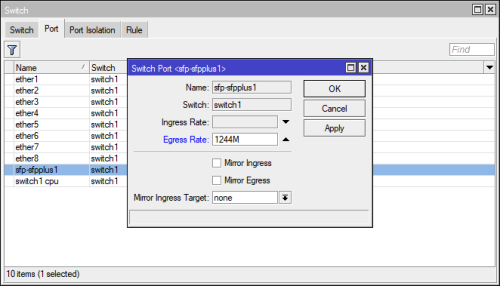
1. set 1244Mbps OLT upload cap
2. set 1024Mbps PPPoE QoS
3. grace period of LCP termination

between PPPoE QoS have buffer until OLT caps
chong601
post Dec 13 2023, 06:13 PM

New Member
*
Newbie
11 posts

Joined: Aug 2017
QUOTE(System Error Message @ Dec 13 2023, 03:44 PM)
seems often but not too often. One thing that could help if your network is overloaded is QoS but i know its easy to do with mikrotik via L2 and L3 but im not sure how well linux handles seperating l2 and L3 queues and priorities.
Sometimes LCP terminated by peer can happen due to an error. Wireshark or sniffing can help, log and filter by packet type. The main way i figure out how TM lock me out of things is by sniffing against their provided equipment and then copying what i can including mac address.
*
I already have a shaper with fq_codel QoS that has 950 Mbps limit on upload.

I just limited to 500 Mbps upload a few mins ago and the packet loss is exactly the same so it's definitely not my QoS configuration issue.

God knows what the hell is up with their networks at this point.
yenchenje
post Dec 13 2023, 08:17 PM

Enthusiast
*****
Junior Member
932 posts

Joined: Dec 2019
Good news

Received my stick back today from Anime4000 sifu, and got my low powered SFP stick from taobao together with my server chassis with X11SCA-F from taobao as well biggrin.gif

Currently have both plugged into BCM57810S, both is showing up as up and running, new 10GBase-T stick apparently runs under 2W (1.8W to be exact) from seller spec sheet

Haven't plugged the fiber into ONU stick yet but if everything is good, I should be able to fully move into dedicated machine for router with just single BCM57810s or a modified M910x biggrin.gif

user posted image

This post has been edited by yenchenje: Dec 13 2023, 08:19 PM
TSAnime4000
post Dec 13 2023, 08:32 PM

Look at all my stars!!
*******
Senior Member
2,399 posts

Joined: Jul 2009
From: /dev/null


QUOTE(yenchenje @ Dec 13 2023, 08:17 PM)
Good news

Received my stick back today from Anime4000 sifu, and got my low powered SFP stick from taobao together with my server chassis with X11SCA-F from taobao as well biggrin.gif

Currently have both plugged into BCM57810S, both is showing up as up and running, new 10GBase-T stick apparently runs under 2W (1.8W to be exact) from seller spec sheet

Haven't plugged the fiber into ONU stick yet but if everything is good, I should be able to fully move into dedicated machine for router with just single BCM57810s or a modified M910x biggrin.gif

user posted image
*
Nice!

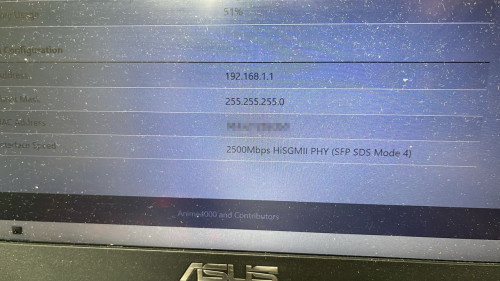
first boot, the PON Stick start with 2500Base-X, then cycle through SGMII to HiSGMII

plan to disable Auto Neg SDS, but that very risky, if Host load OS late then PON Stick, you need wait another minute (usually up to 5min) to Auto Neg SDS match with Host SFP+

if you don't want waiting, can plug PON Stick to CRS305, this sure boot much faster.

since you on ALCL OLT, matching GEM Traffic Scheduler, do this:
user posted image

have multiple customer on ALCL OLT can get high as this guy:
user posted image

Rest of us non ALCL OLT, sad in the corner as upload speed max as 960Mbps cry.gif

No matter what I do, cross multiple brand/chipsets of PON Stick, ALCL OLT is good for 2Gbps for now

This post has been edited by Anime4000: Dec 13 2023, 08:37 PM
yenchenje
post Dec 14 2023, 11:26 AM

Enthusiast
*****
Junior Member
932 posts

Joined: Dec 2019
QUOTE(Anime4000 @ Dec 13 2023, 08:32 PM)
Nice!

first boot, the PON Stick start with 2500Base-X, then cycle through SGMII to HiSGMII

plan to disable Auto Neg SDS, but that very risky, if Host load OS late then PON Stick, you need wait another minute (usually up to 5min) to Auto Neg SDS match with Host SFP+

if you don't want waiting, can plug PON Stick to CRS305, this sure boot much faster.

since you on ALCL OLT, matching GEM Traffic Scheduler, do this:
user posted image

have multiple customer on ALCL OLT can get high as this guy:
user posted image

Rest of us non ALCL OLT, sad in the corner as upload speed max as 960Mbps cry.gif

No matter what I do, cross multiple brand/chipsets of PON Stick, ALCL OLT is good for 2Gbps for now
*
Thanks for the help and heads up! Will try tonight or tmr, can’t disconnect internet Willy nilly or my fam will murder me for not having internet LOL
kwss
post Dec 15 2023, 12:43 AM

Regular
******
Senior Member
1,207 posts

Joined: Aug 2018
QUOTE(chong601 @ Dec 13 2023, 09:24 AM)
I have returned.

I have a bad news.

So starting from September, I get constant packet loss issue whenever my uploads are close to Gigabit and sometimes it will terminate the PPPoE session and re-establishes pretty soon after.

Two months of back-and-forth with TM yields nothing but constant frustration and two fiber repairs that cost me RM 150 each as well as unsolved case.

I got fed up and finally reported to MCMC on November 10 and told them that they kind of already given up with this because even the TMpoint peeps at IOI City Mall told me to report to MCMC after they saw the ticket status.

It is now one month since that and TM did not reply to my MCMC complaint.
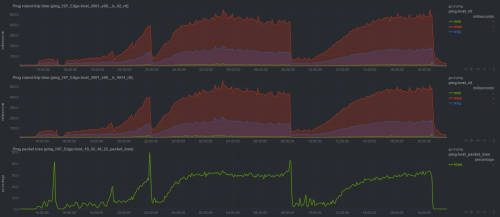
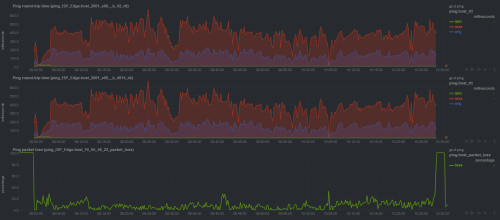
SOOOOOOO with that, I have created a beautiful website called https://howfuccedis.my/ping/charts to show them how it looks like from the customer point of view about the internet experience.

These charts are 100% live and interactive, and instructions on how to utilize the chart interaction are included. History should go up to one month back (except on Optiplex 5050 because I just recently updated the router, so the chart data is gone)

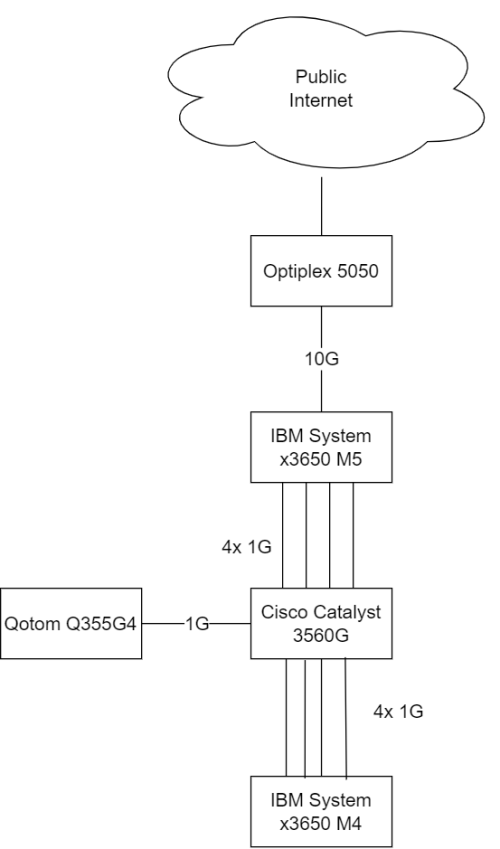
Network is something like this:
user posted image
For everyone here, enjoy the shitfuckery known as UniFi """""Ultra""""" Experience!

For TM people that lurks here, hi, and CAN YOU FIND SOMEONE COMPETENT ENOUGH TO LOOK AT MY ISSUE. My MCMC report ID is TC231110-00050.

Edit: updated network map
*
I had the same problem. I called 100 and ask for a new ONU. Problem solved.
I assume they check your fiber input power? If you can login to your ONU, what's the reading?

Anyway, just ask for a new ONU if you haven't. Its FOC.
chong601
post Dec 15 2023, 12:55 AM

New Member
*
Newbie
11 posts

Joined: Aug 2017
QUOTE(kwss @ Dec 15 2023, 12:43 AM)
I had the same problem. I called 100 and ask for a new ONU. Problem solved.
I assume they check your fiber input power? If you can login to your ONU, what's the reading?

Anyway, just ask for a new ONU if you haven't. Its FOC.
*
Fiber receive is between -18 to -20 dBm, so that's sorted. Already did two fiber repairs due to broken fiber and too many splices (5 from DP to the ONU)


For changing the ONU, I tried.

They wanted to change my router, but they decided to do firmware upgrades first which the last upgrade was two weeks ago, which obviously doesn't work.

They upgraded the firmware from V1.0.6 to V1.1.0 to V1.1.2 within two weeks since I reported to MCMC.

V1.1.2 firmware is so bad that it did this to itself:
user posted image

Now they completely ghosted me and had zero communication with me.

I have completely removed their router away from the whole equation at this point as I will probably commit warcrime on that router if I use it again.

I even tried the old ZTE F620 last week which doesn't help much either.
user posted image

This is just pure cursed.
kwss
post Dec 15 2023, 01:13 AM

Regular
******
Senior Member
1,207 posts

Joined: Aug 2018
QUOTE(chong601 @ Dec 15 2023, 12:55 AM)
Fiber receive is between -18 to -20 dBm, so that's sorted. Already did two fiber repairs due to broken fiber and too many splices (5 from DP to the ONU)
For changing the ONU, I tried.

They wanted to change my router, but they decided to do firmware upgrades first which the last upgrade was two weeks ago, which obviously doesn't work.

They upgraded the firmware from V1.0.6 to V1.1.0 to V1.1.2 within two weeks since I reported to MCMC.

V1.1.2 firmware is so bad that it did this to itself:
user posted image

Now they completely ghosted me and had zero communication with me.

I have completely removed their router away from the whole equation at this point as I will probably commit warcrime on that router if I use it again.

I even tried the old ZTE F620 last week which doesn't help much either.
user posted image

This is just pure cursed.
*
Your new firmware graph gave me a hint: Forward Error Correction.
The problem is very well on the physical fiber cable. Is it possible to replace the whole fiber instead of splicing it?
How did the repair the fiber? Using fusion splicer? Did they heat seal the splice or how?

How long is the cable run? Is it buried or hang on tree / pole?
Did the technician sniff the fiber with PON Analyzer? eg: GPON Doctor

Long time back when I work at this telco, there was a customer who got random disconnect. It took a long time but eventually we figured out if some really heavy truck cross the road, he will get disconnected. Yea, broken cable.

I read your full PPPoE log. Sometimes your router do the disconnect because the LCP-echo has no reply. Sometimes it is TM that did it.
kwss
post Dec 15 2023, 01:41 AM

Regular
******
Senior Member
1,207 posts

Joined: Aug 2018
Try your luck in making them do the following for you:
1. Replace the fiber cable from your ONU all the way to the optical splitter.
2. Replace the optical splitter.

It is an everyday job for technician so maximize the use of your charisma.
yenchenje
post Dec 15 2023, 07:37 AM

Enthusiast
*****
Junior Member
932 posts

Joined: Dec 2019
user posted image

Back on GPON Stick biggrin.gif

As suspected, VoIP VLAN didn’t break my network, it’s how OPNSense did their private routing that’s causing issues, I can still reach my NAS from the internet at large but all local connections within the private network cease to work, it’s probably using VoIP address as gateway as supposed to ONU Stick, will have to look into changing priority for interface to see if that allows ONU Stick interface to have higher priority and ignore VoIP DHCP address

This post has been edited by yenchenje: Dec 15 2023, 07:40 AM
TSAnime4000
post Dec 15 2023, 02:30 PM

Look at all my stars!!
*******
Senior Member
2,399 posts

Joined: Jul 2009
From: /dev/null


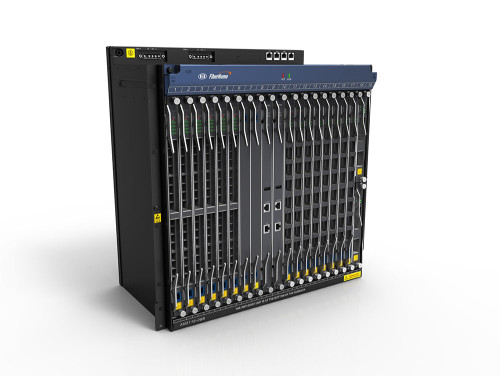
I just checked with TM dude, I found what OLT Model that I under with...

OLT Brand: Fiberhome
OLT Model: AN5116-06B+

user posted image
QUOTE
AN5116-06B is a new intelligent carrier-class MSAN/GPON/10G PON integrated access product offered by FiberHome. It is large


Uplink interface Optical interface 10GE, GE optical interface, GE electrical interface, optical interface STM-1, electric interface E1
Service Interface EPON optical interface, optical interface GPON, optical interface XGPON, optical interface 10GEPON

Attached File  AN5116_1_1632234438.pdf ( 4.17mb ) Number of downloads: 47


This post has been edited by Anime4000: Dec 15 2023, 02:35 PM
TSAnime4000
post Dec 16 2023, 12:49 PM

Look at all my stars!!
*******
Senior Member
2,399 posts

Joined: Jul 2009
From: /dev/null


QUOTE(QuantumEdge @ Dec 7 2023, 08:11 PM)
Any updates on BE800+SPF+ combo?
Kinda wanna swap out my AX58u for that monster of a router with SPF module to declutter my tv rack
*
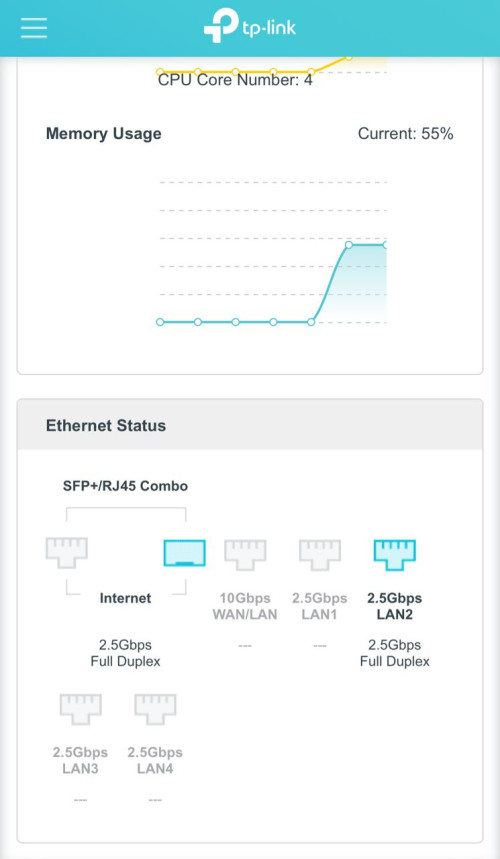
user posted image
user posted image

Now Archer BE800 can support my 2.5G GPON Stick
I just have updated my TP-Link Archer BE800 - Enabling 2.5G Mode @ Anime4000's GitHub

Need my GPON Stick to work due to various fixes has been implemented (such as fix 67Mbps upload speed issue)

TP-Link need your feedback before committing to main/stable, please send your feedback here

If stable for 30 days, then I can tell them

tldr:
Download & Update Debug Firmware

CODE

http://192.168.0.1/webpages/debug.html


CODE

combo_debug stop
combo_debug set plus
combo_debug ipg_set combo10g 1_192bit


This post has been edited by Anime4000: Dec 16 2023, 01:05 PM
blacktubi
post Dec 16 2023, 10:54 PM

-
Group Icon
Elite
8,400 posts

Joined: Jul 2008

QUOTE(Anime4000 @ Dec 16 2023, 12:49 PM)
user posted image
user posted image

Now Archer BE800 can support my 2.5G GPON Stick
I just have updated my TP-Link Archer BE800 - Enabling 2.5G Mode @ Anime4000's GitHub

Need my GPON Stick to work due to various fixes has been implemented (such as fix 67Mbps upload speed issue)

TP-Link need your feedback before committing to main/stable, please send your feedback here

If stable for 30 days, then I can tell them

tldr:
Download & Update Debug Firmware

CODE

http://192.168.0.1/webpages/debug.html


CODE

combo_debug stop
combo_debug set plus
combo_debug ipg_set combo10g 1_192bit

*
TP-Link will introduce Archer BE805 soon

Hopefully they wouldn't stop selling the BE800 since not many actually uses the costly SFP+ port.
TSAnime4000
post Dec 16 2023, 11:07 PM

Look at all my stars!!
*******
Senior Member
2,399 posts

Joined: Jul 2009
From: /dev/null


QUOTE(blacktubi @ Dec 16 2023, 10:54 PM)
TP-Link will introduce Archer BE805 soon

Hopefully they wouldn't stop selling the BE800 since not many actually uses the costly SFP+ port.
*
that model without SFP Cage, can't make All in One pluggable
TSAnime4000
post Dec 21 2023, 03:32 AM

Look at all my stars!!
*******
Senior Member
2,399 posts

Joined: Jul 2009
From: /dev/null


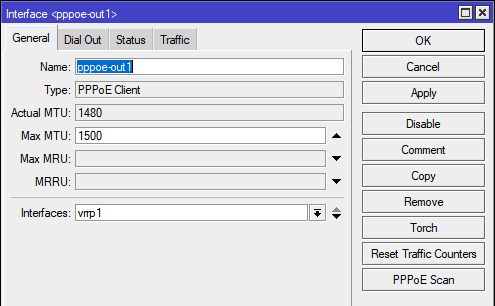
I updated my RB5009 to ROS v7.13

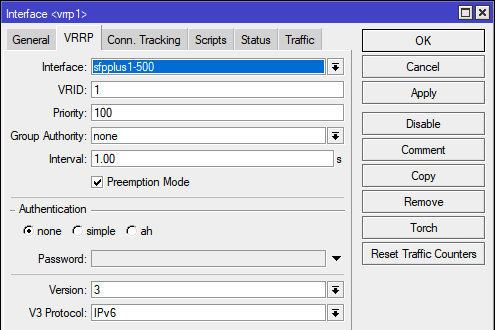
also I set PPPoE Client under VRRP
user posted image

then VRRP on VLAN500
user posted image

Like this
user posted image

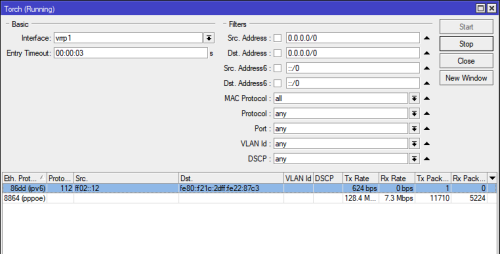
TM VRRP is constant 'hello' to Mikrotik VRRP
user posted image

VRRP should give 'High Availability', I don't think this give more speed, but constant connection and 99% uptime

let's see If my PPPoE can maintain in long run
paultantk
post Jan 1 2024, 04:27 PM

Casual
***
Junior Member
407 posts

Joined: Jan 2003


QUOTE(yenchenje @ Dec 13 2023, 08:17 PM)
I should be able to fully move into dedicated machine for router with just single BCM57810s or a modified M910x biggrin.gif
here's something new i found

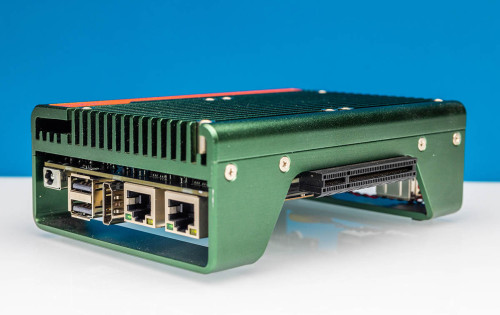
if you use this

the dual/quad port broadcom 10g pcie card would have to hang off the side externally haha

user posted image

https://www.servethehome.com/cwwk-crazy-a-s...b-super-system/
yenchenje
post Jan 1 2024, 07:59 PM

Enthusiast
*****
Junior Member
932 posts

Joined: Dec 2019
QUOTE(paultantk @ Jan 1 2024, 04:27 PM)
here's something new i found

if you use this

the dual/quad port broadcom 10g pcie card would have to hang off the side externally haha

user posted image

https://www.servethehome.com/cwwk-crazy-a-s...b-super-system/
*
I’m aware of this actually, but if I do buy it I’ll have to 3D print a case, and use a PCIe riser for the card

For now my new router box is fine, will see if I have budget in the near future or nt
TSAnime4000
post Jan 3 2024, 09:57 PM

Look at all my stars!!
*******
Senior Member
2,399 posts

Joined: Jul 2009
From: /dev/null


76radius

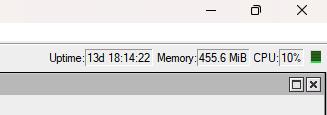
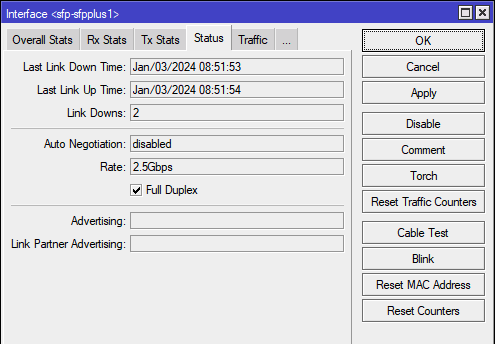
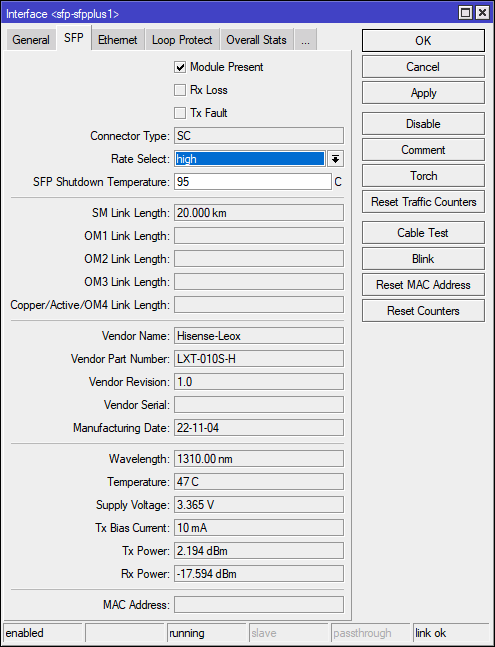
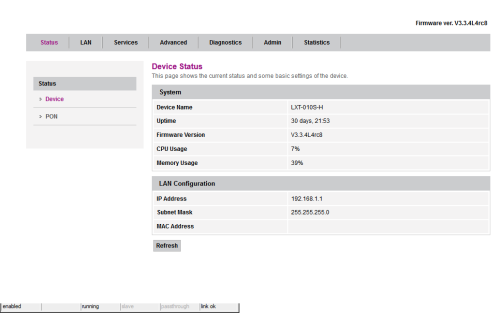
My experience that Leox Stick is quite unsatisfied, using since day 1 (2 Nov 2023) until now...

every 10 to 14 days of use, there will be disconnect lost sync with RB5009 twice

user posted image
Up time last reboot during Firmware Upgrade

user posted image
8am the stick lost sync with RB5009

user posted image
proof of use

user posted image
I was planning to tell TM that allow this "Similar Looking D-Link WebGUI" to white list, make it compatible with all TM OLT, so proper OMCI and FwdOp issued correctly without needing to hack the firmware

I guess, I looking at another solution

In other note:
I tried add back TR069 and use D-Link Info, it cause repeated error and make their engineer wondering why it failed...

Also other note:
TM has a system to monitor all and received OLT Alarm for any fault, these fault will open Issue Ticket automatically and their engineer start investigate.

engineer will check internal first, simple as dropping optical reading also Open Ticket automatically via OLT Alarm (because fiber is shared, one fault can cascade to other users)
if no fault within internal, engineer will check the fiber line until at DB

as you can see, TM maintaining the fiber link quality, if ONT is misbehave can cause OLT send repeated Alarm and TM engineer start to check, they don't know you are using non Stock ONT yet, they know optical RX/TX drop or other mean,

this can result wasting their time on working network.

more to come...

83 Pages « < 52 53 54 55 56 > » Top
 

Change to:
| Lo-Fi Version
0.0276sec    0.95    6 queries    GZIP Disabled
Time is now: 1st December 2025 - 04:10 PM