Welcome Guest ( Log In | Register )

Outline · [ Standard ] · Linear+

Home Networking Ditch ONU, use GPON SFP on Business Grade Router, 2.5G ONU for Unifi & Maxis, NO NEED VLAN

views
     
chong601
post Jun 24 2023, 10:23 PM

New Member
*
Newbie
11 posts

Joined: Aug 2017
QUOTE(Anime4000 @ Jun 24 2023, 06:15 PM)
Today I went to Comic Fiesta at IOI Putrajaya, doing COD of GPON ONU SFP, in exchange he give me this:
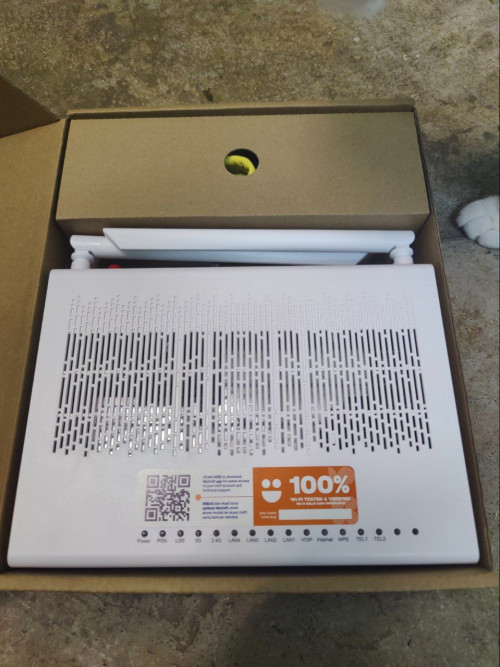
user posted image

1. Claim it using same Realtek SDK as V2801F, TWCGPON567 and ODI.

2. Able to extract VoIP Credentials in plain text

3. Has root access!

I going to reverse engineering and see if can make own Firmware
*
Oh hey that's my Optical Network Router!

It's rated insecure/10 from my assessment.

I still keep the main device just in case my things go out of service due to my stupidity tongue.gif

Looking forward for what's to come as I'm still waiting for my BCM57810S dual 10Gbit SFP+ NIC to arrive as well as additional supporting parts before I can really unleash the true 2Gbps potential!


Extra side note about the Optical Network Router:
- This is specifically made for TM, you won't find this elsewhere (hence the brown box), nor you can find any details about this device
- ... which means NO GPL SOURCES FOR YOU!
- ... which means YOU CAN'T COMPILE KERNEL MODULES BY YOURSELF!
- Every Ultra plans will get the same device, even for business plans (pity them for having this kind of devices in the first place)
- Don't bother using their APs, get your own APs.
- Their mesh is as functional as the D-Link AX3000 APs you get for 800 Mbps plans, in which don't bother, get your own mesh APs
- You can manage IPv4 port forwards and firewalls, but you cannot manage IPv6 firewall rules doh.gif
- ... but it has root, so you can just manage IPv6 rules yourself! (and remember to reconfigure them on every reboot because you cannot persist the rules!)


Again, thanks to Anime4000 for the sale though (and the great conversation)!

This post has been edited by chong601: Jun 24 2023, 10:24 PM
chong601
post Jun 30 2023, 08:57 PM

New Member
*
Newbie
11 posts

Joined: Aug 2017
QUOTE(Anime4000 @ Jun 30 2023, 02:27 PM)
I got call from someone claiming be TM...

tldr; TM want user to stop using ODI DFP-34X-2C2 on 2Gbps:
1. Conflict OMCI parameter with D-Link (I blame Realtek for this, inconsistency between RTL960x family)
2. Don't call 100 to troubleshoot ODI DFP-34X-2C2
3. Keep old ONU (when technician come, revert back to original ONU)
4. Using custom ONU, please clone ONU properties properly, no missing single property or even one character! (if this keep wrong or wrong place, TM has right to ban your unifi)

TM not saying this illegal, but trouble for them and technician team

I been instruct to edit main thread and my GitHub about these

I hope this not haram  mega_shok.gif
*
This wouldn't be an issue if the device they provide at the very least can handle the speeds it should be able to handle in the first place.

But hey, the saving grace is at least they don't say it's illegal though! (for now)


chong601
post Dec 13 2023, 09:24 AM

New Member
*
Newbie
11 posts

Joined: Aug 2017
I have returned.

I have a bad news.

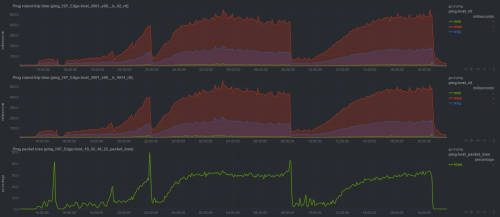
So starting from September, I get constant packet loss issue whenever my uploads are close to Gigabit and sometimes it will terminate the PPPoE session and re-establishes pretty soon after.

Two months of back-and-forth with TM yields nothing but constant frustration and two fiber repairs that cost me RM 150 each as well as unsolved case.

I got fed up and finally reported to MCMC on November 10 and told them that they kind of already given up with this because even the TMpoint peeps at IOI City Mall told me to report to MCMC after they saw the ticket status.

It is now one month since that and TM did not reply to my MCMC complaint.


SOOOOOOO with that, I have created a beautiful website called https://howfuccedis.my/ping/charts to show them how it looks like from the customer point of view about the internet experience.

These charts are 100% live and interactive, and instructions on how to utilize the chart interaction are included. History should go up to one month back (except on Optiplex 5050 because I just recently updated the router, so the chart data is gone)

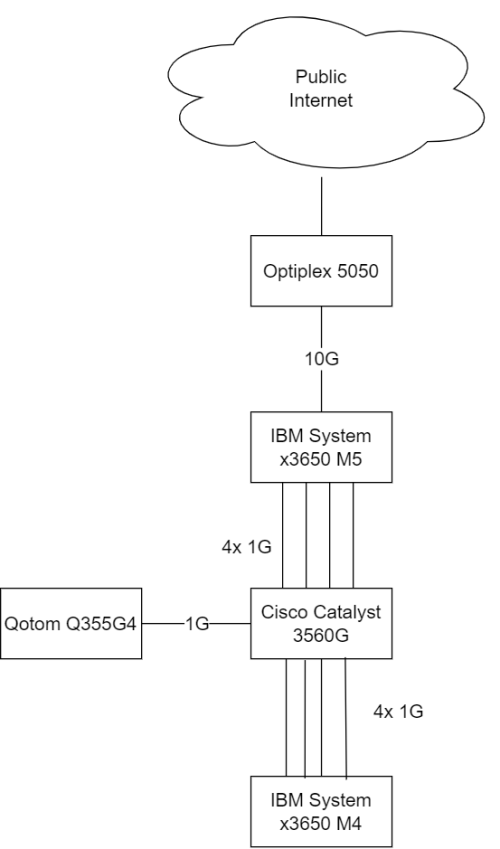
Network is something like this:
user posted image


For everyone here, enjoy the shitfuckery known as UniFi """""Ultra""""" Experience!

For TM people that lurks here, hi, and CAN YOU FIND SOMEONE COMPETENT ENOUGH TO LOOK AT MY ISSUE. My MCMC report ID is TC231110-00050.

Edit: updated network map

This post has been edited by chong601: Dec 13 2023, 10:04 AM
chong601
post Dec 13 2023, 09:56 AM

New Member
*
Newbie
11 posts

Joined: Aug 2017
QUOTE(Oltromen Ripot @ Dec 13 2023, 09:41 AM)
my advices:
• remove the OS and version info (avoid getting attack specific to OS and version)
• highlight large LARGE that the internet is supplied by TM who had promised ULTRA experience but delivered --redacted expletive--.
• put a simple network map (as it is, i can't determine where your fibre is connected to and through) so that people can make sense of the network flow. or at least draw a map of how your network edge is connected to unifi.
*
- these hardware are not exposed to the internet, but fair.
- planned.
- added.
chong601
post Dec 13 2023, 02:23 PM

New Member
*
Newbie
11 posts

Joined: Aug 2017
QUOTE(System Error Message @ Dec 13 2023, 12:06 PM)
i have a similar switch but with POE instead. can see everyone is already pounding your network to view your usage.
May want to consider streaming to an external host and everyone can view from that instead.
*
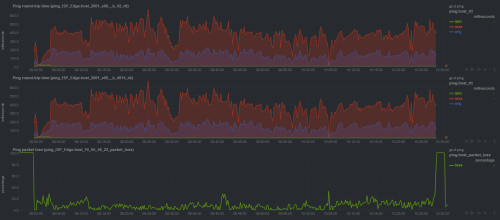
Nah it's fine, this is one of the host VPN tunnel where the chart is being streamed.
user posted image

Those traffic you see are from my own simulated uploads for them to check out anytime they want.

QUOTE(Anime4000 @ Dec 13 2023, 2:00 PM)
Perhaps you put PPP log on howfuccedis.my publicly, it would be nice if you can highlight LCP terminated by peer, show TM PPPoE AC MAC Address.
I can try, but that would need me to think how to stream that nicely....
Added my latest log below.

But if you want a quick excerpt of the logs....
CODE
vyos@vyos:~$ journalctl -eu ppp@pppoe0 | grep "LCP terminated"
Dec 13 07:05:21 vyos pppd[113758]: LCP terminated by peer
Dec 13 07:34:49 vyos pppd[113758]: LCP terminated by peer
Dec 13 07:43:37 vyos pppd[113758]: LCP terminated by peer
Dec 13 07:59:25 vyos pppd[113758]: LCP terminated by peer
Dec 13 08:11:13 vyos pppd[113758]: LCP terminated by peer
Dec 13 08:34:40 vyos pppd[113758]: LCP terminated by peer
Dec 13 09:07:07 vyos pppd[113758]: LCP terminated by peer
Dec 13 10:13:54 vyos pppd[113758]: LCP terminated by peer
Dec 13 13:10:22 vyos pppd[113758]: LCP terminated by peer
Dec 13 13:54:50 vyos pppd[113758]: LCP terminated by peer
vyos@vyos:~$ journalctl -eu ppp@pppoe0 | grep "No response"
Dec 13 05:05:17 vyos pppd[4737]: No response to 3 echo-requests
Dec 13 05:16:04 vyos pppd[4737]: No response to 3 echo-requests
Dec 13 05:42:11 vyos pppd[4737]: No response to 3 echo-requests


Attached File(s)
Attached File  vyos_pppd_logs.txt ( 77.54k ) Number of downloads: 5
chong601
post Dec 13 2023, 06:13 PM

New Member
*
Newbie
11 posts

Joined: Aug 2017
QUOTE(System Error Message @ Dec 13 2023, 03:44 PM)
seems often but not too often. One thing that could help if your network is overloaded is QoS but i know its easy to do with mikrotik via L2 and L3 but im not sure how well linux handles seperating l2 and L3 queues and priorities.
Sometimes LCP terminated by peer can happen due to an error. Wireshark or sniffing can help, log and filter by packet type. The main way i figure out how TM lock me out of things is by sniffing against their provided equipment and then copying what i can including mac address.
*
I already have a shaper with fq_codel QoS that has 950 Mbps limit on upload.

I just limited to 500 Mbps upload a few mins ago and the packet loss is exactly the same so it's definitely not my QoS configuration issue.

God knows what the hell is up with their networks at this point.
chong601
post Dec 15 2023, 12:55 AM

New Member
*
Newbie
11 posts

Joined: Aug 2017
QUOTE(kwss @ Dec 15 2023, 12:43 AM)
I had the same problem. I called 100 and ask for a new ONU. Problem solved.
I assume they check your fiber input power? If you can login to your ONU, what's the reading?

Anyway, just ask for a new ONU if you haven't. Its FOC.
*
Fiber receive is between -18 to -20 dBm, so that's sorted. Already did two fiber repairs due to broken fiber and too many splices (5 from DP to the ONU)


For changing the ONU, I tried.

They wanted to change my router, but they decided to do firmware upgrades first which the last upgrade was two weeks ago, which obviously doesn't work.

They upgraded the firmware from V1.0.6 to V1.1.0 to V1.1.2 within two weeks since I reported to MCMC.

V1.1.2 firmware is so bad that it did this to itself:
user posted image

Now they completely ghosted me and had zero communication with me.

I have completely removed their router away from the whole equation at this point as I will probably commit warcrime on that router if I use it again.

I even tried the old ZTE F620 last week which doesn't help much either.
user posted image

This is just pure cursed.


Change to:
| Lo-Fi Version
0.0607sec    0.33    7 queries    GZIP Disabled
Time is now: 5th December 2025 - 02:57 PM