Welcome Guest ( Log In | Register )

83 Pages « < 50 51 52 53 54 > » Bottom

Outline · [ Standard ] · Linear+

Home Networking Ditch ONU, use GPON SFP on Business Grade Router, 2.5G ONU for Unifi & Maxis, NO NEED VLAN

views
     
Oltromen Ripot
post Nov 27 2023, 08:10 PM

👍 999999 person Likes this member
*******
Senior Member
4,034 posts

Joined: Dec 2019
QUOTE(blacktubi @ Nov 27 2023, 08:02 PM)
Anyone using Maxis 2Gbps on TM Infra mind to shed some light on the performance?

Seriously considering switching over from TIME 1Gbps

TIME 2Gbps is too pricey
*
at least TIME is "true" 2Gbps.
read the current few last pages of Maxis Fibre thread: 1Gbps-ers need to recontract because ONU(!) need to change, yet only get Fibrehome 1GbE ONU, not 2.5GbE.

https://forum.lowyat.net/index.php?amp;show...ost&p=108633445

This post has been edited by Oltromen Ripot: Nov 27 2023, 08:12 PM
blacktubi
post Nov 27 2023, 08:13 PM

-
Group Icon
Elite
8,402 posts

Joined: Jul 2008

QUOTE(Oltromen Ripot @ Nov 27 2023, 08:10 PM)
at least TIME is "true" 2Gbps.
read the current few last pages of Maxis Fibre thread: 1Gbps-ers need to recontract because ONU(!) need to change, yet only get Fibrehome 1GbE ONU, not 2.5GbE.
*
I will be registering for a new account so I should be getting a 2.5G capable ONU.

Only sad part is my area doesn't have Maxis NGBB.
Oltromen Ripot
post Nov 27 2023, 08:23 PM

👍 999999 person Likes this member
*******
Senior Member
4,034 posts

Joined: Dec 2019
QUOTE(blacktubi @ Nov 27 2023, 08:13 PM)
I will be registering for a new account so I should be getting a 2.5G capable ONU.

Only sad part is my area doesn't have Maxis NGBB.
*
its 1 premise 1 fibre.

Unifi have these rules:
• cannot have multiple ISPs per premise,
• a premise can have up to 3 subscriptions, but each need to belong to different owner.

the first rule surely apply to Maxis as well on HSBB.
2nd, that one not sure if also applicable to Maxis.
if want to switch between HSBB-based ISPs, not sure if they allow so without having to terminate first. before, somebody wanted to relocate ISPx to existing premise with ISPy, but both Maxis and Unifi refused to play ball, both ask termination first then apply anew.

--

ohwait, after typing the above, it occured that you are currently on TIME, so HSBB rule definitely not yet applicable on your spanking new Maxis application.
TSAnime4000
post Nov 27 2023, 10:39 PM

Look at all my stars!!
*******
Senior Member
2,399 posts

Joined: Jul 2009
From: /dev/null


I got info that next year would even faster!
This mean I need start research on SFP+ Stick
Many SFP+ Stick are hard to clone OMCI, if I found one, asking TM to add support list.
leezhijiang
post Nov 30 2023, 08:58 AM

Getting Started
**
Junior Member
272 posts

Joined: Jan 2010


QUOTE(Anime4000 @ Oct 20 2023, 11:51 AM)
Yea, mine just normal RB5009 (non-POE), so far not hot even without putting fans
*
My RB4011 can be hot to an extend that can cook egg without fans and AC on.
paultantk
post Dec 3 2023, 08:08 AM

Casual
***
Junior Member
407 posts

Joined: Jan 2003


QUOTE(yenchenje @ Nov 24 2023, 11:50 PM)
Yeah that will work as well, I think the guy does have custom solution for 2x BCM57810S and 1x 2.5GB. Or just with BCM57840
Yeah that will work as well, but IDK I feel like that’d be defeating the purpose of a small AIO. Yeah the converter is not big by any stretch of the imagination but the need for 2 separate plugs is annoying to me.

if going that route, you technically just need 2x SFP+ transceiver, 1 negotiating at 2.5GBe and 1 negotiating at 10GBe as uplink
*
got a test machine set up. somehow the sfp onu in the bcm card just doesnt work, not even when its the only transceiver installed. the card tells me link keeps going up down up down up down. in the end i replaced it with a normal copper transceiver and connected it to the sfp onu via the media converter, then it worked perfectly.

user posted image

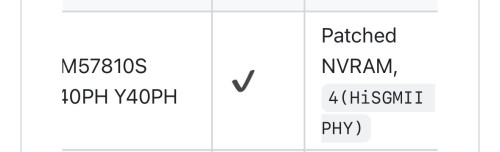
found this in github, but im not sure what patched nvram means. since it works with media converter ill just use that method

This post has been edited by paultantk: Dec 3 2023, 08:18 AM
yenchenje
post Dec 3 2023, 08:46 AM

Enthusiast
*****
Junior Member
932 posts

Joined: Dec 2019
QUOTE(paultantk @ Dec 3 2023, 08:08 AM)
got a test machine set up. somehow the sfp onu in the bcm card just doesnt work, not even when its the only transceiver installed. the card tells me link keeps going up down up down up down. in the end i replaced it with a normal copper transceiver and connected it to the sfp onu via the media converter, then it worked perfectly.

user posted image

found this in github, but im not sure what patched nvram means. since it works with media converter ill just use that method
*
You’ll have to use DOS/UEFI to patch it with ediag, boot it up with USB and patch

https://www.dslreports.com/forum/r32230041-...a-BCM57810S-NIC

It’s just to enable 2500-BaseX since BCM57810S doesn’t support it OOTB

Also remember the power consumption issue, use low power transceivers whenever possible
paultantk
post Dec 3 2023, 10:26 AM

Casual
***
Junior Member
407 posts

Joined: Jan 2003


QUOTE(yenchenje @ Dec 3 2023, 08:46 AM)
You’ll have to use DOS/UEFI to patch it with ediag, boot it up with USB and patch

https://www.dslreports.com/forum/r32230041-...a-BCM57810S-NIC

It’s just to enable 2500-BaseX since BCM57810S doesn’t support it OOTB

Also remember the power consumption issue, use low power transceivers whenever possible
*
thanks! will try later.

for now this is my speedtest result using the media converter method

user posted image

This post has been edited by paultantk: Dec 3 2023, 05:57 PM
TSAnime4000
post Dec 3 2023, 07:53 PM

Look at all my stars!!
*******
Senior Member
2,399 posts

Joined: Jul 2009
From: /dev/null


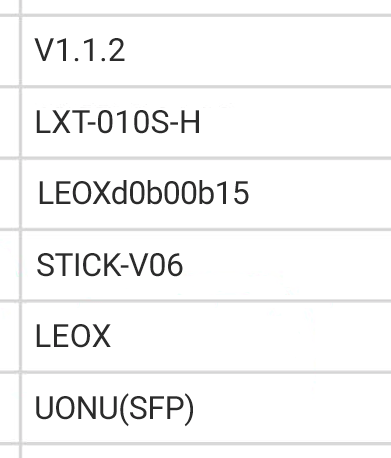
D-Link DPN-FX3060V has new firmware (V1.1.2)

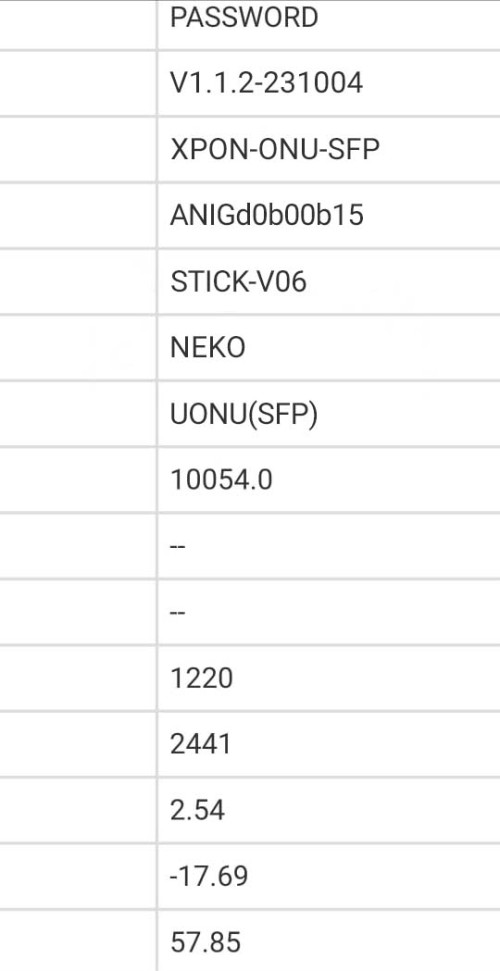
my PON Stick also get new update to follow change of V1.1.2 ensure follow TM Standard.

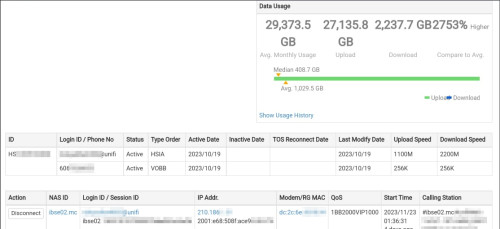
TM show me this:
--redacted--

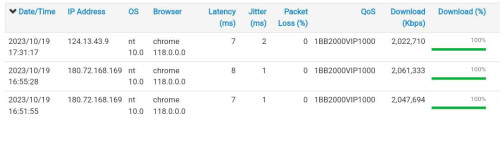
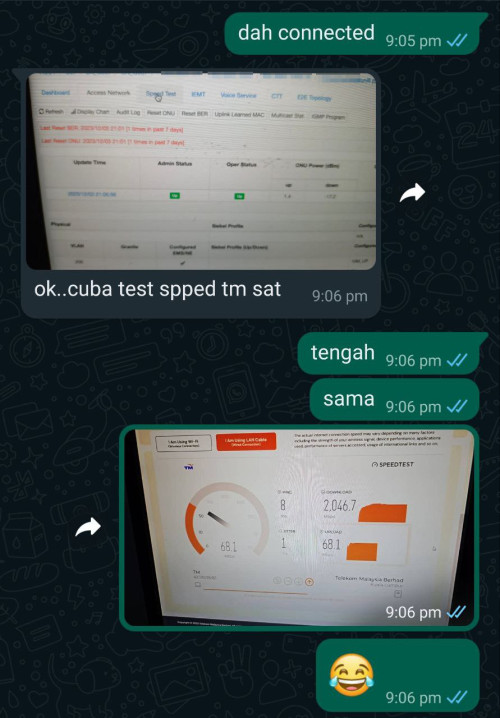
TM toke notice that my first 2Gbps Install speedtest result was amazing, rise suspicious brows.gif
--redacted--

We have run several testing on PON Stick that I experiment,
Then TM show this when my PON Stick is set doesn't reflect back properly, I forgot one command doh.gif
--redacted--
^^^ TM can find who improper Stick DIY, in-case your PON Stick cannot use, it's forbidden for me to help rclxub.gif > NDA

Also suggest a unique VendorId and special MIB Entity to validate my PON Stick

I do this to TM panel:
--redacted--

not sure either I want to use ANIG (Anime GPON) or NEKO or NEMU,

so I put ANIG VendorId as ONT S/N and NEKO as VendorId

Another bad happening... ranting.gif
There already one case that disturb whole Taman Internet,
they didn't tell what cause, but upon checking the user live is not from me (I compare to shipping address)
so, I safe from this trouble at least...

You must know, Fiber Internet is SHARED line,

from one stranding fiber split into multiple subscriber, one rouge ONT can disturb other internet!

Bad ONT can broke OLT QoS and you giving unfair to others!!

Event like this just not nice!

This post has been edited by Anime4000: Dec 5 2023, 03:25 PM
YoungMan
post Dec 3 2023, 10:06 PM

Look at all my stars!!
*******
Senior Member
6,794 posts

Joined: Oct 2008
From: Kuala Lumpur


QUOTE(Anime4000 @ Dec 3 2023, 07:53 PM)
D-Link DPN-FX3060V has new firmware (V1.1.2)

my PON Stick also get new update to follow change of V1.1.2 ensure follow TM Standard.

TM show me this:
user posted image

TM toke notice that my first 2Gbps Install speedtest result was amazing, rise suspicious brows.gif 
user posted image

We have run several testing on PON Stick that I experiment,
Then TM show this when my PON Stick is set doesn't reflect back properly, I forgot one command doh.gif
user posted image
^^^ TM can find who improper Stick DIY, in-case your PON Stick cannot use, it's forbidden for me to help rclxub.gif > NDA

Also suggest a unique VendorId and special MIB Entity to validate my PON Stick

I do this to TM panel:
user posted image

not sure either I want to use ANIG (Anime GPON) or NEKO or NEMU,

so I put ANIG VendorId as ONT S/N and NEKO as VendorId

Another bad happening... ranting.gif
There already one case that disturb whole Taman Internet,
they didn't tell what cause, but upon checking the user live is not from me (I compare to shipping address)
so, I safe from this trouble at least...

You must know, Fiber Internet is SHARED line,

from one stranding fiber split into multiple subscriber, one rouge ONT can disturb other internet!

Bad ONT can broke OLT QoS and you giving unfair to others!!

Event like this just not nice!
*
Wah... looks like you can collab with TM already. Anyway there is good and bad when people starts using their own PON stick. TM should not try to enforce 5-10% QoS to other provider... That way it somehow encourage ppl to try to break it through unauthorise ONT.
TSAnime4000
post Dec 3 2023, 11:36 PM

Look at all my stars!!
*******
Senior Member
2,399 posts

Joined: Jul 2009
From: /dev/null


QUOTE(YoungMan @ Dec 3 2023, 10:06 PM)
Wah... looks like you can collab with TM already. Anyway there is good and bad when people starts using their own PON stick. TM should not try to enforce 5-10% QoS to other provider... That way it somehow encourage ppl to try to break it through unauthorise ONT.
*
Indeed, that my experience with Maxis, and this can happen as did back then (12/Aug/2022) to get 2Gbps by 800x4 PPPoE

thing is, I don't want be responsible for bad thing, I been instruct to not help DIY and keep the release modified firmware that I made private
Omochao
post Dec 4 2023, 09:03 AM

Enthusiast
*****
Junior Member
835 posts

Joined: Nov 2007
From: Land of Forgotten
QUOTE(paultantk @ Dec 3 2023, 10:26 AM)
thanks! will try later.

for now this is my speedtest result using the media converter method

user posted image
*
and here I thought, having 500mbps to download 6gb takes a minute or more.

having 2Gbps speed is like downloading any file below 10gb within secs.
YoungMan
post Dec 4 2023, 10:02 AM

Look at all my stars!!
*******
Senior Member
6,794 posts

Joined: Oct 2008
From: Kuala Lumpur


QUOTE(Anime4000 @ Dec 3 2023, 11:36 PM)
Indeed, that my experience with Maxis, and this can happen as did back then (12/Aug/2022) to get 2Gbps by 800x4 PPPoE

thing is, I don't want be responsible for bad thing, I been instruct to not help DIY and keep the release modified firmware that I made private
*
Maybe if you have the chance, can try to influence TM on this. We as consumer also didn't ask for more than subscribed speed, just nice if the speed for other provider is capped properly base on what they subscribe instead of 5-10% lower.
TSAnime4000
post Dec 4 2023, 12:46 PM

Look at all my stars!!
*******
Senior Member
2,399 posts

Joined: Jul 2009
From: /dev/null


QUOTE(YoungMan @ Dec 4 2023, 10:02 AM)
Maybe if you have the chance, can try to influence TM on this. We as consumer also didn't ask for more than subscribed speed, just nice if the speed for other provider is capped properly base on what they subscribe instead of 5-10% lower.
*
This I have asked, between TM and other ISP, they agree 80% of expected speed
and TM not plan to give any extra speed to non-Unifi.

This might change when non-Unifi stuck at GPON meanwhile Unifi move to faster PON
ChenKaiWen
post Dec 4 2023, 03:44 PM

Casual
***
Junior Member
364 posts

Joined: May 2019


QUOTE(Anime4000 @ Dec 4 2023, 12:46 PM)
This I have asked, between TM and other ISP, they agree 80% of expected speed
and TM not plan to give any extra speed to non-Unifi.

This might change when non-Unifi stuck at GPON meanwhile Unifi move to faster PON
*
For my experience, I still get 10% extra speed when I was on Maxis. I transferred from Unifi to Maxis, don't know if that's why I got 10% extra. Or just because of my area.
TSAnime4000
post Dec 4 2023, 06:04 PM

Look at all my stars!!
*******
Senior Member
2,399 posts

Joined: Jul 2009
From: /dev/null


QUOTE(ChenKaiWen @ Dec 4 2023, 03:44 PM)
For my experience, I still get 10% extra speed when I was on Maxis. I transferred from Unifi to Maxis, don't know if that's why I got 10% extra. Or just because of my area.
*
I also get extra speed before switching to Unifi 2Gbps
extra speed only at Download
upload speed still stuck within 90%

and the OLT was ALCL (Nokia)

Traffic Management differ from each OLT, as you all know, TM use many brands of OLT
from Huawei to Nokia to Fiberhome to ZTE to Generic/x86 Emulated OLT

many of us Unifi 2Gbps can't have more than 1000Mbps Upload
some Unifi 2Gbps user can have more 1000Mbps

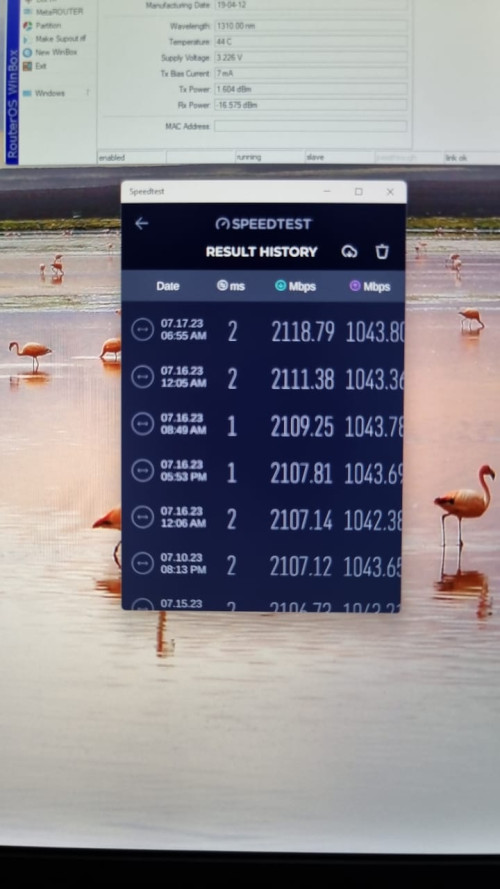
What I observed, Unifi 2Gbps on Nokia OLT, with right PON Stick I configured, it can achieve 1048Mbps of Upload:
user posted image

Even my self can't have that 🤣

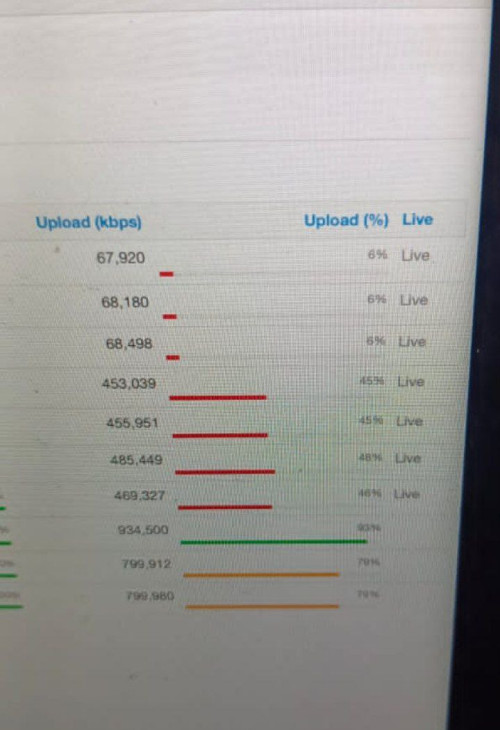
Yesterday we try replicate higher upload speed:
user posted image

but more worst when do something
user posted image

so, we had to revert back,

in conclusion, Nokia OLT has better upstream scheduling
paultantk
post Dec 4 2023, 06:57 PM

Casual
***
Junior Member
407 posts

Joined: Jan 2003


i guess my area not using nokia olt as upload cannot go over 1000mbps... max around 940-960

but download can get 2100

these speedtests are run using CLI version directly inside the pfsense router as my 2.5gbps usb ethernet dongle still in the midst of shipping lol

user posted image
user posted image

This post has been edited by paultantk: Dec 4 2023, 06:59 PM
YoungMan
post Dec 4 2023, 07:47 PM

Look at all my stars!!
*******
Senior Member
6,794 posts

Joined: Oct 2008
From: Kuala Lumpur


QUOTE(ChenKaiWen @ Dec 4 2023, 03:44 PM)
For my experience, I still get 10% extra speed when I was on Maxis. I transferred from Unifi to Maxis, don't know if that's why I got 10% extra. Or just because of my area.
*
It is very much depend on area. When I transfer my Unifi to Digi fibre 100mbps, I get 99mbps to 100mbps. Then transfered to Maxis last month, I get 92-95mbps. On Unifi it is always around 103-105mbps.
paultantk
post Dec 4 2023, 09:01 PM

Casual
***
Junior Member
407 posts

Joined: Jan 2003


QUOTE(YoungMan @ Dec 4 2023, 07:47 PM)
It is very much depend on area. When I transfer my Unifi to Digi fibre 100mbps, I get 99mbps to 100mbps. Then transfered to Maxis last month, I get 92-95mbps. On Unifi it is always around 103-105mbps.
*
this is maxis in the same house as my unifi2gbps plan, maxis is 800/200 plan

user posted image
TSAnime4000
post Dec 4 2023, 10:25 PM

Look at all my stars!!
*******
Senior Member
2,399 posts

Joined: Jul 2009
From: /dev/null


QUOTE(YoungMan @ Dec 4 2023, 07:47 PM)
It is very much depend on area. When I transfer my Unifi to Digi fibre 100mbps, I get 99mbps to 100mbps. Then transfered to Maxis last month, I get 92-95mbps. On Unifi it is always around 103-105mbps.
*
QUOTE(paultantk @ Dec 4 2023, 09:01 PM)
this is maxis in the same house as my unifi2gbps plan, maxis is 800/200 plan

user posted image
*
You know what, non-Unifi pay TM for fiber access is RM5/month/user
This very reasons speed are some 90%, some are +100%

Next Gen PON will be Unifi exclusive only, meanwhile non-Unifi stuck at GPON indefinitely (eg: unless TM rise monthly access fee to Maxis to access Next Gen PON)

83 Pages « < 50 51 52 53 54 > » Top
 

Change to:
| Lo-Fi Version
0.0473sec    0.25    6 queries    GZIP Disabled
Time is now: 3rd December 2025 - 05:42 AM