Welcome Guest ( Log In | Register )

25 Pages « < 8 9 10 11 12 > » Bottom

Outline · [ Standard ] · Linear+

 Celcom Home Fibre - 30Mbps @ RM80. Yay or Nay?, Anything on Celcom Home Fibre

views
     
papyrous
post Dec 4 2021, 10:18 AM

Getting Started
**
Junior Member
214 posts

Joined: May 2017
QUOTE(zilch28 @ Dec 3 2021, 11:22 PM)
not to mention at this period of time, I cannot understand why they insist on sending a technician to our houses. isn't everyone working towards as minimal contact as possible?  vmad.gif
*
then try as mentioned, the day they're supposed to come just switch the domain name yourself. when technician call you can tell them it's already done and send them screenshots as requested. if you mess it up and it doesnt work then no choice let them come and fix it for you.

This post has been edited by papyrous: Dec 4 2021, 10:18 AM
zilch28
post Dec 4 2021, 11:09 AM

Casual
***
Junior Member
444 posts

Joined: Mar 2007


QUOTE(papyrous @ Dec 4 2021, 10:18 AM)
then try as mentioned, the day they're supposed to come just switch the domain name yourself. when technician call you can tell them it's already done and send them screenshots as requested. if you mess it up and it doesnt work then no choice let them come and fix it for you.
*
yea i did that, just baffled by their decisions.
mydurian
post Dec 14 2021, 06:13 PM

Enthusiast
*****
Senior Member
854 posts

Joined: Sep 2005
From: 25.0000° N, 71.0000° W
QUOTE(Left4Dead2 @ Nov 30 2021, 03:21 PM)
Switch from Unifi 30mbps to Celcom 30mbps for cheaper price and new router

Speedtest is below 30mbps with abit higher ping compare with Unifi exactly 30mbps and ~5 ping. I thought using same line and Unifi BTU will be no different, i was wrong  hmm.gif

Though with new router & 5G wifi everything seems smoother loading
*
How has it been so far?

thinking of switching to Celcom 30Mbps from Unifi Air. Unifi Air is getting worse by the day.
Used to get connected at band 38 but now only band 5 / 40.
Left4Dead2
post Dec 14 2021, 06:36 PM

Regular
******
Senior Member
1,103 posts

Joined: Nov 2009
QUOTE(mydurian @ Dec 14 2021, 06:13 PM)
How has it been so far?

thinking of switching to Celcom 30Mbps from Unifi Air. Unifi Air is getting worse by the day.
Used to get connected at band 38 but now only band 5 / 40.
*
Other than higher ping which affect gaming abit (some night really unplayable) it is quite good. At least for my side and non gaming loading
mydurian
post Dec 14 2021, 06:40 PM

Enthusiast
*****
Senior Member
854 posts

Joined: Sep 2005
From: 25.0000° N, 71.0000° W
QUOTE(Left4Dead2 @ Dec 14 2021, 06:36 PM)
Other than higher ping which affect gaming abit (some night really unplayable) it is quite good. At least for my side and non gaming loading
*
that's good to hear. great. registering now.
chiwawa10
post Jan 11 2022, 04:01 PM

Casual
***
Junior Member
393 posts

Joined: Nov 2006
QUOTE(mydurian @ Dec 14 2021, 06:40 PM)
that's good to hear. great. registering now.
*
hi bro, have you got your Celcom Fibre registered and installed? Mind to share your experience on their network. I'm considering it at the moment. My unifi contract ended and am pissed that they do not allow me to drop the UnifiTV without changing plan. And changing plan will need to sign up with another 24-months contract. That is even without a router thrown in. Am quite pi**ed off.
failed.hashcheck
post Jan 12 2022, 06:12 AM

Neighborhood plant pathologist
*******
Senior Member
2,096 posts

Joined: Aug 2009
From: Shithole Klang
QUOTE(chiwawa10 @ Jan 11 2022, 04:01 PM)
Mind to share your experience on their network.
*
Im having hard time finding Celcom fiber review when I deciding isp to use last time.
Been using for 3 months now, I will do some review, to help anyone researching options for their next ISP. Things change from time to time. Be sure to take note of my post date.
Package I use is 300mb, RM140 not include tax. Router I use is my own Asus RT-AC67U.
This review does not represent the entire scene. It only covers my personal experience, usage, and issues encountered as well opinions.

Contract
This is the best thing about Celcom.
- RM500 flat termination fee.
- 2 years contract, you can upgrade or downgrade within contract period without forced renewal (aka no reset). Downgrade however is charged RM50 per request.

Service quality
- Router provided currently is TP-Link AX10. Not the best, but as a stock router provided free it's one of the best compared to other ISP.
- Upgrade/downgrade speed via phone call. No extra steps. New speed will reflect within 24 hours (need to disconnect and reconnect router).
- Online billing need to go through shitty customer portal interface. Set auto billing to save you from having to use that cancer portal every months.


Support
Support is mixed bag. For fiber customer, your support is on separate framework from mobile.
You will be limited to phone and counter support (boomer's heaven). No email, no whatsapp, no live chat, no ticket whatsoever. 50 cent charge to speak to customer service person via 1111 support line.
On the positive side, you are served by a separate team of high quality phone support. Request to speak with CS in person will be connected almost immediately most of time and the guy answering is competent.

Second tier support that dealing with customer network problem is not very pro.
One time I had network problem - my connection to LA via HE get blackholed in HK for god knows why.
Contacted phone support, the issue was delegated to internal network guy. He insisted to send technician to home to check on my router although I explained many times this is upstream problem beyond his scope, and there is nothing he can do. He needs to forward it to higher tier routing/bgp guy. But no. He still insists on investigating it himself for 2 weeks, asking me to check if the connection is fixed from time to time, and asking unrelated questions where he suspected the problem might be caused by my previous public IP switch. But ofc nothing gets fixed lah. One day he finally gave up and forwarded the issue to routing/bgp guy. Couple of tracert and mtr later, the problem fixed the next day doh.gif .
Ignoring that issue with actual problem, the entire support process itself was outstanding. The person in charge would call me from time to time to report the progress. After the problem was solved, the CS that initially filed my issue called again to confirm everything is solved and asking my permission to finally close the case.

From what I see, the entire customer service is built around assuming all the customers have exceptionally low tech literacy by default.
Their stock routers login is assigned as limited users (full admin login is available but not given by installer). They will send technician to home for smallest task like changing PPP username or inspecting router configuration issues.
Its good for majority of users. But for tech savvy people this gets annoying quick.

Network quality
- Private IP by default, Public IP available for all plan on request (for now). Just call CS and tell them you want public IP. No drama. No question asked. But they insist on sending technician home to set up a new router configuration.
- For public IP, you are always assigned in a fixed /24 pool, which is so classy brows.gif
- No IPv6. But not quite. Technically you are still assigned /64 address in wan interface, but the implementation is currently broken, and the prefix is not delegated to LAN so it's basically not usable. If you use Asus router or any router that supports 6in4 tunnel, you can use good 'ol HE's tunnelbroker to get ipv6 and the performance is surprisingly good nowadays.
- Celcom is using different routing than TM. Not good or bad thing, that's just how ISP work lah.
- One notable case is, Celcom is using different undersea cable than TM and not directly affected by current cable fault in HK currently affecting Unifi, and to some extent Digi/Time/Maxis.
- Ping to SG is typically around 13ms, worse than TM's 10ms.
- Celcom generally has better connectivity to European and East Asian datacenters.
- Jitters are minimal. I rarely experience any ping spikes when playing games (mostly bf1 and PoE) during peak hours.

Speedtest (12/1/2022):
- Server selection based on services/dc that I use the most, or major ISP in biggest cities.
- Test made fom my location in Klang, using speedtest-cli 3 times, with median speed result selected.

Local ISP
» Click to show Spoiler - click again to hide... «


OVH (major datacenter) - Singapore, Sydney
» Click to show Spoiler - click again to hide... «


This post has been edited by failed.hashcheck: Jan 12 2022, 06:19 PM
failed.hashcheck
post Jan 12 2022, 06:12 AM

Neighborhood plant pathologist
*******
Senior Member
2,096 posts

Joined: Aug 2009
From: Shithole Klang
i3D (Ubisoft and EA games) - Singapore, Hong Kong, Japan, Sydney
» Click to show Spoiler - click again to hide... «


US - LA (Clouvider), Dallas (Dedipath), NY (Spectrum)
» Click to show Spoiler - click again to hide... «


EU - Netherlands (Clouvider), Germany (Deutsche Telekom), France (Orange)
» Click to show Spoiler - click again to hide... «


iperf (YABS)
» Click to show Spoiler - click again to hide... «


This post has been edited by failed.hashcheck: Jan 12 2022, 07:08 AM
chiwawa10
post Jan 12 2022, 07:50 AM

Casual
***
Junior Member
393 posts

Joined: Nov 2006
QUOTE(failed.hashcheck @ Jan 12 2022, 06:12 AM)
i3D (Ubisoft and EA games) - Singapore, Hong Kong, Japan, Sydney
» Click to show Spoiler - click again to hide... «


US - LA (Clouvider), Dallas (Dedipath), NY (Spectrum)
» Click to show Spoiler - click again to hide... «


EU - Netherlands (Clouvider), Germany (Deutsche Telekom), France (Orange)
» Click to show Spoiler - click again to hide... «

iperf (YABS)
» Click to show Spoiler - click again to hide... «

*
Thanks for the insightful review bro. Celcom fibre seems to be the one for me then. Will check with them to see if there's available port in my area. Btw, do you know whether to terminate existing one with unifi or just go to Celcom and they'll be able to 'port in' just like changing mobile provider?
wilson1stop
post Jan 12 2022, 08:16 AM

Look at all my stars!!
*******
Senior Member
2,779 posts

Joined: Feb 2008


Thanks for feedbacks, Celcom Fiber is better than Unifi, I'm mean their plans, ping still acceptable.
YoungMan
post Jan 12 2022, 02:20 PM

Look at all my stars!!
*******
Senior Member
6,817 posts

Joined: Oct 2008
From: Kuala Lumpur


QUOTE(chiwawa10 @ Jan 12 2022, 08:50 AM)
Thanks for the insightful review bro. Celcom fibre seems to be the one for me then. Will check with them to see if there's available port in my area. Btw, do you know whether to terminate existing one with unifi or just go to Celcom and they'll be able to 'port in' just like changing mobile provider?
*
If you come from Unifi do not terminate or else it will take long time to sign up, worst case your port is taken. Go to Celcom and register the plan you want, inform them you switch from Unifi. Get the transfer ID and submit to Tm, clear your outstanding Unifi bill or just pay 1 month in advance. The switching process will take roughly 2 weeks to complete. Any remaining balance of your paid bill TM will refund through cheque once your Unifi account is closed.
papyrous
post Jan 12 2022, 05:50 PM

Getting Started
**
Junior Member
214 posts

Joined: May 2017
QUOTE(failed.hashcheck @ Jan 12 2022, 06:12 AM)
Im having hard time finding Celcom fiber review when I deciding isp to use last time.
Been using for 3 months now, I will do some review, to help anyone researching options for their next ISP. Things change from time to time. Be sure to take note of my post date.
Package I use is 300mb, RM140 not include tax. Router I use is my own Asus RT-AC67U.
This review does not represent the entire scene. It only covers my personal experience, usage, and issues encountered as well opinions.

Contract
This is the best thing about Celcom.
- RM500 flat termination fee.
- 2 years contract, you can upgrade or downgrade within contract period without forced renewal (aka no reset). Downgrade however is charged RM50 per request.

Service quality
- Router provided currently is TP-Link AX10. Not the best, but as a stock router provided free it's one of the best compared to other ISP.
- Upgrade/downgrade speed via phone call.  No extra steps. New speed will reflect within 24 hours (need to disconnect and reconnect router).
- Online billing need to go through shitty customer portal interface. Set auto billing to save you from having to use that cancer portal every months.
Support
Support is mixed bag. For fiber customer, your support is on separate framework from mobile.
You will be limited to phone and counter support (boomer's heaven). No email, no whatsapp, no live chat, no ticket whatsoever. 50 cent charge to speak to customer service person via 1111 support line.
On the positive side, you are served by a separate team of high quality phone support. Request to speak with CS in person will be connected almost immediately most of time and the guy answering is competent.

Second tier support that dealing with customer network problem is not very pro.
One time I had network problem - my connection to LA via HE get blackholed in HK for god knows why.
Contacted phone support, the issue was delegated to internal network guy. He insisted to send technician to home to check on my router although I explained many times this is upstream problem beyond his scope, and there is nothing he can do. He needs to forward it to higher tier routing/bgp guy. But no. He still insists on investigating it himself for 2 weeks, asking me to check if the connection is fixed from time to time, and asking unrelated questions where he suspected the problem might be caused by my previous public IP switch.  But ofc nothing gets fixed lah. One day he finally gave up and forwarded the issue to routing/bgp guy. Couple of tracert and mtr later, the problem fixed the next day  doh.gif .
Ignoring that issue with actual problem, the entire support process itself was outstanding. The person in charge would call me from time to time to report the progress. After the problem was solved, the CS that initially filed my issue called again to confirm everything is solved and asking my permission to finally close the case.

From what I see, the entire customer service is built around assuming all the customers have exceptionally low tech literacy by default.
Their stock routers login is assigned as limited users (full admin login is available but not given by installer). They will send technician to home for smallest task like changing PPP username or inspecting router configuration issues.
Its good for majority of users. But for tech savvy people this gets annoying quick.

Network quality
- Private IP by default, Public IP available for all plan on request (for now). Just call CS and tell them you want public IP. No drama. No question asked. But they insist on sending the technician home to set up a new router configuration.
- For public IP, you are always assigned in a fixed /24 pool, which is so classy  brows.gif
- No IPv6. But not quite. Technically you are still assigned /64 address in wan interface, but the implementation is currently broken, and the prefix is not delegated to LAN so it's basically not usable. If you use Asus router or any router that supports 6in4 tunnel, you can use good 'ol HE's tunnelbroker to get ipv6 and the performance is surprisingly good nowadays.
- Celcom is using different routing than TM. Not good or bad thing, that's just how ISP work lah.
- One notable case is, Celcom is using different undersea cable than TM and not directly affected by current cable fault in HK currently affecting Unifi, and to some extent Digi/Time/Maxis.
- Ping to SG is typically around 13ms, worse than TM's 10ms.
- Celcom generally has better connectivity to European and East Asian datacenters.
- Jitters are minimal. I rarely experience any ping spikes when playing games (mostly bf1 and PoE) during peak hours.

Speedtest (12/1/2022):
- Server selection based on services/dc that I use the most, or major ISP in biggest cities.
- Test made fom my location in Klang, using speedtest-cli 3 times, with median speed result selected.

Local ISP
» Click to show Spoiler - click again to hide... «


OVH (major datacenter) - Singapore, Sydney
» Click to show Spoiler - click again to hide... «

*
regarding your speedtest, idk how my 30mbps only gets ~28.6mbps but your 300mbps plan gets 320+

wilson1stop
post Jan 12 2022, 07:19 PM

Look at all my stars!!
*******
Senior Member
2,779 posts

Joined: Feb 2008


QUOTE(papyrous @ Jan 12 2022, 06:50 PM)
regarding your speedtest, idk how my 30mbps only gets ~28.6mbps but your 300mbps plan gets 320+
*
Perhaps he testing via LAN cable
Xanxeviera.
post Jan 12 2022, 09:23 PM

Getting Started
**
Junior Member
203 posts

Joined: Jun 2020
It's because 30Mbps and 100Mbps are speedcapeed by TM, it's not just implemented for celcom, maxis user also have this BS

This post has been edited by Xanxeviera.: Jan 12 2022, 09:23 PM
failed.hashcheck
post Jan 13 2022, 02:41 AM

Neighborhood plant pathologist
*******
Senior Member
2,096 posts

Joined: Aug 2009
From: Shithole Klang
QUOTE(papyrous @ Jan 12 2022, 05:50 PM)
regarding your speedtest, idk how my 30mbps only gets ~28.6mbps but your 300mbps plan gets 320+
*
Depends on area, I think.
My neighbor just registered Celcom 30mb few weeks ago and getting 33+ mb.
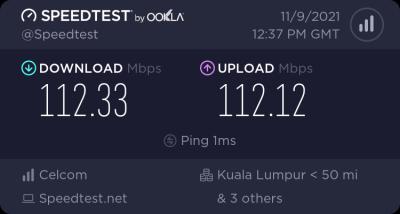
Before I upgrade to 300mb, I use 100mb. Got (abnormal) symmetric 110mb both download and upload.

QUOTE(wilson1stop @ Jan 12 2022, 07:19 PM)
Perhaps he testing via LAN cable
*
Internal networking medium doesn't really matter.
I can still get the same result, but slightly higher ping when connected to wifi ac at reasonable distance (650mb link).

This post has been edited by failed.hashcheck: Jan 13 2022, 03:28 AM
adamw
post Jan 13 2022, 02:53 AM

Back to serve justice to those PKHKC corrupted Ex-ministers!
*******
Senior Member
3,352 posts

Joined: Dec 2006


QUOTE(failed.hashcheck @ Jan 13 2022, 02:41 AM)
Depends on area, I think.
My neighbor just registered Celcom 30mb few weeks ago and getting 33+ mb.
Before I upgrade to 300mb, I use 100mb. Got symmetric 110mb both download and upload.
Internal networking medium doesn't really matter.
I can still get the same result, but slightly higher ping when connected to wifi ac at reasonable distance (650mb link).
*
Sialkom 100mb fiber plan is asymmetrical?
failed.hashcheck
post Jan 13 2022, 03:27 AM

Neighborhood plant pathologist
*******
Senior Member
2,096 posts

Joined: Aug 2009
From: Shithole Klang
QUOTE(adamw @ Jan 13 2022, 02:53 AM)
Sialkom 100mb fiber plan is asymmetrical?
*
supposedly no but idk what caused it to happen.
Attached Image

It goes on like that until the day I upgraded to 300mbps then it returned to advertised nominal 50mbps.

This post has been edited by failed.hashcheck: Jan 13 2022, 03:31 AM
wilson1stop
post Jan 13 2022, 07:54 AM

Look at all my stars!!
*******
Senior Member
2,779 posts

Joined: Feb 2008


QUOTE(failed.hashcheck @ Jan 13 2022, 03:41 AM)
Depends on area, I think.
My neighbor just registered Celcom 30mb few weeks ago and getting 33+ mb.
Before I upgrade to 300mb, I use 100mb. Got (abnormal) symmetric 110mb both download and upload.
Internal networking medium doesn't really matter.
I can still get the same result, but slightly higher ping when connected to wifi ac at reasonable distance (650mb link).
*
I did asked Unifi technician before, the port is near my house so the speed can get a little more than plan subscribed.

The 300Mbps for RM140 is permanently or just 24 months promo like Unifi?
failed.hashcheck
post Jan 13 2022, 12:08 PM

Neighborhood plant pathologist
*******
Senior Member
2,096 posts

Joined: Aug 2009
From: Shithole Klang
QUOTE(wilson1stop @ Jan 13 2022, 07:54 AM)
I did asked Unifi technician before, the port is near my house so the speed can get a little more than plan subscribed.

The 300Mbps for RM140 is permanently or just 24 months promo like Unifi?
*
Permanent. Shown as normal price in website .
papyrous
post Jan 13 2022, 01:36 PM

Getting Started
**
Junior Member
214 posts

Joined: May 2017
QUOTE(failed.hashcheck @ Jan 13 2022, 03:27 AM)
supposedly no but idk what caused it to happen.
Attached Image

It goes on like that until the day I upgraded to 300mbps then it returned to advertised nominal 50mbps.
*
i would’ve kept the 100mbps for that upload speed haha

25 Pages « < 8 9 10 11 12 > » Top
 

Change to:
| Lo-Fi Version
0.0323sec    0.64    6 queries    GZIP Disabled
Time is now: 13th December 2025 - 09:30 PM