Welcome Guest ( Log In | Register )

25 Pages « < 6 7 8 9 10 > » Bottom

Outline · [ Standard ] · Linear+

 Celcom Home Fibre - 30Mbps @ RM80. Yay or Nay?, Anything on Celcom Home Fibre

views
     
xVentrusx
post Nov 15 2021, 10:05 PM

Getting Started
**
Junior Member
233 posts

Joined: Nov 2011
From: Malaysia


guys just wanna ask if any of you experience delay issues playing certain games outside SEA?

playing Dota 2/CSGO ping is fine but when i play FFXIV which is in Japan the ping i usually get around 113ms/130ms now 230-300ms.

Called Celcom CS and she said they cant do anything about it cuz its outside SEA. I try changing DNS and stuff still same. used VPN to a malaysia server then i can get stable ping at 140ms-150ms. makes me want to change to other ISP. A friend using Unifi easily gets 90-100ms ping..

i checked my latency to that server always has packet loss. 5s is 120ms ping then 5s 230+ms. Im using wired to my pc

This post has been edited by xVentrusx: Nov 15 2021, 10:39 PM
failed.hashcheck
post Nov 15 2021, 11:10 PM

Neighborhood plant pathologist
*******
Senior Member
2,096 posts

Joined: Aug 2009
From: Shithole Klang
QUOTE(xVentrusx @ Nov 15 2021, 10:05 PM)
guys just wanna ask if any of you experience delay issues playing certain  games outside SEA?

playing Dota 2/CSGO ping is fine but when i play FFXIV which is in Japan the ping i usually get around 113ms/130ms now 230-300ms.

Called Celcom CS and she said they cant do anything about it cuz its outside SEA. I try changing DNS and stuff still same. used VPN to a malaysia server then i can get stable ping at 140ms-150ms. makes me want to change to other ISP. A friend using Unifi easily gets 90-100ms ping..

i checked my latency to that server always has packet loss. 5s is 120ms ping then 5s 230+ms. Im using wired to my pc
*
Can't be routing issues. My ping to their game servers (124.150.157.0/24) is constantly within 88-99ms.

But I heard somewhere before that there are many complains about ffxiv connection being falsely flagged and throttled as p2p by many ISPs for some reason (which the vpn masked). You may want to look around that.
changing dns won't do anything because it relates to different scope of networking.
xVentrusx
post Nov 15 2021, 11:37 PM

Getting Started
**
Junior Member
233 posts

Joined: Nov 2011
From: Malaysia


QUOTE(failed.hashcheck @ Nov 15 2021, 11:10 PM)
Can't be routing issues. My ping to their game servers (124.150.157.0/24) is constantly within 88-99ms.

But I heard somewhere before that there are many complains about ffxiv connection being falsely flagged and throttled as p2p by many ISPs for some reason (which the vpn masked). You may want to look around that.
changing dns won't do anything because it relates to different scope of networking.
*
do you have any suggestion that i should take? this just happened 2 weeks ago. before this all is good playing ffxiv+dota 2 and watching youtube at the same time no issue. Im from sabah btw and i think its not using the TM infrastructure? since it uses separate boxes i see. not sure if that relates or anything because im not well verse in this

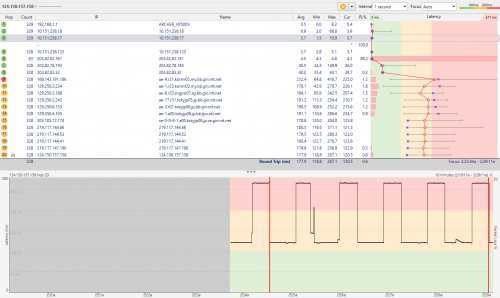
i use a software called pingplotter and i could see that the graph of my ping is like a wave and its consistent. low ping for a couple of seconds then high ping and so on. i dont know if its ISP side or my side that is wrong. called CS but cannot help me also..
failed.hashcheck
post Nov 16 2021, 12:09 AM

Neighborhood plant pathologist
*******
Senior Member
2,096 posts

Joined: Aug 2009
From: Shithole Klang
QUOTE(xVentrusx @ Nov 15 2021, 11:37 PM)
do you have any suggestion that i should take? this just happened 2 weeks ago. before this all is good playing ffxiv+dota 2 and watching youtube at the same time no issue. Im from sabah btw and i think its not using the TM infrastructure? since it uses separate boxes i see. not sure if that relates or anything because im not well verse in this

i use a software called pingplotter and i could see that the graph of my ping is like a wave and its consistent. low ping for a couple of seconds then high ping and so on. i dont know if its ISP side or my side that is wrong. called CS but cannot help me also..
*
have you tried ping to actual jp ffxiv servers?
124.150.157.157
124.150.157.156
124.150.157.158

Look fine from here in Klang.

CODE
Pinging 124.150.157.157 with 32 bytes of data:
Reply from 124.150.157.157: bytes=32 time=88ms TTL=48
Reply from 124.150.157.157: bytes=32 time=89ms TTL=48

Ping statistics for 124.150.157.157:
   Packets: Sent = 4, Received = 4, Lost = 0 (0% loss),
Approximate round trip times in milli-seconds:
   Minimum = 88ms, Maximum = 89ms, Average = 88ms


This post has been edited by failed.hashcheck: Nov 16 2021, 12:16 AM
xVentrusx
post Nov 16 2021, 12:17 AM

Getting Started
**
Junior Member
233 posts

Joined: Nov 2011
From: Malaysia


QUOTE(failed.hashcheck @ Nov 16 2021, 12:09 AM)
have you tried ping to actual jp ffxiv servers?
124.150.157.157
124.150.157.156
124.150.157.158

Look fine from here in Klang.

CODE
Pinging 124.150.157.157 with 32 bytes of data:
Reply from 124.150.157.157: bytes=32 time=89ms TTL=48

*
yep. playing ingame is worse. constant lagging. if i use the pingplotter it says i get packet loss at certain time. i dont know why.. its just making me confuse
heLL_bOy
post Nov 16 2021, 01:20 AM

Regular
******
Senior Member
1,350 posts

Joined: Nov 2004
From: HEAVEN & HELL


QUOTE(xVentrusx @ Nov 16 2021, 12:17 AM)
yep. playing ingame is worse. constant lagging. if i use the pingplotter it says i get packet loss at certain time. i dont know why.. its just making me confuse
*
try run MTR or pingplotter screenshot here.


Xanxeviera.
post Nov 16 2021, 01:21 AM

Getting Started
**
Junior Member
203 posts

Joined: Jun 2020
QUOTE(xVentrusx @ Nov 16 2021, 12:17 AM)
yep. playing ingame is worse. constant lagging. if i use the pingplotter it says i get packet loss at certain time. i dont know why.. its just making me confuse
*
I would say, send those ping and tracert test to Celcom, myb there's something wrong with your routing at Sabah
xVentrusx
post Nov 16 2021, 02:30 AM

Getting Started
**
Junior Member
233 posts

Joined: Nov 2011
From: Malaysia


QUOTE(heLL_bOy @ Nov 16 2021, 01:20 AM)
try run MTR or pingplotter screenshot here.
*
here is the pingplotter

» Click to show Spoiler - click again to hide... «

heLL_bOy
post Nov 16 2021, 12:31 PM

Regular
******
Senior Member
1,350 posts

Joined: Nov 2004
From: HEAVEN & HELL


QUOTE(xVentrusx @ Nov 16 2021, 02:30 AM)
here is the pingplotter

» Click to show Spoiler - click again to hide... «

*
ingress traffic got routing issue back to Celcom.

more likely upstream using MPLS caused the latency up and down.
xVentrusx
post Nov 16 2021, 06:15 PM

Getting Started
**
Junior Member
233 posts

Joined: Nov 2011
From: Malaysia


QUOTE(heLL_bOy @ Nov 16 2021, 12:31 PM)
ingress traffic got routing issue back to Celcom.

more likely upstream using MPLS caused the latency up and down.
*
So nothing i can do to fix it? Already called celcom cs again. They say cant do anything. Its the server i want to go to that has problem they said
heLL_bOy
post Nov 16 2021, 09:19 PM

Regular
******
Senior Member
1,350 posts

Joined: Nov 2004
From: HEAVEN & HELL


QUOTE(xVentrusx @ Nov 16 2021, 06:15 PM)
So nothing i can do to fix it? Already called celcom cs again. They say cant do anything. Its the server i want to go to that has problem they said
*
if they couldn't do anything how do Celcom receive traffic from the game server hmm.gif

just report it to MCMC website and ask celcom fix the route. is nothing to do with game server

all this cs are the same no matter celcom/maxis/time/TM they won't bother much on this kind of thing becos lack of feedback/complaint from public, unless got majority report the case only they take action.


zilch28
post Nov 18 2021, 11:35 PM

Casual
***
Junior Member
444 posts

Joined: Mar 2007


Signed for the 300MB package, the sales dude said there are extra ports in my area so no need to do the transfer transfer thing with unifi.

They just pulled a new cable, which is pretty good since my unifi fibre cable is old.

I am planning to get a better router since the provided AX1500 is just absolutely horrible in terms of configurability (maybe its a custom firmware). Anyone can recommend a good one?
failed.hashcheck
post Nov 19 2021, 12:18 AM

Neighborhood plant pathologist
*******
Senior Member
2,096 posts

Joined: Aug 2009
From: Shithole Klang
QUOTE(zilch28 @ Nov 18 2021, 11:35 PM)
Signed for the 300MB package, the sales dude said there are extra ports in my area so no need to do the transfer transfer thing with unifi.

They just pulled a new cable, which is pretty good since my unifi fibre cable is old.

I am planning to get a better router since the provided AX1500 is just absolutely horrible in terms of configurability (maybe its a custom firmware). Anyone can recommend a good one?
*
configurability as in what?
you just need to login as admin (not customer) for full access.
username: admin
password: c3lc0msuper

beyond that you need something that can install openwrt or Asus router (preferably one that supported by merlin)
zilch28
post Nov 19 2021, 12:25 AM

Casual
***
Junior Member
444 posts

Joined: Mar 2007


QUOTE(failed.hashcheck @ Nov 19 2021, 12:18 AM)
configurability as in what?
you just need to login as admin (not customer) for full access.
username: admin
password: c3lc0msuper

beyond that you need something that can install openwrt or Asus router (preferably one that supported by merlin)
*
oh this helps a lot, didn't know there was a admin login. i just need the regular functions of a router, which the customer account does not provide.
failed.hashcheck
post Nov 27 2021, 10:42 AM

Neighborhood plant pathologist
*******
Senior Member
2,096 posts

Joined: Aug 2009
From: Shithole Klang
Anyone experiencing trouble accessing IPs located in Western US?
Apparently there is something happened to Hurricane Electric (HE) route somewhere in HK for past few days. I can't access few of my servers in LV and LA. Hell, even HE website is inaccessible currently.

Buyvm has been kind enough to temporarily force route to celcom via Cogent on my request. But I still can't access other sites that routed though HE.

This post has been edited by failed.hashcheck: Nov 27 2021, 10:49 AM
heLL_bOy
post Nov 27 2021, 01:35 PM

Regular
******
Senior Member
1,350 posts

Joined: Nov 2004
From: HEAVEN & HELL


QUOTE(failed.hashcheck @ Nov 27 2021, 10:42 AM)
Anyone experiencing trouble accessing IPs located in Western US?
Apparently there is something happened to Hurricane Electric (HE) route somewhere in HK for past few days. I can't access few of my servers in LV and LA. Hell, even HE website is inaccessible currently.

Buyvm has been kind enough to temporarily force route to celcom via Cogent on my request. But I still can't access other sites that routed though HE.
*
isit route over HE (HKG) port-channel4 ? if yes, then is normal.. this route has issue been past few months.
failed.hashcheck
post Nov 27 2021, 03:25 PM

Neighborhood plant pathologist
*******
Senior Member
2,096 posts

Joined: Aug 2009
From: Shithole Klang
QUOTE(heLL_bOy @ Nov 27 2021, 01:35 PM)
isit route over HE (HKG) port-channel4 ? if yes, then is normal.. this route has issue been past few months.
*
idk been experiencing problem only since 2 days ago.
but yeah the traceroute stop at HK BBIX

This post has been edited by failed.hashcheck: Nov 27 2021, 03:49 PM
heLL_bOy
post Nov 27 2021, 04:31 PM

Regular
******
Senior Member
1,350 posts

Joined: Nov 2004
From: HEAVEN & HELL


QUOTE(failed.hashcheck @ Nov 27 2021, 03:25 PM)
idk been experiencing problem only since 2 days ago.
but yeah the traceroute stop at HK BBIX
*
so far no news over HE(HKG) over BBIX. only port-channel4 having problem so far.

route stop at HK BBIX isit null-route?

as far i know celcom and buyvm both doesn't using HK BBIX.

only celcom have 10g over SG BBIX.
failed.hashcheck
post Nov 27 2021, 05:22 PM

Neighborhood plant pathologist
*******
Senior Member
2,096 posts

Joined: Aug 2009
From: Shithole Klang
QUOTE(heLL_bOy @ Nov 27 2021, 04:31 PM)
so far no news over HE(HKG) over BBIX. only port-channel4 having problem so far.

route stop at HK BBIX isit null-route?

as far i know celcom and buyvm both doesn't using HK BBIX.

only celcom have 10g over SG BBIX.
*
can't say for sure but then again this affects number of other US-west sites that are connected via HE, like he.net itself.

tracert to buyvm LA before reroute:

CODE
 1    <1 ms    <1 ms    <1 ms  RT-AC67U-9CF8 [192.168.1.1]
 2     4 ms     1 ms     1 ms  183.171.195.225
 3     5 ms     2 ms     2 ms  10.55.49.57
 4     5 ms     2 ms     2 ms  10.55.50.26
 5     5 ms     1 ms     1 ms  183.171.206.46
 6     6 ms     3 ms     3 ms  183.171.206.41
 7     6 ms     4 ms     3 ms  10.151.83.142
 8     *        7 ms     4 ms  203.82.73.190
 9     *        *        5 ms  203.82.73.189
10     9 ms     6 ms     6 ms  203.82.83.48
11    38 ms    38 ms    38 ms  103.203.158.51
12     *        *        *     Request timed out.
13     *        *        *     Request timed out.

Tracert from buyvm to celcom
CODE
1  205.185.112.1 (205.185.112.1)  1.584 ms  0.524 ms  1.529 ms
2  172.18.0.29 (172.18.0.29)  1.742 ms  1.004 ms  1.308 ms
3  100ge0-70.core3.lax2.he.net (184.104.193.177)  18.459 ms  8.141 ms  18.412 ms
4  100ge10-1.core1.hkg1.he.net (184.105.64.126)  145.295 ms  145.222 ms  145.345 ms
5  port-channel1.core2.hkg1.he.net (184.104.197.90)  170.408 ms  170.706 ms  170.697 ms
6  * * *
7  * * *


reported to celom but I bet they would rather just wait the upstream to fix itself than crapping the entire network for alternative rote just for an isolated complain yawn.gif .

heLL_bOy
post Nov 27 2021, 05:53 PM

Regular
******
Senior Member
1,350 posts

Joined: Nov 2004
From: HEAVEN & HELL


QUOTE(failed.hashcheck @ Nov 27 2021, 05:22 PM)
can't say for sure but then again this affects number of other US-west sites that are connected via HE, like he.net itself.

tracert to buyvm LA before reroute:

CODE
 1    <1 ms    <1 ms    <1 ms  RT-AC67U-9CF8 [192.168.1.1]
 2     4 ms     1 ms     1 ms  183.171.195.225
 3     5 ms     2 ms     2 ms  10.55.49.57
 4     5 ms     2 ms     2 ms  10.55.50.26
 5     5 ms     1 ms     1 ms  183.171.206.46
 6     6 ms     3 ms     3 ms  183.171.206.41
 7     6 ms     4 ms     3 ms  10.151.83.142
 8     *        7 ms     4 ms  203.82.73.190
 9     *        *        5 ms  203.82.73.189
10     9 ms     6 ms     6 ms  203.82.83.48
11    38 ms    38 ms    38 ms  103.203.158.51
12     *        *        *     Request timed out.
13     *        *        *     Request timed out.

Tracert from buyvm to celcom
CODE
1  205.185.112.1 (205.185.112.1)  1.584 ms  0.524 ms  1.529 ms
2  172.18.0.29 (172.18.0.29)  1.742 ms  1.004 ms  1.308 ms
3  100ge0-70.core3.lax2.he.net (184.104.193.177)  18.459 ms  8.141 ms  18.412 ms
4  100ge10-1.core1.hkg1.he.net (184.105.64.126)  145.295 ms  145.222 ms  145.345 ms
5  port-channel1.core2.hkg1.he.net (184.104.197.90)  170.408 ms  170.706 ms  170.697 ms
6  * * *
7  * * *


reported to celom but I bet they would rather just wait the upstream to fix itself than crapping the entire network for alternative rote just for an isolated complain yawn.gif .
*
should be celcom problem... how can celcom route over HK BBIX(103.203.158.51) without connecting HE transit before dropping traffic over HK BBIX.


25 Pages « < 6 7 8 9 10 > » Top
 

Change to:
| Lo-Fi Version
0.0312sec    0.48    6 queries    GZIP Disabled
Time is now: 15th December 2025 - 11:19 AM