

Walao unifi...
Unifi Official TM UniFi High Speed Broadband Thread V37, READ 1ST PAGE FOR TURBO SPEED INFO!
Unifi Official TM UniFi High Speed Broadband Thread V37, READ 1ST PAGE FOR TURBO SPEED INFO!
|
|
 Feb 14 2019, 11:58 PM Feb 14 2019, 11:58 PM
Show posts by this member only | IPv6 | Post
#321
|
 
Senior Member
1,124 posts Joined: Nov 2015 
|
Walao unifi...
|
|
|
|
|
|
Feb 14 2019, 11:58 PM
Show posts by this member only | IPv6 | Post
#322
|
|
Senior Member
1,124 posts Joined: Nov 2015
|
Lag till triple post.
This post has been edited by RallyNight: Feb 15 2019, 12:00 AM |
|
|
Feb 14 2019, 11:59 PM
|
|
Senior Member
1,124 posts Joined: Nov 2015
|
Damn wtf 100mbps.
Attached thumbnail(s) 
|
|
|
Feb 15 2019, 12:03 AM
|

Junior Member
174 posts Joined: Feb 2019
|
for vdsl user
the modem/router got sell in lowyat? or only can got from TM? |
|
|
Feb 15 2019, 12:33 AM
Show posts by this member only | IPv6 | Post
#325
|

Senior Member
5,608 posts Joined: Jan 2010 
|
QUOTE(Brotherjoe @ Feb 14 2019, 10:33 PM) Bayan lepas area also no internet Unifi just down a few mins ago ... staying at Bayan Baru area |
|
|
Feb 15 2019, 12:34 AM
|

Senior Member
6,035 posts Joined: Jan 2003 From: Penang 
|
QUOTE(lucianm @ Feb 14 2019, 10:23 PM) Same from around Butterworth, internet down. But when calling them there is an announcement saying that they are *upgrading* internet services in Penang and Perak and might affect certain users. So god knows why. Mine also down 5min ago, bworth area as well |
|
|
|
|
|
Feb 15 2019, 01:10 AM
Show posts by this member only | IPv6 | Post
#327
|

Newbie
10 posts Joined: Dec 2012
|
QUOTE(PowerSlide @ Feb 15 2019, 12:34 AM) Mine also down 5min ago, bworth area as well Glad to see I'm not the only one. Tg Bungah area down as well 😱😱 |
|
|
Feb 15 2019, 01:15 AM
Show posts by this member only | IPv6 | Post
#328
|

Junior Member
51 posts Joined: Mar 2017
|
Bukit Mertajam down 15 min ago
|
|
|
Feb 15 2019, 01:17 AM
|

Junior Member
290 posts Joined: Dec 2009
|
Bukit mertajam down 30min ago
|
|
|
Feb 15 2019, 02:19 AM
|

Junior Member
76 posts Joined: Dec 2008
|
Kajang is down 15 mins ago, not sure if other klang valley users are affected
|
|
|
Feb 15 2019, 02:24 AM
|

Junior Member
145 posts Joined: May 2013
|
Same here, gaming in halfway @#$%&*
This post has been edited by isonic: Feb 15 2019, 02:57 AM |
|
|
Feb 15 2019, 02:26 AM
|

All Stars
11,456 posts Joined: Oct 2007 From: KL
|
QUOTE(crest91 @ Feb 15 2019, 02:19 AM) Kajang is down 15 mins ago, not sure if other klang valley users are affected Sungai Long, Kajang seems OK. Was watching Ken Jeong Netflix special for the last hour. No interruptions. |
|
|
Feb 15 2019, 06:17 AM
Show posts by this member only | IPv6 | Post
#333
|

Senior Member
4,412 posts Joined: Jan 2013
|
Penang BM Alma area still down..
|
|
|
|
|
|
Feb 15 2019, 08:54 AM
|
|
Senior Member
6,261 posts Joined: Jul 2005 From: UEP Subang Jaya 
|
QUOTE(yed @ Feb 14 2019, 10:56 PM) Old router can get 5++mbps is very good indeed It's a microtik |
|
|
Feb 15 2019, 09:32 AM
Show posts by this member only | IPv6 | Post
#335
|
|
Senior Member
5,608 posts Joined: Jan 2010
|
Unifi down again?
|
|
|
Feb 15 2019, 10:26 AM
|

Senior Member
5,714 posts Joined: Mar 2007
|
QUOTE(lolzcalvin @ Feb 14 2019, 09:18 PM) it's not the line problem since my neighbour has a stable connection from maxis fibre. Yes, figures. You need to go to the main TMPoint and the proper one, not some reseller which is branded as TMPoint.and going to the main TMPoint worked. I went there and complained about the technical report and about how incompetent they are. they immediately escalated the issue and fixed it this evening. QUOTE(zeronova @ Feb 14 2019, 09:43 PM) Just spoke to customer service. Recently downgrade to 100mb plan but still using Innacom RG4332 router and Alcatel lucent I-240G-T modem, am I eligible for changing router? Just change router if you want to. I suggest changing to your own router, rather than getting their model.After testing with wired connection, it came out to be 85mbps download and 50 mbps upload and the customer service told me that there is nothing wrong with my router and can support up to 300mbps. How to argue? QUOTE(soonwai @ Feb 14 2019, 10:45 PM) Dug out a few old routers to see how they fare with UniFi Turbo 800Mbps. No surprises there. Good job.First one is Mikrotik RB750GL from 2011. RouterOS 6.43.12 Fasttrack ON CPU Usage: ~80%  Next is Asus RT-N16 from dunno which year. Tomato 1.28.0000 MIPSR2-3.5-140 K26 USB AIO BCM_NAT: ON  Not sure if this is the best firmware for the Asus. DLink DIR-615 I tested before with Turbo 500Mbps. 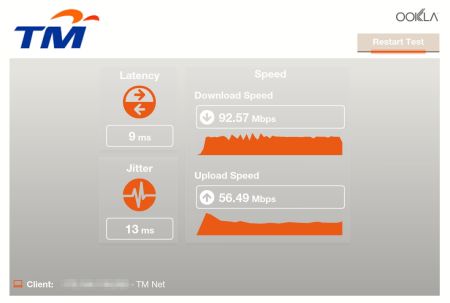 Limited by 100Mbps ethernet ports All tests on Gigabit LAN. speedtest.net server is Telekom Malaysia. |
|
|
Feb 15 2019, 11:32 AM
|
|
Senior Member
2,329 posts Joined: Jun 2015
|
no unifi downtime issue in miri
|
|
|
Feb 15 2019, 11:39 AM
|

Junior Member
23 posts Joined: Nov 2011
|
Hi guys, just to update regarding my problem previously. TM come to my house and change my router that support 800mbps, in exchange of extend my contract for 1 year.
Now the problem is, when they used their laptop direct lan to my router, they can get 800mbps, but my desktop only manage to get to 5++. They have check my network card able to support 1gbps. they told me that probably because of my antivirus ? which I only use windows security. anyone know how to achieve 800mbps |
|
|
Feb 15 2019, 12:12 PM
|
|
Senior Member
5,714 posts Joined: Mar 2007
|
QUOTE(Nonetobeknow @ Feb 15 2019, 11:39 AM) Hi guys, just to update regarding my problem previously. TM come to my house and change my router that support 800mbps, in exchange of extend my contract for 1 year. Speedtest with Firefox or Edge. Try speedtest in safe mode with networking as well. It is probably throttled by the Spectre or Meltdown patch.Now the problem is, when they used their laptop direct lan to my router, they can get 800mbps, but my desktop only manage to get to 5++. They have check my network card able to support 1gbps. they told me that probably because of my antivirus ? which I only use windows security. anyone know how to achieve 800mbps |
|
|
Feb 15 2019, 12:30 PM
|
|
Junior Member
511 posts Joined: May 2009
|
Thanks to all that help me few days ago regarding my problems.
Took SilentVampire recommendation and changed my router to AC3150 and adapter to T9UH. Tested both with cat5e that came with router and cat6 and there are no significant differences (from BTU to router).  Tested last night and got 460mbps. Still wait for my 10 meters cat6 to arrive to see the speed with cable. Setting the router is really breeze and easy at least for a man like me that not so expert in this things. And if my last adapter only gave me 2 bars of wireless coverage, this T9UH give me full bars! Impressive the fact that my pc to my router is blocked my walls Edited: Test again just now and got this.  This post has been edited by kazekage_09: Feb 15 2019, 12:35 PM |
|
Topic ClosedOptions
|
| Change to: |  0.0229sec 0.0229sec
 0.40 0.40
 6 queries 6 queries
 GZIP Disabled GZIP Disabled
Time is now: 4th December 2025 - 10:39 AM |
 Quote
Quote