

QUOTE(lyc1982 @ Mar 19 2019, 02:47 PM)
so meaning only 1 reported case here...not more than 1 user having 800Mbps at rm129

No, IIRC someone got an even better deal with 800mbps+Ultimate+std20 @rm129.Unifi Official TM UniFi High Speed Broadband Thread V37, READ 1ST PAGE FOR TURBO SPEED INFO!
|
|
 Mar 19 2019, 05:06 PM Mar 19 2019, 05:06 PM
|
 
All Stars
18,416 posts Joined: Oct 2010 
|
QUOTE(lyc1982 @ Mar 19 2019, 02:47 PM) so meaning only 1 reported case here...not more than 1 user having 800Mbps at rm129 No, IIRC someone got an even better deal with 800mbps+Ultimate+std20 @rm129. |
|
|
|
|
|
Mar 19 2019, 05:12 PM
|
|
Senior Member
2,329 posts Joined: Jun 2015
|
QUOTE(MGM @ Mar 19 2019, 05:06 PM) No, IIRC someone got an even better deal with 800mbps+Ultimate+std20 @rm129. tbh...ultimate or whatnot additional stuff don't matter to meonly matters to me is the DL/UL speed vs price |
|
|
Mar 19 2019, 09:35 PM
|

Senior Member
628 posts Joined: Apr 2016
|
when unifi 800mbps will be launch officially ? any prediction
|
|
|
Mar 19 2019, 10:38 PM
|

All Stars
11,458 posts Joined: Oct 2007 From: KL 
|
QUOTE(dannielshazmeer @ Mar 19 2019, 09:35 PM) when unifi 800mbps will be launch officially ? any prediction Q3 of this year, I wager. |
|
|
Mar 20 2019, 01:06 AM
|
|
Senior Member
1,882 posts Joined: Sep 2017
|
|
|
|
Mar 20 2019, 01:59 AM
|
|
All Stars
11,458 posts Joined: Oct 2007 From: KL
|
QUOTE(go626201 @ Mar 20 2019, 01:06 AM) Nice, Imperial Shuttle! Wifi range: 1 parsec. |
|
|
|
|
|
Mar 20 2019, 07:44 AM
|
|
Junior Member
864 posts Joined: May 2005
|
Nooo. We already had spider-shaped routers, and now this? Mesh routers or Ubiquity UAPs looks far sleeker.
|
|
|
Mar 20 2019, 08:21 AM
Show posts by this member only | IPv6 | Post
#1208
|

Junior Member
60 posts Joined: May 2007
|
Unifi biz here,
previously using streamyx at my office, just change DNS server and all censor website still can access, but after upgrade to unifi, all censor website not access anymore. set both dns server at pc and router, but still same... any idea what happen? |
|
|
Mar 20 2019, 09:12 AM
|
|
Senior Member
1,274 posts Joined: Nov 2016
|
QUOTE(AVFAN @ Mar 18 2019, 10:46 AM) so, they changed nothing in the end? Yeah.. you are right.. use their laptop test very fast... can get almost 200mbps speed for upload and 100+ for download. they show me its not their equipment prob.... i tested using my laptop also same speed. however my wife always complain slow when she access using her laptop via wifi cause she watches korean movie streaming u got charged most likely becos technician came n tested with their own laptop with lan cable, got 500mbps. guess they showed u the result, right? so, they conclude it is not their equipment problem. when u called them to come, u were likely told beforehand u will be charged if there is no problem with TM equipment. many users are not aware that the promised speed is only for ethernet/cable, not wifi. wifi, it depends a lot on what device(s) u use... older handphones, pcs, etc cannot get >300.  So far, i don't stream movies... i use basic stuff, check emails, fb, instagram, surf web speed so far ok for me. i tried torrent download games / movies the speed is quite fast compare to before it was upgraded to turbo. oh i am not aware needs to be charged, all the while before upgrading it to turbo i did ask tm come and check several times its FOC. i don't know why this time they charge. crazy... RM55 for just less than 20 mins job... not worth it. they test they did, i also can do the same....  |
|
|
Mar 20 2019, 09:16 AM
|
|
Senior Member
1,274 posts Joined: Nov 2016
|
QUOTE(SilentVampire @ Mar 18 2019, 04:29 PM) That router can't support 500Mbps over wifi. It can only support it via wired connection, with RJ45 Cat 5e and above. I suggest referring to 1st page, 1st post, green text, for a quick lesson in home networking, and recommendations for a good router for your speed. Sure or not? thats the router TM provide when upgrade my line to turbo 500mbps. i saw the router configuration inside got 2.4ghz and 5ghz speed configuration. TM engineer told me if old devices connecting most likely use 2.4ghz if newer devices connecting will be on 5ghz. how do i know whether my device is old or new? NEw means bought in 2018? 2017? 2016? old means ?? how do they define old and new? i am confused. |
|
|
Mar 20 2019, 09:39 AM
|
|
All Stars
11,458 posts Joined: Oct 2007 From: KL
|
QUOTE(achong09 @ Mar 20 2019, 09:16 AM) Sure or not? thats the router TM provide when upgrade my line to turbo 500mbps. i saw the router configuration inside got 2.4ghz and 5ghz speed configuration. TM engineer told me if old devices connecting most likely use 2.4ghz if newer devices connecting will be on 5ghz. how do i know whether my device is old or new? NEw means bought in 2018? 2017? 2016? old means ?? how do they define old and new? i am confused. Check with Google. Old & new all relative. My laptop from 2010 has 5Ghz. My old phone from 2012 has 5Ghz. My friend's 2018 laptop only has 2.4Ghz.C1200 should have no probs with 500 on wired LAN. Maybe even wifi given the right combination of C1200 and device. https://forum.lowyat.net/index.php?showtopi...post&p=90234095 C1200 on 800Mbps. This post has been edited by soonwai: Mar 20 2019, 09:43 AM |
|
|
Mar 20 2019, 10:28 AM
|

All Stars
24,454 posts Joined: Nov 2010
|
QUOTE(achong09 @ Mar 20 2019, 09:12 AM) Yeah.. you are right.. use their laptop test very fast... can get almost 200mbps speed for upload and 100+ for download. they show me its not their equipment prob.... i tested using my laptop also same speed. however my wife always complain slow when she access using her laptop via wifi cause she watches korean movie streaming the router u have CAN do 500mbps wired. So far, i don't stream movies... i use basic stuff, check emails, fb, instagram, surf web speed so far ok for me. i tried torrent download games / movies the speed is quite fast compare to before it was upgraded to turbo. oh i am not aware needs to be charged, all the while before upgrading it to turbo i did ask tm come and check several times its FOC. i don't know why this time they charge. crazy... RM55 for just less than 20 mins job... not worth it. they test they did, i also can do the same.... i had it before can even do 800 mbps wired. many routers can do that, not a big issue. wifi is the common complaint. read other wifi threads, been discussed over n over. how much u get depends on both the router and yr device. sifus can explain to u in detail but i will simply say yr router can do max 300mbps wifi only at short distance 5ghz. longer distance or 2.4ghz, u likely get 20-50 only. and that is not too bad for most purposes. if u want higher wifi speeds, u need to spend $ on new router and even change your devices. online streaming of common videos does not require high speeds, 30mbps is more than enough. yr wifey laptop... check if needs a usb ac adaptor (rm50-150) to do 5ghz. once u have that, it will improve. my pc fitted with such an adaptor can do up to 300mbps 5ghz at 50ft. another box 50ft away can get 50mbps 2.4ghz, stream all korean or chinese stuff smoothly. |
|
|
Mar 20 2019, 10:58 AM
|

Senior Member
2,104 posts Joined: Sep 2008
|
QUOTE(soonwai @ Mar 19 2019, 10:38 PM) Q3 of this year, I wager. Hope the price for 300,500 and 800Mbps is reasonable otherwise a lot of ppl will stick to 100Mbps only... |
|
|
|
|
|
Mar 20 2019, 11:23 AM
|

Senior Member
5,714 posts Joined: Mar 2007 
|
QUOTE(achong09 @ Mar 20 2019, 09:16 AM) Sure or not? thats the router TM provide when upgrade my line to turbo 500mbps. i saw the router configuration inside got 2.4ghz and 5ghz speed configuration. TM engineer told me if old devices connecting most likely use 2.4ghz if newer devices connecting will be on 5ghz. how do i know whether my device is old or new? NEw means bought in 2018? 2017? 2016? old means ?? how do they define old and new? i am confused. Sure la. They only provide a router that can support the speed on wired, but definitely not on WiFi. TM only promise that you can get the speed on wired, and NOT WiFi. You have to get your own router for that.It is possible to reach the speed in WiFi, but you need to be near the router la. Nothing to do with new or old. If your device support 5GHz, then you will be able to connect on 5GHz. If not, then no. Older devices and cheap newer devices only support 2.4GHz. There is 5GHz N and 5GHz AC. You would want to connect to 5GHz AC, not 5GHz N. Refer to 1st page, 1st post, green text, for a brief lesson in home networking. |
|
|
Mar 20 2019, 11:23 AM
|
|
Senior Member
5,714 posts Joined: Mar 2007
|
QUOTE(wlting @ Mar 20 2019, 08:21 AM) Unifi biz here, Disable IPv6.previously using streamyx at my office, just change DNS server and all censor website still can access, but after upgrade to unifi, all censor website not access anymore. set both dns server at pc and router, but still same... any idea what happen? |
|
|
Mar 20 2019, 01:13 PM
Show posts by this member only | IPv6 | Post
#1216
|

Junior Member
14 posts Joined: Jan 2008 From: Penang 
|
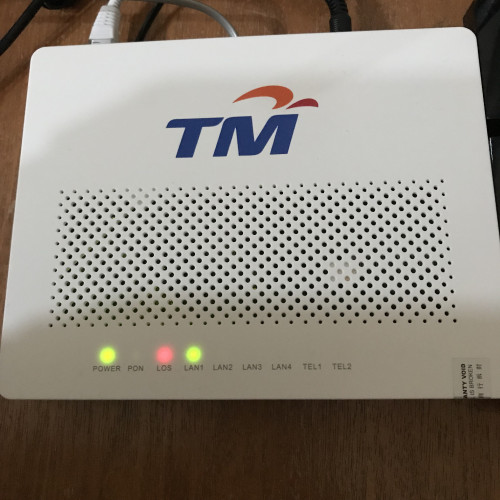
Just upgrade from streamyx to unifi on last Saturday, suddenly got disconnect yesterday around 2pm untill today morning and now disconnect again, anyone facing this problem before? So unstable
 |
|
|
Mar 20 2019, 01:15 PM
|
|
Junior Member
60 posts Joined: May 2007
|
QUOTE(SilentVampire @ Mar 20 2019, 11:23 AM) Disable IPv6. Just that simple... XD thanks.... |
|
|
Mar 20 2019, 02:12 PM
|
|
Senior Member
1,263 posts Joined: Dec 2009
|
QUOTE(blueybaby @ Mar 20 2019, 01:13 PM) Just upgrade from streamyx to unifi on last Saturday, suddenly got disconnect yesterday around 2pm untill today morning and now disconnect again, anyone facing this problem before? So unstable make a report to tm or call installer. still under installer's warranty for new installation. |
|
|
Mar 20 2019, 02:16 PM
|
|
Senior Member
1,021 posts Joined: Aug 2006 From: Penang Island, Alor Star
|
QUOTE(achong09 @ Mar 20 2019, 09:16 AM) Sure or not? thats the router TM provide when upgrade my line to turbo 500mbps. i saw the router configuration inside got 2.4ghz and 5ghz speed configuration. TM engineer told me if old devices connecting most likely use 2.4ghz if newer devices connecting will be on 5ghz. how do i know whether my device is old or new? NEw means bought in 2018? 2017? 2016? old means ?? how do they define old and new? i am confused. Old or new is just relative and general assumption only. Older models are usually lest modern than newer ones.Wifi AC 5Ghz (802.11ac) is definitely newer than Wifi N 2.4Ghz (802.11n). However, not all new devices support wifi AC 5Ghz. Even if it supports, there is also difference in speed supported due to antenna & chipset used inside the device. Even some smartphones/laptops selling in 2018 or 2019 still 'skimp' on the wifi AC support, where they only use wifi N 2.4Ghz in the device to save cost and sell cheaper. You should check the spec of the device to be sure. Just check the specs and models of your wifi USB dongle, Wifi cards (laptop), smartphone and the wifi router first. Every model is different in their own. Older devices we can safely say are less modern. But we can't say this to all devices because old phones like Note5, galaxy s8, iPhone6/7 are still good on wifi AC 5Ghz speed because they were the high end models at their launch time (premium models and still going strong). Like new cars, not all are given the extra features of push start button, keyless entry, reverse camera, 6 air bags, multi-port usb chargers, and all the fancy stuff. It depends on which tier you buy. More money put in, more features with latest techs. But as time goes, all these basic features will slowly become a 'standard' if the manufacturer wants to do it for an added cost. This post has been edited by mmohdnor: Mar 20 2019, 02:22 PM |
|
|
Mar 20 2019, 02:19 PM
Show posts by this member only | IPv6 | Post
#1220
|
|
Junior Member
14 posts Joined: Jan 2008 From: Penang
|
QUOTE(dannychen @ Mar 20 2019, 02:12 PM) make a report to tm or call installer. still under installer's warranty for new installation. Make report yesterday and call installer, this morning woke up already can connect but now disconnect again, dont know is tm or installer problem. If fibre cable problem straight away cant connect right? |
|
Topic ClosedOptions
|
| Change to: |  0.0179sec 0.0179sec
 0.25 0.25
 6 queries 6 queries
 GZIP Disabled GZIP Disabled
Time is now: 9th December 2025 - 07:43 AM |
 Quote
Quote
