Welcome Guest ( Log In | Register )

Bump Topic Topic Closed RSS Feed
316 Pages « < 60 61 62 63 64 > » Bottom

Outline · [ Standard ] · Linear+

Unifi Official TM UniFi High Speed Broadband Thread V37, READ 1ST PAGE FOR TURBO SPEED INFO!

views
     
uGinn
post Mar 20 2019, 02:32 PM

New Member
*
Junior Member
36 posts

Joined: Nov 2009
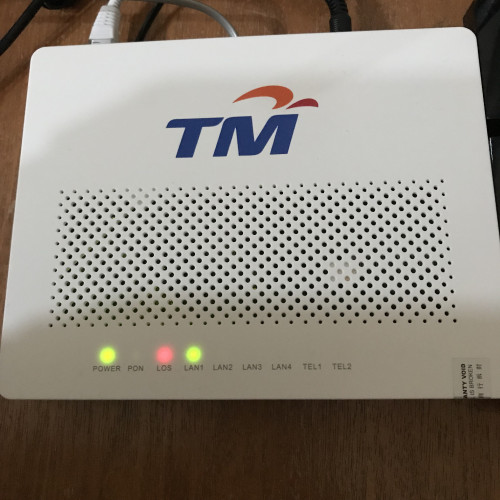
My parent's house just got the turbo boost few months back and they are still using the HG850a ONU. Do I need call TM to have that replaced? They are on 500mbps speed.
soonwai
post Mar 20 2019, 03:26 PM


********
All Stars
11,458 posts

Joined: Oct 2007
From: KL


QUOTE(uGinn @ Mar 20 2019, 02:32 PM)
My parent's house just got the turbo boost few months back and they are still using the HG850a ONU. Do I need call TM to have that replaced? They are on 500mbps speed.
*
Have to or else speeds will be limited to 100Mbps. The HG850a only has 100Mbps Ethernet ports.

There should be no charge at all for the change as the BTU is TM’s responsibility.

This post has been edited by soonwai: Mar 20 2019, 03:28 PM
hashtag2016
post Mar 20 2019, 04:39 PM

On my way
****
Junior Member
506 posts

Joined: Feb 2016
--deleted--- seem problem solved...

This post has been edited by hashtag2016: Mar 20 2019, 04:41 PM
hashtag2016
post Mar 20 2019, 04:47 PM

On my way
****
Junior Member
506 posts

Joined: Feb 2016
QUOTE(mmohdnor @ Mar 20 2019, 02:16 PM)
Old or new is just relative and general assumption only. Older models are usually lest modern than newer ones.

Wifi AC 5Ghz (802.11ac) is definitely newer than Wifi N 2.4Ghz (802.11n).
However, not all new devices support wifi AC 5Ghz. Even if it supports, there is also difference in speed supported due to antenna & chipset used inside the device.

Even some smartphones/laptops selling in 2018 or 2019 still 'skimp' on the wifi AC support, where they only use wifi N 2.4Ghz in the device to save cost and sell cheaper.
You should check the spec of the device to be sure. Just check the specs and models of your wifi USB dongle, Wifi cards (laptop), smartphone and the wifi router first. Every model is different in their own.
Older devices we can safely say are less modern. But we can't say this to all devices because old phones like Note5, galaxy s8, iPhone6/7 are still good on wifi AC 5Ghz speed because they were the high end models at their launch time (premium models and still going strong).

Like new cars, not all are given the extra features of push start button, keyless entry, reverse camera, 6 air bags, multi-port usb chargers, and all the fancy stuff. It depends on which tier you buy. More money put in, more features with latest techs.
But as time goes, all these basic features will slowly become a 'standard' if the manufacturer wants to do it for an added cost.
*
Maybe they just clearance the old chips.. Even some multifunction printer selling in 2018 or 2019 still cannot copy(or printing) A4 in full size(the page number will be truncated rclxub.gif ).. devil.gif
TSSilentVampire
post Mar 20 2019, 05:21 PM

Networking Enthusiast
*******
Senior Member
5,714 posts

Joined: Mar 2007


QUOTE(blueybaby @ Mar 20 2019, 01:13 PM)
Just upgrade from streamyx to unifi on last Saturday, suddenly got disconnect yesterday around 2pm untill today morning and now disconnect again, anyone facing this problem before? So unstable

user posted image
*
QUOTE(blueybaby @ Mar 20 2019, 02:19 PM)
Make report yesterday and call installer, this morning woke up already can connect but now disconnect again, dont know is tm or installer problem. If fibre cable problem straight away cant connect right?
*
I suggest call installer to come check. It is definitely a physical issue. They need to check for you. Where in Penang are you? They could be doing some maintenance.

This post has been edited by SilentVampire: Mar 20 2019, 05:23 PM
achong09
post Mar 20 2019, 06:44 PM

Regular
******
Senior Member
1,274 posts

Joined: Nov 2016
Hi
For 2.4ghz what channel witdh should be configured? Not mention here


Edited by fruitie. Removed whole long quote!

This post has been edited by fruitie: Mar 20 2019, 07:55 PM
soonwai
post Mar 20 2019, 07:24 PM


********
All Stars
11,458 posts

Joined: Oct 2007
From: KL


It's been awhile since someone quoted the entire first post.
AVFAN
post Mar 20 2019, 07:31 PM

20k VIP Club
*********
All Stars
24,454 posts

Joined: Nov 2010
QUOTE(soonwai @ Mar 20 2019, 07:24 PM)
It's been awhile since someone quoted the entire first post.
*
biggrin.gif

cyberspace is infinitely free, i suppose.
nag
post Mar 20 2019, 07:54 PM

Casual
***
Junior Member
336 posts

Joined: Jul 2010
From: Changlun, Kedah
QUOTE(soonwai @ Mar 20 2019, 07:24 PM)
It's been awhile since someone quoted the entire first post.
*
Quoting first pinned post occupied a lot of space.

TSSilentVampire
post Mar 20 2019, 08:19 PM

Networking Enthusiast
*******
Senior Member
5,714 posts

Joined: Mar 2007


QUOTE(achong09 @ Mar 20 2019, 06:44 PM)
Hi
For 2.4ghz what channel witdh should be configured?  Not mention here
Edited by fruitie. Removed whole long quote!
*
Lol. You don’t need to quote the whole first post. I did say 20MHz, somewhere in there: “2.4 GHz offers coverage for further distances, but may perform at slower speeds. Use 20MHz channels in the 2.4 GHz band”.
calvin_gsc
post Mar 20 2019, 08:35 PM

10k Club
********
All Stars
10,261 posts

Joined: Jan 2003


» Click to show Spoiler - click again to hide... «


Update 11:55pm

It was indeed a user error for one case! My new laptop didn't come with gigabit ethernet, just fast ethernet @ 100Mbps. I did speedtest again via usb gigabit ethernet adapter. I managed to get >800Mbps result. doh.gif

This post has been edited by calvin_gsc: Mar 20 2019, 11:56 PM
go626201
post Mar 20 2019, 10:16 PM

Regular
******
Senior Member
1,882 posts

Joined: Sep 2017
QUOTE(calvin_gsc @ Mar 20 2019, 08:35 PM)
ranting.gif Feel so cheated by TM  vmad.gif

I have 2 Unifi 800 account under me. I got my upgrade early of last year, no issue with getting full speed with my current equipment. However recently did speed test with my Laptop via LAN, no equipment change. One location getting 100Mbps D/100Mbps U another 300Mbps D/ 100Mbps U. I contacted TM via Livechat and both location also did port reset but still same speed results. Now waiting for technical team to call me for site visit.

Some more they will tell you, site visit if your fault then RM53 will be billed. Next if fiber equipment faulty, option1 free replacement but extend contract WTF  ranting.gif  vmad.gif  option2 pay for yourself for the new equipment with no contract extension.

Dont know how long i have been getting slow speed but still paying full bill amount. What a scam!  icon_question.gif
*
old laptop might not get full speed due to cpu usage full or browser problem or hardware problem or router problem.
Try change new cable or new device or new browser to speedtest.

(Example: my 2017 i77700hq laptop always cant get full speed with lan or wifi.I also dont know why,using power adapter also,but sometimes can get more than 500mbps)(With my desktop pc always full speed after format my pc)
Rudd
post Mar 20 2019, 11:53 PM

Look at all my stars!!
*******
Senior Member
4,043 posts

Joined: Jul 2010

Downgrade plan is hard capped at rm200?
Does not matter voluntarily/involuntarily?
virgoguy
post Mar 21 2019, 08:02 AM

On my way
****
Junior Member
616 posts

Joined: Oct 2008
Hi all, just to check. unifi installation through ceiling. As I understand that it is Rm60 first 10meter then subsequently Rm10 for 1 meter. Does that inclusive going through conceal pipe From wall?

This post has been edited by virgoguy: Mar 21 2019, 08:03 AM
ClarenceT
post Mar 21 2019, 09:12 AM

10k Club
********
All Stars
14,939 posts

Joined: May 2015
QUOTE(virgoguy @ Mar 21 2019, 08:02 AM)
Hi all, just to check. unifi installation through ceiling. As I understand that it is Rm60 first 10meter then subsequently Rm10 for 1 meter. Does that inclusive going through conceal pipe From wall?
*
I did pay for the conceal works

achong09
post Mar 21 2019, 10:44 AM

Regular
******
Senior Member
1,274 posts

Joined: Nov 2016
QUOTE(SilentVampire @ Mar 20 2019, 08:19 PM)
Lol. You don’t need to quote the whole first post. I did say 20MHz, somewhere in there: “2.4 GHz offers coverage for further distances, but may perform at slower speeds. Use 20MHz channels in the 2.4 GHz band”.
*
Bro,

how about 5Mhz? What channels band? not mention in the posts either.
TSSilentVampire
post Mar 21 2019, 11:40 AM

Networking Enthusiast
*******
Senior Member
5,714 posts

Joined: Mar 2007


QUOTE(achong09 @ Mar 21 2019, 10:44 AM)
Bro,

how about 5Mhz? What channels band? not mention in the posts either.
*
The bandwidth on 5GHz is up to you. You can go for 40MHz or 80MHz, depending on your devices and your speed.
giggs_509
post Mar 21 2019, 11:43 AM

Regular
******
Senior Member
1,475 posts

Joined: Nov 2005


got new promo? TM Unifi promoter called, didn't pickup though..
virgoguy
post Mar 21 2019, 01:32 PM

On my way
****
Junior Member
616 posts

Joined: Oct 2008
QUOTE(ClarenceT @ Mar 21 2019, 09:12 AM)
I did pay for the conceal works
*
you mean using the existing conceal pipe or you ask to create one?
ClarenceT
post Mar 21 2019, 02:06 PM

10k Club
********
All Stars
14,939 posts

Joined: May 2015
QUOTE(virgoguy @ Mar 21 2019, 01:32 PM)
you mean using the existing conceal pipe or you ask to create one?
*
Existing, hidden inside ceiling.
I paid less than RM100 to the installers, not much, one-off.
I appreciate it. Don't want to have an eyesore for many years to come.

316 Pages « < 60 61 62 63 64 > » Top
Topic ClosedOptions
 

Change to:
| Lo-Fi Version
0.0169sec    0.82    6 queries    GZIP Disabled
Time is now: 9th December 2025 - 08:19 PM