

QUOTE(KL_menJERIT @ Jan 26 2019, 03:43 PM)
very lucky who get unifi 100mbps rm99

Someone got 500Mbps for rm99.Unifi Official TM UniFi High Speed Broadband Thread V36, READ 1ST PAGE FOR TURBO SPEED INFO!
|
|
 Jan 26 2019, 03:53 PM Jan 26 2019, 03:53 PM
|
 
All Stars
18,432 posts Joined: Oct 2010 
|
QUOTE(KL_menJERIT @ Jan 26 2019, 03:43 PM) very lucky who get unifi 100mbps rm99 Someone got 500Mbps for rm99. |
|
|
|
|
|
Jan 26 2019, 04:08 PM
Show posts by this member only | IPv6 | Post
#7282
|

Senior Member
4,490 posts Joined: Oct 2014 
|
QUOTE(salveusassault @ Jan 26 2019, 01:35 PM) Do you mean by usb wifi adapters? But the weird thing is, i was able to get the 500Mbps through wifi (no adapters and such, just default router) before this, but not anymore USB adapters will not cut it. You would need a PCIe based Adapter. Even though I know I couldnt utilize the speed even on 2xx-3xxMbps, I'd just wanna see that number there. Call me OCD of some sort. |
|
|
Jan 26 2019, 04:21 PM
|

Newbie
25 posts Joined: Oct 2018
|
QUOTE(zher4883 @ Jan 26 2019, 04:08 PM) USB adapters will not cut it. You would need a PCIe based Adapter. Ahh i see noted on this, thanks!But what about phones? From the results I've posted, it was on my iPhone 6S and was able to get the speed, but now it's constantly on 200-300Mbps ish. Hmmm..  Even on my sibling's iPhone X, no where close to that too. To add: Speedtest on LAN cable, not a problem getting constant 500. Could it be something to do with the router or bandwidth limiter? Asus RT-AC86U supports up to 800Mbps though. Edit: In case you're wondering, it's on 5G network. This post has been edited by salveusassault: Jan 26 2019, 04:23 PM |
|
|
Jan 26 2019, 04:25 PM
|
|
Senior Member
1,781 posts Joined: Jul 2010
|
QUOTE(salveusassault @ Jan 26 2019, 01:22 PM) I got the turbo upgrade 500Mbps and have changed the router to Asus RT-AC86U, so able to support the speed. The problem right now is, I couldn't get the wifi speeds up to 500Mbps. Where I could get it few weeks ago (attachment) compared to now just around 240-300Mbps. Wifi AC will get around 50% of the speed of rated link on a good day, worst around 30%. With the given TM C1200 i get 40% of the 867Mb/s link speed on wifi. Check what rate your wifi syncs at, expect to get 40-50% of the rated speed. I once stress tested the AC68U with a dual channel wifi AC with a link speed of 867Mb/s i was able to utilise 90% of its bandwidth but i get a lot of packet drops in the process, and this was really stressful, basically using all of an i7 to push/receive lots of data through.Any sifu can enlighten this? 🤔 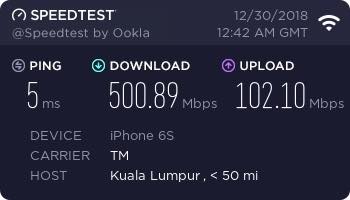 You can get 3 or 4 channel wifi AC but your speeds will be 50% of the link speed for the client. Phones typically use one channel (433Mb/s), laptops usually 2 channels, so if you get a 3 channel adapter thats 1300Mb/s, 4 channel would match your speed as the 3 channel practically will give 650Mb/s. QUOTE(zher4883 @ Jan 26 2019, 01:26 PM) You need to use high end wifi adapters to be able to get close to 500Mbps on Wifi. Nothing to do much to do with the wifi adapter, just practical speeds from link speed.4 channels are typically either 4 channels or 2 channels twice especially with MU-MIMO. at 866Mb/s your expected practical speed for the client syncing at that speed will be 433Mb/s on a good day, |
|
|
Jan 26 2019, 04:31 PM
|
|
Senior Member
1,781 posts Joined: Jul 2010
|
QUOTE(zher4883 @ Jan 26 2019, 04:08 PM) USB adapters will not cut it. You would need a PCIe based Adapter. no, PCIe adapters dont actually get better speeds than USB adapters. As long as the interface and CPU arent the bottleneck, PCIe adapters require a sizable external antenna and a lot of internal shielding as well but its hard to fully shield the entire card, so you will not get those higher rates. The sizable external antenna gives the PCIe card better range, but not better bandwidth. Stick with your internal/USB adapters, you can even get usb adapters with external antenna too. This was actually tested and this is why the PCIe adapter is not very popular and price per benefit too.QUOTE(salveusassault @ Jan 26 2019, 04:21 PM) Ahh i see noted on this, thanks! USB OTG and attach wifi adapter But what about phones? From the results I've posted, it was on my iPhone 6S and was able to get the speed, but now it's constantly on 200-300Mbps ish. Hmmm.. Even on my sibling's iPhone X, no where close to that too. To add: Speedtest on LAN cable, not a problem getting constant 500. Could it be something to do with the router or bandwidth limiter? Asus RT-AC86U supports up to 800Mbps though. Edit: In case you're wondering, it's on 5G network.  I would say it depends on the interface between radio and the innards of the router. Some routers connect wifi to the switch, some go through the CPU so share the 1Gb/s during high traffic (if WAN-LAN use 1Gb/s, then wifi have no bandwidth) But most of the time speed is just limited by your sync speed. What link speed you get on wifi for AC, expect 50% of that on a good day. For wifi N, expect 30% of link speed on a good day. |
|
|
Jan 26 2019, 04:39 PM
|
|
Newbie
25 posts Joined: Oct 2018
|
QUOTE(System Error Message @ Jan 26 2019, 04:25 PM) Wifi AC will get around 50% of the speed of rated link on a good day, worst around 30%. With the given TM C1200 i get 40% of the 867Mb/s link speed on wifi. Check what rate your wifi syncs at, expect to get 40-50% of the rated speed. I once stress tested the AC68U with a dual channel wifi AC with a link speed of 867Mb/s i was able to utilise 90% of its bandwidth but i get a lot of packet drops in the process, and this was really stressful, basically using all of an i7 to push/receive lots of data through. You can get 3 or 4 channel wifi AC but your speeds will be 50% of the link speed for the client. Phones typically use one channel (433Mb/s), laptops usually 2 channels, so if you get a 3 channel adapter thats 1300Mb/s, 4 channel would match your speed as the 3 channel practically will give 650Mb/s. Nothing to do much to do with the wifi adapter, just practical speeds from link speed. 4 channels are typically either 4 channels or 2 channels twice especially with MU-MIMO. at 866Mb/s your expected practical speed for the client syncing at that speed will be 433Mb/s on a good day, QUOTE(System Error Message @ Jan 26 2019, 04:31 PM) no, PCIe adapters dont actually get better speeds than USB adapters. As long as the interface and CPU arent the bottleneck, PCIe adapters require a sizable external antenna and a lot of internal shielding as well but its hard to fully shield the entire card, so you will not get those higher rates. The sizable external antenna gives the PCIe card better range, but not better bandwidth. Stick with your internal/USB adapters, you can even get usb adapters with external antenna too. This was actually tested and this is why the PCIe adapter is not very popular and price per benefit too. Thank you very very much on providing these information!USB OTG and attach wifi adapter I would say it depends on the interface between radio and the innards of the router. Some routers connect wifi to the switch, some go through the CPU so share the 1Gb/s during high traffic (if WAN-LAN use 1Gb/s, then wifi have no bandwidth) But most of the time speed is just limited by your sync speed. What link speed you get on wifi for AC, expect 50% of that on a good day. For wifi N, expect 30% of link speed on a good day. ⭐⭐⭐⭐⭐ rated  |
|
|
|
|
|
Jan 26 2019, 04:42 PM
Show posts by this member only | IPv6 | Post
#7287
|
|
Senior Member
4,490 posts Joined: Oct 2014
|
QUOTE(System Error Message @ Jan 26 2019, 04:31 PM) no, PCIe adapters dont actually get better speeds than USB adapters. As long as the interface and CPU arent the bottleneck, PCIe adapters require a sizable external antenna and a lot of internal shielding as well but its hard to fully shield the entire card, so you will not get those higher rates. The sizable external antenna gives the PCIe card better range, but not better bandwidth. Stick with your internal/USB adapters, you can even get usb adapters with external antenna too. This was actually tested and this is why the PCIe adapter is not very popular and price per benefit too. But it can't be coincidence that the top performing adapters are dominated PCIe based adapter.USB OTG and attach wifi adapter I would say it depends on the interface between radio and the innards of the router. Some routers connect wifi to the switch, some go through the CPU so share the 1Gb/s during high traffic (if WAN-LAN use 1Gb/s, then wifi have no bandwidth) But most of the time speed is just limited by your sync speed. What link speed you get on wifi for AC, expect 50% of that on a good day. For wifi N, expect 30% of link speed on a good day. |
|
|
Jan 26 2019, 04:49 PM
|
|
Senior Member
1,781 posts Joined: Jul 2010
|
QUOTE(zher4883 @ Jan 26 2019, 04:42 PM) But it can't be coincidence that the top performing adapters are dominated PCIe based adapter. thats because they come in 3 channel flavours vs the usb 2 channel flavours you commonly see, that is the reason for their higher performance. However very rarely does 3 channel come with MU-MIMO, you will see more benefits using 2 and 1 channels with MU-MIMO rather than 3 channels.I have seen the asus PCE-68 PCIE 3 channel wifi AC and i have tested the 2 channel asus USB wifi card, i was able to utilise 90% of the link speed for the 2 channels stress testing so practically i'd say its still good especially that the USB cost less than half the price of the PCIe card and can be used with laptops while the PCIe card cant. It is nice if you can afford it but it depends on your router too, if you are using a 2 or 4 channel radio rather than 3, then its just wasting money. |
|
|
Jan 26 2019, 04:54 PM
Show posts by this member only | IPv6 | Post
#7289
|

Senior Member
628 posts Joined: Aug 2007 
|
hi all the sifus here, i know this might be asked and answered many times but i tried searching but cant really get my asnwer.
Currently turboed to 500mbps plan i just changed my router to dlink DIR867, pc adapter to dlink DWA-192, tried speedtest but still cant get anywhere near 500mbps. wifi speedtest on both my iphone and pc around 90mbps only. anyone can let me know is there any settings i've not done? wifi setup on router is smart enabled 2.4ghz and 5ghz combined. million thanks!!! |
|
|
Jan 26 2019, 05:32 PM
|
|
Senior Member
1,021 posts Joined: Aug 2006 From: Penang Island, Alor Star
|
QUOTE(carcraze66 @ Jan 26 2019, 04:54 PM) hi all the sifus here, i know this might be asked and answered many times but i tried searching but cant really get my asnwer. not sure what BTU unit you have there.Currently turboed to 500mbps plan i just changed my router to dlink DIR867, pc adapter to dlink DWA-192, tried speedtest but still cant get anywhere near 500mbps. wifi speedtest on both my iphone and pc around 90mbps only. anyone can let me know is there any settings i've not done? wifi setup on router is smart enabled 2.4ghz and 5ghz combined. million thanks!!! but make sure : - BTU gigabit supported model (what model??) - Router with Gigabit LAN (DIR-867 is OK) - Cable cat5e/6/7 for all connections ---> Don't use cat5 cable, cat5e and above is OK - Wired : PC Lan port Gigabit supported - Wifi : Wifi AC 5GHz only, Wifi N 2.4Ghz is limited speed. Use USB 3.0 Wifi AC 5GHz dongle and connect it to USB 3.0 port for best max speed supported. (DWA-192 is OK) Note : Not all smarpthone/laptop supports Wifi AC 5GHz, even if it supports, speed might not be the same due to antenna designs and chipset used. But always connect to Wifi AC 5GHz for faster speed (at a shorter range disadvantage). This post has been edited by mmohdnor: Jan 26 2019, 05:34 PM |
|
|
Jan 26 2019, 05:40 PM
Show posts by this member only | IPv6 | Post
#7291
|
|
Senior Member
628 posts Joined: Aug 2007
|
QUOTE(mmohdnor @ Jan 26 2019, 05:32 PM) not sure what BTU unit you have there. hi, thanks for replying.but make sure : - BTU gigabit supported model - Router with Gigabit LAN (DIR-867 ok) - Cable cat5e/6/7 for all connections - Wired : PC Lan port Gigabit supported - Wifi : Wifi AC 5GHz only, Wifi N 2.4Ghz is limited speed. Use USB 3.0 Wifi AC 5GHz dongle and connect it to USB 3.0 port for best max speed supported. Note : Not all smarpthone/laptop supports Wifi AC 5GHz, even if it supports, speed might not be the same due to antenna designs and chipset used. But always connect to Wifi AC 5GHz for faster speed (at a shorter range disadvantage). currently BTU using is alcatel lucent i240G cable using CAT5E cables. usb wifi adapters connected to usb 3.0 is there any settings not done? |
|
|
Jan 26 2019, 05:52 PM
|
|
Senior Member
1,781 posts Joined: Jul 2010
|
QUOTE(carcraze66 @ Jan 26 2019, 04:54 PM) hi all the sifus here, i know this might be asked and answered many times but i tried searching but cant really get my asnwer. Can you login to your router?Currently turboed to 500mbps plan i just changed my router to dlink DIR867, pc adapter to dlink DWA-192, tried speedtest but still cant get anywhere near 500mbps. wifi speedtest on both my iphone and pc around 90mbps only. anyone can let me know is there any settings i've not done? wifi setup on router is smart enabled 2.4ghz and 5ghz combined. million thanks!!! also i dont trust dlink products, this is from experience and from what i have seen. Their adapters, absolute garbage. It sounds like your router is connected to modem at 100Mb/s. If you check modem specs, see if it has gigabit ethernet ports. Make sure your phone is connected via wireless AC as well. |
|
|
Jan 26 2019, 05:58 PM
Show posts by this member only | IPv6 | Post
#7293
|
|
Senior Member
628 posts Joined: Aug 2007
|
QUOTE(System Error Message @ Jan 26 2019, 05:52 PM) Can you login to your router? yes, im able to login to my router.also i dont trust dlink products, this is from experience and from what i have seen. Their adapters, absolute garbage. It sounds like your router is connected to modem at 100Mb/s. If you check modem specs, see if it has gigabit ethernet ports. Make sure your phone is connected via wireless AC as well. how to check on the router-modem connections whether its gigabit port or not? currently connected on alcatel lucent i-240G LAN1. thanks!  |
|
|
|
|
|
Jan 26 2019, 06:20 PM
Show posts by this member only | IPv6 | Post
#7294
|

Junior Member
292 posts Joined: Jun 2016
|
QUOTE(carcraze66 @ Jan 26 2019, 05:58 PM) yes, im able to login to my router. login router , under Ethernet Ports' link state, can see speed. how to check on the router-modem connections whether its gigabit port or not? currently connected on alcatel lucent i-240G LAN1. thanks! WAN is connection with BTU. LAN is Router to PC. |
|
|
Jan 26 2019, 09:17 PM
Show posts by this member only | IPv6 | Post
#7295
|
|
Senior Member
628 posts Joined: Aug 2007
|
QUOTE(jpong1 @ Jan 26 2019, 06:20 PM) login router , under Ethernet Ports' link state, can see speed. ok went and check ethernet speed status, mine shown 100.0mbps instead of 1gbps..WAN is connection with BTU. LAN is Router to PC. anyone know what configuration needed? checked my hardware compatibility on TM hardware checker it shows mine can support. alamak, spent few hundred bucks on router but getting same speed thanks! |
|
|
Jan 26 2019, 10:38 PM
|
|
Senior Member
2,318 posts Joined: Dec 2012
|
QUOTE(carcraze66 @ Jan 26 2019, 09:17 PM) ok went and check ethernet speed status, mine shown 100.0mbps instead of 1gbps.. Using cat5e cable? How about try cat 6 cable?anyone know what configuration needed? checked my hardware compatibility on TM hardware checker it shows mine can support. alamak, spent few hundred bucks on router but getting same speed thanks! |
|
|
Jan 26 2019, 10:57 PM
|

Senior Member
1,095 posts Joined: Jun 2005 From: KL
|
Anyone terminate unifi on contract expiry date ?
Unifi told me my contract expired on 20 March 2019. So i will make notice of termination on 20 Feb 2019. Unifi said cannot. Must notify them after 20 March coz cant notify when still on contract. Is that true? Any experience buddy here ? |
|
|
Jan 26 2019, 10:57 PM
|

Senior Member
5,714 posts Joined: Mar 2007 
|
QUOTE(carcraze66 @ Jan 26 2019, 09:17 PM) ok went and check ethernet speed status, mine shown 100.0mbps instead of 1gbps.. Read 1st page, 1st post, green text. It could be your BTU, router, or even cable. Try Cat 6 cable.anyone know what configuration needed? checked my hardware compatibility on TM hardware checker it shows mine can support. alamak, spent few hundred bucks on router but getting same speed thanks! |
|
|
Jan 26 2019, 11:05 PM
Show posts by this member only | IPv6 | Post
#7299
|
|
Senior Member
628 posts Joined: Aug 2007
|
QUOTE(SilentVampire @ Jan 26 2019, 10:57 PM) Read 1st page, 1st post, green text. It could be your BTU, router, or even cable. Try Cat 6 cable. yup read thru. so far i can suspect its BTU problem. tomorow will buy cat6 cable and try. for BTU is there any configuration needed? or its by TM side. router i think shudnt be the issue right? coz im using dlink dir867, ac1750 and impossible it will only have around 100mbps only  |
|
|
Jan 26 2019, 11:10 PM
|

Senior Member
732 posts Joined: Dec 2017
|
QUOTE(piglover @ Jan 26 2019, 10:57 PM) Anyone terminate unifi on contract expiry date ? Shud this be pinned on the 1st page? Many have terminated exactly on date of expiry... 30 days notice is scare tactic. Man up! Threaten them on not leaving until the they agree to proceed with the termination. Get acknowledgement letter or some sort as proof that the staffs have received the termination submission on xxx time and date.Unifi told me my contract expired on 20 March 2019. So i will make notice of termination on 20 Feb 2019. Unifi said cannot. Must notify them after 20 March coz cant notify when still on contract. Is that true? Any experience buddy here ? This post has been edited by imalmighty: Jan 26 2019, 11:11 PM |
|
Topic ClosedOptions
|
| Change to: |  0.0377sec 0.0377sec
 0.44 0.44
 6 queries 6 queries
 GZIP Disabled GZIP Disabled
Time is now: 11th December 2025 - 02:55 PM |
 Quote
Quote