Outline ·
[ Standard ] ·
Linear+
Unifi Official TM UniFi High Speed Broadband Thread V36, READ 1ST PAGE FOR TURBO SPEED INFO!
|
zher4883
|
 Nov 4 2018, 07:14 PM Nov 4 2018, 07:14 PM
|

|
QUOTE(cskean @ Nov 4 2018, 07:10 PM) Is it even legal to do so in the 1st place? If yes, will placing those dish near to where we stay, will affect our health? What about the cost of building the setup? Worth the money saved for sharing? If you have reason to believe those device carries health hazard, you should also be worried about cosmic radiation and background radiation. You are exposed to these radiation on daily basis. |
|
|
|
|
|
zher4883
|
Nov 28 2018, 05:44 PM
|
|
|
QUOTE(abubin @ Nov 28 2018, 05:43 PM) What is the official upload speed for the turbo packages? 300mpbs down, ?? up 500mbps down, ?? up 800mbos down, ?? up 300/50 500/100 800/200 |
|
|
|
|
|
zher4883
|
Nov 29 2018, 08:06 AM
|
|
|
QUOTE(kevin916587 @ Nov 29 2018, 07:47 AM) Hi sorry, a bit off topic. Anyone can recommend a vpn service? (Access china site) PureVPN They have servers located in Shanghai and Beijing |
|
|
|
|
|
zher4883
|
Dec 4 2018, 08:59 PM
|
|
|
QUOTE(luckywang @ Dec 4 2018, 08:40 PM) finally got my turbo upgrade today. quite shock (but a good shock) because i live chatted twice and they confirmed im in phase 2 but i just got upgraded today without any notice (no email, no sms). just randomly performing speed test and realize my speed got bumped to 100mbps down/up. so i start checking... restart everything... live chat with tm multiple times... reset port... logged report... then finally i found the culprit... a 15m cat5e that doesnt perform!!! the cable is between my modem downstair and router upstair... quickly livechat tm again to cancel the report... isnt cat5e should be able to giv gigabit speed? it is a 15m cable but isnit it rated at 100feets for the gigabit speed? maybe i got a fake cable. Thinking to get a 15m cat 7 cable... Anyone has any suggestion other than UGREEN? i always bought cables from ugreen which never fail me even once... but they dont have 15m WHITE cat7 cable... FYI: Kajang area. Actually Cat6 cable could run Gigabit at considerable long distance but it doesn't hurt to get something better if you could afford it  I pulled a 30m long Cat6 cable in my house and no issue running at gigabit connection. |
|
|
|
|
|
zher4883
|
Dec 4 2018, 09:47 PM
|
|
|
QUOTE(luckywang @ Dec 4 2018, 09:26 PM) actually cat5e almost equal to cat6 right? but since i got issue with cat5e so i go for cat7 which should be better... also not that expensive compare to the stupid 15m cat5e i bought 2 years ago. i bought it for rm40 and now i found cat7 15m black is around rm53. and branded somemore. the 15m cat5e i just randomly click 1 with the lowest price in lazada. haha Cat6 is note even close to Cat5e in terms of physical properties. Since Cat7 is quite affordable, then just go for it. |
|
|
|
|
|
zher4883
|
Dec 8 2018, 07:28 AM
|
|
|
QUOTE(gedebe @ Dec 8 2018, 03:00 AM) can anybody teach me how to kill my router dlink wbr2300 so that tm could replace 1 new one since it is still under warranty  Ahem Ahem maybe you accidentally plug the notebook adapter into the router  |
|
|
|
|
|
zher4883
|
Dec 10 2018, 08:19 AM
|
|
|
QUOTE(soR @ Dec 10 2018, 02:26 AM) Expect very poor software support from them  |
|
|
|
|
|
zher4883
|
Dec 10 2018, 04:03 PM
|
|
|
QUOTE(westlife @ Dec 10 2018, 03:29 PM) yes, the content grows over time. 1080p streaming needs 5Mbps, 4k streaming needs 25Mbps. the requirements grows over time, but they are growing in the speed that is few times more than before. dun forget, everyone has 100Mbps at cheap price of rm129 with free calls and tv. one to two years back people are paying rm329 for the same speed. and most people are from the still paying 30Mbps at rm179 and it can fit their needs perfectly 2 years back. now one can pay rm50 cheaper monthly 3.3 times of speed than before. in just 1 to 2 years, for most people their requirement can change so fast? if individual, yes, maybe. but certainly not for majority. for individual, your requirement can change, but certainly not for majority of the people. and as i had mentioned, i am referring to most people and individual needs has no point to discuss and it only affects one person. You missed out a point. Content quality grow over time as so with bit rate. Videos might have the same resolution but with higher demands, the bit rate are increased. Increased bit rate requires more bandwidth so for a reasonably good 1080p with bit rate enough in today standard, you would need 8Mbps for the bare minimum and 10Mbps for minimal buffering. |
|
|
|
|
|
zher4883
|
Jan 2 2019, 02:03 PM
|
|
|
QUOTE(sgpdsmss @ Jan 2 2019, 01:33 PM) guys ....turboed to 800Mbps ... use PC with CPU core2duo E8400 with 1Gbit network plus connected with cat 7 ugreen Lan cable to ASUS AC68u router ... speed test Max only get 300Mbps ... change stock router dlink 850L ..same result... wonder why cant get 800Mbps ? isn't CPU buttonnet? currently no other PC with 1Gbit network card .. thanks ... C'mon dude how much do you expect your dinosaur age CPU to perform? |
|
|
|
|
|
zher4883
|
Jan 7 2019, 04:09 PM
|
|
|
QUOTE(eehong @ Jan 7 2019, 03:21 PM) i just got the turbo upgrade to 800Mbps. did speedtest via LAN cable, max DL speed is 200Mbps+, max UL speed 170Mbps+ can anyone enlighten me here? below are my equipment: MODEM: FIBERHOME AN5506 (supplied by TM) ROUTER: ASUS RT-AC1200G+ *both equipment supports gigabit speed, as shown in ASUS router's configuration & Windows network page WAN speed: 1Gbps LAN speed: 1Gbps *I disable QoS on ASUS router. surprisingly the QoS makes the speed even slower speedtest was done on Ookla website browser: Google Chrome OS: Windows 10 Pro Because when you enable the QoS, NAT acceleration is disabled and hence the throughput is reduced. |
|
|
|
|
|
zher4883
|
Jan 7 2019, 04:22 PM
|
|
|
QUOTE(eehong @ Jan 7 2019, 04:14 PM) i've already disable QoS but the speed i achieved via LAN only 200Mbps+, way lower than what i was promised (800Mbps) any idea what's the issue? Does your computer had one of the logical core 100% when speed test was done? Does your computer experience any thermal throttling? Have you allow the NAT boost/NAT acceleration/Cut-through Forwarding (CTF) set to auto on your router? |
|
|
|
|
|
zher4883
|
Jan 26 2019, 01:26 PM
|
|
|
QUOTE(salveusassault @ Jan 26 2019, 01:22 PM) I got the turbo upgrade 500Mbps and have changed the router to Asus RT-AC86U, so able to support the speed. The problem right now is, I couldn't get the wifi speeds up to 500Mbps. Where I could get it few weeks ago (attachment) compared to now just around 240-300Mbps. Any sifu can enlighten this? 🤔 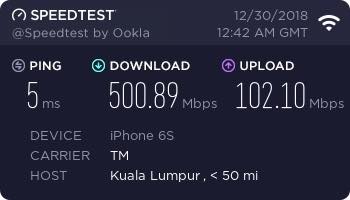 You need to use high end wifi adapters to be able to get close to 500Mbps on Wifi. |
|
|
|
|
|
zher4883
|
Jan 26 2019, 04:08 PM
|
|
|
QUOTE(salveusassault @ Jan 26 2019, 01:35 PM) Do you mean by usb wifi adapters? But the weird thing is, i was able to get the 500Mbps through wifi (no adapters and such, just default router) before this, but not anymore  Even though I know I couldnt utilize the speed even on 2xx-3xxMbps, I'd just wanna see that number there. Call me OCD of some sort. USB adapters will not cut it. You would need a PCIe based Adapter. |
|
|
|
|
|
zher4883
|
Jan 26 2019, 04:42 PM
|
|
|
QUOTE(System Error Message @ Jan 26 2019, 04:31 PM) no, PCIe adapters dont actually get better speeds than USB adapters. As long as the interface and CPU arent the bottleneck, PCIe adapters require a sizable external antenna and a lot of internal shielding as well but its hard to fully shield the entire card, so you will not get those higher rates. The sizable external antenna gives the PCIe card better range, but not better bandwidth. Stick with your internal/USB adapters, you can even get usb adapters with external antenna too. This was actually tested and this is why the PCIe adapter is not very popular and price per benefit too. USB OTG and attach wifi adapter I would say it depends on the interface between radio and the innards of the router. Some routers connect wifi to the switch, some go through the CPU so share the 1Gb/s during high traffic (if WAN-LAN use 1Gb/s, then wifi have no bandwidth) But most of the time speed is just limited by your sync speed. What link speed you get on wifi for AC, expect 50% of that on a good day. For wifi N, expect 30% of link speed on a good day. But it can't be coincidence that the top performing adapters are dominated PCIe based adapter. |
|
|
|
|



 Quote
Quote
 0.0423sec
 0.82
0.82
 7 queries
 GZIP Disabled