

Any sifu can enlighten this? 🤔
Unifi Official TM UniFi High Speed Broadband Thread V36, READ 1ST PAGE FOR TURBO SPEED INFO!
|
|
 Jan 26 2019, 01:22 PM Jan 26 2019, 01:22 PM
Return to original view | Post
#1
|
 
Newbie
25 posts Joined: Oct 2018 
|
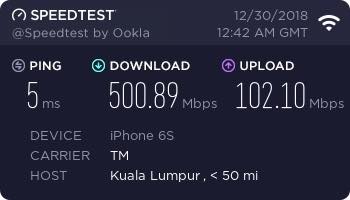
I got the turbo upgrade 500Mbps and have changed the router to Asus RT-AC86U, so able to support the speed. The problem right now is, I couldn't get the wifi speeds up to 500Mbps. Where I could get it few weeks ago (attachment) compared to now just around 240-300Mbps.
Any sifu can enlighten this? 🤔 |
|
|
|
|
|
Jan 26 2019, 01:35 PM
Return to original view | Post
#2
|
|
Newbie
25 posts Joined: Oct 2018
|
QUOTE(zher4883 @ Jan 26 2019, 01:26 PM) You need to use high end wifi adapters to be able to get close to 500Mbps on Wifi. Do you mean by usb wifi adapters? But the weird thing is, i was able to get the 500Mbps through wifi (no adapters and such, just default router) before this, but not anymore   Even though I know I couldnt utilize the speed even on 2xx-3xxMbps, I'd just wanna see that number there. Call me OCD of some sort. |
|
|
Jan 26 2019, 04:21 PM
Return to original view | Post
#3
|
|
Newbie
25 posts Joined: Oct 2018
|
QUOTE(zher4883 @ Jan 26 2019, 04:08 PM) USB adapters will not cut it. You would need a PCIe based Adapter. Ahh i see noted on this, thanks!But what about phones? From the results I've posted, it was on my iPhone 6S and was able to get the speed, but now it's constantly on 200-300Mbps ish. Hmmm..  Even on my sibling's iPhone X, no where close to that too. To add: Speedtest on LAN cable, not a problem getting constant 500. Could it be something to do with the router or bandwidth limiter? Asus RT-AC86U supports up to 800Mbps though. Edit: In case you're wondering, it's on 5G network. This post has been edited by salveusassault: Jan 26 2019, 04:23 PM |
|
|
Jan 26 2019, 04:39 PM
Return to original view | Post
#4
|
|
Newbie
25 posts Joined: Oct 2018
|
QUOTE(System Error Message @ Jan 26 2019, 04:25 PM) Wifi AC will get around 50% of the speed of rated link on a good day, worst around 30%. With the given TM C1200 i get 40% of the 867Mb/s link speed on wifi. Check what rate your wifi syncs at, expect to get 40-50% of the rated speed. I once stress tested the AC68U with a dual channel wifi AC with a link speed of 867Mb/s i was able to utilise 90% of its bandwidth but i get a lot of packet drops in the process, and this was really stressful, basically using all of an i7 to push/receive lots of data through. You can get 3 or 4 channel wifi AC but your speeds will be 50% of the link speed for the client. Phones typically use one channel (433Mb/s), laptops usually 2 channels, so if you get a 3 channel adapter thats 1300Mb/s, 4 channel would match your speed as the 3 channel practically will give 650Mb/s. Nothing to do much to do with the wifi adapter, just practical speeds from link speed. 4 channels are typically either 4 channels or 2 channels twice especially with MU-MIMO. at 866Mb/s your expected practical speed for the client syncing at that speed will be 433Mb/s on a good day, QUOTE(System Error Message @ Jan 26 2019, 04:31 PM) no, PCIe adapters dont actually get better speeds than USB adapters. As long as the interface and CPU arent the bottleneck, PCIe adapters require a sizable external antenna and a lot of internal shielding as well but its hard to fully shield the entire card, so you will not get those higher rates. The sizable external antenna gives the PCIe card better range, but not better bandwidth. Stick with your internal/USB adapters, you can even get usb adapters with external antenna too. This was actually tested and this is why the PCIe adapter is not very popular and price per benefit too. Thank you very very much on providing these information!USB OTG and attach wifi adapter  I would say it depends on the interface between radio and the innards of the router. Some routers connect wifi to the switch, some go through the CPU so share the 1Gb/s during high traffic (if WAN-LAN use 1Gb/s, then wifi have no bandwidth) But most of the time speed is just limited by your sync speed. What link speed you get on wifi for AC, expect 50% of that on a good day. For wifi N, expect 30% of link speed on a good day. ⭐⭐⭐⭐⭐ rated  |
|
Topic ClosedOptions
|
| Change to: |  0.2122sec 0.2122sec
 0.24 0.24
 7 queries 7 queries
 GZIP Disabled GZIP Disabled
Time is now: 13th December 2025 - 07:11 AM |
 Quote
Quote