Welcome Guest ( Log In | Register )

Bump Topic Topic Closed RSS Feed
371 Pages « < 365 366 367 368 369 > » Bottom

Outline · [ Standard ] · Linear+

Unifi Official TM UniFi High Speed Broadband Thread V36, READ 1ST PAGE FOR TURBO SPEED INFO!

views
     
SzeMeng76
post Jan 27 2019, 09:14 PM

Look at all my stars!!
*******
Senior Member
2,318 posts

Joined: Dec 2012
QUOTE(kazekage_09 @ Jan 27 2019, 08:31 PM)
Ok I forgot that part. the BTU is ONU-HUAWEI-HG8240w.

But still, even if you say my router is not good enough, I should at least get around 300-400 mbps right? My BTU support gigabit speed according to the first post.

I see, so I need to change to Cat5e/Cat6 cable right? Fromy my BTU to router.

Any great router to suggest?
*
Ya u try to change your cable 1st, and speedtest again.
For recommendation of router you can refer 1st post in green text, there are general guide include router recommendation.

ASUS

RT-AC66U - 500Mbps
RT-AC67U - 500Mbps
RT-AC68U - 500Mbps
Asus Lyra Trio - 500Mbps

TP-Link

Archer C9 - 500Mbps


D-Link

DIR-878 - 500Mbps

Tenda

Tenda AC15 - 500Mbps, ~800Mbps
Tenda AC18 - 500Mbps, ~800Mbps
soonwai
post Jan 27 2019, 09:57 PM


********
All Stars
11,458 posts

Joined: Oct 2007
From: KL


QUOTE(carcraze66 @ Jan 27 2019, 09:14 PM)
just tried plugging in cat6 cable from BTU to laptop, ethernet status shows 100.0mbps speed only.  doh.gif

tried plugging in from router to laptop, shows 1.0gbps

this means my BTU is the one limiting all the speed to 100mbps right?

already lodged a complaint to TM, waiting for them to rectify it
*
Yep, BTU port is set to 100Mbps even though it's capable of 1Gbps so your internet is limited to 100Mbps. A few of us here has faced that problem. TM can reconfigure the BTU remotely but more likely, they'll just change the BTU.
carcraze66
post Jan 27 2019, 10:25 PM

Ninetwenty2
****
Senior Member
628 posts

Joined: Aug 2007

QUOTE(soonwai @ Jan 27 2019, 09:57 PM)
Yep, BTU port is set to 100Mbps even though it's capable of 1Gbps so your internet is limited to 100Mbps. A few of us here has faced that problem. TM can reconfigure the BTU remotely but more likely, they'll just change the BTU.
*
ahh ok, so im not the only one facing this issue.

ive already lodge complaint to TM, they say will resolve my report on next working day.

just gotta wait them to contact me and change the BTU then laugh.gif
blibala
post Jan 27 2019, 11:01 PM

Regular
******
Senior Member
1,914 posts

Joined: Jan 2005
Is unifi Basic RM79 confirmed unlimited quota now?
Doraku
post Jan 27 2019, 11:46 PM

Old threads digger
******
Senior Member
1,155 posts

Joined: Apr 2016


QUOTE(blibala @ Jan 27 2019, 11:01 PM)
Is unifi Basic RM79 confirmed unlimited quota now?
*
Not confirmed yet, but tm has extend the unlimited quota to end 2019
blacktubi
post Jan 27 2019, 11:56 PM

-
Group Icon
Elite
8,413 posts

Joined: Jul 2008

QUOTE(kazekage_09 @ Jan 27 2019, 07:39 PM)
Hello guys.

I just login to my unifi account today and notice that I'd been upgraded to 500mbps. So from my understanding (I'm very lame at all these technical and networking stuffs) in order to get the desired speed, my router and my adapter must be able to suppport the high speed right?

So here my router model. It is TPLink N750 Wireless Dual Band Gigabit Router model TL-WDR4300. I googled it specs and this shows up:

"Simultaneous 2.4GHz 300Mbps and 5GHz 450Mbps connections for 750Mbps of total available bandwidth"

Meaning maximum I will get from 5GHz is just 450Mbps right?

My adapter is DLink AC1200 Wireless Dual Band USB Adapter  Model DWA-182 which I cross-checked with the 1st page and it says it support until 500Mbps.

Both my hardwares can support the turbo right?

But I still get the old speed on Testspeed. Download 50mbps and upload 100mbps. What else that I need to do?

Thanks
*
Nope, your equipment need to be replaced.

Get a Wireless AC router. Expect maximum of around 60% of claimed speed even with good signal.
System Error Message
post Jan 28 2019, 03:36 AM

Regular
******
Senior Member
1,781 posts

Joined: Jul 2010
QUOTE(kazekage_09 @ Jan 27 2019, 07:39 PM)
Hello guys.

I just login to my unifi account today and notice that I'd been upgraded to 500mbps. So from my understanding (I'm very lame at all these technical and networking stuffs) in order to get the desired speed, my router and my adapter must be able to suppport the high speed right?

So here my router model. It is TPLink N750 Wireless Dual Band Gigabit Router model TL-WDR4300. I googled it specs and this shows up:

"Simultaneous 2.4GHz 300Mbps and 5GHz 450Mbps connections for 750Mbps of total available bandwidth"

Meaning maximum I will get from 5GHz is just 450Mbps right?

My adapter is DLink AC1200 Wireless Dual Band USB Adapter  Model DWA-182 which I cross-checked with the 1st page and it says it support until 500Mbps.

Both my hardwares can support the turbo right?

But I still get the old speed on Testspeed. Download 50mbps and upload 100mbps. What else that I need to do?

Thanks
*
Actually its not as the others say. You do need a new router and your adapter sucks.

Wireless N practical speeds are 30% on a good day, wireless AC practical speeds are 50% on a good day.
So at 30% on wifi your current router will do 100Mb/s on 2.4Ghz, 150Mb/s on 5Ghz. If you want 500Mb/s you'll need a 3 channel wireless AC router to max it out but your adapter is 2 channel wifi AC and crap, so i'd expect around 400Mb/s from it. All you need is a 2 channel wifi AC router, and if you are on a budget, tplink is decent, infact call TM to let them know you arent enjoying their new speeds, still at 100Mb/s, get them to come and have them replace your equipment. The tp link AC1200 that tm gives out may only have a wifi 5Ghz practical speed of 433Mb/s but thats at least close to your subscribed speed if you get it free.
Doraku
post Jan 28 2019, 07:02 AM

Old threads digger
******
Senior Member
1,155 posts

Joined: Apr 2016


QUOTE(System Error Message @ Jan 28 2019, 03:36 AM)
Actually its not as the others  say. You do  need a new router and  your adapter sucks.

Wireless N practical speeds are 30% on a good day, wireless AC practical speeds are 50% on  a good day.
So at 30% on wifi your current router will do 100Mb/s on 2.4Ghz, 150Mb/s on 5Ghz. If you want 500Mb/s you'll need a 3 channel wireless AC router to max it out but your adapter is 2 channel wifi AC and crap, so i'd expect  around  400Mb/s from it. All you need is a 2 channel wifi AC router, and if you are on a budget, tplink is decent, infact  call TM to let them know you arent enjoying their new speeds, still at 100Mb/s, get them to come and have them replace your equipment. The tp link AC1200 that tm gives out may only have a wifi 5Ghz practical speed of 433Mb/s but thats at least close to your subscribed speed if you get it free.
*
Streams* AKA Spatial Streams AKA 1x1, 2x2, 3x3, 4x4(1, 2, 3, 4 streams)AKA MIMO. Channel is your wifi operating frequency range.

This post has been edited by Doraku: Jan 29 2019, 02:25 AM
dannychen
post Jan 28 2019, 09:15 AM

Regular
******
Senior Member
1,263 posts

Joined: Dec 2009
TP-Link Archer Wireless Dual Band Gigabits Router A7 AC1750

Good Deal?
xperiaVuser
post Jan 28 2019, 09:22 AM

Regular
******
Senior Member
1,201 posts

Joined: Jul 2013
QUOTE(dannychen @ Jan 28 2019, 09:15 AM)
Identical to Archer C7 except for flash layout according to wikidevi. I'd say good deal since it's RM100 cheaper than C7. ohh C7 has dropped to RM325, still cheaper with A7.

This post has been edited by xperiaVuser: Jan 28 2019, 09:27 AM
TSSilentVampire
post Jan 28 2019, 10:41 AM

Networking Enthusiast
*******
Senior Member
5,714 posts

Joined: Mar 2007


QUOTE(dannychen @ Jan 28 2019, 09:15 AM)
Very good deal. Get it if possible.
Fantasia
post Jan 28 2019, 11:39 AM

Look at all my stars!!
*******
Senior Member
5,486 posts

Joined: Feb 2009
Guys, may I know how long do we need to wait normally for TM to respond after lodging complaint to MCMC? I didn't receive any response from TM after almost 2 weeks of waiting =(
cho
post Jan 28 2019, 11:55 AM

Casual
***
Junior Member
369 posts

Joined: Sep 2004
From: Kajang


Hi and morning all..

If anyone experience this -> while all devices connected to router wirelessly and also wired, a new device failed to connect WIFI to the router, it says "IP Configuration Failed". Then shutdown the router and modem for 10 minutes and turn it back on. Now all device can not connect neither through WIFI or LAN.

However, it is possible to get connected back by using static IP address.

But, why is suddenly like that.

I still using TM Router and Modem.

for info..TM Router = Dir 850L


System Error Message
post Jan 28 2019, 12:15 PM

Regular
******
Senior Member
1,781 posts

Joined: Jul 2010
QUOTE(Doraku @ Jan 28 2019, 07:02 AM)
Streams* AKA Spatial Streams AKA 1x1, 2x2, 3x3, 4x4(1, 2, 3, 4 streams)AKA MIMO. Channel is your wifi operating frequency range.
*
channel is correct as well. 4 streams/channel actually uses the physical space of 4 5Ghz channels
nikrizal
post Jan 28 2019, 01:18 PM

Regular
******
Senior Member
1,230 posts

Joined: Oct 2005
I’m getting Asus rt ac88u as a belated birthday gift from my friend! It’s a good router, right?
soonwai
post Jan 28 2019, 01:26 PM


********
All Stars
11,458 posts

Joined: Oct 2007
From: KL


QUOTE(nikrizal @ Jan 28 2019, 01:18 PM)
I’m getting Asus rt ac88u as a belated birthday gift from my friend! It’s a good router, right?
*
I suggest a Mikrotik RB4011iGS+5HacQ2HnD-IN. The product model alone makes it sound so impressive.
TSSilentVampire
post Jan 28 2019, 01:40 PM

Networking Enthusiast
*******
Senior Member
5,714 posts

Joined: Mar 2007


QUOTE(cho @ Jan 28 2019, 11:55 AM)
Hi and morning all..

If anyone experience this -> while all devices connected to router wirelessly and also wired, a new device failed to connect WIFI to the router, it says "IP Configuration Failed". Then shutdown the router and modem for 10 minutes and turn it back on. Now all device can not connect neither through WIFI or LAN.

However, it is possible to get connected back by using static IP address.

But, why is suddenly like that.

I still using TM Router and Modem.

for info..TM Router = Dir 850L
*
Sounds like hardware issue. Did you check the DHCP server in the router? Sounds like the DHCP server has failed.

QUOTE(nikrizal @ Jan 28 2019, 01:18 PM)
I’m getting Asus rt ac88u as a belated birthday gift from my friend! It’s a good router, right?
*
Yes, it is good, at least it is free.
lyc1982
post Jan 28 2019, 01:44 PM

ExpectNoMercy
*******
Senior Member
2,329 posts

Joined: Jun 2015
QUOTE(salveusassault @ Jan 26 2019, 01:22 PM)
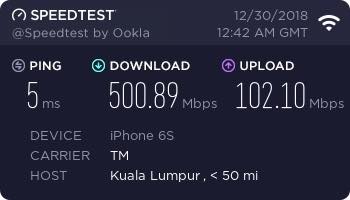
I got the turbo upgrade 500Mbps and have changed the router to Asus RT-AC86U, so able to support the speed. The problem right now is, I couldn't get the wifi speeds up to 500Mbps. Where I could get it few weeks ago (attachment) compared to now just around 240-300Mbps.

Any sifu can enlighten this? 🤔

user posted image
*
same situation here...

the highest is 320 on my iphone 7+....
christina1
post Jan 28 2019, 01:56 PM

Never stop learning, because life never stops teaching.
*******
Senior Member
2,104 posts

Joined: Sep 2008
QUOTE(soonwai @ Jan 28 2019, 01:26 PM)
I suggest a Mikrotik RB4011iGS+5HacQ2HnD-IN. The product model alone makes it sound so impressive.
*
Better features than Asus 88U?
How much does this router cost?

This post has been edited by christina1: Jan 28 2019, 01:59 PM
comowater
post Jan 28 2019, 02:29 PM

New Member
*
Newbie
2 posts

Joined: Jul 2018

i would like to know can i change my unifi tv ultimate to ruby? to save rm30
my unifi package like this,jst turbo to 300mb

HyppTV Residential

unifi playTV

Ultimate Pack

unifi playTV Plan A (Promo)

HDMI Cable

unifi TV Free

Promo - 1 Month Free unifi TV Premium Channels

Residential Voice

034032xxxx


Voice STD20

Residential Voice Basic - 1BB

Voice Premium Calls (Barring IDD Call + 600)

InfoBlast

Voice - Do Not Disturb

Voice - Call Line Identification Presentation (CLIP)

Residential High Speed Internet

xxxx54@unifi


Promo Discount RM130

Promo Discount Perpetual

Residential Internet Security

Online Guard Plus

371 Pages « < 365 366 367 368 369 > » Top
Topic ClosedOptions
 

Change to:
| Lo-Fi Version
0.0386sec    0.45    6 queries    GZIP Disabled
Time is now: 9th December 2025 - 09:05 PM