Outline ·
[ Standard ] ·
Linear+
TIME [OFFICIAL] TIME Fibre Broadband™ v4, Experience the ONE TRUE 2Gbps
|
cyberloner
|
 Aug 30 2022, 10:24 PM Aug 30 2022, 10:24 PM
|

|
QUOTE(DJ-Spike @ Aug 30 2022, 09:19 PM) Hi, I'm currently using Unifi. Thinking of maybe switching to Time. My question is, do I have to cancel my Unifi subscription first or will Time do it for me if I decide to switch? it is not same network.... if time available go for it... no regret with higher speed upload and cheaper higher speed package |
|
|
|
|
|
PRSXFENG
|
Aug 31 2022, 10:44 AM
|
|
|
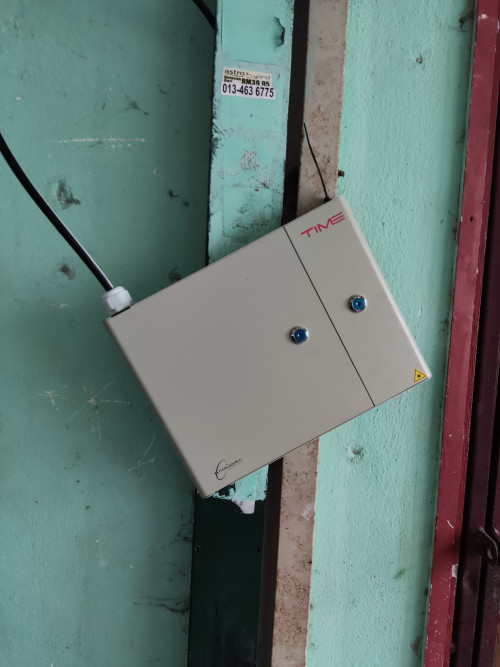 Wow looks like TIME Fibre is coming to my area But the installation of the Fibre distribution box  |
|
|
|
|
|
asiatrader98
|
Aug 31 2022, 09:56 PM
|
|
|
QUOTE(anwa @ Jul 19 2022, 06:29 AM) Hi, I'm on the 500Mbps package, no longer have contract. Got a call from CS offering free new wifi router, rm10 discount/mth but contract renew for 24 months. Is it worth it? with mesh also right? me too..... I wonder the price to pay each month, will it be the same as previously |
|
|
|
|
|
jjj2
|
Sep 1 2022, 09:58 AM
|
|
|
QUOTE(DJ-Spike @ Aug 30 2022, 09:19 PM) Hi, I'm currently using Unifi. Thinking of maybe switching to Time. My question is, do I have to cancel my Unifi subscription first or will Time do it for me if I decide to switch? Hi, advisable to have TIME installed first to avoid downtime. You have to perform the existing service Termination/Cancellation by yourself. Thanks. |
|
|
|
|
|
jjj2
|
Sep 1 2022, 10:00 AM
|
|
|
QUOTE(PRSXFENG @ Aug 31 2022, 10:44 AM) Wow looks like TIME Fibre is coming to my area But the installation of the Fibre distribution box Sigh ....  |
|
|
|
|
|
jjj2
|
Sep 1 2022, 10:09 AM
|
|
|
QUOTE(anwa @ Jul 19 2022, 06:29 AM) Hi, I'm on the 500Mbps package, no longer have contract. Got a call from CS offering free new wifi router, rm10 discount/mth but contract renew for 24 months. Is it worth it? It depends what is your expectation....if you want something free & don't mind the 2 years contract, then go for it. If you don't mind spending extra for high performance & absolute stability, then go for your own mesh system or router. Thanks. |
|
|
|
|
|
notfair
|
Sep 1 2022, 10:52 AM
|
Getting Started

|
Having LOS light blinking on huwei HG8145X6 router (can't connect to PPPoE), modem light seem fine.
after report to TIME awhile then it suddenly back normal.
actually what is this issue? fiber cable on the modem problem or router LAN cable or router itself got problem?
|
|
|
|
|
|
DJ-Spike
|
Sep 1 2022, 07:04 PM
|
Getting Started
|
QUOTE(jjj2 @ Sep 1 2022, 09:58 AM) Hi, advisable to have TIME installed first to avoid downtime. You have to perform the existing service Termination/Cancellation by yourself. Thanks. Noted. Only asking cause I seem to recalled reading somewhere quite a while back that Time will handle the termination for the customer. Maybe I remembered wrong. Anyways, thanks. |
|
|
|
|
|
jjj2
|
Sep 1 2022, 07:12 PM
|
|
|
QUOTE(notfair @ Sep 1 2022, 10:52 AM) Having LOS light blinking on huwei HG8145X6 router (can't connect to PPPoE), modem light seem fine. after report to TIME awhile then it suddenly back normal. actually what is this issue? fiber cable on the modem problem or router LAN cable or router itself got problem? If you call & the CS can settle your problem remotely, it's not the fiber issue. It's the X6 problem. |
|
|
|
|
|
jun_ng_1208
|
Sep 2 2022, 06:13 PM
|
|
|
My time fibre dunno why suddenly goes LOS, yday still working fine but this morning KO The 192.168.100.1 now goes into the modem page instead of the router page...but I dunno what the password for it... Reboot both router and modem also useless, still goes back to LOS  Called CS but Monday only can arrange technician to come over... |
|
|
|
|
|
diehard1979
|
Sep 2 2022, 09:16 PM
|
|
|
Today just get my 500Mbps package installed.
I test with PC LAN, I can get full 500Mbps.
I test with phone wifi near Huawei HG8145X6, I can get about 200Mbps.
I test with the farthest room, I can get about 70Mbps so I decide to switch on the mesh and put at corridor near that room but the speed become even less before mesh at there which is 28Mbps only so I suspect Mesh connect as 2.4 Ghz from HG8145X6.
My room before mesh on, my phone wifi can get 170Mbps but if I on Mesh, I can only get 30Mbps.
Why I can't access my mesh with ip 192.168.101.1 as state in manual?
Is that anyway for me to change the mesh so that it can connect to 5Ghz rather than 2.4 Ghz?
I test my wifi with phone
This post has been edited by diehard1979: Sep 2 2022, 09:18 PM
|
|
|
|
|
|
jjj2
|
Sep 2 2022, 11:15 PM
|
|
|
QUOTE(jun_ng_1208 @ Sep 2 2022, 06:13 PM) My time fibre dunno why suddenly goes LOS, yday still working fine but this morning KO The 192.168.100.1 now goes into the modem page instead of the router page...but I dunno what the password for it... Reboot both router and modem also useless, still goes back to LOS Called CS but Monday only can arrange technician to come over... Hi, feel free to take a clear picture of your devices & the cable connection, you may pm me for p&c concern. Thanks. |
|
|
|
|
|
jjj2
|
Sep 2 2022, 11:20 PM
|
|
|
QUOTE(diehard1979 @ Sep 2 2022, 09:16 PM) Today just get my 500Mbps package installed. I test with PC LAN, I can get full 500Mbps. I test with phone wifi near Huawei HG8145X6, I can get about 200Mbps. I test with the farthest room, I can get about 70Mbps so I decide to switch on the mesh and put at corridor near that room but the speed become even less before mesh at there which is 28Mbps only so I suspect Mesh connect as 2.4 Ghz from HG8145X6. My room before mesh on, my phone wifi can get 170Mbps but if I on Mesh, I can only get 30Mbps.
It's because you are connecting to the wifi5 mesh node which is most probably connected to the X6 via 2.4GHz band.Why I can't access my mesh with ip 192.168.101.1 as state in manual? Turn off the X6 or use a network cable directly connect to the Mesh Node.Is that anyway for me to change the mesh so that it can connect to 5Ghz rather than 2.4 Ghz? You can login to it and add the 5GHz uplink. Do bear in mind 5GHz may not connect well if your mesh node is placed far or out of range.I test my wifi with phone |
|
|
|
|
|
jun_ng_1208
|
Sep 2 2022, 11:31 PM
|
|
|
QUOTE(jjj2 @ Sep 2 2022, 11:15 PM) Hi, feel free to take a clear picture of your devices & the cable connection, you may pm me for p&c concern. Thanks. hi bro jjj2 which device ya? the router? or the modem? or both? cos the devices totally no touch at all, never moved or anything, just tiba² LOS |
|
|
|
|
|
hotfloppy
|
Sep 3 2022, 08:55 AM
|
Getting Started
|
Hello. Anyone facing downtime right now? Kota Damansara right now.
Update: Seems like fixed itself after power cycle the modem.
This post has been edited by hotfloppy: Sep 3 2022, 08:59 AM
|
|
|
|
|
|
jun_ng_1208
|
Sep 3 2022, 12:59 PM
|
|
|
QUOTE(jjj2 @ Sep 2 2022, 11:15 PM) Hi, feel free to take a clear picture of your devices & the cable connection, you may pm me for p&c concern. Thanks. The technician came today and sorted it out appratenly it's the fibre cable at the control room that was KOed |
|
|
|
|
|
azerak
|
Sep 4 2022, 01:56 PM
|
|
|
Hi. anyone knows if the huawei wifi 6 router that we will get if we upgrade our plan will allow us to change the DNS on the router itself? It's for my SmartDNS use.
|
|
|
|
|
|
jjj2
|
Sep 4 2022, 03:06 PM
|
|
|
QUOTE(jun_ng_1208 @ Sep 2 2022, 11:31 PM) hi bro jjj2 which device ya? the router? or the modem? or both? Both Bro.... cos the devices totally no touch at all, never moved or anything, just tiba² LOS |
|
|
|
|
|
jjj2
|
Sep 4 2022, 03:06 PM
|
|
|
QUOTE(jun_ng_1208 @ Sep 3 2022, 12:59 PM) The technician came today and sorted it out appratenly it's the fibre cable at the control room that was KOed Great  |
|
|
|
|
|
jjj2
|
Sep 4 2022, 03:07 PM
|
|
|
QUOTE(azerak @ Sep 4 2022, 01:56 PM) Hi. anyone knows if the huawei wifi 6 router that we will get if we upgrade our plan will allow us to change the DNS on the router itself? It's for my SmartDNS use. Yes you can login using the credentials at the bottom of the ONT. |
|
|
|
|



 Quote
Quote






 0.0249sec
 0.75
0.75
 6 queries
 GZIP Disabled