Welcome Guest ( Log In | Register )

671 Pages « < 453 454 455 456 457 > » Bottom

Outline · [ Standard ] · Linear+

TIME [OFFICIAL] TIME Fibre Broadband™ v4, Experience the ONE TRUE 2Gbps

views
     
springfall
post Aug 26 2022, 08:59 AM

Spring and fall helping Summer and winter
*******
Senior Member
4,072 posts

Joined: Mar 2011
From: μετά
QUOTE(JimmyX @ Aug 25 2022, 10:41 PM)
Hello, today TIME come to install free Huawei mesh WA8021V5. They just paired with my existing TIME router/modem huawei hg8145v5 as "wifi repeater".
Is this it? There is nothing I need to do? Like doing the access mode (<optional?)?
*
1st do hard reset (hold down reset button when powered on) to the new router Time given.

you will see the interface page will change dramatically from TIME locked options back to original Huawei full features.

Time used to give good clean routers, now they installed it with junk and backdoor enabled, so they can come access your router anytime.
B u B u
post Aug 27 2022, 03:15 PM

chill
******
Senior Member
1,479 posts

Joined: Nov 2008


Just got 500mbps plan installed. The huawei modem and node are terrible…. Can anyone share with me how to setup my own tplink ax73 please tqtq
PRSXFENG
post Aug 27 2022, 03:47 PM

Look at all my stars!!
*******
Senior Member
2,613 posts

Joined: Nov 2020


QUOTE(B u B u @ Aug 27 2022, 03:15 PM)
Just got 500mbps plan installed. The huawei modem and node are terrible…. Can anyone share with me how to setup my own tplink ax73 please tqtq
*
Ask CS to set the 2in1 modem/router into bridge mode then connect up your own router with PPPoE credentials.
B u B u
post Aug 27 2022, 03:55 PM

chill
******
Senior Member
1,479 posts

Joined: Nov 2008


QUOTE(PRSXFENG @ Aug 27 2022, 03:47 PM)
Ask CS to set the 2in1 modem/router into bridge mode then connect up your own router with PPPoE credentials.
*
The 2in1 into bridge mode, can be done over phone call or a technician must visit my house again? Tq
FusionXY
post Aug 27 2022, 04:09 PM

LAZZIE ON VACATION
*******
Senior Member
3,836 posts

Joined: Aug 2016

QUOTE(B u B u @ Aug 27 2022, 03:55 PM)
The 2in1 into bridge mode, can be done over phone call or a technician must visit my house again? Tq
*
You can contact CS. Make sure that you know your account number.

Before contacting CS, ensure you know the PPPOE credentials as you might loss internet access.
Clavie
post Aug 27 2022, 05:37 PM

Getting Started
**
Junior Member
74 posts

Joined: Jan 2020


Hi,

My 500Mbps fibre link provides speedtest up/down results of 500+ to TIME's Shah Alam and Singtel SG servers and with other servers like in California I get 370Mbps.
When I ping IPs in California, ping is very good ~12-14ms.
All this is very good!

But when I browse the web, it is a bit sluggish at times, with all types of devices (laptop, phones, LAN connected desktop) and this is not good! Sometimes it's almost like being in China honestly, with ISP/net control! ohmy.gif

What is your feedback about web surfing and pages loading with TIME Fibre?

FYI I've made a few tracert and I realized that (I don't know whether it's important) the 3rd hop is always timeout until it moves on to the next hop (this happens in TT Dotcom Sdn Bhd Shah Alam according to the resolution of these IP addresses), for both sites in Malaysia and overseas.
e.g.
Tracing route to cs87.can.transactcdn.com [198.7.31.89] [Verizon CDN in California]
1 2 ms 2 ms 2 ms 192.168.100.1
2 6 ms 5 ms 4 ms 202.186.240.1 [TT Dotcom Sdn Bhd Kuala Lumpur]
3 * * * Request timed out.
4 12 ms 12 ms 13 ms 223.28.43.54 [TT Dotcom Sdn Bhd Shah Alam]
5 12 ms 12 ms 13 ms ae-112.border1.sgm.edgecastcdn.net [152.195.196.220]
6 12 ms 11 ms 11 ms ae-91.core1.sgz.lc3.n1cdn.net [152.195.196.137]
7 13 ms 12 ms 11 ms 198-7-31-89.edgecastcdn.net [198.7.31.89]

Tracing route to time.com.my [211.24.220.166] [TiME.com.my]
1 3 ms 2 ms 1 ms 192.168.100.1
2 6 ms 11 ms 5 ms 202.186.240.1
3 * * * Request timed out.
4 10 ms 5 ms 4 ms 223.28.43.222
5 12 ms 17 ms 5 ms vpn.time.com.my [211.24.220.4]
6 7 ms 6 ms 6 ms www.globaltransit.com.sg [211.24.220.166]


Notes: I'm located in KL. I have the Standard config of the TIME Huawei router, no additional network devices/software to slow it down. I've tried using google and cloudflare DNS in the router and it's the same surfing speed.


blacktubi
post Aug 27 2022, 08:37 PM

-
Group Icon
Elite
8,421 posts

Joined: Jul 2008

QUOTE(Clavie @ Aug 27 2022, 05:37 PM)
Hi,

My 500Mbps fibre link provides speedtest up/down results of 500+ to TIME's Shah Alam and Singtel SG servers and with other servers like in California I get 370Mbps.
When I ping IPs in California, ping is very good ~12-14ms.
All this is very good!

But when I browse the web, it is a bit sluggish at times, with all types of devices (laptop, phones, LAN connected desktop) and this is not good! Sometimes it's almost like being in China honestly, with ISP/net control!  ohmy.gif

What is your feedback about web surfing and pages loading with TIME Fibre?

FYI I've made a few tracert and I realized that (I don't know whether it's important) the 3rd hop is always timeout until it moves on to the next hop (this happens in TT Dotcom Sdn Bhd Shah Alam according to the resolution of these IP addresses), for both sites in Malaysia and overseas.
e.g.
Tracing route to cs87.can.transactcdn.com [198.7.31.89]  [Verizon CDN in California]
  1    2 ms    2 ms    2 ms  192.168.100.1
  2    6 ms    5 ms    4 ms  202.186.240.1  [TT Dotcom Sdn Bhd Kuala Lumpur]
  3    *        *        *    Request timed out.
  4    12 ms    12 ms    13 ms  223.28.43.54    [TT Dotcom Sdn Bhd Shah Alam]
  5    12 ms    12 ms    13 ms  ae-112.border1.sgm.edgecastcdn.net [152.195.196.220]
  6    12 ms    11 ms    11 ms  ae-91.core1.sgz.lc3.n1cdn.net [152.195.196.137]
  7    13 ms    12 ms    11 ms  198-7-31-89.edgecastcdn.net [198.7.31.89]

Tracing route to time.com.my [211.24.220.166]  [TiME.com.my]
  1    3 ms    2 ms    1 ms  192.168.100.1
  2    6 ms    11 ms    5 ms  202.186.240.1
  3    *        *        *    Request timed out.
  4    10 ms    5 ms    4 ms  223.28.43.222
  5    12 ms    17 ms    5 ms  vpn.time.com.my [211.24.220.4]
  6    7 ms    6 ms    6 ms  www.globaltransit.com.sg [211.24.220.166]


Notes: I'm located in KL. I have the Standard config of the TIME Huawei router, no additional network devices/software to slow it down. I've tried using google and cloudflare DNS in the router and it's the same surfing speed.
*
Are you testing this on WiFi or wired LAN?

It's normal as some hops are configured not to respond to ICMP request hence resulting in a timed out traceroute. TM unifi don't even let you to do TCP traceroute.

For you scenario I would blame it on the free router. Speedtest does not measure the responsiveness of the router. Fast.com can measure the loaded latency but it doesn't tell the full story as well.

Most free routers from the ISP have terrible congestion management which resulted in bufferbloat. This is where you find things to be laggy despite having a fast speed.

I am using a pretty decent third party router on TIME Fibre and it's the best consumer ISP in Malaysia in terms of connectivity, stability and responsiveness.

Clavie
post Aug 28 2022, 12:57 PM

Getting Started
**
Junior Member
74 posts

Joined: Jan 2020


QUOTE(blacktubi @ Aug 27 2022, 08:37 PM)
Are you testing this on WiFi or wired LAN?

It's normal as some hops are configured not to respond to ICMP request hence resulting in a timed out traceroute. TM unifi don't even let you to do TCP traceroute.

For you scenario I would blame it on the free router. Speedtest does not measure the responsiveness of the router. Fast.com can measure the loaded latency but it doesn't tell the full story as well.

Most free routers from the ISP have terrible congestion management which resulted in bufferbloat. This is where you find things to be laggy despite having a fast speed.

I am using a pretty decent third party router on TIME Fibre and it's the best consumer ISP in Malaysia in terms of connectivity, stability and responsiveness.
*
Thanks for your reply and explanations. Yes, mostly happening on WiFi, less on LAN. I'll try using a good Linksys router I have and see whether this improves.

So from your end with another router your pages loading while surfing the web is good, right?
evolutiontech88
post Aug 28 2022, 01:13 PM

Enthusiast
*****
Senior Member
836 posts

Joined: Apr 2010
Hi k/,
I need help to set up ipv6 DNS server in Huawei router HG8145X6 (default router from TIME).
For ipv4 DNS server I had managed set up except for ipv6.
Appreciate for the advice.
TQ
cyberloner
post Aug 28 2022, 02:38 PM

Regular
******
Senior Member
1,560 posts

Joined: May 2005
From: Penang


QUOTE(evolutiontech88 @ Aug 28 2022, 01:13 PM)
Hi k/,
I need help to set up ipv6 DNS server in Huawei router HG8145X6 (default router from TIME).
For ipv4 DNS server I had managed set up except for ipv6.
Appreciate for the advice.
TQ
*
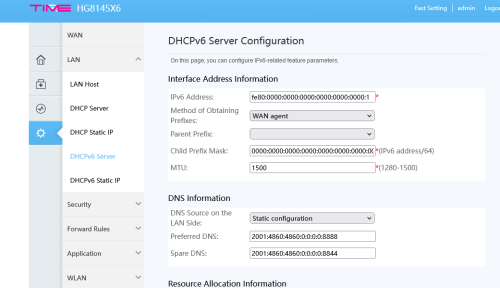
advance
dhcpv6 server
DNS Information
choose static

google dns
2001:4860:4860:0:0:0:0:8888
2001:4860:4860:0:0:0:0:8844

https://www.cybermania.ws/cybermania/google...bsite-security/

This post has been edited by cyberloner: Aug 28 2022, 02:40 PM
evolutiontech88
post Aug 28 2022, 03:49 PM

Enthusiast
*****
Senior Member
836 posts

Joined: Apr 2010
QUOTE(cyberloner @ Aug 28 2022, 02:38 PM)
advance
dhcpv6 server
DNS Information
choose static

google dns
2001:4860:4860:0:0:0:0:8888
2001:4860:4860:0:0:0:0:8844

https://www.cybermania.ws/cybermania/google...bsite-security/
*
Appreciate for your assistance.

But from my router UI, seems cannot find the mentioned setting to change the dhcpv6 server. Huawei router HG8145X6 (default router from TIME).
Any help on this matter?

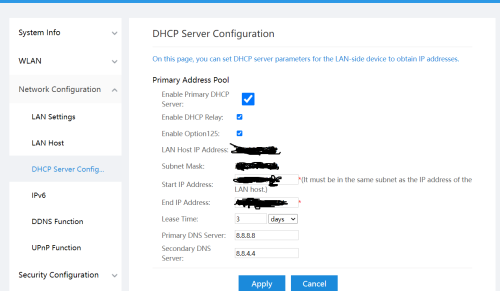
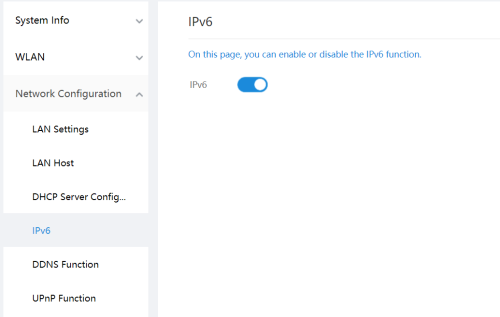
user posted image

user posted image
cyberloner
post Aug 28 2022, 06:49 PM

Regular
******
Senior Member
1,560 posts

Joined: May 2005
From: Penang


QUOTE(evolutiontech88 @ Aug 28 2022, 03:49 PM)
Appreciate for your assistance.

But from my router UI, seems cannot find the mentioned setting to change the dhcpv6 server. Huawei router HG8145X6 (default router from TIME).
Any help on this matter?

user posted image

user posted image
*
user posted image

else you are not router admin

This post has been edited by cyberloner: Aug 28 2022, 06:51 PM
jjj2
post Aug 28 2022, 07:04 PM

Look at all my stars!!
*******
Senior Member
3,610 posts

Joined: Feb 2006
QUOTE(Clavie @ Aug 28 2022, 12:57 PM)
Thanks for your reply and explanations. Yes, mostly happening on WiFi, less on LAN. I'll try using a good Linksys router I have and see whether this improves.

So from your end with another router your pages loading while surfing the web is good, right?
*
Yes, we have no issues on that.
evolutiontech88
post Aug 28 2022, 08:51 PM

Enthusiast
*****
Senior Member
836 posts

Joined: Apr 2010
QUOTE(cyberloner @ Aug 28 2022, 06:49 PM)
user posted image

else you are not router admin
*
Hi bro,
Can you advise me how to change to ADMIN in router since I'm the owner?
I'm noob about those thingy.
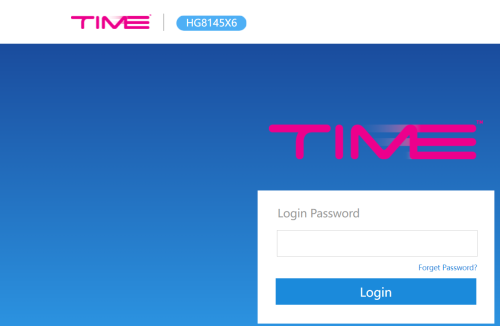
My logon to Huawei router portal as below. No username to logon, just key in password.
TQ

user posted image

This post has been edited by evolutiontech88: Aug 28 2022, 09:07 PM
cyberloner
post Aug 28 2022, 09:30 PM

Regular
******
Senior Member
1,560 posts

Joined: May 2005
From: Penang


QUOTE(evolutiontech88 @ Aug 28 2022, 08:51 PM)
Hi bro,
Can you advise me how to change to ADMIN in router since I'm the owner?
I'm noob about those thingy.
My logon to Huawei router portal as below. No username to logon, just key in password.
TQ

user posted image
*
user is admin
password is behind your router
evolutiontech88
post Aug 28 2022, 09:43 PM

Enthusiast
*****
Senior Member
836 posts

Joined: Apr 2010
QUOTE(cyberloner @ Aug 28 2022, 09:30 PM)
user is admin
password is behind your router
*
My access to router portal doesn't require key in username, just straight key in password.
I believe your config hardware is 2in1 modem and router altogether thus has some slight differ UI setting.
I had contacted TIME CS technician to come over on site to assist.

TQ bro for your kind assistance. Truly appreciate it.
jjj2
post Aug 28 2022, 10:19 PM

Look at all my stars!!
*******
Senior Member
3,610 posts

Joined: Feb 2006
QUOTE(evolutiontech88 @ Aug 28 2022, 09:43 PM)
My access to router portal doesn't require key in username, just straight key in password.
I believe your config hardware is 2in1 modem and router altogether thus has some slight differ UI setting.
I had contacted TIME CS technician to come over on site to assist.

TQ bro for your kind assistance. Truly appreciate it.
*
Your unit is configured in AP mode, you need to press the Reset button for 3s to convert back to ONT mode.
Thanks.
evolutiontech88
post Aug 29 2022, 10:25 AM

Enthusiast
*****
Senior Member
836 posts

Joined: Apr 2010
QUOTE(jjj2 @ Aug 28 2022, 10:19 PM)
Your unit is configured in AP mode, you need to press the Reset button for 3s to convert back to ONT mode.
Thanks.
*
TQ bro for the replied.
I'll check it out tonight.
jjj2
post Aug 29 2022, 05:08 PM

Look at all my stars!!
*******
Senior Member
3,610 posts

Joined: Feb 2006
QUOTE(evolutiontech88 @ Aug 29 2022, 10:25 AM)
TQ bro for the replied.
I'll check it out tonight.
*
Normally under this kind of config, there should be an ONU (aka fibre modem) placed in front... please check whether there is a Huawei HG8240H5 ONU in front of the Huawei HG8145X6.

If yes, then if you insist to use HG8145X6 as your ONT (2-in-1), then you gotta request the SI to request the provisioning team to load in the new config profile as your original profile was on HG8240H5.

Thanks.

DJ-Spike
post Aug 30 2022, 09:19 PM

Getting Started
**
Junior Member
73 posts

Joined: May 2011
Hi, I'm currently using Unifi. Thinking of maybe switching to Time. My question is, do I have to cancel my Unifi subscription first or will Time do it for me if I decide to switch?

This post has been edited by DJ-Spike: Aug 30 2022, 09:22 PM

671 Pages « < 453 454 455 456 457 > » Top
 

Change to:
| Lo-Fi Version
0.0336sec    0.60    6 queries    GZIP Disabled
Time is now: 19th December 2025 - 05:45 PM