Outline ·
[ Standard ] ·
Linear+
TIME [OFFICIAL] TIME Fibre Broadband™ v4, Experience the ONE TRUE 2Gbps
|
eauyong
|
 Jul 29 2022, 02:30 PM Jul 29 2022, 02:30 PM
|
Getting Started


|
QUOTE(Franko @ Jul 29 2022, 01:57 PM) Can anybody help to advise? I’m on the 500Mbps plan and was given the HG8145V5 router. Weird thing is, I can get full speed wirelessly if seated near the router, but when I use a CAT6 cable (10m long) and connect it to my PC, speed is barely 100Mbps. PC mobo is latest Asus B550 with 2.5G Ethernet port, all latest driver updated. If I bring my PC next to the router and connect wirelessly, I am able to enjoy full speed. FYI, my PC wireless hardware is AX200. It doesn’t make sense that a wireless connection is 5x faster than Ethernet. Why? Check the cable connection. Use another cable to test with lap tops as you may not have another long cable. Check the "Ethernet Status" for a 1Gbps connection as it may be a 100Mbps connection. Also on Elevated Command Prompt (Administrator), type in the following commands: ipconfig /release ipconfig /flushdns ipconfig /renew REBOOT Computer. Good Luck! |
|
|
|
|
|
Franko
|
Jul 29 2022, 05:22 PM
|
New Member
|
QUOTE(eauyong @ Jul 29 2022, 02:30 PM) Check the cable connection. Use another cable to test with lap tops as you may not have another long cable. Check the "Ethernet Status" for a 1Gbps connection as it may be a 100Mbps connection. Also on Elevated Command Prompt (Administrator), type in the following commands: ipconfig /release ipconfig /flushdns ipconfig /renew REBOOT Computer. Good Luck! Tried the CMD, no changes. Still shows my Link Speed for the Cat6 at 100Mbps. Tried swapping it with a shorter Cat5e and Link Speed increased to 1Gbps. Throughout both tests, I switched off wireless on my PC so that the connection is purely wired. Does this mean that my Cat6 cable is fake? Lol didn’t know such thing could exist, it’s just Ethernet cable ffs |
|
|
|
|
|
eauyong
|
Jul 29 2022, 06:50 PM
|
Getting Started
|
QUOTE(Franko @ Jul 29 2022, 05:22 PM) Tried the CMD, no changes. Still shows my Link Speed for the Cat6 at 100Mbps. Tried swapping it with a shorter Cat5e and Link Speed increased to 1Gbps. Throughout both tests, I switched off wireless on my PC so that the connection is purely wired. Does this mean that my Cat6 cable is fake? Lol didn’t know such thing could exist, it’s just Ethernet cable ffs I prefer Cat5e, it's better and still 1 Gbps. |
|
|
|
|
|
PRSXFENG
|
Jul 29 2022, 08:32 PM
|
|
|
QUOTE(Franko @ Jul 29 2022, 05:22 PM) Tried the CMD, no changes. Still shows my Link Speed for the Cat6 at 100Mbps. Tried swapping it with a shorter Cat5e and Link Speed increased to 1Gbps. Throughout both tests, I switched off wireless on my PC so that the connection is purely wired. Does this mean that my Cat6 cable is fake? Lol didn’t know such thing could exist, it’s just Ethernet cable ffs Is it one of those "flat" cables, generally they're less reliable |
|
|
|
|
|
blacktubi
|
Jul 29 2022, 09:54 PM
|
-

|
QUOTE(Franko @ Jul 29 2022, 05:22 PM) Tried the CMD, no changes. Still shows my Link Speed for the Cat6 at 100Mbps. Tried swapping it with a shorter Cat5e and Link Speed increased to 1Gbps. Throughout both tests, I switched off wireless on my PC so that the connection is purely wired. Does this mean that my Cat6 cable is fake? Lol didn’t know such thing could exist, it’s just Ethernet cable ffs Learn it the hard way that those Ug**** CAT7, CAT6 are made poorly. They are fine on short distance, but once it exceeded 5m, get their CAT8. At least their CAT8 is slightly better. One more thing, avoid those flat cable. Those are literally con. |
|
|
|
|
|
jjj2
|
Jul 30 2022, 01:07 AM
|
|
|
QUOTE(Franko @ Jul 29 2022, 05:22 PM) Tried the CMD, no changes. Still shows my Link Speed for the Cat6 at 100Mbps. Tried swapping it with a shorter Cat5e and Link Speed increased to 1Gbps. Throughout both tests, I switched off wireless on my PC so that the connection is purely wired. Does this mean that my Cat6 cable is fake? Lol didn’t know such thing could exist, it’s just Ethernet cable ffs Copper quality, No of Twist/inch, moreover the quality of RJ45 connectors used, all of these greatly affecting the ethernet cable performance.. Usually go for brands like R&M, Panduit, Compscope, TE, Schneider etc...you cant be wrong... |
|
|
|
|
|
jjj2
|
Jul 30 2022, 01:13 AM
|
|
|
QUOTE(Yamcha265 @ Jul 28 2022, 06:37 PM) Hi guys, i am subscribed to TIME and planning to relocate to a new unit but same building. But the relocation fee (rm120) is a bit too high for poor student. Since the new unit has fibre cable already. Can I use that for my modem instead? Will it work or not? If it doesn't work, is it something because of OLT port thing on the TIME side so I still have to contact them? Yes, you need to login into your selfcare portal (selfcare.time.com.my) , click Manage Plan > Relocation Services , fill in your new address & click Submit. Thanks. |
|
|
|
|
|
cursebreaker
|
Jul 30 2022, 02:14 AM
|
|
|
QUOTE(Macnair @ Mar 15 2022, 09:13 AM) Hi jjj2, Thanks for the reply! Time scheduled a tech for me today to check the router. The tech also told me how to access the WAN settings so all good for now. ------------- Anyone who to likes to tinker things in the router might have a hard time with the Huawei Wifi6 router since the default login is very limited. Hi, the technician came and setup the mesh but left the HG8145X6. When I connect that to my existing BNU, nothing happens. Am I missing something? |
|
|
|
|
|
tachlio
|
Jul 30 2022, 12:28 PM
|
|
|
Hi all,
I plan to upgrade from 100mb to 500mb.
I saw the plan offer Wifi 6 mesh + Wifi 5 nodes.
Currently, I already using TPLink Deco M9 Plusm which with AC2200
5 GHz: 867 Mbps (802.11ac) - wireless backhaul
5 GHz: 867 Mbps (802.11ac)
2.4 GHz: 400 Mbps (802.11n)
I like to ask, what is the spec/model for Time offer free mesh + router? I though Node shall using same as Master, why its mention Wifi 5 node?
If its a downgrade, then I would just keep my current mesh instead
|
|
|
|
|
|
cyberloner
|
Jul 30 2022, 05:36 PM
|
|
|
does anyone using HG8145X6 router and disable 2.4ghz wifi? i cannot manage to disable it... it will just auto reenable itself
|
|
|
|
|
|
jjj2
|
Jul 30 2022, 05:54 PM
|
|
|
QUOTE(cursebreaker @ Jul 30 2022, 02:14 AM) Hi, the technician came and setup the mesh but left the HG8145X6. When I connect that to my existing BNU, nothing happens. Am I missing something? Hi, please show me the connection drawings....if your X6 is in ONT mode, when you connect to it, for sure there will be Internet connection. Thanks. |
|
|
|
|
|
jjj2
|
Jul 30 2022, 05:57 PM
|
|
|
QUOTE(tachlio @ Jul 30 2022, 12:28 PM) Hi all, I plan to upgrade from 100mb to 500mb. I saw the plan offer Wifi 6 mesh + Wifi 5 nodes. Currently, I already using TPLink Deco M9 Plusm which with AC2200 5 GHz: 867 Mbps (802.11ac) - wireless backhaul 5 GHz: 867 Mbps (802.11ac) 2.4 GHz: 400 Mbps (802.11n) I like to ask, what is the spec/model for Time offer free mesh + router? I though Node shall using same as Master, why its mention Wifi 5 node? If its a downgrade, then I would just keep my current mesh instead Keep your current mesh. |
|
|
|
|
|
tachlio
|
Aug 2 2022, 09:59 PM
|
|
|
QUOTE(jjj2 @ Jul 30 2022, 05:57 PM) Does the Wifi 5 "node" actually just a Router that config into Wifi Extender? Or its really a Mesh System? Anyone had the Huawei model for both? This post has been edited by tachlio: Aug 2 2022, 10:01 PM |
|
|
|
|
|
jjj2
|
Aug 3 2022, 03:46 AM
|
|
|
QUOTE(tachlio @ Aug 2 2022, 09:59 PM) Does the Wifi 5 "node" actually just a Router that config into Wifi Extender? Or its really a Mesh System? It's a very basic mesh system, dont expect its performance on par with those branded ones. Anyone had the Huawei model for both? WA8021V5. |
|
|
|
|
|
XxLCxX
|
Aug 3 2022, 10:52 AM
|
New Member
|
QUOTE(cyberloner @ Jul 30 2022, 05:36 PM) does anyone using HG8145X6 router and disable 2.4ghz wifi? i cannot manage to disable it... it will just auto reenable itself Basically restricting the router to run solely on 5GHz WiFi? I don't think that's possible on this model as per testing last time.. I end up disabling the WiFi feature altogether using the Self Care portal and route the LAN to another router instead 😑 |
|
|
|
|
|
jjj2
|
Aug 5 2022, 10:46 AM
|
|
|
QUOTE(cyberloner @ Jul 30 2022, 05:36 PM) does anyone using HG8145X6 router and disable 2.4ghz wifi? i cannot manage to disable it... it will just auto reenable itself Hi, login to the X6 control panel using the credentials at the bottom it, go to Advanced > WLAN > 2.4GHz > untick "Enanle WLAN", click Save & Reboot. If you have Mesh Node (Huawei WA8021V5), connected to it, off it. |
|
|
|
|
|
tom_tombak
|
Aug 7 2022, 08:11 AM
|
Getting Started
|
Hi got my first bill for this month time charge me rm152.25 instead of rm139 + 6%sst make me confused and one more thing that im eligible for 1 month free so it stated discount rm139 but have some extra charges
|
|
|
|
|
|
jjj2
|
Aug 7 2022, 06:07 PM
|
|
|
QUOTE(tom_tombak @ Aug 7 2022, 08:11 AM) Hi got my first bill for this month time charge me rm152.25 instead of rm139 + 6%sst make me confused and one more thing that im eligible for 1 month free so it stated discount rm139 but have some extra charges The promotion applies to your first full month's broadband fees. The charges you're seeing in your very first bill may be pro-rated charges leading up to your first full month or other charges such as voice calls, add-ons etc. |
|
|
|
|
|
cyberloner
|
Aug 9 2022, 09:24 PM
|
|
|
QUOTE(jjj2 @ Aug 5 2022, 10:46 AM) Hi, login to the X6 control panel using the credentials at the bottom it, go to Advanced > WLAN > 2.4GHz > untick "Enanle WLAN", click Save & Reboot. If you have Mesh Node (Huawei WA8021V5), connected to it, off it. it will auto enable back after a while.... i end up with using other ssid name for 2ghz and don't connect it... just to get full performance with 5ghz speed wifi... |
|
|
|
|
|
hlmilk1122 P
|
Aug 11 2022, 08:56 PM
|
New Member
|
Can anyone help on setting google DNS? Ini macam betul? consider set liao? 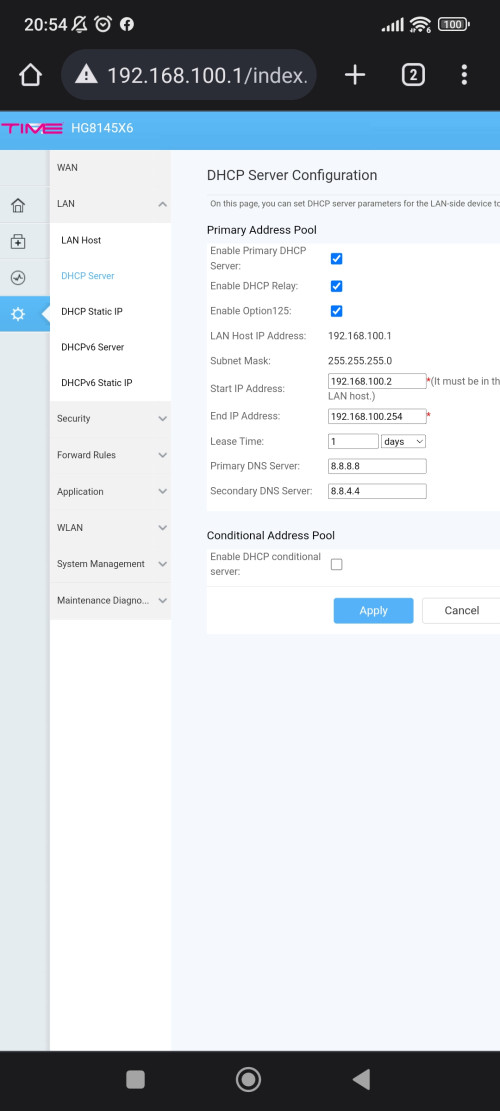 |
|
|
|
|



 Quote
Quote





 0.3542sec
 0.78
0.78
 6 queries
 GZIP Disabled