Welcome Guest ( Log In | Register )

Outline · [ Standard ] · Linear+

TIME [OFFICIAL] TIME Fibre Broadband™ v4, Experience the ONE TRUE 2Gbps

views
     
Alpha_Tay
post Mar 23 2020, 05:25 PM

Beware The Spammer Star!
******
Senior Member
1,725 posts

Joined: Jan 2003
Yesterday Sunday around 3:30PM, out of the Blue, i run Speed Test to Time.com http://testyourspeed.time.com.my/index2.php Result 8.xMbps Download, 50Mbps Upload with Unifi Fibre 300Mbps, same Result Multiple times. i visit Lowyat Forum after that, and find out about Time Fibre Slowdown recently, Traceroute from Unifi Fibre to Time.com Speed Test Server go through timedotcom-1.myix.my 218.100.44.112 , i run speedtest to other Major ISP Malaysia Speedtest doesn't suffer from such Major Slowdown.

i run Speed test to Time.com again at Monday Morning around 5AM, the Speed Test Result back to 300Mbps Download, 50Mbps Upload.

sometimes during Time.com Major Slowdown, the ping to Time.com MyIX would goes up to around 80ms-100ms.

Time.com can Upgrade Their Network during Fibre Age easily.

This post has been edited by Alpha_Tay: Mar 23 2020, 05:29 PM
Alpha_Tay
post Mar 26 2020, 02:10 PM

Beware The Spammer Star!
******
Senior Member
1,725 posts

Joined: Jan 2003
getting full speed right now 300Mbps / 50Mbps at time.net Speed Test with unifi fibre 300Mbps Package.

QUOTE(Alpha_Tay @ Mar 23 2020, 05:25 PM)
Yesterday Sunday around 3:30PM, out of the Blue, i run Speed Test to Time.com http://testyourspeed.time.com.my/index2.php Result 8.xMbps Download, 50Mbps Upload with Unifi Fibre 300Mbps, same Result Multiple times. i visit Lowyat Forum after that, and find out about Time Fibre Slowdown recently, Traceroute from Unifi Fibre to Time.com Speed Test Server go through timedotcom-1.myix.my 218.100.44.112 , i run speedtest to other Major ISP Malaysia Speedtest doesn't suffer from such Major Slowdown.

i run Speed test to Time.com again at Monday Morning around 5AM, the Speed Test Result back to 300Mbps Download, 50Mbps Upload.

sometimes during Time.com Major Slowdown, the ping to Time.com MyIX would goes up to around 80ms-100ms.

Time.com can Upgrade Their Network during Fibre Age easily.
*
Alpha_Tay
post Mar 2 2022, 12:36 PM

Beware The Spammer Star!
******
Senior Member
1,725 posts

Joined: Jan 2003
TIME Looking Glass

Get real-time information on your backbone routing and network efficiency.

https://lglass.time.com.my/

https://www.time.com.my/carrier

Other

https://www.ipserverone.com/connection-test

https://lg.my.controlvm.com/

https://lg.shinjiru.com.my/

https://looking.house/company.php?id=164

https://lg.gbnetwork.my/

https://malaysia-vps.com/looking-glass/

http://lg-malaysia.hybridserver.net/

https://lg.myren.net.my/lg/lg.cgi doesnt work

https://lg.ixtelecom.net/

https://lg.exabytes.my/

https://looking-glass.tm.com.my/

Welcome to TM Looking Glass Portal

Home

Login

Thank you for visiting TM Looking Glass Portal.

Telekom Malaysia Berhad ™ Copyright © 2017

Please login to enter and use the system.

THIS PORTAL SYSTEM IS PROVIDED 'AS IS', WITHOUT WARRANTY OF ANY KIND, EXPRESS OR IMPLIED, INCLUDING BUT NOT LIMITED TO THE WARRANTIES OF MERCHANTABILITY, FITNESS FOR A PARTICULAR PURPOSE AND NONINFRINGEMENT. IN NO EVENT SHALL THE AUTHORS OR COPYRIGHT HOLDERS BE LIABLE FOR ANY CLAIM, DAMAGES OR OTHER LIABILITY, WHETHER IN AN ACTION OF CONTRACT, TORT OR OTHERWISE, ARISING FROM, OUT OF OR IN CONNECTION WITH THE SOFTWARE OR THE USE OR OTHER DEALINGS IN THE SOFTWARE.


This post has been edited by Alpha_Tay: Mar 2 2022, 05:27 PM
Alpha_Tay
post Mar 2 2022, 05:28 PM

Beware The Spammer Star!
******
Senior Member
1,725 posts

Joined: Jan 2003
use traceroute to find out?

different ip range, different route?

also, ping result depend on your last mile 1st hop ping beside router, example, for adsl streamyx, there is a setting called fast path or interleaved mode with different level at dslam for each port, with fast path, the ping could go as low as around 6ms 1st hop, with highest level interleaved mode, the ping would go as high as 60ms 1st hop, in the end, the malaysia local or nearby country example singapore destination ping would interpolate depend on 1st hop ping, it's not just plus minus + - only.

i ping sgp-2.valve.net 103.10.124.1 valve dota 2 singapore server, the ping result is almost same with your server https://lg-my-time.samsam123.name.my/ and time server https://lglass.time.com.my/

traceroute doesnt seem to work at time server, but do work at your server with missing result at the middle.

time server 1st hop result from traceroute is 223.28.26.21 ge-1-2-5-er-01-akhmw.ni.time.net.my , while 211.24.220.166 lglass.time.com.my , and 104.21.86.232 lg-my-time.samsam123.name.my and 1st hop 202.184.160.1

QUOTE(Sam Leong @ Mar 2 2022, 04:15 PM)
i don't think their looking glass can reflect actual home fibre network status

user posted image

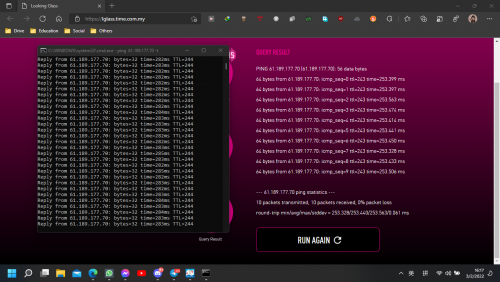
Destination same IP [China Telecom] 61.189.177.70

from my side 280+ms
from TIME looking Glass = 250+ms
from my side to TIME speedtest server = 3ms

So wat's the problem here lol

ps : 2nd time test both side almost same (390+ms)

user posted image
so again whats the problem here can make so much difference between 1st and 2nd time test
just after 1/2 minutes then the latency spike up over 100ms+
both test run parellel
when i hit start on the looking glass page then i hit enter on my cmd to ping
ps2 : 3rd time test return back to 1st time status

user posted image
*
This post has been edited by Alpha_Tay: Mar 2 2022, 09:46 PM
Alpha_Tay
post Mar 3 2022, 11:45 AM

Beware The Spammer Star!
******
Senior Member
1,725 posts

Joined: Jan 2003
maybe due to QoS from Time

QUOTE(Sam Leong @ Mar 3 2022, 07:52 AM)
My 1st hop ping beside ping around 2-3 ms only so i don't think it will caused the final result inaccurate.
The IP i stated above [61.189.177.70] will get diff result with time server and my side
idk why

From my side :
CODE
traceroute to 61.189.177.70 (61.189.177.70), 30 hops max, 32 byte packets
1  202.184.160.1  2.63 ms  AS9930  Malaysia, Kuala Lumpur, time.com.my
2  *
3  223.28.43.54  8.89 ms  AS9930  Singapore, time.com.my
4  ix-be-12.ecore1.svq-singapore.as6453.net (180.87.105.6)  10.14 ms  AS6453  Singapore, tatacommunications.com
5  if-be-24-2.ecore1.esin4-singapore.as6453.net (180.87.107.193)  182.00 ms  AS6453  Singapore, tatacommunications.com
6  180.87.15.112  181.91 ms  AS6453  Singapore, tatacommunications.com
7  if-ae-28-2.tcore1.av3-toyohashi.as6453.net (180.87.3.128)  185.15 ms  AS6453  Japan, Aichi, Toyohashi, tatacommunications.com
8  if-ae-2-2.tcore2.av3-toyohashi.as6453.net (180.87.3.131)  180.77 ms  AS6453  Japan, Aichi, Toyohashi, tatacommunications.com
9  if-ae-28-2.tcore2.lvw-losangeles.as6453.net (64.86.252.32)  181.79 ms  AS6453  United States, California, Los Angeles, tatacommunications.com
10  64.86.252.63  182.02 ms  AS6453  United States, California, Los Angeles, tatacommunications.com
11  202.97.43.105  266.43 ms  AS4134  China, Guangdong, Guangzhou, ChinaTelecom
12  202.97.91.189  267.42 ms  AS4134  China, Guangdong, Guangzhou, ChinaTelecom
13  202.97.94.125  270.46 ms  AS4134  China, Guangdong, Guangzhou, ChinaTelecom
14  202.97.96.118  281.06 ms  AS4134  China, Guizhou, Guiyang, ChinaTelecom
15  61.189.177.70  281.63 ms  AS4134  China, Guizhou, Guiyang, ChinaTelecom

CODE
PING 61.189.177.70 (61.189.177.70) 56(84) bytes of data.
64 bytes from 61.189.177.70: icmp_seq=1 ttl=244 time=282 ms
64 bytes from 61.189.177.70: icmp_seq=2 ttl=244 time=282 ms
64 bytes from 61.189.177.70: icmp_seq=3 ttl=244 time=281 ms
64 bytes from 61.189.177.70: icmp_seq=4 ttl=244 time=281 ms

--- 61.189.177.70 ping statistics ---
4 packets transmitted, 4 received, 0% packet loss, time 3004ms
rtt min/avg/max/mdev = 281.355/281.472/281.607/0.094 ms


TIME side (No tracert) :
CODE
PING 61.189.177.70 (61.189.177.70): 56 data bytes
64 bytes from 61.189.177.70: icmp_seq=0 ttl=243 time=252.687 ms
64 bytes from 61.189.177.70: icmp_seq=1 ttl=243 time=252.696 ms
64 bytes from 61.189.177.70: icmp_seq=2 ttl=243 time=252.673 ms
64 bytes from 61.189.177.70: icmp_seq=3 ttl=243 time=252.648 ms
64 bytes from 61.189.177.70: icmp_seq=4 ttl=243 time=252.665 ms
64 bytes from 61.189.177.70: icmp_seq=5 ttl=243 time=252.684 ms
64 bytes from 61.189.177.70: icmp_seq=6 ttl=243 time=252.689 ms
64 bytes from 61.189.177.70: icmp_seq=7 ttl=243 time=252.650 ms
64 bytes from 61.189.177.70: icmp_seq=8 ttl=243 time=252.665 ms
64 bytes from 61.189.177.70: icmp_seq=9 ttl=243 time=252.743 ms

--- 61.189.177.70 ping statistics ---
10 packets transmitted, 10 packets received, 0% packet loss
round-trip min/avg/max/stddev = 252.648/252.680/252.743/0.026 ms


I don't think my 1st hop ping will cause around 30ms different aon the last destination
I've checked the BGP path , the AS number is same as my routing
AS9930 - AS6453 - AS4134
Maybe TIME side routing is different from mine?

*


Change to:
| Lo-Fi Version
0.0320sec    0.66    7 queries    GZIP Disabled
Time is now: 18th December 2025 - 08:55 AM