Welcome Guest ( Log In | Register )

Outline · [ Standard ] · Linear+

TIME [OFFICIAL] TIME Fibre Broadband™ v4, Experience the ONE TRUE 2Gbps

views
     
trix
post Jan 6 2022, 10:44 AM

Enthusiast
*****
Senior Member
848 posts

Joined: Feb 2005
From: everywhere, yet nowhere.


QUOTE(lohmaikai @ Jan 5 2022, 10:51 PM)
I have a question.
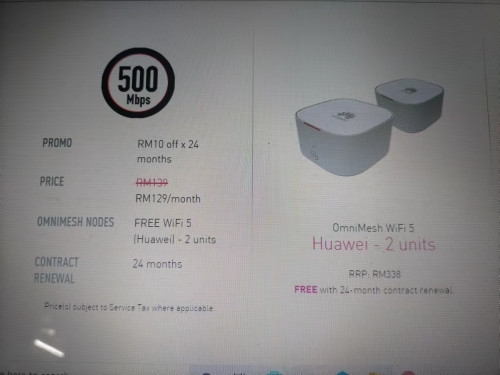
Im currently paying 129 for 500mb which is already a -rm10 discount from a promo many years ago.
Now Time offer recontract but the summary states 139-rm10 which is back to rm129 the same as what im paying now. It is supposed to be rm119?

Otherwise if no reduction of the rm10 i don't think i will take the recontract.

» Click to show Spoiler - click again to hide... «
*
probably recontract if you want the mesh unit
but the mesh unit is kinda shit
when logged in, no option to change anything other than SSID and password
using custom Time firmware, no resale value
trix
post Jan 24 2022, 11:06 AM

Enthusiast
*****
Senior Member
848 posts

Joined: Feb 2005
From: everywhere, yet nowhere.


QUOTE(hezaika @ Jan 24 2022, 02:53 AM)
user posted image

Anyone got this router with installation? how do I set as bridge? , the router is so bad cant even port forward correctly sad.gif
Looking to use other router and keep it as ONU.
*
Live chat with CS, ask them to change it to bridge mode
15m done from waiting to initiate chat until completion

But from my recent dealings with them, they somehow were unable to disable the wifi on the ONT.
I had to disable it myself.
trix
post Jan 27 2022, 03:19 PM

Enthusiast
*****
Senior Member
848 posts

Joined: Feb 2005
From: everywhere, yet nowhere.


QUOTE(lil_chocobo @ Jan 26 2022, 11:36 PM)
when you said you had to disable it yourself, how did you do it? i cant login to the modem/router anymore.
*
manually set ip on your laptop/desktop to 192.168.100.x (eg 192.168.100.2), subnet mask 255.255.255.0, gw leave empty or 192.168.100.1
then open browser to 192.168.100.1, login using credential on the bottom of the ONT
trix
post Feb 23 2022, 04:11 PM

Enthusiast
*****
Senior Member
848 posts

Joined: Feb 2005
From: everywhere, yet nowhere.


QUOTE(noobfm @ Feb 22 2022, 04:36 PM)
Hi guys, i've called Time CS for 5 times to request their help in switching to bridging mode but that doesn't seems to be effective at all..

how should i proceed in this case? other than keep on calling them lol
*
don't call, use chat faster
protip: you can skip the automated stuff and straight go to actual person by typing "live chat"

done in ~15m from several of my past experiences.
trix
post Oct 4 2022, 03:31 PM

Enthusiast
*****
Senior Member
848 posts

Joined: Feb 2005
From: everywhere, yet nowhere.


QUOTE(FusionXY @ Oct 4 2022, 10:42 AM)
Yes. TIME is using their own infra, not shared with TM.
*
Separate infra probably only until MDF room right
From there to each unit, the building's own infra, so even if can subscribe 2 ISP, cannot use them both at the same time

trix
post Oct 18 2022, 02:41 PM

Enthusiast
*****
Senior Member
848 posts

Joined: Feb 2005
From: everywhere, yet nowhere.


QUOTE(findinga @ Oct 18 2022, 10:08 AM)
Hi all, I plan to get the 500Mbps package but need some professional input to verify my set up.

Some info:
- I am moving to my new condo unit in a few week's time, the unit's size is 1200sqft
- My brother plans to rent another condo unit on the same floor as mine, unit size around 1200sqft too
- Distance between my unit and my brother's unit could be 30 - 50meters

We plan to get the 500Mbps package, 2 units of TP-AX20 (TP1800) and get management's approval to pull LAN cables to connect both our routers.
Is this an ideal set up or is there a better alternative? Would greatly appreciate any help!


Any TIME agent, please PM me too for the 500Mbps sign up
*
https://en.wikipedia.org/wiki/Ground_loop_(electricity)
Use fiber, do not use LAN cable
trix
post Nov 17 2023, 07:25 PM

Enthusiast
*****
Senior Member
848 posts

Joined: Feb 2005
From: everywhere, yet nowhere.


just received offer to renew contract with RM20 discount
currently have RM10 discount until contract finish in Jan 2024
probably gonna accept it since i don't think time is gonna have a price war with unifi
trix
post Dec 22 2023, 12:37 PM

Enthusiast
*****
Senior Member
848 posts

Joined: Feb 2005
From: everywhere, yet nowhere.


» Click to show Spoiler - click again to hide... «


so the child node needs to be located where there is a power plug right?
for the fiber cable, do they drill through walls and did they patch it up nicely afterwards?

This post has been edited by trix: Dec 22 2023, 12:38 PM
trix
post Apr 2 2024, 11:49 AM

Enthusiast
*****
Senior Member
848 posts

Joined: Feb 2005
From: everywhere, yet nowhere.


@jjj2 adding on on GBP56's query, is it possible to use own router for Time's FTTR offering?
so the FTTR Master node only acts as AP

Also, is the fiber connector using SC? possible to hire the installer just to lay out the micro optical fiber around the house?
trix
post Apr 4 2024, 05:21 PM

Enthusiast
*****
Senior Member
848 posts

Joined: Feb 2005
From: everywhere, yet nowhere.


QUOTE(jjj2 @ Apr 2 2024, 10:26 PM)
If I get you correctly, nope, you cant use your own router to replace the given FTTR devices, unless it is designed/modified in such way.

Yes SC/APC. I'm not sure whether the installer has the extra cable to lay for you as they are given the cable according to work order. By the way where are you located ?

*
I'm running pfsense to do some blocking and S2S VPN. So if possible to do like the below, then I will straight away jump in

Wall -> existing ONT -> pfsense -> Master node -> Child node


If not, then considering that the optical cable used is very thin and just pasted on the wall and uses normal SC, then my idea is to hire them just to lay out the cable around the house and then use media converter to convert between fiber/copper
The place is in Bandar Bukit Raja, Klang btw.
trix
post Apr 17 2024, 08:37 PM

Enthusiast
*****
Senior Member
848 posts

Joined: Feb 2005
From: everywhere, yet nowhere.


QUOTE(gtiwtks @ Apr 17 2024, 02:00 PM)
Guys, need so advise....

I am currently using TPLINK AX55... Prior to the Free Upgrade from 500mbps to 600mbps.... I can constantly get 500++ when doing speed test on lan connection

However after the so call upgrade... When i do speed test can only get 400++...

Reported to Time... Technician come over and do some test.... On modem can get 600... but on the tplink ax55 just getting 400... Use back the old huawei wa8021 also get 600 too... Technician said problem with my own supplied router and ask me to resolve myself....

Any idea how to resolve speed issue?
*
maybe you set QoS that you forgot about?
try do a factory reset and reconfigure again
trix
post May 5 2024, 10:20 AM

Enthusiast
*****
Senior Member
848 posts

Joined: Feb 2005
From: everywhere, yet nowhere.


installed FTTR
currently working to integrate it with my pfSense

wall->old ont->pfsense->parent node is only partially working
first your ONT authentication password is changed, so you need to grab the new one from parent node and update it in the old ONT
then the child node needs DHCP from parent node otherwise parent node will see them as offline so this is what is blocking me from using this method

workaround i'm using is
wall->parent node -> 2 network cables to pfsense
-configure secondary IP address on the parent node to be in one of pfSense's LAN subnet, then configure WAN on pfsense using static IP
-on parent node configure DMZ to pfSense
-any device that needs to be behind pfSense needs their IP address to be manually configured

at least my original usecase for pfsense(S2S VPN, DNS/IP blocking) is still working with this setup
trix
post Jul 11 2024, 11:55 AM

Enthusiast
*****
Senior Member
848 posts

Joined: Feb 2005
From: everywhere, yet nowhere.


QUOTE(corallinkz @ Jul 10 2024, 11:52 PM)
which is the best router/modem solution for 3600 sqft home at 200mbps time speed. currently use deco. not getting full speed.
*
sell your deco and get FTTR
trix
post Jul 12 2024, 12:31 AM

Enthusiast
*****
Senior Member
848 posts

Joined: Feb 2005
From: everywhere, yet nowhere.


QUOTE(suns8630 @ Jul 11 2024, 03:24 PM)
Thank you so much for your advise..


so I get the TIME  Technician to set the HG 8145x6 to bridge .. and set the pppoe to my new wifi 7 mesh router..

Is this correct ..????
please refer to the attached photo.. for my new house layout plan .. 1118 sq ft 3 rooms concept..
Modem will be set in the living room marked RED star .. ..running on RJ45 to my setup Router on the blue box .. on the living hall

as you can see the position of the router placement .. wifi signal is  beam directly .. to the bed room I .. which  I had converted it to study room .. with 2 PC
connect of RJ 45 via this mesh node 1(wireless backhaul connection)  .. and hopefully my mastered room Mesh node 2 ..

Does this connection / Pairing works  well ..

please give me advice...

I prefer to be over planned,, than to be under planned .. ( and dealing with blind spot )

I allocated budget of 1600 ringgit for the 3 mesh wifi .. not sure about wifi 6E or wifi 7

and I have no intention to upgrade my TIME package to 1Gb plan .. 600mbps .. is enough for me and my wife ..

anyway  .. good to have your reply comment ... all are welcome to comment

thank you so much
*
i've said this and i'll say it again
get FTTR
for RM2160 you will get 4 mesh nodes (1 parent+3child) plus you will also get fiber backhaul to each child node
each child node also have 2 eth ports
trix
post Oct 24 2024, 10:19 PM

Enthusiast
*****
Senior Member
848 posts

Joined: Feb 2005
From: everywhere, yet nowhere.


same just got cgnat ip today
time internet on remote site
thankfully i set up site 2 site vpn, so just need to view firewall log for incoming connection attempt to vpn port to get the mapped public ip, update in the vpn setting and s2s is up again, but this is too much manual work
just had a chat with them requesting for public ip, but have to wait for ~24h for other team to check
trix
post Oct 25 2024, 05:59 PM

Enthusiast
*****
Senior Member
848 posts

Joined: Feb 2005
From: everywhere, yet nowhere.


QUOTE(PeacefulDiscord @ Oct 25 2024, 11:58 AM)
Same experience from me regarding being switched to CGNAT. Last night I noticed I couldn't access my services from outside. Checked my router and saw that I was assigned IP address in 100.x.x.x range.

I called TIME CS and today they switched me back to public IP but I wonder if it will stay this way forever.

Wonder if they will push people who want to use their network from outside to buy dedicated IP. Maybe time to move to IPv6 hmm.gif
*
if they assign ipv6 with at least prefix length 60, i would be ok with cgnat ipv4

This post has been edited by trix: Oct 25 2024, 06:00 PM
trix
post Dec 2 2024, 06:50 PM

Enthusiast
*****
Senior Member
848 posts

Joined: Feb 2005
From: everywhere, yet nowhere.


QUOTE(FusionXY @ Dec 2 2024, 11:31 AM)
One way to check is checking router web interface.
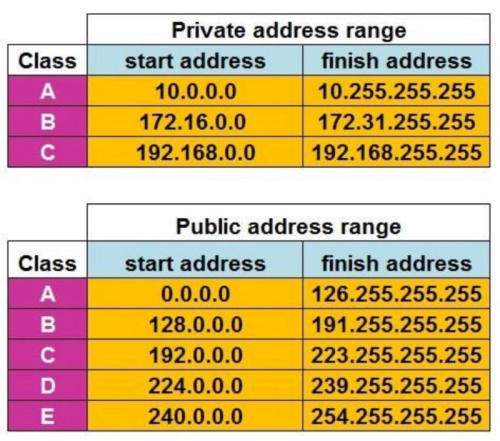
Take note of the address range below to know whether it is public or private IP.

user posted image
*
CGNAT IP range:
100.64.0.0 - 100.127.255.255
trix
post Jan 5 2025, 03:18 PM

Enthusiast
*****
Senior Member
848 posts

Joined: Feb 2005
From: everywhere, yet nowhere.


QUOTE(westlife @ Jan 4 2025, 10:57 PM)
for if subscribe to FTTR for time, whether they will allow to FTTR the two units under one time fibre internet account is a question mark i guess?
*
yeah, this should be the main concern
but then again, the installer that comes to lay the fiber for FTTR is probably just a contractor and most probably won't even question it
and i believe they have a limit on the length of the fiber cable for FTTR. not technology limitation, more like limit per installation
trix
post Jan 17 2025, 06:53 PM

Enthusiast
*****
Senior Member
848 posts

Joined: Feb 2005
From: everywhere, yet nowhere.


QUOTE(flexyx @ Jan 17 2025, 12:00 PM)
FTTR device came with ethernet port for each room?
*
each child node have 2 ethernet ports
each child node have 2.5g uplink to parent node
trix
post Jan 17 2025, 07:13 PM

Enthusiast
*****
Senior Member
848 posts

Joined: Feb 2005
From: everywhere, yet nowhere.


QUOTE(blacktubi @ Jan 17 2025, 07:04 PM)
The FTTR uplink to parent node is 2.5G?

IINM it's only 1Gbps hence it couldn't support 2Gbps plan
*
child node communicate with parent node at 2.5g, but its 2 ethernet ports only support 1g

user posted image

This post has been edited by trix: Jan 17 2025, 07:17 PM

2 Pages  1 2 >Top
 

Change to:
| Lo-Fi Version
0.2328sec    0.25    7 queries    GZIP Disabled
Time is now: 7th December 2025 - 11:03 AM