Welcome Guest ( Log In | Register )

671 Pages « < 410 411 412 413 414 > » Bottom

Outline · [ Standard ] · Linear+

TIME [OFFICIAL] TIME Fibre Broadband™ v4, Experience the ONE TRUE 2Gbps

views
     
jjj2
post Nov 29 2021, 11:40 AM

Look at all my stars!!
*******
Senior Member
3,612 posts

Joined: Feb 2006
QUOTE(jimbet1337 @ Nov 29 2021, 11:18 AM)
Guys, by any chance Huawei HG8240H5 ONU will get spoilt due to life span etc?

Been using TIME since 2017 and WFH since March 2020. Can't afford to have downtime. I have spare router but not the ONU.

Just having a thought in case the ONU fails.
*
Hi, rarely happens, even though when it's faulty, usually caused by the faulty power adaptor, you can easily get one to replace while waiting for SI to attend to your case.

Thanks.
jimbet1337
post Nov 29 2021, 12:05 PM

meh
*******
Senior Member
2,672 posts

Joined: Sep 2006
QUOTE(jjj2 @ Nov 29 2021, 11:40 AM)
Hi, rarely happens, even though when it's faulty, usually caused by the faulty power adaptor, you can easily get one to replace while waiting for SI to attend to your case.

Thanks.
*
Good suggestion. Thanks notworthy.gif
darren_yuri
post Nov 29 2021, 03:43 PM

Casual
***
Junior Member
395 posts

Joined: Aug 2010
From: 御堂筋

QUOTE(jjj2 @ Nov 26 2021, 03:54 PM)
What is the model of your primary router ? And how does Mesh Node in Bedroom 3 link to primary router ?
*
Primary router is TP Link EC230-G1.
The mesh node in Bedroom 3 linked wirelessly?
jjj2
post Nov 29 2021, 06:14 PM

Look at all my stars!!
*******
Senior Member
3,612 posts

Joined: Feb 2006
QUOTE(darren_yuri @ Nov 29 2021, 03:43 PM)
Primary router is TP Link EC230-G1.
The mesh node in Bedroom 3 linked wirelessly?
*
Hi, your current configuration is not really proper as the mesh nodes is wirelessly bridged with the EC230, you should be connecting using a network cable to achieve optimum performance at least for the 1st node, and then mesh the 2nd node with the 1st node wirelessly.

If there is no way to run any network cable, then you remove the EC230, and configure the 1st Mesh Node to dial PPPOE, and the 2nd node pairing with it.

Thanks.
fredzdrust
post Nov 29 2021, 10:55 PM

New Member
*
Junior Member
42 posts

Joined: Oct 2006
From: Saya-Berjaya


Hi. I just got my Huawei wa8021v5 but i only received 1 only. Do I get 1 or 2 actually? 🤔
skylinelover
post Nov 30 2021, 01:48 AM

Future Crypto Player😄👊Driver Abamsado😎😎
********
All Stars
11,265 posts

Joined: Jul 2005
QUOTE(Seng89 @ Nov 25 2021, 11:35 PM)
Hi guys, anyone got this promotion ? Is it worth ? I'm currently using ax73 router. If upgrade this package will have any issue ? After 24 months I can just downgrade back to 100mbps right?
*
Waaa

500mbps very tempting

drool.gif rclxm9.gif
Ota54
post Nov 30 2021, 03:27 AM

New Member
*
Newbie
19 posts

Joined: Feb 2018
QUOTE(darren_yuri @ Nov 26 2021, 01:12 AM)
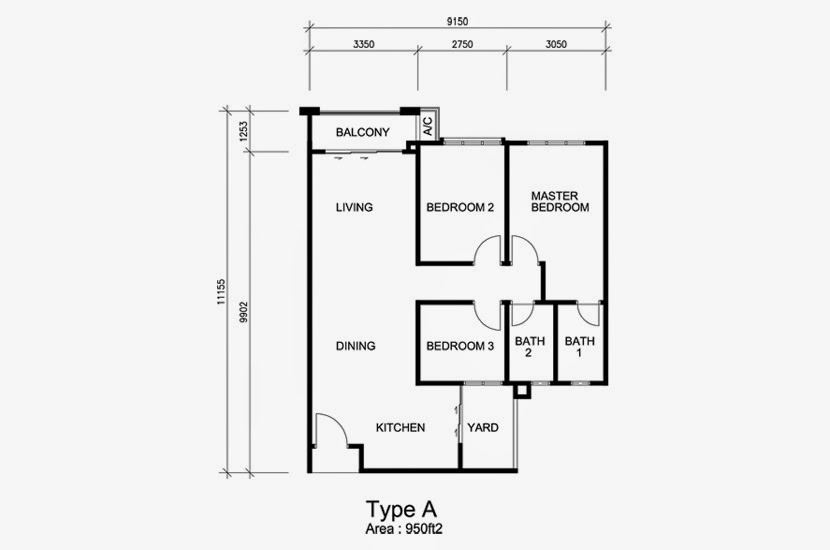
Here is my unit layout diagram.
» Click to show Spoiler - click again to hide... «

My primary router setup near the fibre socket at living room, located on the wall shared with Bedroom 2.

Then the TIME installer he setup the mesh nodes inside Bedroom 3 and Master Bedroom.
Because the mesh nodes are provided by TIME so I do not want to make any changes or modifications to the setup..

Can I know how to rectify the issues?
*
My house layout is very similar with yours. I'm using TP link AX50, can cover the whole house with 5Ghz without problem.
Slightly weaker 5Ghz signal at Bath 1 area only.
KingArthurVI
post Nov 30 2021, 08:10 PM

BWOAHHHH
******
Senior Member
1,127 posts

Joined: Feb 2011
From: Penang


Hi guys I bought an ASUS TUF-AX3000 in anticipation for moving into my condo next year, and I've already decided to get the 500Mbps plan. Is there anything I need to do to set it up, or can I ask the technician who's coming to install to set it up for me? Thanks in advance.
ryansxs
post Nov 30 2021, 08:35 PM

Look at all my stars!!
*******
Senior Member
2,380 posts

Joined: Dec 2005


QUOTE(KingArthurVI @ Nov 30 2021, 08:10 PM)
Hi guys I bought an ASUS TUF-AX3000 in anticipation for moving into my condo next year, and I've already decided to get the 500Mbps plan. Is there anything I need to do to set it up, or can I ask the technician who's coming to install to set it up for me? Thanks in advance.
*
Can set up. Easy setup.
Just get the time login and password (usually they will write on the installation form too).
Not sure if they are willing to do the setup on your router than the stock router. You can ask.
I use TUF-AX3000 as well, paired with AX3000 for mesh. Its super stable and easy to setup. No worries.
KingArthurVI
post Dec 1 2021, 12:22 AM

BWOAHHHH
******
Senior Member
1,127 posts

Joined: Feb 2011
From: Penang


QUOTE(ryansxs @ Nov 30 2021, 08:35 PM)
Can set up. Easy setup.
Just get the time login and password (usually they will write on the installation form too).
Not sure if they are willing to do the setup on your router than the stock router. You can ask.
I use TUF-AX3000 as well, paired with AX3000 for mesh. Its super stable and easy to setup. No worries.
*
Thanks, if I can DIY then definitely do that better than paying random "custom job" fee to the technicians for sure.

So all I need is the TIME username, password, then plug that into the router config page? Is that called the PPPOE username and password?
ryansxs
post Dec 1 2021, 12:10 PM

Look at all my stars!!
*******
Senior Member
2,380 posts

Joined: Dec 2005


QUOTE(KingArthurVI @ Dec 1 2021, 12:22 AM)
Thanks, if I can DIY then definitely do that better than paying random "custom job" fee to the technicians for sure.

So all I need is the TIME username, password, then plug that into the router config page? Is that called the PPPOE username and password?
*
Yes. You only need the PPPoE credentials and you are good to go.
DarkNite
post Dec 2 2021, 02:30 PM

ФĻĐ ИΞШB!Ξ
********
All Stars
11,058 posts

Joined: Jun 2008
QUOTE(skylinelover @ Nov 30 2021, 01:48 AM)
Waaa

500mbps very tempting

drool.gif rclxm9.gif
*
Free OmniMesh too brows.gif

QUOTE(jjj2 @ Nov 27 2021, 10:03 AM)
Yes, by 1-1 comparison.
*
Ok. use back the AX20.
Boss, the Free OmniMesh I can sell off or need to keep in case want to terminate TIME service?
jjj2
post Dec 2 2021, 03:33 PM

Look at all my stars!!
*******
Senior Member
3,612 posts

Joined: Feb 2006
QUOTE(DarkNite @ Dec 2 2021, 02:30 PM)
Free OmniMesh too brows.gif
Ok. use back the AX20.
Boss, the Free OmniMesh I can sell off or need to keep in case want to terminate TIME service?
Not going to collect back... keep for memory la.... lol
*
KingArthurVI
post Dec 2 2021, 08:14 PM

BWOAHHHH
******
Senior Member
1,127 posts

Joined: Feb 2011
From: Penang


Hey guys I just realized my fiber optic will come in from my condo foyer area, so my understanding is the modem will need to be there. However, I also have 2 ethernet ports, one at living room and one at study.

I want to put the router in my study so it's connected to the wall ethernet port.

How should I set it up such that: Modem in foyer ---PPPoE +bridge mode ---> Router in office ---> Wi-Fi and Ethernet ports on the wall?

Or am I basically stuck with Modem in foyer --> Ethernet ports on wall --> Router piggyback as 192.168.2.1 from one of the wall ports?

Much appreciated.

This post has been edited by KingArthurVI: Dec 2 2021, 08:23 PM
jjj2
post Dec 3 2021, 11:40 AM

Look at all my stars!!
*******
Senior Member
3,612 posts

Joined: Feb 2006
QUOTE(KingArthurVI @ Dec 2 2021, 08:14 PM)
Hey guys I just realized my fiber optic will come in from my condo foyer area, so my understanding is the modem will need to be there. However, I also have 2 ethernet ports, one at living room and one at study.
When you say "Will come in..." means Installer will pull in or the fibre is already there by the developer ? Please take a picture, is there a distribution panel or soho box at foyer area ?

I want to put the router in my study so it's connected to the wall ethernet port.

How should I set it up such that: Modem in foyer ---PPPoE +bridge mode ---> Router in office ---> Wi-Fi and Ethernet ports on the wall?

Or am I basically stuck with Modem in foyer --> Ethernet ports on wall --> Router piggyback as 192.168.2.1 from one of the wall ports?

Much appreciated.
*
KingArthurVI
post Dec 4 2021, 12:05 PM

BWOAHHHH
******
Senior Member
1,127 posts

Joined: Feb 2011
From: Penang


QUOTE(jjj2 @ Dec 3 2021, 11:40 AM)
When you say "Will come in..." means Installer will pull in or the fibre is already there by the developer ? Please take a picture, is there a distribution panel or soho box at foyer area ?
*
The fibre is already there by the developer. There's a distribution panel at foyer area but it's barred (I didn't bring screwdriver when I visited...)

I did notice there's a network switch with multiple LAN ports, but idk how those are connected to the wall ports in my study and living room.

Maybe the easiest is to do

Modem at foyer -- bridge mode --> switch --> wall port in study --> router plug there w/ PPPoE configured?

But if I do this above, my other wall port won't be usable right, since the modem is connected directly to the other wall port? Sorry for so many questions blush.gif
jjj2
post Dec 4 2021, 06:32 PM

Look at all my stars!!
*******
Senior Member
3,612 posts

Joined: Feb 2006
QUOTE(KingArthurVI @ Dec 4 2021, 12:05 PM)
The fibre is already there by the developer. There's a distribution panel at foyer area but it's barred (I didn't bring screwdriver when I visited...)

I did notice there's a network switch with multiple LAN ports, but idk how those are connected to the wall ports in my study and living room.

Maybe the easiest is to do

Modem at foyer -- bridge mode --> switch --> wall port in study --> router plug there w/ PPPoE configured?

But if I do this above, my other wall port won't be usable right, since the modem is connected directly to the other wall port? Sorry for so many questions blush.gif
*
Hi, in your case, the ONT will be placed inside the distribution panel (soho box), PPPOE will be handled by the ONT, and from your ONT, patch in 2 UTP cables into the patch panels, and your study & living room network port will have Internet ready.
Speaking on coverage, then have your own router or Mesh Node plug into the network port....it will work in AP mode.

Alternatively, you can have your ONT put inside Soho box to be configured as bridge mode, and put your router at study room, and have it configured to handle pppoe.

There are numerous ways to play around depends on your requirement.

Thanks.


piglover
post Dec 4 2021, 10:22 PM

Regular
******
Senior Member
1,095 posts

Joined: Jun 2005
From: KL


Anyone get offer rm10 upgrade to 300mbps?
With free mesh modem
Xaphier
post Dec 6 2021, 12:21 AM

Casual
***
Junior Member
495 posts

Joined: Sep 2007


Dear Sifus,

I asked a similar question before, and would I like to confirm again before I am committing to a Time fiber. Can I move my ONU (of different TIME account) from location A (old) to location B (new), and have location B's new router/ONU combo move to location A? Basically swapping equipment?

The reason for this is because I intends to use my own router in my new location B, and since new subscriber comes with a newer Router/ONU combo, I would like to move the new and better router/ONU to Location A, while have location A old ONU move to location B to pair with a better personal router.


I have asked a couple of TIME agents, but they all are giving conflicting answers; Some say you cannot do that, some say it is possible by asking the installer to reconfigure with old ONU during the new subscriber setup, some say need to raise service request. I am still a quite confused, hence this post today. Thanks in advance for all inputs.

This post has been edited by Xaphier: Dec 6 2021, 12:28 AM
IMAX
post Dec 6 2021, 01:23 PM

Casual
***
Junior Member
445 posts

Joined: Jun 2005
user posted image

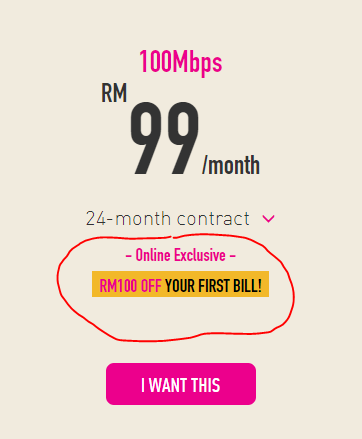
How to get the RM100 off for first bill?
Need to apply online or via agent will do?

671 Pages « < 410 411 412 413 414 > » Top
 

Change to:
| Lo-Fi Version
0.0232sec    0.90    6 queries    GZIP Disabled
Time is now: 21st December 2025 - 11:37 AM