

QUOTE(IMAX @ Dec 6 2021, 01:23 PM)
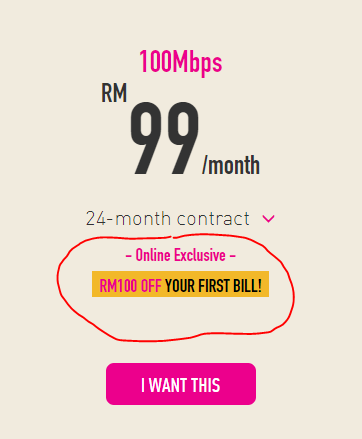
How to get the RM100 off for first bill?
Need to apply online or via agent will do?

and i did it online
TIME [OFFICIAL] TIME Fibre Broadband™ v4, Experience the ONE TRUE 2Gbps
|
|
 Dec 7 2021, 09:41 PM Dec 7 2021, 09:41 PM
Show posts by this member only | IPv6 | Post
#8241
|
 
Senior Member
1,274 posts Joined: Sep 2010 
|
QUOTE(IMAX @ Dec 6 2021, 01:23 PM) How to get the RM100 off for first bill? Need to apply online or via agent will do? and i did it online |
|
|
|
|
|
Dec 7 2021, 11:46 PM
|

All Stars
21,963 posts Joined: Dec 2004 From: KL  
|
QUOTE(IMAX @ Dec 6 2021, 01:23 PM) How to get the RM100 off for first bill? Need to apply online or via agent will do? |
|
|
Dec 8 2021, 08:25 AM
|

Junior Member
495 posts Joined: Sep 2007 
|
QUOTE(Xaphier @ Dec 6 2021, 12:21 AM) Dear Sifus, Anyone?I asked a similar question before, and would I like to confirm again before I am committing to a Time fiber. Can I move my ONU (of different TIME account) from location A (old) to location B (new), and have location B's new router/ONU combo move to location A? Basically swapping equipment? The reason for this is because I intends to use my own router in my new location B, and since new subscriber comes with a newer Router/ONU combo, I would like to move the new and better router/ONU to Location A, while have location A old ONU move to location B to pair with a better personal router. I have asked a couple of TIME agents, but they all are giving conflicting answers; Some say you cannot do that, some say it is possible by asking the installer to reconfigure with old ONU during the new subscriber setup, some say need to raise service request. I am still a quite confused, hence this post today. Thanks in advance for all inputs. |
|
|
Dec 9 2021, 11:04 AM
|

Junior Member
466 posts Joined: Jan 2003 From: N.S
|
@jjj2, Is there time coverage for Savanna 2 Bukit Jalil ?
|
|
|
Dec 9 2021, 03:29 PM
|

Junior Member
24 posts Joined: Jan 2005
|
Hi fellow forumer,
Is there any possibility to set a better encryption for this router? 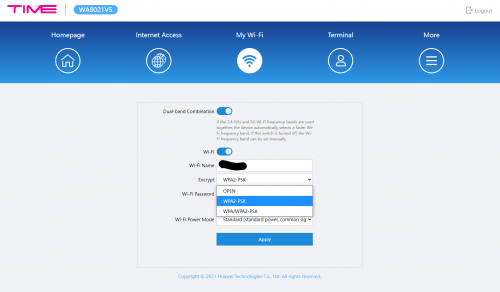 Also I check every possible menu in the router it does not seems to set my own DNS. Appreciate anyone who can share some solution. Trying to explain to TIME customer support, but it seems like having hard time to understand the problem. |
|
|
Dec 9 2021, 06:23 PM
Show posts by this member only | IPv6 | Post
#8246
|

Senior Member
3,616 posts Joined: Feb 2006
|
QUOTE(tZZ @ Dec 9 2021, 11:04 AM) @jjj2, Is there time coverage for Savanna 2 Bukit Jalil ? Hi, Savanna 2 not in coverage yet. Thanks. |
|
|
|
|
|
Dec 10 2021, 04:15 PM
Show posts by this member only | IPv6 | Post
#8247
|
|
Probation
7 posts Joined: Sep 2021
|
Sifu, can i use the Times ONU as a modem only with TP-link AX50 router.
|
|
|
Dec 10 2021, 07:53 PM
Show posts by this member only | IPv6 | Post
#8248
|
|
Senior Member
3,616 posts Joined: Feb 2006
|
QUOTE(wayangpok @ Dec 10 2021, 04:15 PM) Sifu, can i use the Times ONU as a modem only with TP-link AX50 router. Hi, which ONU model you have ? |
|
|
Dec 10 2021, 08:06 PM
Show posts by this member only | IPv6 | Post
#8249
|
|
Probation
7 posts Joined: Sep 2021
|
QUOTE(jjj2 @ Dec 10 2021, 07:53 PM) Hi, which ONU model you have ? The one come with the latest 500mb promo. |
|
|
Dec 10 2021, 09:53 PM
Show posts by this member only | IPv6 | Post
#8250
|

Senior Member
574 posts Joined: Jun 2010
|
Is the Asus RT AC768U sufficient for my space?
2.8k sqft condo, under a 300mbps plan from Time. Condo layout is rectangular. The wifi setup is currently at one end of the condo, and the rooms on the other end don't have coverage. Looking to add some routers to extend the range. Open to suggestions! |
|
|
Dec 11 2021, 09:20 AM
Show posts by this member only | IPv6 | Post
#8251
|

Senior Member
2,380 posts Joined: Dec 2005
|
QUOTE(markypcs @ Dec 10 2021, 09:53 PM) Is the Asus RT AC768U sufficient for my space? Set up mesh Wifi. 2.8k sqft condo, under a 300mbps plan from Time. Condo layout is rectangular. The wifi setup is currently at one end of the condo, and the rooms on the other end don't have coverage. Looking to add some routers to extend the range. Open to suggestions! Only one router, will not cover that huge space. |
|
|
Dec 11 2021, 09:47 AM
|
|
All Stars
21,963 posts Joined: Dec 2004 From: KL
|
QUOTE(markypcs @ Dec 10 2021, 09:53 PM) Is the Asus RT AC768U sufficient for my space? Need put move the router to middle of the condo otherwise setup mesh wifi.2.8k sqft condo, under a 300mbps plan from Time. Condo layout is rectangular. The wifi setup is currently at one end of the condo, and the rooms on the other end don't have coverage. Looking to add some routers to extend the range. Open to suggestions! My place 2.4k sqft also very bad reception at the other end of the place due to walls obstruction. ryansxs liked this post
|
|
|
Dec 11 2021, 10:55 AM
Show posts by this member only | IPv6 | Post
#8253
|
|
Senior Member
3,616 posts Joined: Feb 2006
|
QUOTE(wayangpok @ Dec 10 2021, 08:06 PM) The one come with the latest 500mb promo. Hi, please give our CS a call @ 1800 18 1818, and request them to switch your ONT to Bridge Mode, inform them you wish to use your own router.New profile will be pushed over to your HG8145V5 ONT. Thanks. wayangpok liked this post
|
|
|
|
|
|
Dec 11 2021, 02:16 PM
Show posts by this member only | IPv6 | Post
#8254
|
|
Senior Member
574 posts Joined: Jun 2010
|
QUOTE(ryansxs @ Dec 11 2021, 09:20 AM) Set up mesh Wifi. Only one router, will not cover that huge space. QUOTE(WaCKy-Angel @ Dec 11 2021, 09:47 AM) Need put move the router to middle of the condo otherwise setup mesh wifi. Would you guys suggest the router or mesh solution? Or a mix of both?My place 2.4k sqft also very bad reception at the other end of the place due to walls obstruction. I did pull a line to the middle bedroom, which is sort of the middle point of the unit. Was thinking to setup the Asus there, would that be sufficient to cover the space? |
|
|
Dec 11 2021, 02:21 PM
|
|
All Stars
21,963 posts Joined: Dec 2004 From: KL
|
QUOTE(markypcs @ Dec 11 2021, 02:16 PM) Would you guys suggest the router or mesh solution? Or a mix of both? Depends individual. For me i prefer less hardware easier to maintain and less power consumption.I did pull a line to the middle bedroom, which is sort of the middle point of the unit. Was thinking to setup the Asus there, would that be sufficient to cover the space? As long its in the middle should be alright |
|
|
Dec 11 2021, 03:13 PM
Show posts by this member only | IPv6 | Post
#8256
|
|
Senior Member
2,380 posts Joined: Dec 2005
|
QUOTE(markypcs @ Dec 11 2021, 02:16 PM) Would you guys suggest the router or mesh solution? Or a mix of both? You can try to put a router in the middle and check the coverage. Get a router that can support mesh wifi. (I would recommend asus AX routers)I did pull a line to the middle bedroom, which is sort of the middle point of the unit. Was thinking to setup the Asus there, would that be sufficient to cover the space? Then if you feel the coverage is not good (places where you spend most of the time), add one more router there (as a node). You can add as many nodes as you want. Of course it will cost you more. Rule of thumb is, cover with signal at locations where you spend most of your time at home. Just my 2cents |
|
|
Dec 11 2021, 03:27 PM
Show posts by this member only | IPv6 | Post
#8257
|
|
Senior Member
574 posts Joined: Jun 2010
|
QUOTE(WaCKy-Angel @ Dec 11 2021, 02:21 PM) Depends individual. For me i prefer less hardware easier to maintain and less power consumption. As long its in the middle should be alright QUOTE(ryansxs @ Dec 11 2021, 03:13 PM) You can try to put a router in the middle and check the coverage. Get a router that can support mesh wifi. (I would recommend asus AX routers) Thanks for the replies!Then if you feel the coverage is not good (places where you spend most of the time), add one more router there (as a node). You can add as many nodes as you want. Of course it will cost you more. Rule of thumb is, cover with signal at locations where you spend most of your time at home. Just my 2cents I was recommended the Asus RT-AC768U. Would it be good enough for the space? |
|
|
Dec 11 2021, 10:02 PM
Show posts by this member only | IPv6 | Post
#8258
|
|
Senior Member
2,380 posts Joined: Dec 2005
|
QUOTE(markypcs @ Dec 11 2021, 03:27 PM) Thanks for the replies! Its a good router. But I would suggest you to get AX router. As most devices supports AX now, rather than AC.I was recommended the Asus RT-AC768U. Would it be good enough for the space? |
|
|
Dec 12 2021, 12:49 AM
Show posts by this member only | IPv6 | Post
#8259
|
|
Senior Member
574 posts Joined: Jun 2010
|
QUOTE(ryansxs @ Dec 11 2021, 10:02 PM) Its a good router. But I would suggest you to get AX router. As most devices supports AX now, rather than AC. Would you recommend this for 300 mbps plan?Asus RT-AX55 (twin pack) https://shopee.com.my/ASUS-Router-RT-AX55-A...c5-f14afbb0e08c And follow up question: Should I buy a slightly better router where the optic cable is, and buy a 'cheaper' router to pair with it? Does it help with the wifi strength and coverage? Do note that I have lan access for both positions in my house. This post has been edited by markypcs: Dec 12 2021, 12:55 AM |
|
|
Dec 12 2021, 09:57 AM
Show posts by this member only | IPv6 | Post
#8260
|
|
Senior Member
2,380 posts Joined: Dec 2005
|
QUOTE(markypcs @ Dec 12 2021, 12:49 AM) Would you recommend this for 300 mbps plan? You can use the LAN as the backhaul for your internet. Asus RT-AX55 (twin pack) https://shopee.com.my/ASUS-Router-RT-AX55-A...c5-f14afbb0e08c And follow up question: Should I buy a slightly better router where the optic cable is, and buy a 'cheaper' router to pair with it? Does it help with the wifi strength and coverage? Do note that I have lan access for both positions in my house. You can simply connect one end of the LAN to router and the other end of the LAN to a WIFI AP. |
| Change to: |  0.0265sec 0.0265sec
 0.23 0.23
 6 queries 6 queries
 GZIP Disabled GZIP Disabled
Time is now: 22nd December 2025 - 01:47 PM |
 Quote
Quote