

Got any agent for kl area here?
TIME [OFFICIAL] TIME Fibre Broadband™ v4, Experience the ONE TRUE 2Gbps
TIME [OFFICIAL] TIME Fibre Broadband™ v4, Experience the ONE TRUE 2Gbps
|
|
 Nov 22 2020, 12:42 PM Nov 22 2020, 12:42 PM
|
 
Junior Member
247 posts Joined: Jan 2012  
|
Got any agent for kl area here?
|
|
|
|
|
|
Nov 22 2020, 12:53 PM
Show posts by this member only | IPv6 | Post
#6402
|

Senior Member
3,836 posts Joined: Aug 2016
|
QUOTE(ssajnani @ Nov 22 2020, 12:42 PM) Got any agent for kl area here? Thanks for the interest on TIME FIBRE.  How can I help you with anything? Thanks |
|
|
Nov 22 2020, 04:17 PM
|

Junior Member
161 posts Joined: Oct 2018
|
QUOTE(jjj2 @ Nov 18 2020, 11:58 PM) Hi, it's hard to give a specific exact timeframe as the work depends very much on too many uncertain factors. wow, it is much more longer than i expected. i was hoping within 1-2 months. Thanks for the reply.Hence, usually it will take up at least 6--9 months or more. Thanks. |
|
|
Nov 22 2020, 11:53 PM
|
|
Junior Member
659 posts Joined: Nov 2007
|
QUOTE(yoong_y89 @ Nov 22 2020, 04:17 PM) wow, it is much more longer than i expected. i was hoping within 1-2 months. Thanks for the reply. I have to bring up my case again....my building management office signed the agreement form with Time on 2018, we get noting until now (already more than 2 years)....the latest feedback is still pending for JKR approval...they keep on giving us empty promise! |
|
|
Nov 23 2020, 09:32 AM
Show posts by this member only | IPv6 | Post
#6405
|

Senior Member
3,616 posts Joined: Feb 2006
|
QUOTE(koaybl @ Nov 21 2020, 11:50 PM) I just upgraded my package from 100mbps to 500mbps. Restarted both router and modem a few times. Did a few speedtest , the speed is still around 100-120 mbps. Run a diagnosis and i get the error as the screenshot. Anyone know what does that mean ? The internet now is still usable by the way just the speed is still at around 100mbps although Time confirmed they already upgraded my account to 500mbps. Already escalated to Time , they said technician will contact me during working hours next week In layman term, it simply means the fibre reading is not within the recommended range.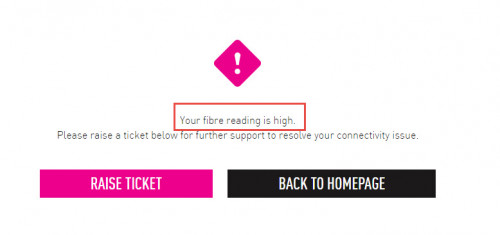 When the tech comes, he will use a power meter to test it, do expect the reading ranging from -15.xdBm <--> -20.xdBm, that would be a usual optimal range. Thanks. |
|
|
Nov 23 2020, 06:07 PM
Show posts by this member only | IPv6 | Post
#6406
|

Senior Member
1,604 posts Joined: Oct 2005 From: Penang 
|
Guys what is the average ping for time broadband? I'm having average 18-21ms. Peak or non peak hour same. The speed is quite consistent at 100mb. Just the ping is a bit high for me.
When on unifi I'm able to get 4-6ms |
|
|
|
|
|
Nov 23 2020, 06:19 PM
|
|
Senior Member
2,318 posts Joined: Dec 2012
|
QUOTE(MaGNiFiCo @ Nov 23 2020, 06:07 PM) Guys what is the average ping for time broadband? I'm having average 18-21ms. Peak or non peak hour same. The speed is quite consistent at 100mb. Just the ping is a bit high for me. My ping always 2-3ms. not more than 5 for max. maybe your router problem? When on unifi I'm able to get 4-6ms  |
|
|
Nov 23 2020, 07:28 PM
|
|
Junior Member
161 posts Joined: Oct 2018
|
QUOTE(kskoay @ Nov 22 2020, 11:53 PM) I have to bring up my case again....my building management office signed the agreement form with Time on 2018, we get noting until now (already more than 2 years)....the latest feedback is still pending for JKR approval...they keep on giving us empty promise! that is worst than unifi...hopefully same thing will not happen to my apartment. |
|
|
Nov 23 2020, 10:02 PM
Show posts by this member only | IPv6 | Post
#6409
|
|
Junior Member
654 posts Joined: May 2020
|
Hi, i just sign up time 100mbps package, got a few questions to ask all shifu:
1. In my apartment, from my room to router, it is about 12m, 5ghz signal very weak, only 1 or 2 bar in my room, just bought wifi booster, should i place at my room or living room? Worry about wifi emission too close to me. 2. There are plastic cover on each of 4 antenna of TP link router, should I remove it? This post has been edited by datolee32: Nov 23 2020, 10:03 PM |
|
|
Nov 24 2020, 12:14 AM
|
 
Elite
8,424 posts Joined: Jul 2008 
|
QUOTE(datolee32 @ Nov 23 2020, 10:02 PM) Hi, i just sign up time 100mbps package, got a few questions to ask all shifu: 1) I assume you mean a WiFi extender. Put it somewhere in the middle from router to your room for the best performance.1. In my apartment, from my room to router, it is about 12m, 5ghz signal very weak, only 1 or 2 bar in my room, just bought wifi booster, should i place at my room or living room? Worry about wifi emission too close to me. 2. There are plastic cover on each of 4 antenna of TP link router, should I remove it? 2) Remove it. |
|
|
Nov 24 2020, 01:07 PM
Show posts by this member only | IPv6 | Post
#6411
|
|
Junior Member
654 posts Joined: May 2020
|
QUOTE(blacktubi @ Nov 24 2020, 12:14 AM) 1) I assume you mean a WiFi extender. Put it somewhere in the middle from router to your room for the best performance. Yea, it is wifi extender. Thank you very much for reply.2) Remove it. |
|
|
Nov 24 2020, 05:11 PM
|
|
Junior Member
659 posts Joined: Nov 2007
|
QUOTE(yoong_y89 @ Nov 23 2020, 07:28 PM) that is worst than unifi...hopefully same thing will not happen to my apartment. No unifi at my place, we are still suffering from streamyx.... |
|
|
Nov 24 2020, 05:21 PM
|
|
Junior Member
85 posts Joined: Sep 2009
|
QUOTE(FusionXY @ Nov 10 2020, 03:51 PM) Lack of USB Port if you don't mind. Hi, i have done the router setting for RT-AX55, so far no issue.You can order from MONO and CO aka Mono Digital from 12am - 2am for the price of RM259. Thanks You need to get the PPPOE Details ready. ID: XXXX@timebb. You may get it from CS or from the work completion form. I may guide you via PM. Thanks. just plug and key in your PPPOE details. There is no special ISP for TIME. there is a new release of the firmware, but i yet to update it. anyway, thanks for reply and help.  |
|
|
|
|
|
Nov 24 2020, 06:22 PM
Show posts by this member only | IPv6 | Post
#6414
|
|
Senior Member
3,836 posts Joined: Aug 2016
|
QUOTE(ILV @ Nov 24 2020, 05:21 PM) Hi, i have done the router setting for RT-AX55, so far no issue. You're welcome. just plug and key in your PPPOE details. There is no special ISP for TIME. there is a new release of the firmware, but i yet to update it. anyway, thanks for reply and help. Have a nice day. Stay Safe! Thanks |
|
|
Nov 25 2020, 09:56 PM
|
|
Junior Member
161 posts Joined: Oct 2018
|
QUOTE(kskoay @ Nov 24 2020, 05:11 PM) No unifi at my place, we are still suffering from streamyx.... can report MCMC. my area had no unifi for many years as well. suddenly out of no where, unifi booth pop out. I immediately go and apply unifi. unifi put a lot effort to expand coverage last 2 years...but now a bit quiet |
|
|
Nov 26 2020, 10:38 PM
Show posts by this member only | IPv6 | Post
#6416
|

Junior Member
127 posts Joined: Feb 2011
|
hi guys, i just upgraded my 100mbps to 500mbps, but only 95mpbs i can get for now. what should i do?
2nd q : can i connect my mesh wifi deco E3 to ac1350? if can, what is the step? and max mbps can i get? |
|
|
Nov 26 2020, 10:55 PM
|

All Stars
11,459 posts Joined: Oct 2007 From: KL
|
QUOTE(tokuyushi.maeda @ Nov 26 2020, 10:38 PM) hi guys, i just upgraded my 100mbps to 500mbps, but only 95mpbs i can get for now. what should i do? Deco E3 only 100Mbps ethernet ports so max around 95Mbps.2nd q : can i connect my mesh wifi deco E3 to ac1350? if can, what is the step? and max mbps can i get? |
|
|
Nov 26 2020, 11:24 PM
Show posts by this member only | IPv6 | Post
#6418
|
|
Junior Member
127 posts Joined: Feb 2011
|
QUOTE(soonwai @ Nov 26 2020, 10:55 PM) Deco E3 only 100Mbps ethernet ports so max around 95Mbps. they claim can get until 800mbps for 5ghz and 300mbps for 2.4ghz. is it wrong? then should i change to another mesh? which one is recommend for 500mbps plan? |
|
|
Nov 26 2020, 11:33 PM
Show posts by this member only | IPv6 | Post
#6419
|
|
Senior Member
3,836 posts Joined: Aug 2016
|
QUOTE(tokuyushi.maeda @ Nov 26 2020, 11:24 PM) they claim can get until 800mbps for 5ghz and 300mbps for 2.4ghz. is it wrong? It depends on LAN Port either is Fast Ethernet (100Mbps) or Gigabit Ethernet (1000Mbps).then should i change to another mesh? which one is recommend for 500mbps plan? How big is your house in sqft? Thanks |
|
|
Nov 26 2020, 11:44 PM
Show posts by this member only | IPv6 | Post
#6420
|
|
Junior Member
127 posts Joined: Feb 2011
|
QUOTE(FusionXY @ Nov 26 2020, 11:33 PM) It depends on LAN Port either is Fast Ethernet (100Mbps) or Gigabit Ethernet (1000Mbps). 1300sqft. but once i entered my bedroom, check fast.com for 5ghz connection, only get 55mbps. 2.4ghz only get 39mbps. distance my router to bedroom only 10-15m only. why meh?How big is your house in sqft? Thanks |
| Change to: |  0.0499sec 0.0499sec
 1.44 1.44
 6 queries 6 queries
 GZIP Disabled GZIP Disabled
Time is now: 23rd December 2025 - 03:28 AM |
 Quote
Quote