

Thanks Mr. JJ Choo willing to solve my prob. Immediately. Kamsiah........ Very much. 1st time face to face see u. Mr nice guy. 👍🏻👍🏻👍🏻👍🏻👍🏻
TIME [OFFICIAL] TIME Fibre Broadband™ v4, Experience the ONE TRUE 2Gbps
TIME [OFFICIAL] TIME Fibre Broadband™ v4, Experience the ONE TRUE 2Gbps
|
|
 Nov 18 2020, 05:58 PM Nov 18 2020, 05:58 PM
Show posts by this member only | IPv6 | Post
#6381
|
 
Junior Member
106 posts Joined: Sep 2010 
|
Thanks Mr. JJ Choo willing to solve my prob. Immediately. Kamsiah........ Very much. 1st time face to face see u. Mr nice guy. 👍🏻👍🏻👍🏻👍🏻👍🏻
|
|
|
|
|
|
Nov 18 2020, 06:44 PM
Show posts by this member only | IPv6 | Post
#6382
|

Senior Member
3,616 posts Joined: Feb 2006
|
QUOTE(Choongster @ Nov 16 2020, 03:10 PM) can someone share me Time Fiber installation for apartment building? Hi, we can assist on that., feel free to drop us a line.Not those that is already build into new building. I am looking for those setup where installer will pull a the outside of the unit ( riser ) back into your unit . Would like to see the end point .. as i am doing reno .. would like to see to coordinate the installation and final location of the "fiber plate" if any  Thanks. |
|
|
Nov 18 2020, 06:45 PM
Show posts by this member only | IPv6 | Post
#6383
|
|
Senior Member
3,616 posts Joined: Feb 2006
|
QUOTE(hlmilk112 @ Nov 18 2020, 05:58 PM) Thanks Mr. JJ Choo willing to solve my prob. Immediately. Kamsiah........ Very much. 1st time face to face see u. Mr nice guy. 👍🏻👍🏻👍🏻👍🏻👍🏻 Haha Bro...glad that can help ..nice talking to you Bro  |
|
|
Nov 18 2020, 07:13 PM
Show posts by this member only | IPv6 | Post
#6384
|

Senior Member
2,380 posts Joined: Dec 2005 
|
QUOTE(fakerdemit @ Nov 18 2020, 02:45 AM) I'm having a poor wifi connection from my room, the router is like 2-3 meter away from my room. I don't know why, maybe there is dead spot in my room. I'm looking for ways to improve the wifi connection because of wfh. Can someone suggest some tips or device to buy? u plan to change landlord router as well?Currently using default router, but I don't think can upgrade to a better one because I'm only renting the room and the router was provided by the landlord. My housemate got himself a wifi extender but according to him even that doesn't improve the speed. So I'm looking at wifi mesh but not sure which one should I get. |
|
|
Nov 18 2020, 09:18 PM
|
|
Junior Member
161 posts Joined: Oct 2018
|
QUOTE(jjj2 @ Nov 18 2020, 06:45 PM) Haha Bro...glad that can help ..nice talking to you Bro Hi, usually how long does it take for TIME to survey the site & complete installation/lay fiber? assume the JMB already provide ROE. |
|
|
Nov 18 2020, 09:40 PM
|

Junior Member
56 posts Joined: Jul 2020
|
QUOTE(fakerdemit @ Nov 18 2020, 02:45 AM) I'm having a poor wifi connection from my room, the router is like 2-3 meter away from my room. I don't know why, maybe there is dead spot in my room. I'm looking for ways to improve the wifi connection because of wfh. Can someone suggest some tips or device to buy? Get a LAN cable plug into your default router and pull into your room. Currently using default router, but I don't think can upgrade to a better one because I'm only renting the room and the router was provided by the landlord. My housemate got himself a wifi extender but according to him even that doesn't improve the speed. So I'm looking at wifi mesh but not sure which one should I get. Buy this device, plug the cable in and setup. Voila, enjoy your own personal WIFI. https://www.senheng.com.my/tp-link-300mbps-...6oaAvPEEALw_wcB |
|
|
|
|
|
Nov 18 2020, 11:58 PM
Show posts by this member only | IPv6 | Post
#6387
|
|
Senior Member
3,616 posts Joined: Feb 2006
|
QUOTE(yoong_y89 @ Nov 18 2020, 09:18 PM) Hi, usually how long does it take for TIME to survey the site & complete installation/lay fiber? assume the JMB already provide ROE. Hi, it's hard to give a specific exact timeframe as the work depends very much on too many uncertain factors.Hence, usually it will take up at least 6--9 months or more. Thanks. |
|
|
Nov 19 2020, 02:05 AM
|

Junior Member
227 posts Joined: Nov 2008
|
QUOTE(ryansxs @ Nov 18 2020, 07:13 PM) u plan to change landlord router as well? No really since I'll be moving out anyway in a year and probably not gonna use the router though. Do you think I should just upgrade the router and bring it with me when I move out?QUOTE(CH3COOH @ Nov 18 2020, 09:40 PM) Get a LAN cable plug into your default router and pull into your room. Ok thank you. I just need to figure out how to pull the LAN cable to my room. Any suggestion other than nail cable clip? Buy this device, plug the cable in and setup. Voila, enjoy your own personal WIFI. https://www.senheng.com.my/tp-link-300mbps-...6oaAvPEEALw_wcB |
|
|
Nov 19 2020, 09:20 AM
|
|
Junior Member
52 posts Joined: Jan 2012
|
QUOTE(fakerdemit @ Nov 19 2020, 02:05 AM) . Any suggestion other than nail cable clip? https://shopee.com.my/product/147176156/2294042585https://shopee.com.my/product/214944925/3552409449 These might be some options. |
|
|
Nov 19 2020, 12:25 PM
Show posts by this member only | IPv6 | Post
#6390
|
|
Senior Member
2,380 posts Joined: Dec 2005
|
QUOTE(fakerdemit @ Nov 19 2020, 02:05 AM) No really since I'll be moving out anyway in a year and probably not gonna use the router though. Do you think I should just upgrade the router and bring it with me when I move out? I think cheaper solution is just pull a long LAN cable to your room. Then use a WIFI AP device.Ok thank you. I just need to figure out how to pull the LAN cable to my room. Any suggestion other than nail cable clip? |
|
|
Nov 19 2020, 02:23 PM
Show posts by this member only | IPv6 | Post
#6391
|
|
Probation
5 posts Joined: May 2019
|
Hi, a quick question here. Does upgrading router firmware will reset the settings? Do I need to do fresh setup after upgrade?
|
|
|
Nov 19 2020, 02:54 PM
Show posts by this member only | IPv6 | Post
#6392
|
|
Probation
5 posts Joined: May 2019
|
If I do need to configure it, can someone kindly guide me the instructions through PM.
Thanks. |
|
|
Nov 20 2020, 11:47 AM
Show posts by this member only | IPv6 | Post
#6393
|

All Stars
12,062 posts Joined: Oct 2017
|
Is it call from TIME?
Every week call me  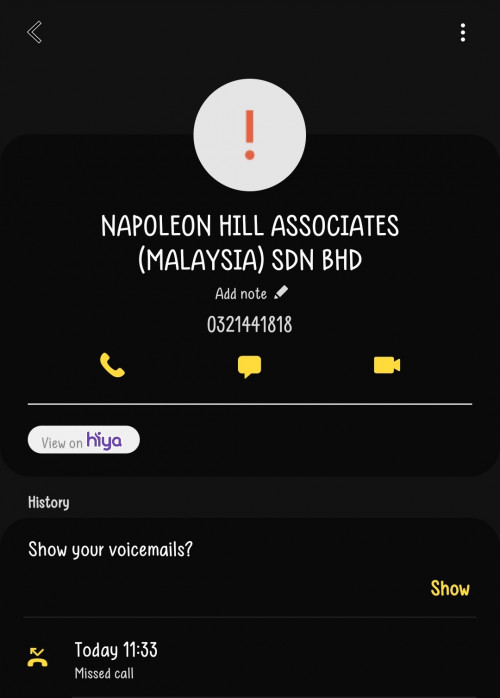 But google search look different |
|
|
|
|
|
Nov 21 2020, 07:21 PM
Show posts by this member only | IPv6 | Post
#6394
|
|
Probation
1 posts Joined: Oct 2019
|
Is time down at subang area?
|
|
|
Nov 21 2020, 07:46 PM
|

Junior Member
354 posts Joined: Apr 2007 From: sarawak
|
after 2 year and 1 month, i will have no choice to terminate TIME as moving to house and no TIME fibre there. Well, now tying contract with Maxis Fibre (with free 65inch TV). Thanks TIME for a more or less hassle free service.
|
|
|
Nov 21 2020, 10:35 PM
|
|
Junior Member
464 posts Joined: Aug 2008
|
When they installed TIME, we got 2 things: router and one-other-thing-that-I-dont-know-the-name
What's the name of that thing? Do the 2 things connect using normal ethernet cable? |
|
|
Nov 21 2020, 10:40 PM
|

Senior Member
3,836 posts Joined: Aug 2016
|
QUOTE(red4900 @ Nov 21 2020, 10:35 PM) When they installed TIME, we got 2 things: router and one-other-thing-that-I-dont-know-the-name Hello, do you mean the White Huawei Modem aka ONU?What's the name of that thing? Do the 2 things connect using normal ethernet cable? Thanks. |
|
|
Nov 21 2020, 10:58 PM
|
|
Junior Member
464 posts Joined: Aug 2008
|
QUOTE(FusionXY @ Nov 21 2020, 10:40 PM) Hello, do you mean the White Huawei Modem aka ONU? Ahh that thing is called ONU. Yes. Does it connect to router using normal ethernet cable?Thanks. |
|
|
Nov 21 2020, 11:24 PM
|
|
Senior Member
3,836 posts Joined: Aug 2016
|
QUOTE(red4900 @ Nov 21 2020, 10:58 PM) Ahh that thing is called ONU. Yes. Does it connect to router using normal ethernet cable? Yes it is. Thanks |
|
|
Nov 21 2020, 11:50 PM
|
|
Junior Member
119 posts Joined: Dec 2007
|
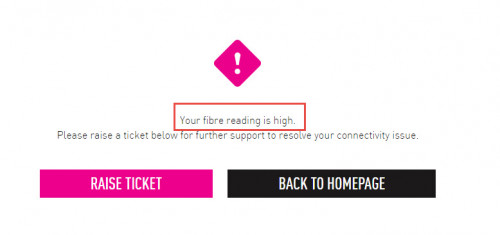
I just upgraded my package from 100mbps to 500mbps. Restarted both router and modem a few times. Did a few speedtest , the speed is still around 100-120 mbps. Run a diagnosis and i get the error as the screenshot. Anyone know what does that mean ? The internet now is still usable by the way just the speed is still at around 100mbps although Time confirmed they already upgraded my account to 500mbps. Already escalated to Time , they said technician will contact me during working hours next week
 This post has been edited by koaybl: Nov 21 2020, 11:53 PM |
| Change to: |  0.0394sec 0.0394sec
 0.85 0.85
 6 queries 6 queries
 GZIP Disabled GZIP Disabled
Time is now: 22nd December 2025 - 09:18 PM |
 Quote
Quote