Welcome Guest ( Log In | Register )

668 Pages « < 77 78 79 80 81 > » Bottom

Outline · [ Standard ] · Linear+

TIME [OFFICIAL] TIME Fibre Broadband™ v4, Experience the ONE TRUE 2Gbps

views
     
FusionXY
post Oct 31 2018, 09:45 PM

LAZZIE ON VACATION
*******
Senior Member
3,834 posts

Joined: Aug 2016

QUOTE(psyduck89 @ Oct 31 2018, 09:34 PM)
seems better after restart
1.0 Gbps
is it normal case even using cable oso hadly able to et 500?
*
Upload speed not good.

Try out CAT 6 cable.
I supposed the LAN Cable quality not good already.

Thanks
psyduck89
post Oct 31 2018, 09:46 PM

New Korean Member
*****
Senior Member
818 posts

Joined: Nov 2009
From: Not Your Business
QUOTE(hashtag2016 @ Oct 31 2018, 09:40 PM)
I think you r confused between the MIMO spec of  LTE 4G and WIFI .
this 4x4 should be LTE 4G not for WIFI. U may get 1Gbps from your phone, if Yes/Maxis/Digi offer 1Gbps LTE internet speed.

AFAIK, no mobile phone is support 3x3 yet, coz more power consuming...
all we got now is either  2x2 or 1x1 MIMO for WIFI 802.11AC.. (nothing special, so nobody even mention about it in their advertisent).
*
QUOTE
Network & Connectivity
Enhanced 4x4 MIMO, 5CA, LAA, LTE Cat.18

Wi-Fi 802.11 a/b/g/n/ac (2.4/5GHz), VHT80 MU-MIMO, 1024QAM,

Bluetooth® v 5.0 (LE up to 2Mbps), ANT+, USB Type-C, NFC, Location (GPS, Galileo, Glonass, BeiDou)


copied from samsung official site...
perhaps u r right... they din mention about wifi mimo...

hashtag2016
post Oct 31 2018, 09:51 PM

On my way
****
Junior Member
506 posts

Joined: Feb 2016
QUOTE(psyduck89 @ Oct 31 2018, 09:46 PM)
copied from samsung official site...
perhaps u r right... they din mention about wifi mimo...
*
so, the best u can get from 1x1 and 2x2 (Wifi 802.11ac) is 433Mbps and 866Mbps in theory.
(note: above calculation base on 256-QAM, 80Mhz)

edited@2018.11.01:
just found that Huawei Mate 20 Series which is using "Kirin 980 (7nm SoC) + Huawei Hi1103(wifi-chipset)" claimed to support 802.11ac wifi speed upto 1732 Mbps . It is using 2x2, 160Mhz bandwidth..
so, to reach the claimed peak speed, should ensure the wifi router support 160Mhz (VHT160) as well.

This post has been edited by hashtag2016: Nov 1 2018, 06:15 AM
voncrane
post Oct 31 2018, 11:27 PM

Noir et fier!
*******
Senior Member
7,120 posts

Joined: Oct 2011
From: Wakanda


QUOTE(muffdiver @ Oct 31 2018, 08:34 PM)
Thought I wanted to share some review for my 500Mbps network. I am using Asus RT-AC88U which I bought since 1 years+ ago when I was just having 100Mbps. My apartment is about 2500 sq ft and have thick walls. I wanted just a single WIFI router which can cover the entire house and this really performed well. Quite pricey as it cost me about RM 1.9k+ back then.

For my desktop which is about 30 feet away from the router with 2 walls in between, I upgraded to a WIFI Adapter, Asus PCE-AC88. From the windows adapter properties, my PC is connecting at 975mbps. For my Speedtest on Time's site, I am getting 350Mbps download and 482Mbps upload with 9ms ping.

Everything seems much faster now from web surfing, Netflix on AppleTV is loading 4K much faster, multiple streaming without an issue. Completely satisfied with this new upgrade!
*
Nice.. Glad to know that the router can easily cover the whole space.. thumbup.gif
jjj2
post Nov 1 2018, 12:27 AM

Look at all my stars!!
*******
Senior Member
3,607 posts

Joined: Feb 2006
Can't wait to try this new router from Asus, RT AX88U 802.11AX featuring OFDMA & MU-MIMO.

Supports 160MHz bandwidth and 1024-QAM to provide WiFi speed of up 6000Mbps :
1148Mbps on 2.4GHz band & 4804Mbps on 5GHz band which is over twice as fast as 802.11ac 4×4 dual-band routers.

user posted image


https://www.asus.com/Networking/RT-AX88U/

This post has been edited by jjj2: Nov 1 2018, 08:47 AM
gin&tonic
post Nov 1 2018, 07:47 AM

Look at all my stars!!
*******
Senior Member
4,874 posts

Joined: Sep 2011


QUOTE(jjj2 @ Nov 1 2018, 12:27 AM)
Can't wait to try this new router from Asus, RT AX88U 802.11AX featuring OFDMA & MU-MIMO.

Supports 160MHz bandwidth and 1024-QAM to provide WiFi speed of up 6000Mbps :
1148Mbps on 2.4GHz band & 4804Mbps on 5GHz band which is over twice as fast as 802.11ac 4×4 dual-band routers.

user posted image

https://www.asus.com/Networking/RT-AX88U/
*
Nice design. Looks abit like Tenda AC18.
Probably need to sell 1 kidney for this. Haha

This post has been edited by gin&tonic: Nov 1 2018, 07:47 AM
niceguypenang
post Nov 1 2018, 08:06 AM

Getting Started
**
Junior Member
193 posts

Joined: Oct 2009


QUOTE(LeoLilieno @ Oct 30 2018, 09:13 PM)
Walau eh bro.... You are better than the TIME Tech guy. All solved.... Now I dont have to switch off IPv6
*
This is for which issue? Normal DNS or something else, sorry I miss the picture here.

For the WiFI router what is the normal DNS setting should be:

Primary: ??
Secondary: ??

Thanks.
jjj2
post Nov 1 2018, 08:28 AM

Look at all my stars!!
*******
Senior Member
3,607 posts

Joined: Feb 2006
QUOTE(gin&tonic @ Nov 1 2018, 07:47 AM)
Nice design. Looks abit like Tenda AC18.
Probably need to sell 1 kidney for this. Haha
*
Hahha...it looks like AC88U, its predecessor..
jjj2
post Nov 1 2018, 08:30 AM

Look at all my stars!!
*******
Senior Member
3,607 posts

Joined: Feb 2006
QUOTE(niceguypenang @ Nov 1 2018, 08:06 AM)
This is for which issue? Normal DNS or something else, sorry I miss the picture here.

For the WiFI router what is the normal DNS setting should be:

Primary: ??
Secondary: ??

Thanks.
*
Hi,

You can leave the nornal settings that comes with the router (TIME firmware) untouched.

Primary : TIME DNS
Secondary : 8.8.8.8

Thanks.
Lord_Ashe
post Nov 1 2018, 08:37 AM

Old Treasure Hunter Sidekick
******
Senior Member
1,495 posts

Joined: Sep 2005
From: Damansara Perdana - KL


QUOTE(muffdiver @ Oct 31 2018, 08:34 PM)
Thought I wanted to share some review for my 500Mbps network. I am using Asus RT-AC88U which I bought since 1 years+ ago when I was just having 100Mbps. My apartment is about 2500 sq ft and have thick walls. I wanted just a single WIFI router which can cover the entire house and this really performed well. Quite pricey as it cost me about RM 1.9k+ back then.

For my desktop which is about 30 feet away from the router with 2 walls in between, I upgraded to a WIFI Adapter, Asus PCE-AC88. From the windows adapter properties, my PC is connecting at 975mbps. For my Speedtest on Time's site, I am getting 350Mbps download and 482Mbps upload with 9ms ping.

Everything seems much faster now from web surfing, Netflix on AppleTV is loading 4K much faster, multiple streaming without an issue. Completely satisfied with this new upgrade!
*
Sounds like this router is serving you well! My apartment is nowhere as big as yours but this seems to be a good option to get good coverage!
jjj2
post Nov 1 2018, 08:39 AM

Look at all my stars!!
*******
Senior Member
3,607 posts

Joined: Feb 2006
QUOTE(Lord_Ashe @ Nov 1 2018, 08:37 AM)
Sounds like this router is serving you well! My apartment is nowhere as big as yours but this seems to be a good option to get good coverage!
*
Yes, Bro...I have one unit of this AC88U too..& it performs awesome.

stasio
post Nov 1 2018, 02:33 PM

10k Club
********
All Stars
18,504 posts

Joined: Oct 2007
From: P.Jaya
QUOTE(andyheng @ Oct 29 2018, 05:54 PM)
1 Gbit on Asus RT-AC88U Router!

[attachmentid=10091075][attachmentid=10091077]
*
1 Gbps plan on TP-Link AC2300....(30 met of Cat 5e cable to my room from router)

Attached Image

To Singapore....
user posted image

This post has been edited by stasio: Nov 1 2018, 02:51 PM
FusionXY
post Nov 1 2018, 07:09 PM

LAZZIE ON VACATION
*******
Senior Member
3,834 posts

Joined: Aug 2016

QUOTE(stasio @ Nov 1 2018, 02:33 PM)
1 Gbps plan on TP-Link AC2300....(30 met of Cat 5e cable to my room from router)

Attached Image

To Singapore....
user posted image
*
Wow!. Zero PING?

tongue.gif tongue.gif
stasio
post Nov 1 2018, 07:48 PM

10k Club
********
All Stars
18,504 posts

Joined: Oct 2007
From: P.Jaya
QUOTE(FusionXY @ Nov 1 2018, 07:09 PM)
Wow!. Zero PING?

tongue.gif  tongue.gif
*
Yup....from TIME server ping....0 or max. 2

user posted image

Attached Image

This post has been edited by stasio: Nov 1 2018, 07:59 PM
fai.the.zal
post Nov 1 2018, 09:09 PM

Getting Started
**
Junior Member
84 posts

Joined: Oct 2018
QUOTE(jjj2 @ Oct 31 2018, 12:00 PM)
Hi,

Can you pm me your email ? I will send you.

Thanks.
*
I'm using C1200 & having the same issue too.. system says that i have entered an invalid account number. Any way i can check my firmware version? Thanks. rclxms.gif
FusionXY
post Nov 1 2018, 09:12 PM

LAZZIE ON VACATION
*******
Senior Member
3,834 posts

Joined: Aug 2016

QUOTE(stasio @ Nov 1 2018, 07:48 PM)
Yup....from TIME server ping....0 or max. 2

user posted image

Attached Image
*
Wow! Wanna move to your place liao. Hehe

biggrin.gif biggrin.gif
zebras
post Nov 1 2018, 09:36 PM

Casual
***
Junior Member
302 posts

Joined: Mar 2010
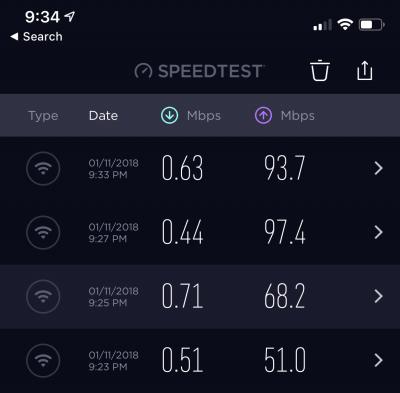
Why is my u time so slow😭


Attached thumbnail(s)
Attached Image
lyrilmaki
post Nov 1 2018, 09:40 PM

Enthusiast
*****
Senior Member
964 posts

Joined: Sep 2010


user posted image
What a superb speed... sad.gif sad.gif

Restarted few times also like this
Yamy
post Nov 1 2018, 09:55 PM

Casual
***
Junior Member
462 posts

Joined: Nov 2011
QUOTE(lyrilmaki @ Nov 1 2018, 09:40 PM)
user posted image
What a superb speed...  sad.gif  sad.gif

Restarted few times also like this
*
Me too experiencing the snail speed and my DL is around 0.5-1.0 Mbps for few hours dy! This is just my 3rd day using TIME! confused.gif vmad.gif

Now i just swap to my Mobile Hotspot for surfing.

This post has been edited by Yamy: Nov 1 2018, 09:55 PM
voncrane
post Nov 1 2018, 10:12 PM

Noir et fier!
*******
Senior Member
7,120 posts

Joined: Oct 2011
From: Wakanda


QUOTE(zebras @ Nov 1 2018, 09:36 PM)
Why is my u time so slow😭
*
QUOTE(lyrilmaki @ Nov 1 2018, 09:40 PM)
user posted image
What a superb speed...  sad.gif  sad.gif

Restarted few times also like this
*
QUOTE(Yamy @ Nov 1 2018, 09:55 PM)
Me too experiencing the snail speed and my DL is around 0.5-1.0 Mbps for few hours dy! This is just my 3rd day using TIME!  confused.gif  vmad.gif

Now i just swap to my Mobile Hotspot for surfing.
*
This is becoming a trend now.. TIME seems can't provide reliable speeds at night time.. Any ideas why this seems to happen so frequently?

668 Pages « < 77 78 79 80 81 > » Top
 

Change to:
| Lo-Fi Version
0.0196sec    0.72    6 queries    GZIP Disabled
Time is now: 12th December 2025 - 12:30 AM