

may I know how to change/enable the DHCPv6 to Google DNS in HG8145X6?


thanks.
TIME [OFFICIAL] TIME Fibre Broadband™ v4, Experience the ONE TRUE 2Gbps
|
|
 May 7 2022, 10:31 AM May 7 2022, 10:31 AM
Return to original view | IPv6 | Post
#1
|
 
Senior Member
3,795 posts Joined: Jan 2003 From: .: Old Klang Road :.   
|
Hey guys,
may I know how to change/enable the DHCPv6 to Google DNS in HG8145X6?
thanks. |
|
|
|
|
|
May 12 2022, 03:31 PM
Return to original view | IPv6 | Post
#2
|
|
Senior Member
3,795 posts Joined: Jan 2003 From: .: Old Klang Road :.
|
QUOTE(jjj2 @ May 9 2022, 01:44 PM) Hi, try change the DNS source to Static. I guess is this one? Thanks.  
QUOTE(jun_ng_1208 @ May 10 2022, 11:41 AM) My router page menu is much more simple than yours and seems to have much lesser settings to change is a default interface, I didn't change anything. How did you change the interface? are you using WiFi-6 Router (HG8145X6) as well? |
|
|
May 12 2022, 11:40 PM
Return to original view | IPv6 | Post
#3
|
|
Senior Member
3,795 posts Joined: Jan 2003 From: .: Old Klang Road :.
|
QUOTE(jun_ng_1208 @ May 12 2022, 11:21 PM) Yea wor~ You need to click the "More" icon and bring you to advanced pages? But mine looks like this.. 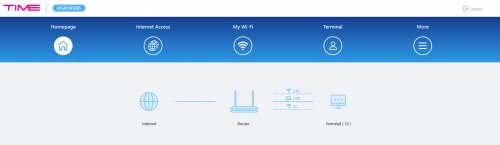 anyway, my unit Hardware & Software as below : HWVer:1CDD.A SWVer:V5R020C10S135 Clavie liked this post
|
|
|
Nov 26 2023, 12:09 AM
Return to original view | IPv6 | Post
#4
|
|
Senior Member
3,795 posts Joined: Jan 2003 From: .: Old Klang Road :.
|
QUOTE(diehard1979 @ Nov 25 2023, 03:29 PM)  Time should do something already. Other provider now keep doing a lot of offer and cut price. Now Astro Fibre even offer 500Mbps for RM90 per month and it is fixed price for 24 months. Astro Fiber Plan website still show wonderful price...  |
|
|
Mar 25 2024, 11:15 AM
Return to original view | IPv6 | Post
#5
|
|
Senior Member
3,795 posts Joined: Jan 2003 From: .: Old Klang Road :.
|
Guys,
Is it must call TIME technical team to reconfigure the default WiFi Router to Bridge mode ? Cannot DIY ? Thinking to pair with better WiFi router after been used two-years of the default WiFi router.. |
|
|
Apr 4 2024, 12:37 AM
Return to original view | IPv6 | Post
#6
|
|
Senior Member
3,795 posts Joined: Jan 2003 From: .: Old Klang Road :.
|
Just got the speed boost..
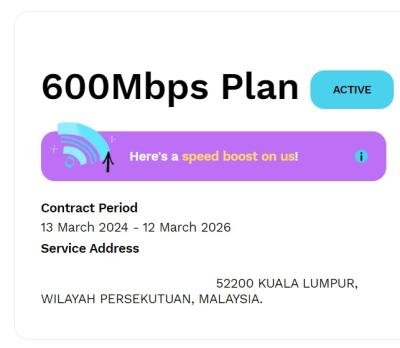
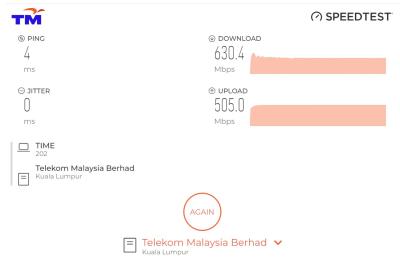
 This post has been edited by ahpaul82: Apr 4 2024, 12:38 AM |
|
|
|
|
|
Apr 4 2024, 08:47 AM
Return to original view | IPv6 | Post
#7
|
|
Senior Member
3,795 posts Joined: Jan 2003 From: .: Old Klang Road :.
|
QUOTE(JimmyX @ Apr 4 2024, 08:38 AM) Do you receive the email of speed boost? Macam no see any email but in TIME self-care portal saw the speed boost completed notification..
|
|
|
Apr 14 2024, 03:14 PM
Return to original view | IPv6 | Post
#8
|
|
Senior Member
3,795 posts Joined: Jan 2003 From: .: Old Klang Road :.
|
QUOTE(blacktubi @ Apr 8 2024, 10:58 AM) Basically anything that's AX3000 and above will be better than that provided modem router. do share your thoughts after change to new WiFi router yaI will get something that's AX4200 and above for a more significant upgrade. Yup, it's an all-in-one product. If you want to use your own router, you need to contact TIME and request their customer service to switch it to bridge mode (they can do it remotely) then you can proceed with the usual PPPOE config as usual. PPPOE details available on self care portal. I also planning to replace the stock TIME WiFi Modem Router... |
|
|
Apr 21 2024, 04:42 PM
Return to original view | IPv6 | Post
#9
|
|
Senior Member
3,795 posts Joined: Jan 2003 From: .: Old Klang Road :.
|
QUOTE(jjj2 @ Apr 14 2024, 07:13 PM) You need to contact the CS for that. Possible do it ownself?  |
|
|
Apr 21 2024, 05:51 PM
Return to original view | IPv6 | Post
#10
|
|
Senior Member
3,795 posts Joined: Jan 2003 From: .: Old Klang Road :.
|
QUOTE(derthvadar @ Apr 21 2024, 05:37 PM) Nope, the CS will enable the function to request for termination from their end. Bro, Must submit within 24-hours, else need to contact them again. Must serve the 30-days notice even after out of contract.  ada wrong quote boh? I'm asking whether can change the default connection mode to Bridge Mode so I can use my own WiFi Router...  |
|
|
May 7 2024, 10:00 PM
Return to original view | Post
#11
|
|
Senior Member
3,795 posts Joined: Jan 2003 From: .: Old Klang Road :.
|
Upgraded the stock TIME WiFi Modem Router to this :
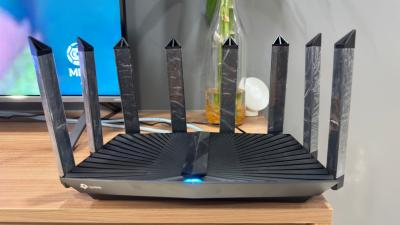
Called to TIME SC and get them change the connection to Bridge Mode, About 30mins they called back said done, Insert Username & Password under PPPOE and get it connected without much issue. One thing just curious, Should use IPv4 or IPv6 PPPOE leh? Currently using IPv4. |
|
|
May 18 2024, 08:16 AM
Return to original view | IPv6 | Post
#12
|
|
Senior Member
3,795 posts Joined: Jan 2003 From: .: Old Klang Road :.
|
QUOTE(leechunghan @ May 17 2024, 09:39 PM) Is this Archer AX95? Nope How is the coverage signal of this Router at house? Becoz already bought this Router few months but no yet setup 😂 It's an AX80. 
The WiFi connection seems better than stock TIME Modem WiFi Router.. Previously having IPv6 difficulty, But now seems all okay already. leechunghan and jjj2 liked this post
|
|
|
May 19 2024, 02:17 PM
Return to original view | IPv6 | Post
#13
|
|
Senior Member
3,795 posts Joined: Jan 2003 From: .: Old Klang Road :.
|
QUOTE(leechunghan @ May 19 2024, 12:31 PM) You guys think this router is enough to cover whole 1001sf condo house or not? 🤔 LOLActually I was using TIME mesh in every bedroom but the speed is just 30-80Mbps in every bedroom , if at living room beside the main router can get full speed 500Mbps I'm in 1001sf condo too Definitely the WiFi performance greatly improved when I in bedrooms and toilets leh .. I initially have plan to install the WiFi extender in 2nd bed room, But seems the connection better than the TIME Mesh set-up now, So probably wait awhile and see how things goes.. |
| Change to: |  0.0333sec 0.0333sec
 0.73 0.73
 7 queries 7 queries
 GZIP Disabled GZIP Disabled
Time is now: 8th December 2025 - 04:30 AM |
 Quote
Quote