Welcome Guest ( Log In | Register )

Bump Topic Topic Closed RSS Feed
420 Pages « < 18 19 20 21 22 > » Bottom

Outline · [ Standard ] · Linear+

Unifi Official TM UniFi High Speed Broadband Thread V35, READ 1ST PAGE FOR TURBO SPEED INFO!

views
     
cannavaro
post Sep 18 2018, 11:45 PM

CATTENACIO
*******
Senior Member
3,008 posts

Joined: Sep 2005
From: T.T.D.I, Bukit Damansara


QUOTE(JohnLai @ Sep 18 2018, 11:32 AM)
That inspectre tool hasn't been updated for quite a while. It can't detect the latest spectre mitigation registry key.
Need to manually disable those mitigations.

Plus the 'good' performance merely indicated PCID optimization being used for HDD read/write etc.

Before you do so....try to open up task manager, go to CPU utilization, switch graph to per logical core basis.
Run a speedtest and check if one of the core is maxed or not.
Currently it only happen if one has older spectre microcode installed.

Read more here https://forum.lowyat.net/index.php?showtopic=4649008

and

https://support.microsoft.com/en-us/help/40...nerabilities-in
Section Manage Speculative Store Bypass and mitigations around Spectre Variant 2 and Meltdown
*


On wifi, I don't see any of the cores maxing up. Haven't tried on cable, will do that when I get the chance.
Thanks for the info and links!

QUOTE(soonwai @ Sep 18 2018, 02:10 PM)
Bought at RM26. A bit cheaper now. https://shopee.com.my/product/28053243/377998272/
But it doesn't have USB ports like yours.

What chipset is the Ugreen? Mine is a Realtek. Product ID: 0x8153 so I think should be RTL8153.
*
It's ASIX Electronics.. particularly ASIX 'AX88179'. Not familiar with this company.. hmm.gif
stephantsen
post Sep 18 2018, 11:48 PM

Regular
******
Senior Member
1,966 posts

Joined: Sep 2014


QUOTE(gahkin @ Sep 18 2018, 11:44 PM)
from sabah fly to kl ?  blink.gif
*
its my parents house, visit there few days and though tm point sabah able to downgrade but the fact is no. now back to kl and decide to walk in to main branch to settle this issue.

This post has been edited by stephantsen: Sep 18 2018, 11:49 PM
StuartLee2015
post Sep 18 2018, 11:51 PM

Regular
******
Senior Member
1,221 posts

Joined: Sep 2014
From: Malaysia


QUOTE(silver311 @ Sep 18 2018, 07:30 PM)
Hi,

Yeah, I've troubleshoot based on the 1st page.

- Currently using Asus RT-N18U which supports 1gbps
- BTU Alcatel Lucent I-240-G supports 1gbps as well
- All connected using Dintek cat6 lan cables

Anything that I missed? Anyway, I guess I'll be calling their hotline to check on their side. And maybe as per 1st page, might be btu configuration issue as well? Thanks by the way for helping
*
I think you need an AC Router. 1300 and above for better.

I using DIR842.. achieve 500+ Mbps on Cat6 Lan ( tested by TM's Technician cable ) which i don't have now.
and Wifi can achieve 320Mbps on DWA182 (Rev.D)
soonwai
post Sep 18 2018, 11:52 PM


********
All Stars
11,455 posts

Joined: Oct 2007
From: KL


QUOTE(dickybird @ Sep 18 2018, 10:34 PM)
So when is the mass rollout?
*
From all my correspondence with TM on the same matter, they made it very clear that it'll be at the end of the pilot phase. smile.gif
dav3
post Sep 18 2018, 11:54 PM

Getting Started
**
Junior Member
230 posts

Joined: Mar 2006


i'm living in Condo, will i get to Turbo as well? My condo building is still using the copper cable sad.gif
nikrizal
post Sep 19 2018, 12:04 AM

Regular
******
Senior Member
1,230 posts

Joined: Oct 2005
QUOTE(Zi-Tech @ Sep 18 2018, 11:31 PM)
nope.... only 2x2 wifi... 4x4 only for lte...

https://www.apple.com/iphone-xs/specs/
*
QUOTE(soonwai @ Sep 18 2018, 11:42 PM)
Awesome, for LTE. Not for wifi. WiFi still 2x2.
*
Thanks guys for the clarification. Bad move by Apple then!
stasio
post Sep 19 2018, 12:11 AM

10k Club
********
All Stars
18,503 posts

Joined: Oct 2007
From: P.Jaya
QUOTE(dav3 @ Sep 18 2018, 11:54 PM)
i'm living in Condo, will i get to Turbo as well? My condo building is still using the copper cable sad.gif
*
No TURBO....max. speed 30-50Mbps......usual with high price (as me RM249 !!)
If TIME there...go to TIME.

This post has been edited by stasio: Sep 19 2018, 12:22 AM
JohnLai
post Sep 19 2018, 12:15 AM

Skeptical Cat
*******
Senior Member
3,669 posts

Joined: Apr 2006
QUOTE(cannavaro @ Sep 18 2018, 11:45 PM)
On wifi, I don't see any of the cores maxing up. Haven't tried on cable, will do that when I get the chance.
Thanks for the info and links!
*
It kinda depend on the Wifi and LAN transfer speed, CPU clock and installed microcode version.

Microsoft (not sure about Mac OS or Linux) forces mandatory microcode update (problem = it is older spectre mitigation microcode) on users with win10 (not sure about win7).
If the CPU single thread performance isn't good enough or CPU isn't clocked high enough, then you might encounter network speed issue with microsoft older microcode.
For my I5-3570K (with microcode + mitigation) overclocked at 4.2Ghz, best speed I can get over is around 650 - 700Mbps via LAN Iperf to my other Haswell I3-4330 3.5Ghz (with mitigation disabled, thus very low cpu utilization on this PC).

For pc/laptop wifi adapter 802.11ac with 2x2:2 that maxed at 450Mbps, I don't think one of the cpu cores will be maxed, probably higher utilization (60-70%) on that one core depending your CPU clock. hmm.gif

The guy on the other thread overclocked his I5-4690K to 4.5Ghz to compensate for the older spectre microcode performance penalty just to get 1Gbps transfer speed via LAN back until bluescreen. sweat.gif
johnnywynne
post Sep 19 2018, 12:25 AM

Getting Started
**
Junior Member
70 posts

Joined: Jul 2009
Still waiting on my Turbo upgrade. Have been paying RM329 a month since June 2016 for my 100Mb line. But will be interesting to test my set up. I have an Asus RT68u router handling my IP assignments but lan connected to my Netgear Orbi Router in AP mode handling the WiFi. Netgear Orbi supposedly has 1733Mb on the dedicated backhaul channel. Ive checked and consistently get between 650 and 800 (transfer tests) between Orbi router and Orbi satellites. TV, Firestick and HTPC are wired connections at the satellite. Users in the US say they get close to full gigabit Internet speeds so can't wait to test.

This post has been edited by johnnywynne: Sep 19 2018, 12:37 AM
soonwai
post Sep 19 2018, 12:31 AM


********
All Stars
11,455 posts

Joined: Oct 2007
From: KL


QUOTE(biloxee @ Sep 18 2018, 10:54 PM)
Yup, I just tested using two very old 1.5 Meter CAT 5 cables. Both sync @ 1Gbps but maxes out at about 400Mbps constant...
*
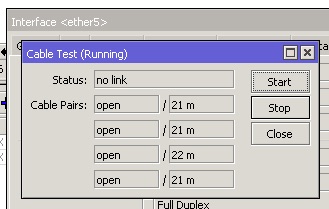
Mine is 20m. Not bad for 350Mbps for Cat 5 at that length, I guess.
user posted image
I hand measured it at 20m but I think the Mikrotik is more accurate.

This post has been edited by soonwai: Sep 19 2018, 12:38 AM
kwss
post Sep 19 2018, 12:33 AM

Regular
******
Senior Member
1,207 posts

Joined: Aug 2018
QUOTE(JohnLai @ Sep 19 2018, 12:15 AM)
It kinda depend on the Wifi and LAN transfer speed, CPU clock and installed microcode version.

Microsoft (not sure about Mac OS or Linux) forces mandatory microcode update (problem = it is older spectre mitigation microcode) on users with win10 (not sure about win7).
If the CPU single thread performance isn't good enough or CPU isn't clocked high enough, then you might encounter network speed issue with microsoft older microcode.
For my I5-3570K (with microcode + mitigation) overclocked at 4.2Ghz, best speed I can get over is around 650 - 700Mbps via LAN Iperf to my other Haswell I3-4330 3.5Ghz (with mitigation disabled, thus very low cpu utilization on this PC).

For pc/laptop wifi adapter 802.11ac with 2x2:2 that maxed at 450Mbps, I don't think one of the cpu cores will be maxed,  probably higher utilization (60-70%) on that one core depending your CPU clock. hmm.gif 

The guy on the other thread overclocked his I5-4690K to 4.5Ghz to compensate for the older spectre microcode performance penalty just to get 1Gbps transfer speed via LAN back until bluescreen.  sweat.gif
*
macOS 10.13.6 has microcode update until Spectre. Red Hat Enterprise Linux 7.5 has microcode until L1 Terminal Fault. It is seriously slow. To fully mitigate L1TF you must disable Hyper-Threading as well, which I found very hard to swallow. Can really feel the slowness
go626201
post Sep 19 2018, 12:35 AM

Regular
******
Senior Member
1,882 posts

Joined: Sep 2017
QUOTE(soonwai @ Sep 19 2018, 12:31 AM)
Mine is 20m. Not bad I guess.
user posted image
I hand measured it at 20m but I think the Mikrotik is more accurate.
*
Why your cable pair showing thing?
mine is empty...

This post has been edited by go626201: Sep 19 2018, 12:35 AM
soonwai
post Sep 19 2018, 12:36 AM


********
All Stars
11,455 posts

Joined: Oct 2007
From: KL


QUOTE(nikrizal @ Sep 19 2018, 12:04 AM)
Thanks guys for the clarification. Bad move by Apple then!
*
Steve Jobs says you don't need so high speed for wifi. That's why. Also probably a power consumption problem, maybe no space for 2 more antennas.
TSSilentVampire
post Sep 19 2018, 12:43 AM

Networking Enthusiast
*******
Senior Member
5,714 posts

Joined: Mar 2007


QUOTE(prokiller1199 @ Sep 18 2018, 11:31 PM)
bro you don't want to update first page?
*
Update what?

QUOTE(soonwai @ Sep 18 2018, 11:42 PM)
Awesome, for LTE. Not for wifi. WiFi still 2x2.
*
That really sucks. Samsung has 4x4 already.
soonwai
post Sep 19 2018, 12:43 AM


********
All Stars
11,455 posts

Joined: Oct 2007
From: KL


QUOTE(go626201 @ Sep 19 2018, 12:35 AM)
Why your cable pair showing thing?
mine is empty...
*
RB750Gr3 doesn't support the cable test feature. It's a feature of the switch chip which is a Mediatek in the RB750Gr3. The QCA switch chips support it. I tested using hAP AC and hAP AC Lite.
go626201
post Sep 19 2018, 12:44 AM

Regular
******
Senior Member
1,882 posts

Joined: Sep 2017
Oh okay thanks for answer my question.
soonwai
post Sep 19 2018, 12:45 AM


********
All Stars
11,455 posts

Joined: Oct 2007
From: KL


QUOTE(SilentVampire @ Sep 19 2018, 12:43 AM)
Update what?
That really sucks. Samsung has 4x4 already.
*
That's OK, I have a Samsung also but mine probably not 4x4.
imalmighty
post Sep 19 2018, 12:46 AM

mic test
*****
Senior Member
732 posts

Joined: Dec 2017
Sory wrong post, delete

This post has been edited by imalmighty: Sep 19 2018, 12:48 AM
JohnLai
post Sep 19 2018, 12:47 AM

Skeptical Cat
*******
Senior Member
3,669 posts

Joined: Apr 2006
QUOTE(kwss @ Sep 19 2018, 12:33 AM)
macOS 10.13.6 has microcode update until Spectre. Red Hat Enterprise Linux 7.5 has microcode until L1 Terminal Fault. It is seriously slow. To fully mitigate L1TF you must disable Hyper-Threading as well, which I found very hard to swallow. Can really feel the slowness
*
Guess macOS is going to be affected by one core maxing out as well.

I disabled HT for my Haswell I3-4330 after modding the latest microcode (0x25) into the BIOS binary and updated the mainboard + enabling SSBD for windows 7.
Reduction in responsiveness kinda......feelable. sad.gif

Latest microcode that mitigates foreshadows is mandatory if one wanna get full 1Gbps LAN transfer speed for those with low cpu clock! thumbsup.gif
Otherwise = disable all the mitigation. dry.gif


Time to buy new system, too bad I don't earn enough since beginning of this year. Oh well....
imalmighty
post Sep 19 2018, 12:47 AM

mic test
*****
Senior Member
732 posts

Joined: Dec 2017
QUOTE(dav3 @ Sep 18 2018, 11:54 PM)
i'm living in Condo, will i get to Turbo as well? My condo building is still using the copper cable sad.gif
*
They are very adamant and reluctant on price reduction, for the sake of maintaining ARPU[evident for streamyx guys]. U are in the most difficult position.

420 Pages « < 18 19 20 21 22 > » Top
Topic ClosedOptions
 

Change to:
| Lo-Fi Version
0.0352sec    0.40    6 queries    GZIP Disabled
Time is now: 1st December 2025 - 11:34 PM