Welcome Guest ( Log In | Register )

Bump Topic Topic Closed RSS Feed
5 Pages  1 2 3 > » Bottom

Outline · [ Standard ] · Linear+

Unifi Official TM UniFi High Speed Broadband Thread V35, READ 1ST PAGE FOR TURBO SPEED INFO!

views
     
cannavaro
post Sep 18 2018, 12:56 AM

CATTENACIO
*******
Senior Member
3,008 posts

Joined: Sep 2005
From: T.T.D.I, Bukit Damansara


Yesterday I tested the speed on 4x Unifi 800Mbps account (all at the same building but different floors)
I use UGREEN USB3 to gigabit ethernet adapter (link here on lazada) since my laptop only comes with fast ethernet.
the relevant laptop specs;
i5 4210
8GB ddr3l ram
240gb ssd

Router used, yes for all 4 accounts
Draytek Vigor 2130n (it's a product released in 2010 or so)

Cable used to test on my laptop: Unitek CAT6 20m

However on all 4 accounts, the max speed that I could get was around 720Mbps
I'm wondering if this is due to using the ugreen adapter, or the dated Vigor 2130n or just the line being not stable since it's the so called pilot phase
I notice during each speedtests it would hit past 500Mbps quickly before slowing a bit.
Had to try a few times to get that max figure, but the speed never dipped below 500Mbps.
Unfortunately for now I have no other device to test with sweat.gif

or could it be the cable being too long? hmm.gif

This post has been edited by cannavaro: Sep 18 2018, 12:56 AM
cannavaro
post Sep 18 2018, 10:08 AM

CATTENACIO
*******
Senior Member
3,008 posts

Joined: Sep 2005
From: T.T.D.I, Bukit Damansara


QUOTE(chocobo7779 @ Sep 18 2018, 01:55 AM)
Note that using converters like USB 3.0 -> Ethernet may introduce some overhead icon_idea.gif

Might want to try using a newer machine with Gigabit Ethernet built-in icon_idea.gif

There might be a CPU bottleneck too - JohnLai may be able to explain this hmm.gif
*
CPU bottleneck, referring to meltdown and spectre vulnerabilities yes?
I ran the tool to check and it showed performance is 'Good'
yeah probably the converter giving some overhead

QUOTE(ldragon @ Sep 18 2018, 01:57 AM)
cannavaro
According to the spec "Up to 500Mb/s WAN Throughput"

source
https://www.draytek.co.uk/products/legacy/vigor-2130n
*
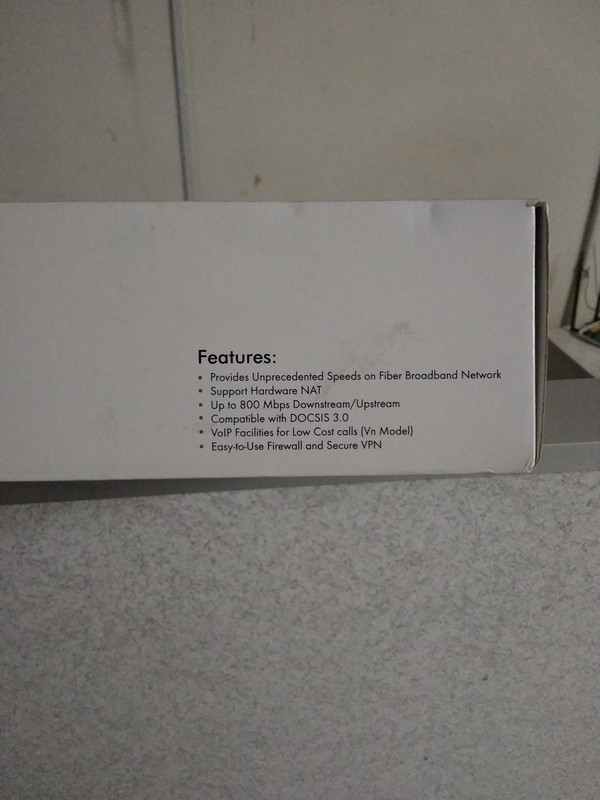
that is probably the newer batches
the ones I bought were advertised as "up to 800Mbps"
user posted image

QUOTE(soonwai @ Sep 18 2018, 02:59 AM)
Looks like router limitation. See here. Max routing speed is around 700Mbps.
https://www.smallnetbuilder.com/wireless/wi...howall=&start=3

The USB3-Gigabit adaptor should be OK, maybe a little bit of effect on speed. I'm using the cheapest one I found on Shopee with my MacBook Pro.
Speeds I can get are:

mbpr:~ $ iperf3 -c 10.0.1.80 -R -i 4 -t 30
Connecting to host 10.0.1.80, port 5201
Reverse mode, remote host 10.0.1.80 is sending
[  5] local 10.0.1.5 port 63287 connected to 10.0.1.80 port 5201
[ ID] Interval          Transfer    Bitrate
[  5]  0.00-4.00  sec  446 MBytes  934 Mbits/sec                 
[  5]  4.00-8.00  sec  446 MBytes  934 Mbits/sec                 
[  5]  8.00-12.00  sec  446 MBytes  934 Mbits/sec                 
[  5]  12.00-16.00  sec  446 MBytes  934 Mbits/sec                 
[  5]  16.00-20.00  sec  446 MBytes  934 Mbits/sec                 
[  5]  20.00-24.00  sec  446 MBytes  934 Mbits/sec                 
[  5]  24.00-28.00  sec  446 MBytes  934 Mbits/sec                 
[  5]  28.00-30.00  sec  223 MBytes  934 Mbits/sec                 
- - - - - - - - - - - - - - - - - - - - - - - - -
[ ID] Interval          Transfer    Bitrate        Retr
[  5]  0.00-30.00  sec  3.27 GBytes  935 Mbits/sec    0            sender
[  5]  0.00-30.00  sec  3.26 GBytes  934 Mbits/sec                  receiver
*
Oh I see.. the speed sounds about right, similar to the test on smallnetbuilder sweat.gif

BTW how cheap is your USB3-gigabit adaptor?

cannavaro
post Sep 18 2018, 11:45 PM

CATTENACIO
*******
Senior Member
3,008 posts

Joined: Sep 2005
From: T.T.D.I, Bukit Damansara


QUOTE(JohnLai @ Sep 18 2018, 11:32 AM)
That inspectre tool hasn't been updated for quite a while. It can't detect the latest spectre mitigation registry key.
Need to manually disable those mitigations.

Plus the 'good' performance merely indicated PCID optimization being used for HDD read/write etc.

Before you do so....try to open up task manager, go to CPU utilization, switch graph to per logical core basis.
Run a speedtest and check if one of the core is maxed or not.
Currently it only happen if one has older spectre microcode installed.

Read more here https://forum.lowyat.net/index.php?showtopic=4649008

and

https://support.microsoft.com/en-us/help/40...nerabilities-in
Section Manage Speculative Store Bypass and mitigations around Spectre Variant 2 and Meltdown
*


On wifi, I don't see any of the cores maxing up. Haven't tried on cable, will do that when I get the chance.
Thanks for the info and links!

QUOTE(soonwai @ Sep 18 2018, 02:10 PM)
Bought at RM26. A bit cheaper now. https://shopee.com.my/product/28053243/377998272/
But it doesn't have USB ports like yours.

What chipset is the Ugreen? Mine is a Realtek. Product ID: 0x8153 so I think should be RTL8153.
*
It's ASIX Electronics.. particularly ASIX 'AX88179'. Not familiar with this company.. hmm.gif
cannavaro
post Sep 20 2018, 05:39 PM

CATTENACIO
*******
Senior Member
3,008 posts

Joined: Sep 2005
From: T.T.D.I, Bukit Damansara


QUOTE(GamerKid @ Sep 20 2018, 05:07 PM)
Hahaha, I fight for it. I told them if i'm paying 329 and not getting a speed upgrade now, i'll make a skmm report for unfairness. I told them to make a case, a day later someone using a private number called me and told me that they have gave the request to the HQ for the speed upgrade. Waited a day and boom, turbo-ed.
*
you didn't get the RM20 so called early bird discount for 100Mbps? laugh.gif
I signed up back in May 2016 or so, finally reported to SKMM/MCMC about unfair price early this month and still waiting or the outcome (I already went to TM Point HQ but failed to get a price adjustment)
I have 2 more 100Mbps account, RM249 per month.
1 account has been upgraded to 800Mbps and was given additional discount (apparently it's the same for most people who got turboed), now it's RM219 per month.

So now it's like this...
100Mbps account 1: RM309
100Mbps account 2: RM240
100Mbps> 800Mbps account 3: RM219
all aneka pack except for account 1, jumbo lite. same price anyway (RM30)

Meanwhile, this is what my FIL is getting for his two 100Mbps account that has been upgraded to turbo:
Account 1: RM229
Account 2: RM229
After turbo to 800Mbps. both accounts RM199!

The aforementioned accounts are all installed at the same building.

Crazy eh?
And many people got this, and some have also been turboed!

100Mbps = RM189 including hypptv ultimate pack


cannavaro
post Sep 21 2018, 05:33 PM

CATTENACIO
*******
Senior Member
3,008 posts

Joined: Sep 2005
From: T.T.D.I, Bukit Damansara


question about terminating unifi account, if anyone knows..
after giving a 30 days termination notice, what will happen if the customer didn't go to tmpoint to handover btu and finalizing documents and whatnot by the due date?

This post has been edited by cannavaro: Sep 21 2018, 05:34 PM
cannavaro
post Sep 24 2018, 11:17 AM

CATTENACIO
*******
Senior Member
3,008 posts

Joined: Sep 2005
From: T.T.D.I, Bukit Damansara


can you guys login to the unifi portal now? I can't login, it says invalid username
cannavaro
post Sep 24 2018, 06:08 PM

CATTENACIO
*******
Senior Member
3,008 posts

Joined: Sep 2005
From: T.T.D.I, Bukit Damansara


Anyone knows if it is possible to swap the unifi phone number to another unifi account in the same area? same account owner

cannavaro
post Sep 24 2018, 06:34 PM

CATTENACIO
*******
Senior Member
3,008 posts

Joined: Sep 2005
From: T.T.D.I, Bukit Damansara


information sharing.

my FIL last 50Mbps unifi account bill, before turbo:
user posted image

After turbo (haven't received latest bill):
user posted image

Discount increased by a mere RM10 (from RM40 to RM50)

Total excluding tax, RM229 (with unifi tv ultimate pack)

Interesting to see that the discount after turbo is only RM10 compared to the discount received for 800Mpbs upgrades (RM30)

So what's the best price given for 50Mbps>500Mbps?

As made widely known the most common for 100Mbps>800Mbps is RM189 including ultimate pack.
cannavaro
post Sep 25 2018, 05:07 PM

CATTENACIO
*******
Senior Member
3,008 posts

Joined: Sep 2005
From: T.T.D.I, Bukit Damansara


already submitted termination notice for all 3 of my unifi accounts
mcmc report taking too effing long
I might just keep 1 account though, the 1 that has been turboed laugh.gif
the other 2 will switch to maxis
gonna wait till it's closer to the BTU submission date before I finalize my decision


cannavaro
post Sep 25 2018, 10:29 PM

CATTENACIO
*******
Senior Member
3,008 posts

Joined: Sep 2005
From: T.T.D.I, Bukit Damansara


QUOTE(tyja @ Sep 25 2018, 07:42 PM)
Guys, im using tplink archer c60 and my speed os around 90mbps. My package b4 turbo is 50mbps. I can't get 500 due to archer c60?
*
Archer c60 is crap.. I used it for about 2 days while waiting for archer c7 v4 to arrive (I did post about this experience in one of the older unifi threads). previously I was using WDR4300, getting 100Mbps and above on speedtest was easy then. On the c60 however, I got a lot of 90-ish Mbps consistently. On top of that there were intermittent problems with hypptv when using the c60.
I bought the c60 to be used as an AP for a project, ngam ngam that time my WDR4300 spoil so I used it temporarily

QUOTE(soonwai @ Sep 25 2018, 10:01 PM)
Me too, requested for termination over the phone today. 1 month to go before I have to go to TM Point. See what happens. Are we supposed to get an SMS re the termination?
*
I used twitter, msg @helpmeunifi
after that I see 3 new report numbers (open ticket) on the portal. no contact from TM till now though

cannavaro
post Sep 26 2018, 12:16 AM

CATTENACIO
*******
Senior Member
3,008 posts

Joined: Sep 2005
From: T.T.D.I, Bukit Damansara


QUOTE(skyliner66 @ Sep 25 2018, 11:21 PM)
need some help from experts here regarding router setting...

my setup :

- BTU : Alcatel Lucent I240G
- Router : Dlink DIR-842 (NEW)
- Cable : CAT 6
- On Unifi 500Mbps

i follow the setup wizard in the dlink router to setup my unifi for both 2.4Ghz and 5Ghz...

i use my phone to connect to 5Ghz wifi and speedtest can reach around 200mbps, which is ok for me...then i use my laptop to connect to the 2.4Ghz wifi (my laptop does not support 802.11ac), the speedtest result is disappointing in which the result only give me 25mbps for both download and upload speed... sad.gif

before this i only use my old router which is the TP Link TL-WR841HP Wireless N router, and my laptop (connect to 2.4Ghz wifi) can get constantly good speed at around 75 to 80mbps for both download and upload speed, upon change to the dlink dir-842, the speed drops a lot and never can exceed 30mbps... sad.gif

have i done something wrong on the dlink 842 router setting? or i need to do extra setting for the 2.4Ghz wifi?

really appreciate some help here...thx a lot... smile.gif
*
Is the 2.4Ghz wifi on your DIR-842 set to 'N' only mode?
cannavaro
post Sep 27 2018, 05:40 PM

CATTENACIO
*******
Senior Member
3,008 posts

Joined: Sep 2005
From: T.T.D.I, Bukit Damansara


QUOTE(stringfellow @ Sep 27 2018, 05:25 PM)
Oooh I see this in on my dashboard now:

"Promo Discount RM60

Promo Discount Perpetual".

I wonder what kind of speed they want me to settle to now, for their failure to deliver 800/200.  "Promo discount" more, and I settle for less. Too slow? There's always the RM129 100Mbps. *shrugs*
*
Are you paying RM329 for 100Mbps?

Mine is RM309 inclusive of jumbo lite, and it's written there on the portal 'unifi special discount RM20'
Effing LOL.. this was from the early bird campaign when they first launched 100Mbps

Meanwhile, for my other 2 100Mbps accounts:
user posted image

user posted image
This one has been turboed, previously the discount is the same as above (RM80)

Already submitted termination for all 3 accounts, will probably keep the account that has been turboed though laugh.gif

cannavaro
post Sep 28 2018, 07:32 PM

CATTENACIO
*******
Senior Member
3,008 posts

Joined: Sep 2005
From: T.T.D.I, Bukit Damansara


QUOTE(alfredkch @ Sep 28 2018, 07:13 PM)
Thanks dickybird. I’m still want the 800mbps. But what is the cheapest rate I could get? I spoke to a TM lady at Tm point today. According to her, the lowest for 800mbps is 199rm. Is that true?
*
lowest is RM189, AFAIK

these people were previously on 100Mbps + ultimate tv pack

not sure if they get additional discount after getting the turbo upgrade because that seems to be the pattern.. others have shared their experience here, plus it happened to 1 of my accounts, as well as 3 of my FIL's accounts.

discount increase after turbo, from my experience (in the unifi portal it will be shown as promo perpetual discount)
RM80 becomes RM100
RM100 becomes RM130

Deduct these amounts from the original base price of 100Mbps, which is RM299 excluding hypptv

I believe 1 guy here with ultimate pack managed to removed his redundant tv pack (aneka ruby or varnam) and got his monthly down to RM159 and still eligible for turbo... ? forgot his name

cannavaro
post Sep 28 2018, 10:51 PM

CATTENACIO
*******
Senior Member
3,008 posts

Joined: Sep 2005
From: T.T.D.I, Bukit Damansara


QUOTE(Mazda9 @ Sep 28 2018, 10:01 PM)
I did mention it in the previous thread version, legal battle + mcmc involvement with TM.
*
wait, I don't recall reading about the legal battle.. you mean lawyer letters and all that?

cannavaro
post Sep 29 2018, 09:07 AM

CATTENACIO
*******
Senior Member
3,008 posts

Joined: Sep 2005
From: T.T.D.I, Bukit Damansara


QUOTE(stringfellow @ Sep 29 2018, 05:53 AM)
How can TM close a case that's handed to SKMM? Are they in cahoots?
*
probably sweat.gif

when I complained about the unfairness of the different pricing for my accounts vs others on the skmm portal, I also mentioned in another post (in the portal you can add more msgs after the main write up) about not getting all accounts turboed despite paying a premium.
around 8 days later, tm simply emailed me the copy and paste msg about the turbo being in pilot stage blablabla.. completely ignoring the main issue about the unfair pricing vmad.gif
called skmm and was told to reopen the case on the portal rclxub.gif
the skmm staff even acknowledge that tm didn't really solve my problem.


cannavaro
post Sep 29 2018, 10:44 AM

CATTENACIO
*******
Senior Member
3,008 posts

Joined: Sep 2005
From: T.T.D.I, Bukit Damansara


QUOTE(leezhijiang @ Sep 29 2018, 09:48 AM)
Me too, they are replying the same thing also. I guess they are given a list of replies and they just choose one that put the best fit which apparently is incorrect
*
did you reopen your case?
cannavaro
post Sep 29 2018, 11:41 AM

CATTENACIO
*******
Senior Member
3,008 posts

Joined: Sep 2005
From: T.T.D.I, Bukit Damansara


QUOTE(ItsTrixinity @ Sep 29 2018, 10:06 AM)
Hey guys!

So weeks ago I got upgraded to unifi turbo which is 500 mbps but whenever I speedtest it via wireless / wired, it is capped at 100 and can never surpass that. I'm not that good at networking stuffs so apologize if I'm being dumb.

I've tested with speedtest on my S8+, laptop and PC which are both capable of Gigabit speeds wirelessly and wired by using Cat 5e cables. The results would never go pass 100 on 5GHz and it's even worse on 2.4GHz as it would get stuck at 50.

Router Model : DIR850L connected with TM router via Ethernet Cat5e.

Should I wait any longer since I've waited weeks for any changes to occur. It would be greatly appreciated for your suggestions!
*
cat5e cables from BTU to router as well?
btw you may want to test with another cable
I believe there was someone (or two) in here previously who said he was using cat5e and not getting the right speed. after changing to another cable (another cat5e or cat6 I can't recall), he got the right speed.

QOS turned off on DIR850L ?

cannavaro
post Sep 29 2018, 12:58 PM

CATTENACIO
*******
Senior Member
3,008 posts

Joined: Sep 2005
From: T.T.D.I, Bukit Damansara


QUOTE(zioburosky13 @ Sep 29 2018, 12:31 PM)
Price range wise, between MYR 300 - 450, does anyone know which router can support beyond 300Mbps to 500Mbps?

While it is good to get a router than can support beyond 800Mbps, it is a bit overkill when there is no consumer grade Gbps service provider in town, for now.
*
Tenda Ac18, around RM290 best value for money
the highest speed on wifi for this model that I've seen mentioned here is 500Mbps+, the guy tested using his iphone X

not sure about the stability in general though, been hearing mixed results about it sweat.gif

cannavaro
post Sep 29 2018, 07:37 PM

CATTENACIO
*******
Senior Member
3,008 posts

Joined: Sep 2005
From: T.T.D.I, Bukit Damansara


Got the chance to test my in laws' Unifi 500Mbps.. similar to the 'good' speeds I see here
user posted image

BTU to router: 2m unitek cat5e
router to my laptop, 5m unitek cat6 cable -> ugreen USB3 to gigabit ethernet

router:
tplink archer c7 v5

Ran the test a few times, got above 500Mbps consistently

bought the unitek cables from ALLIT ipc
cannavaro
post Sep 29 2018, 07:38 PM

CATTENACIO
*******
Senior Member
3,008 posts

Joined: Sep 2005
From: T.T.D.I, Bukit Damansara


QUOTE(zioburosky13 @ Sep 29 2018, 06:07 PM)
Update on the new setup.

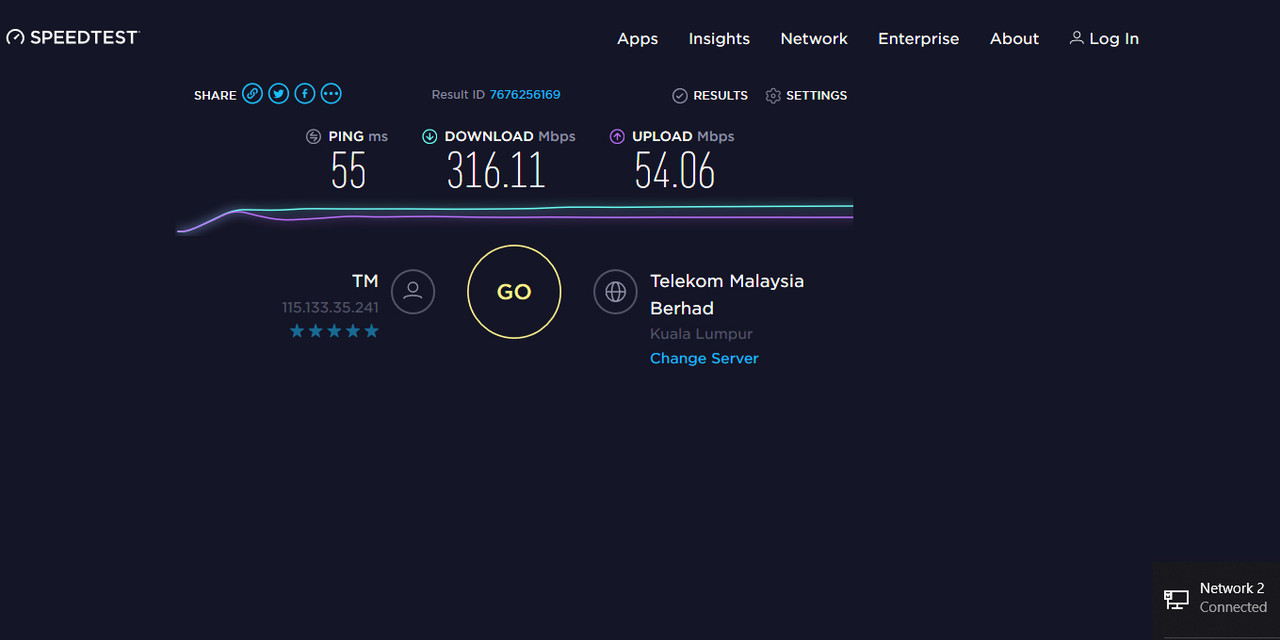
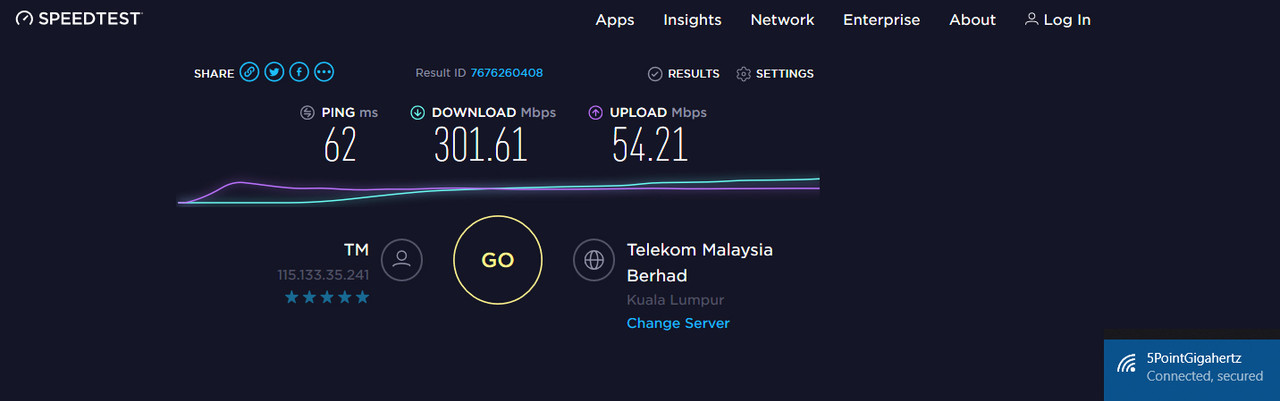
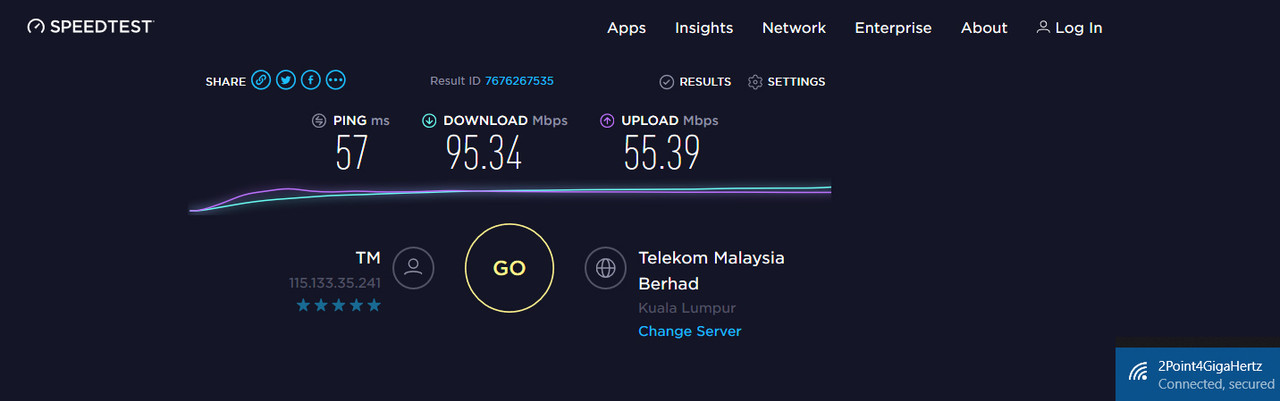
- Using new router, ASUS RT-AC58U with CAT 6 cable, and the results are:
user posted image

user posted image

user posted image

Total cost: MYR 420.00 with 2 CAT 6 cables. 1 for connecting the router to BTU. The other for testing purpose.
*
your ping is kinda high for FTTH sweat.gif

5 Pages  1 2 3 > » Top
Topic ClosedOptions
 

Change to:
| Lo-Fi Version
0.2304sec    0.15    7 queries    GZIP Disabled
Time is now: 2nd December 2025 - 09:36 AM